> ## Documentation Index
> Fetch the complete documentation index at: https://docs.rootly.com/llms.txt
> Use this file to discover all available pages before exploring further.
# Incident Catchup
> Quickly get up to speed on an ongoing incident with a private Rootly AI summary of timeline events, status, and key decisions, delivered directly in Slack.
## Overview
Incident Catchup helps responders quickly understand the current state of an incident when joining an incident Slack channel midstream. Rootly AI generates an up-to-date summary that explains what has happened so far, what is currently known, and how the incident is being handled — without needing to read the full channel history.
Incident Catchup is available in **Slack only** and is designed for real-time collaboration during an active incident. When a responder runs the catchup command in an incident channel, Rootly AI generates a concise summary based on the incident's current context and delivers it as a private, ephemeral message visible only to the requester.
This is the single-turn `/rootly catchup` command, which returns a one-off ephemeral summary. For a conversational catch-up where you can ask follow-ups, request actions, and keep context across a thread, see [Rootly AI in Slack](/ai/rootly-in-slack/overview).
### Via Slack
In an incident Slack channel, run one of the following commands:
* `/rootly catchup`
* `/rootly catch up`
* `/rootly catch-up`
* `/rootly summarize`
All variations trigger the same behavior.
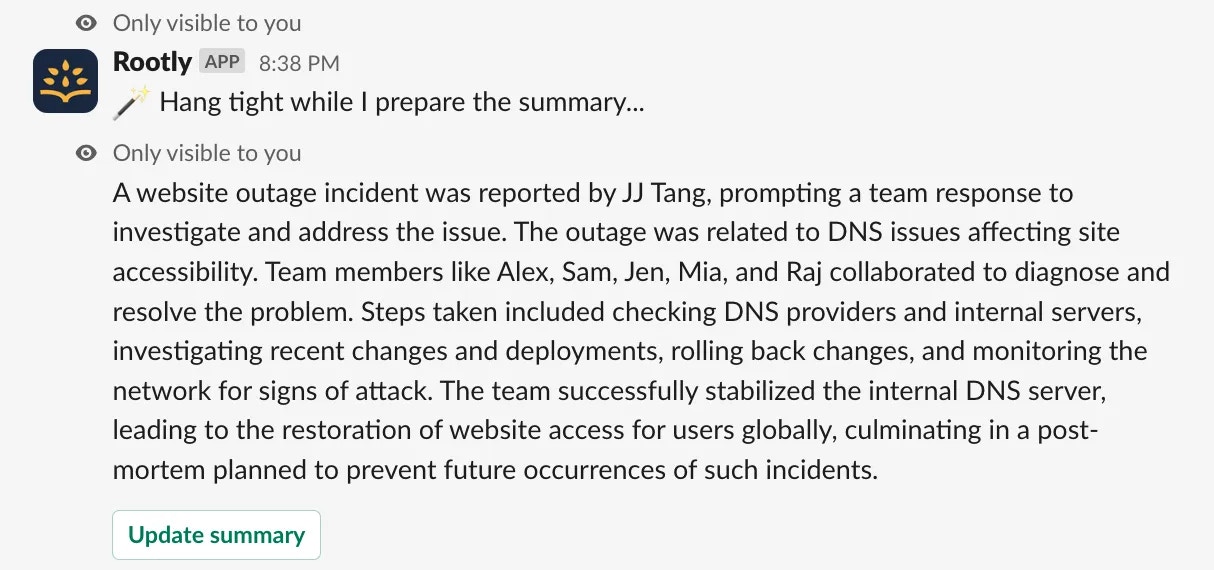
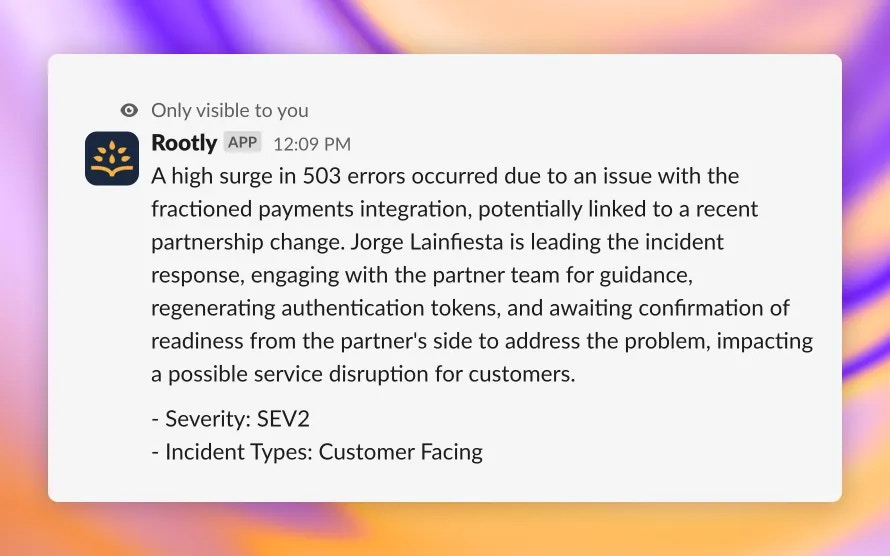 The summary is sent as an ephemeral message, meaning it is only visible to you and does not post publicly in the channel. You can run the command multiple times as the incident evolves to receive updated summaries.
 ## What's Included in a Catchup Summary
Incident Catchup uses the same Rootly AI summarization as standard incident summaries, with an expanded output.
The catchup summary includes:
* A single-paragraph narrative describing the incident problem, impact, trigger or cause, and resolution or mitigation steps (when available)
* People involved in the incident and their roles (when documented)
* An automatically appended attributes list, which may include:
* Meeting or bridge links
* Severity
* Affected environments and services
* Selected custom form field values
This ensures responders receive both a narrative overview and key structured details in one view.
## How It Works
The `/rootly catchup` command uses the same Rootly AI service as Incident Summarization and analyzes the incident's complete current context, which may include:
* Incident metadata and attributes
* Timeline events
* Associated alerts
* Action items and follow-ups
* Slack channel messages (when permitted by privacy settings)
* Meeting transcripts, if available
The summary is generated at the time the command is run and reflects the most current state of the incident. Because the message is ephemeral, it does not clutter the incident channel and remains private to the requesting user.
## Permissions
To use Incident Catchup, you need the following conditions:
* Have permission to generate summaries on the incident, or
* Have permission to update the incident
If you do not meet these requirements, the command will return an error.
## Configuration
Incident Catchup is available to all customers but requires Incident Summarization to be enabled.
To enable this feature:
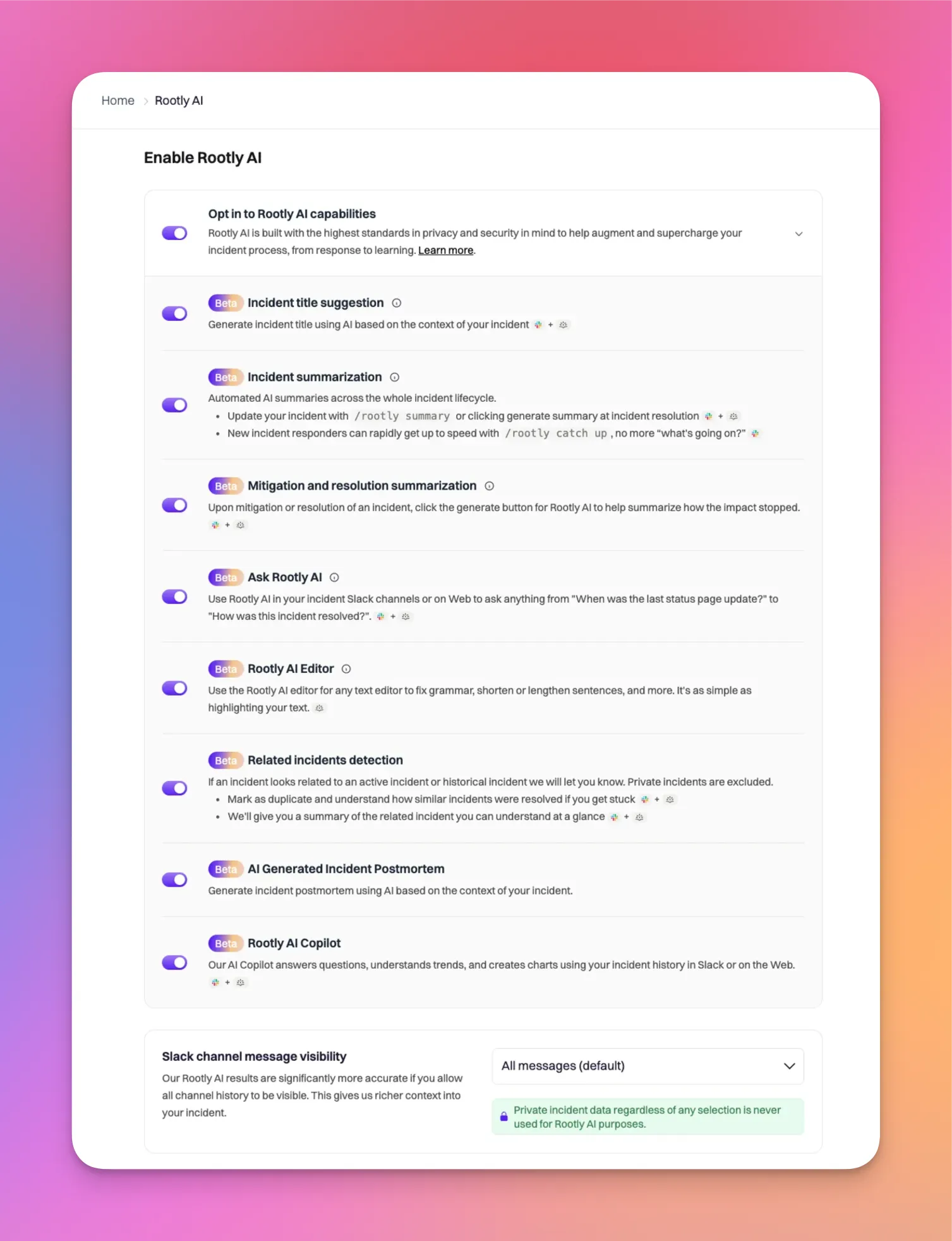
1. Navigate to **Rootly AI**
2. Toggle on **Enable Rootly AI**
3. Ensure **Incident summarization** is enabled
Only Admins can manage Rootly AI configuration.
To ensure the best results, configure **Slack channel message visibility** to one of the following:
* **All messages**
* **All messages in Public + pinned in Private**
These settings allow Rootly AI to access sufficient Slack context when generating summaries and can be updated at any time from **Rootly AI** configuration.
## What's Included in a Catchup Summary
Incident Catchup uses the same Rootly AI summarization as standard incident summaries, with an expanded output.
The catchup summary includes:
* A single-paragraph narrative describing the incident problem, impact, trigger or cause, and resolution or mitigation steps (when available)
* People involved in the incident and their roles (when documented)
* An automatically appended attributes list, which may include:
* Meeting or bridge links
* Severity
* Affected environments and services
* Selected custom form field values
This ensures responders receive both a narrative overview and key structured details in one view.
## How It Works
The `/rootly catchup` command uses the same Rootly AI service as Incident Summarization and analyzes the incident's complete current context, which may include:
* Incident metadata and attributes
* Timeline events
* Associated alerts
* Action items and follow-ups
* Slack channel messages (when permitted by privacy settings)
* Meeting transcripts, if available
The summary is generated at the time the command is run and reflects the most current state of the incident. Because the message is ephemeral, it does not clutter the incident channel and remains private to the requesting user.
## Permissions
To use Incident Catchup, you need the following conditions:
* Have permission to generate summaries on the incident, or
* Have permission to update the incident
If you do not meet these requirements, the command will return an error.
## Configuration
Incident Catchup is available to all customers but requires Incident Summarization to be enabled.
To enable this feature:
1. Navigate to **Rootly AI**
2. Toggle on **Enable Rootly AI**
3. Ensure **Incident summarization** is enabled
Only Admins can manage Rootly AI configuration.
To ensure the best results, configure **Slack channel message visibility** to one of the following:
* **All messages**
* **All messages in Public + pinned in Private**
These settings allow Rootly AI to access sufficient Slack context when generating summaries and can be updated at any time from **Rootly AI** configuration.
 Incident Catchup in private incidents depends on your Slack channel message visibility settings. For private incidents, Rootly AI features are available only when your channel history scope includes private messages.
## Troubleshooting
Ensure that Rootly AI is enabled and **Incident summarization** is turned on. Verify that you have permission to generate summaries and that you meet the incident permission requirements. For private incidents, confirm that Slack channel message visibility settings allow Rootly AI access.
Incident Catchup summaries are sent as ephemeral messages and are only visible to you. Check for a private message in the channel rather than a public post.
The summary can only include information that exists at the time it is generated. Add or update timeline events, alerts, action items, or incident details, then run the command again to receive an updated summary.
Incident Catchup in private incidents depends on your Slack channel message visibility settings. For private incidents, Rootly AI features are available only when your channel history scope includes private messages.
## Troubleshooting
Ensure that Rootly AI is enabled and **Incident summarization** is turned on. Verify that you have permission to generate summaries and that you meet the incident permission requirements. For private incidents, confirm that Slack channel message visibility settings allow Rootly AI access.
Incident Catchup summaries are sent as ephemeral messages and are only visible to you. Check for a private message in the channel rather than a public post.
The summary can only include information that exists at the time it is generated. Add or update timeline events, alerts, action items, or incident details, then run the command again to receive an updated summary.