> ## Documentation Index
> Fetch the complete documentation index at: https://docs.rootly.com/llms.txt
> Use this file to discover all available pages before exploring further.
# Built-In Fields
> The pre-configured incident properties Rootly ships with — Severity, Environments, Services, Teams, Incident Types — and how to enable or rename them.
## Overview
**Built-in fields** are the pre-configured incident properties Rootly ships with — Severity, Environments, Services, Teams, Incident Types, Incident Causes, Functionalities, and a handful of behavioral toggles like `Backfill Incident` and `Mark as Triage`. Every built-in field is designed to capture a common piece of incident metadata that drives workflows, metrics, and status page updates.
You can turn built-in fields on or off, rename them (Severity → "Priority", if that matches your team's vocabulary), and — for many of them — change their behavior (single-select vs multi-select, default values, whether they appear on the incident details page). What you **can't** do is add net-new dimensions to the built-in schema; for that, use [Custom Fields](/configuration/custom-fields).
Access built-in fields in **Configuration → Fields → Built-In Fields**.
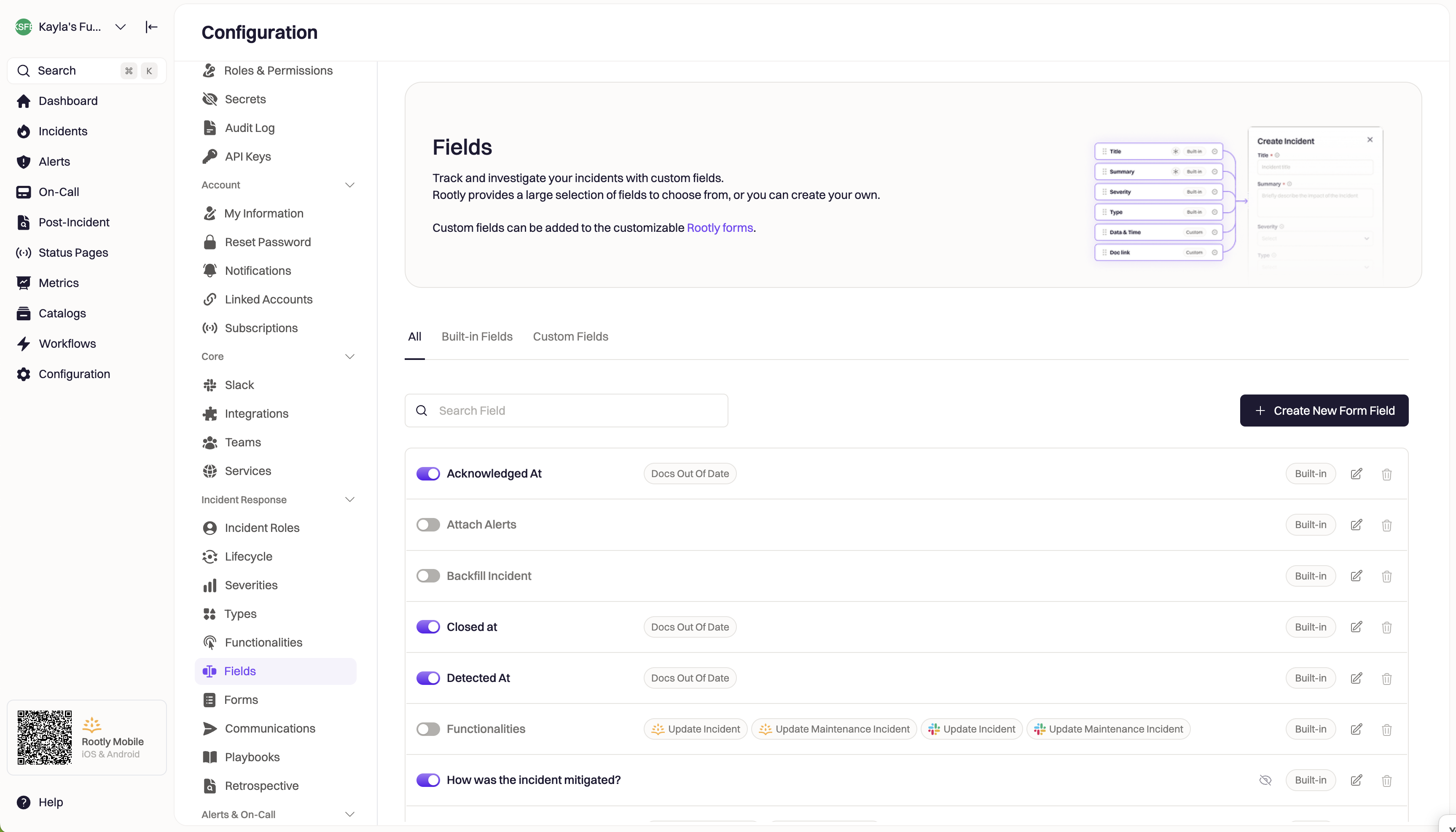 **Built-in vs Custom:** Built-in fields are baked into Rootly and integrate with everything (workflows, metrics, retrospectives, status pages) automatically. [Custom Fields](/configuration/custom-fields) are extensions you define — they're just as usable in workflows, but their integration surface is what you wire up yourself. Reach for a built-in field first; drop to a custom field only when the built-in schema doesn't cover what you need.
***
## Built-In Fields Reference
| Field | Type | Purpose | Configurable |
| ----------------------------------------------------- | ---------------------- | ------------------------------------------------------------------------------------------------------ | --------------------------------------------------------------------------- |
| **[Severity](/configuration/severities)** | Select | How bad the incident is (SEV0–SEV3) | Values, colors, Slack channels, aliases, notify emails |
| **[Environments](/configuration/environments)** | Select or Multi-Select | Which deployment tier is affected (Production, Staging, Dev) | Values, colors, field type (select/multi), attached channels/aliases/emails |
| **[Incident Types](/configuration/incident-types)** | Select or Multi-Select | Category of incident (UI Bug, Infrastructure, Security Event, etc.) | Values, colors, field type (select/multi), attached channels/aliases/emails |
| **[Incident Causes](/configuration/incident-causes)** | Multi-Select | Root causes captured during retrospective | Values, colors |
| **[Services](/configuration/services)** | Select or Multi-Select | Infrastructure components impacted | Values, colors, ownership, field type (select/multi) |
| **[Functionalities](/configuration/functionalities)** | Select or Multi-Select | Product capabilities impacted | Values, colors, field type (select/multi) |
| **[Teams](/configuration/teams)** | Select or Multi-Select | Team ownership and routing | Values, membership, field type (select/multi) |
| **Summary** | Text | Human-readable incident description | Enabled / disabled |
| **Status Page Title** | Text | The incident title as it appears on status pages | Enabled / disabled |
| **Notify Emails** | Multi-Select (emails) | Per-incident additional email recipients | Enabled / disabled |
| **Mark as Triage** | Checkbox | Whether to open the incident in Triage status | Enabled / disabled, default value |
| **Backfill Incident** | Checkbox | Retroactively documenting an already-resolved incident | Enabled / disabled, default value |
| **Private** | Checkbox | Restrict incident visibility (see [Private Incidents](/incidents/private-incidents/private-incidents)) | Enabled / disabled, default value |
| **Not a real emergency** | Checkbox | Marks as test/training without changing Kind | Enabled / disabled, default value |
This reference list captures the most common built-in fields. Your Rootly workspace may show additional fields depending on which integrations are enabled — for example, PagerDuty and Opsgenie integrations expose their own built-in fields for cross-referenced IDs.
***
## Managing Built-In Fields
Navigate to **Configuration → Fields → Built-In Fields** to see the full list. Every built-in field has an enable/disable toggle and — for most fields — an edit pane where you can rename, change the field type, set defaults, and control display behavior.
### Enable Or Disable A Field
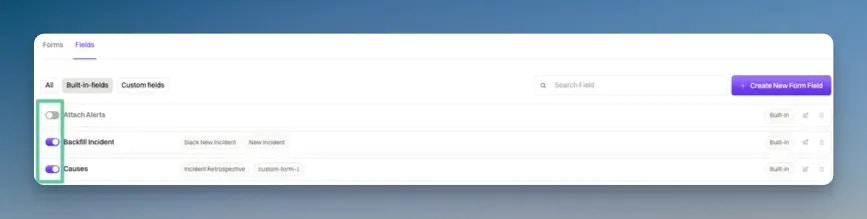
Only enabled fields are live — they appear on incident forms, on the incident details page, and can be updated by workflows. Disabled fields are hidden from users and unavailable to workflow actions.
Use the toggle next to the field name in the list view.
**Built-in vs Custom:** Built-in fields are baked into Rootly and integrate with everything (workflows, metrics, retrospectives, status pages) automatically. [Custom Fields](/configuration/custom-fields) are extensions you define — they're just as usable in workflows, but their integration surface is what you wire up yourself. Reach for a built-in field first; drop to a custom field only when the built-in schema doesn't cover what you need.
***
## Built-In Fields Reference
| Field | Type | Purpose | Configurable |
| ----------------------------------------------------- | ---------------------- | ------------------------------------------------------------------------------------------------------ | --------------------------------------------------------------------------- |
| **[Severity](/configuration/severities)** | Select | How bad the incident is (SEV0–SEV3) | Values, colors, Slack channels, aliases, notify emails |
| **[Environments](/configuration/environments)** | Select or Multi-Select | Which deployment tier is affected (Production, Staging, Dev) | Values, colors, field type (select/multi), attached channels/aliases/emails |
| **[Incident Types](/configuration/incident-types)** | Select or Multi-Select | Category of incident (UI Bug, Infrastructure, Security Event, etc.) | Values, colors, field type (select/multi), attached channels/aliases/emails |
| **[Incident Causes](/configuration/incident-causes)** | Multi-Select | Root causes captured during retrospective | Values, colors |
| **[Services](/configuration/services)** | Select or Multi-Select | Infrastructure components impacted | Values, colors, ownership, field type (select/multi) |
| **[Functionalities](/configuration/functionalities)** | Select or Multi-Select | Product capabilities impacted | Values, colors, field type (select/multi) |
| **[Teams](/configuration/teams)** | Select or Multi-Select | Team ownership and routing | Values, membership, field type (select/multi) |
| **Summary** | Text | Human-readable incident description | Enabled / disabled |
| **Status Page Title** | Text | The incident title as it appears on status pages | Enabled / disabled |
| **Notify Emails** | Multi-Select (emails) | Per-incident additional email recipients | Enabled / disabled |
| **Mark as Triage** | Checkbox | Whether to open the incident in Triage status | Enabled / disabled, default value |
| **Backfill Incident** | Checkbox | Retroactively documenting an already-resolved incident | Enabled / disabled, default value |
| **Private** | Checkbox | Restrict incident visibility (see [Private Incidents](/incidents/private-incidents/private-incidents)) | Enabled / disabled, default value |
| **Not a real emergency** | Checkbox | Marks as test/training without changing Kind | Enabled / disabled, default value |
This reference list captures the most common built-in fields. Your Rootly workspace may show additional fields depending on which integrations are enabled — for example, PagerDuty and Opsgenie integrations expose their own built-in fields for cross-referenced IDs.
***
## Managing Built-In Fields
Navigate to **Configuration → Fields → Built-In Fields** to see the full list. Every built-in field has an enable/disable toggle and — for most fields — an edit pane where you can rename, change the field type, set defaults, and control display behavior.
### Enable Or Disable A Field
Only enabled fields are live — they appear on incident forms, on the incident details page, and can be updated by workflows. Disabled fields are hidden from users and unavailable to workflow actions.
Use the toggle next to the field name in the list view.
 Disabling a built-in field that's already referenced by workflows or Liquid templates doesn't remove those references — they just start failing silently. Before disabling a heavily-used field, audit your workflows and templates for references to it.
### Edit A Field's Configuration
Click the edit icon on the right side of any field row to open the Edit Form Field pane.
Disabling a built-in field that's already referenced by workflows or Liquid templates doesn't remove those references — they just start failing silently. Before disabling a heavily-used field, audit your workflows and templates for references to it.
### Edit A Field's Configuration
Click the edit icon on the right side of any field row to open the Edit Form Field pane.
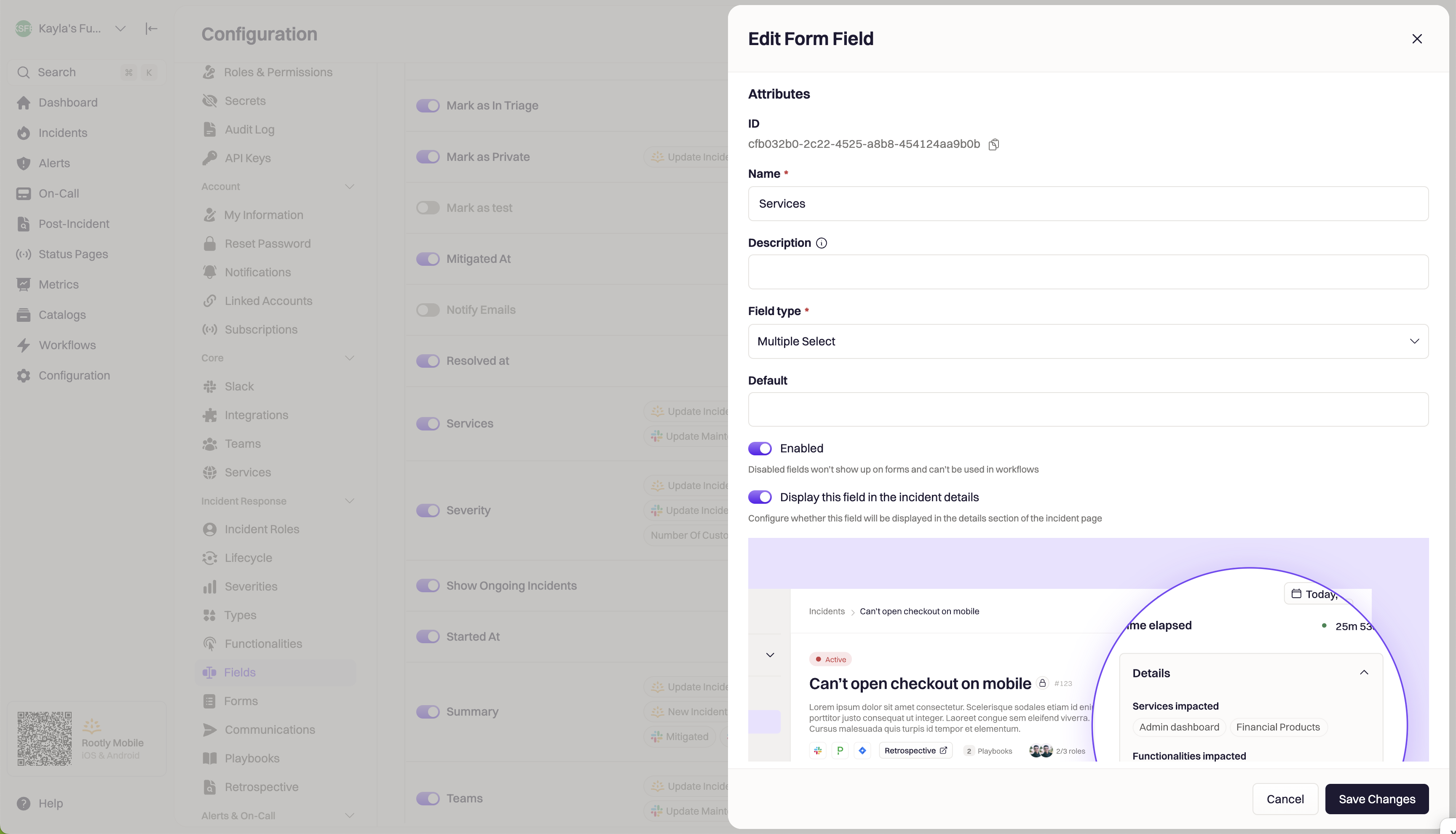 The edit pane exposes the settings below. Not all settings apply to every field — a checkbox field like `Backfill Incident` has no `Field Type` setting because it's inherently a boolean.
Unique identifier generated at field creation. **Not customizable.** Used in API calls and Liquid references.
Display label shown on incident forms and the incident details page. Renaming affects the **UI only** — Liquid references and API paths remain unchanged.
For example, renaming `Severity` to `Priority` in the UI still leaves the Liquid reference as `{{ incident.severity }}`, not `{{ incident.priority }}`.
For fields that support both modes — Environments, Incident Types, Services, Functionalities, and Teams — you can choose whether responders pick one or many values. Severity is always single-select; Incident Causes is always multi-select; checkbox and text fields don't expose this setting.
Changing the field type is one-way in practice — moving from multi-select to select truncates existing multi-value incidents to their first value.
Default value that pre-populates on new incident forms. Common uses: default Severity to `SEV3`, default Environment to `Production`, default `Mark as Triage` to `true` for a triage-first workflow.
Defaults only apply to new incidents — changing a default doesn't retroactively update existing incidents.
When enabled, the field is live on the incident form, in workflows, and on the incident details page. Disabled fields are hidden from users and inaccessible to workflow actions.
This is the same toggle as the enable/disable switch in the list view.
Controls whether the field appears in the **Details** section of the incident details page. Hiding does **not** disable the field — workflows can still read and write it. Users may still be able to edit the field from other surfaces (creation forms, update forms) unless you also hide or restrict it there.
Common use: a "system-managed" flag that workflows set automatically and shouldn't clutter the Details view. To make it fully non-editable to humans, also remove it from the relevant [Incident Forms](/configuration/built-in-forms) or restrict form access.
***
## Common Configuration Patterns
If your team uses "Priority" or "Impact Level" instead of "Severity", edit the built-in Severity field and change the Name. The values (SEV0–SEV3, or your custom Severity names) stay the same, but the field label changes across every incident form.
Remember: renaming the field name does NOT change the Liquid reference. `{{ incident.severity }}` still works; `{{ incident.priority }}` does not.
If most of your incidents are Production incidents, set the Environment field's default value to Production. Responders only need to change it for the exceptional cases (Staging, Dev). This is one of the fastest ways to reduce the number of unspecified-Environment incidents.
Not every built-in field is relevant to every team. If your team doesn't use Functionalities (because you don't yet have them defined) or Notify Emails (because everything routes through Slack), disable those fields. Fewer fields on the incident form means faster triage and lower cognitive load for responders.
Audit workflow references before disabling, per the warning above.
Some teams use a built-in field as a workflow-controlled system flag — e.g., an internal "escalated to exec team" boolean that gets set by a workflow when specific conditions are met. Disable "Display This Field in the Incident Details" to remove it from the Details section. To keep it out of human hands entirely, also remove it from the creation and update [Incident Forms](/configuration/built-in-forms).
Teams sometimes start with multi-select Incident Types and later realize they always want exactly one Type per incident. Switching to Select is a one-way change: existing multi-value incidents get truncated to their first value. Confirm you're ready for the truncation, or bulk-update multi-value incidents to a single Type before switching.
***
## Best Practices
* **Reach for built-in fields first; use custom fields only when built-ins don't cover the case.** Built-in fields have first-class integration with workflows, metrics, retrospectives, and status pages. Custom fields work everywhere too, but you're building the integrations yourself.
* **Rename cautiously.** Renaming a field changes what responders see but not what workflows and Liquid templates reference. If you're changing the display name of a heavily-referenced field, audit the templates that use its old name in prose (not the Liquid reference itself) so they don't drift.
* **Default the fields that are usually the same value.** Environment (usually Production), Severity (usually SEV2 or SEV3 as a default before triage), and Mark as Triage (true if your team starts every incident in Triage) are all good candidates. Defaults reduce keystrokes; unspecified-value incidents route to the wrong workflows.
* **Audit disabled fields quarterly.** Fields that were disabled six months ago and haven't been re-enabled probably aren't coming back. Consider whether the workflow references pointing at them are still needed.
* **Prefer built-in Field Type changes over custom-field replacements.** If a built-in field can be reconfigured (e.g., Environment from multi to single), that's simpler than disabling the built-in and creating a custom field to replace it. Every workflow and template that references the built-in continues to work.
***
## Troubleshooting
Check that the field is enabled in Configuration → Fields → Built-In Fields. Also verify the field is enabled on the specific incident form you're using — form-level field configuration can override the built-in-field-level enable state.
Renaming a built-in field affects **only the UI label**, not the Liquid reference. If your template broke after a rename, something else changed — check the actual Liquid syntax against the field's reference (see the individual field docs like [Severity](/configuration/severities) or [Environments](/configuration/environments) for exact syntax).
Working as designed. When you switch a multi-value field to single-select, existing incidents with multiple values keep only their first value. This is not reversible — the additional values are removed at conversion time.
If you need to preserve historical multi-value data, export incident data before switching. Alternatively, bulk-update multi-value incidents to a single canonical value before making the field type change.
Disabling a built-in field doesn't remove workflow references — those references just start failing silently or with runtime errors when the workflow tries to read or write the disabled field.
Re-enable the field, or audit and update the referencing workflows in **Configuration → Workflows** — use the search box to filter by the field's slug or Liquid variable name.
Confirm the default is set on the built-in field configuration (not just the form-level configuration — those are separate). If it's set at the field level and still not applying, check for a workflow that runs on Incident Created and overwrites the default value.
***
## Frequently Asked Questions
**Built-in fields** are pre-configured properties Rootly ships with — Severity, Environments, Services, Teams, Incident Types, and similar. They have first-class integration with workflows, metrics, retrospectives, and status pages.
**[Custom Fields](/configuration/custom-fields)** are extensions you define — same usability in workflows, but you wire up the integrations yourself. Use built-ins for common dimensions (impact, tier, category); use custom fields for organization-specific dimensions the built-in schema doesn't cover.
No. The built-in field set is defined by Rootly. If you need a new dimension, use a [Custom Field](/configuration/custom-fields). Custom fields work in workflows and Liquid templates the same way built-in fields do — the main difference is you configure the integration behavior yourself.
No — built-in fields can be disabled but not deleted. This preserves the field's data on historical incidents. If you don't want a field surfaced anywhere in the UI, disable it and hide it from incident details.
No. API paths and Liquid references are based on the field's stable slug (assigned at creation), not the display name. Renaming Severity to Priority in the UI doesn't change `/incidents/{id}/severity` in the API or `{{ incident.severity }}` in Liquid.
Configurable field type: Environments, Incident Types, Services, Teams, Functionalities. Fixed: Severity is always single-select; Incident Causes is always multi-select; checkbox fields (Backfill Incident, Mark as Triage, Private) are always booleans.
Yes, via form-level configuration. Each incident-creation form can have its own default values that override the field-level defaults. This lets a Frontend team default Environment to `Web`, while an Infra team defaults it to `Production` — with the same underlying built-in field.
Workflows that reference the disabled field will fail or silently no-op at runtime. Rootly does not automatically detect and update dependent workflows. Audit workflow references before disabling any heavily-used built-in field.
***
## Related Pages
Add fields the built-in schema doesn't cover. Both built-in and custom fields work in the same workflows and templates.
Filter workflow runs on built-in field values — the interactive evaluator lets you test conditions against a sample incident.
The umbrella page linking every incident property doc, including all built-in fields covered here.
The edit pane exposes the settings below. Not all settings apply to every field — a checkbox field like `Backfill Incident` has no `Field Type` setting because it's inherently a boolean.
Unique identifier generated at field creation. **Not customizable.** Used in API calls and Liquid references.
Display label shown on incident forms and the incident details page. Renaming affects the **UI only** — Liquid references and API paths remain unchanged.
For example, renaming `Severity` to `Priority` in the UI still leaves the Liquid reference as `{{ incident.severity }}`, not `{{ incident.priority }}`.
For fields that support both modes — Environments, Incident Types, Services, Functionalities, and Teams — you can choose whether responders pick one or many values. Severity is always single-select; Incident Causes is always multi-select; checkbox and text fields don't expose this setting.
Changing the field type is one-way in practice — moving from multi-select to select truncates existing multi-value incidents to their first value.
Default value that pre-populates on new incident forms. Common uses: default Severity to `SEV3`, default Environment to `Production`, default `Mark as Triage` to `true` for a triage-first workflow.
Defaults only apply to new incidents — changing a default doesn't retroactively update existing incidents.
When enabled, the field is live on the incident form, in workflows, and on the incident details page. Disabled fields are hidden from users and inaccessible to workflow actions.
This is the same toggle as the enable/disable switch in the list view.
Controls whether the field appears in the **Details** section of the incident details page. Hiding does **not** disable the field — workflows can still read and write it. Users may still be able to edit the field from other surfaces (creation forms, update forms) unless you also hide or restrict it there.
Common use: a "system-managed" flag that workflows set automatically and shouldn't clutter the Details view. To make it fully non-editable to humans, also remove it from the relevant [Incident Forms](/configuration/built-in-forms) or restrict form access.
***
## Common Configuration Patterns
If your team uses "Priority" or "Impact Level" instead of "Severity", edit the built-in Severity field and change the Name. The values (SEV0–SEV3, or your custom Severity names) stay the same, but the field label changes across every incident form.
Remember: renaming the field name does NOT change the Liquid reference. `{{ incident.severity }}` still works; `{{ incident.priority }}` does not.
If most of your incidents are Production incidents, set the Environment field's default value to Production. Responders only need to change it for the exceptional cases (Staging, Dev). This is one of the fastest ways to reduce the number of unspecified-Environment incidents.
Not every built-in field is relevant to every team. If your team doesn't use Functionalities (because you don't yet have them defined) or Notify Emails (because everything routes through Slack), disable those fields. Fewer fields on the incident form means faster triage and lower cognitive load for responders.
Audit workflow references before disabling, per the warning above.
Some teams use a built-in field as a workflow-controlled system flag — e.g., an internal "escalated to exec team" boolean that gets set by a workflow when specific conditions are met. Disable "Display This Field in the Incident Details" to remove it from the Details section. To keep it out of human hands entirely, also remove it from the creation and update [Incident Forms](/configuration/built-in-forms).
Teams sometimes start with multi-select Incident Types and later realize they always want exactly one Type per incident. Switching to Select is a one-way change: existing multi-value incidents get truncated to their first value. Confirm you're ready for the truncation, or bulk-update multi-value incidents to a single Type before switching.
***
## Best Practices
* **Reach for built-in fields first; use custom fields only when built-ins don't cover the case.** Built-in fields have first-class integration with workflows, metrics, retrospectives, and status pages. Custom fields work everywhere too, but you're building the integrations yourself.
* **Rename cautiously.** Renaming a field changes what responders see but not what workflows and Liquid templates reference. If you're changing the display name of a heavily-referenced field, audit the templates that use its old name in prose (not the Liquid reference itself) so they don't drift.
* **Default the fields that are usually the same value.** Environment (usually Production), Severity (usually SEV2 or SEV3 as a default before triage), and Mark as Triage (true if your team starts every incident in Triage) are all good candidates. Defaults reduce keystrokes; unspecified-value incidents route to the wrong workflows.
* **Audit disabled fields quarterly.** Fields that were disabled six months ago and haven't been re-enabled probably aren't coming back. Consider whether the workflow references pointing at them are still needed.
* **Prefer built-in Field Type changes over custom-field replacements.** If a built-in field can be reconfigured (e.g., Environment from multi to single), that's simpler than disabling the built-in and creating a custom field to replace it. Every workflow and template that references the built-in continues to work.
***
## Troubleshooting
Check that the field is enabled in Configuration → Fields → Built-In Fields. Also verify the field is enabled on the specific incident form you're using — form-level field configuration can override the built-in-field-level enable state.
Renaming a built-in field affects **only the UI label**, not the Liquid reference. If your template broke after a rename, something else changed — check the actual Liquid syntax against the field's reference (see the individual field docs like [Severity](/configuration/severities) or [Environments](/configuration/environments) for exact syntax).
Working as designed. When you switch a multi-value field to single-select, existing incidents with multiple values keep only their first value. This is not reversible — the additional values are removed at conversion time.
If you need to preserve historical multi-value data, export incident data before switching. Alternatively, bulk-update multi-value incidents to a single canonical value before making the field type change.
Disabling a built-in field doesn't remove workflow references — those references just start failing silently or with runtime errors when the workflow tries to read or write the disabled field.
Re-enable the field, or audit and update the referencing workflows in **Configuration → Workflows** — use the search box to filter by the field's slug or Liquid variable name.
Confirm the default is set on the built-in field configuration (not just the form-level configuration — those are separate). If it's set at the field level and still not applying, check for a workflow that runs on Incident Created and overwrites the default value.
***
## Frequently Asked Questions
**Built-in fields** are pre-configured properties Rootly ships with — Severity, Environments, Services, Teams, Incident Types, and similar. They have first-class integration with workflows, metrics, retrospectives, and status pages.
**[Custom Fields](/configuration/custom-fields)** are extensions you define — same usability in workflows, but you wire up the integrations yourself. Use built-ins for common dimensions (impact, tier, category); use custom fields for organization-specific dimensions the built-in schema doesn't cover.
No. The built-in field set is defined by Rootly. If you need a new dimension, use a [Custom Field](/configuration/custom-fields). Custom fields work in workflows and Liquid templates the same way built-in fields do — the main difference is you configure the integration behavior yourself.
No — built-in fields can be disabled but not deleted. This preserves the field's data on historical incidents. If you don't want a field surfaced anywhere in the UI, disable it and hide it from incident details.
No. API paths and Liquid references are based on the field's stable slug (assigned at creation), not the display name. Renaming Severity to Priority in the UI doesn't change `/incidents/{id}/severity` in the API or `{{ incident.severity }}` in Liquid.
Configurable field type: Environments, Incident Types, Services, Teams, Functionalities. Fixed: Severity is always single-select; Incident Causes is always multi-select; checkbox fields (Backfill Incident, Mark as Triage, Private) are always booleans.
Yes, via form-level configuration. Each incident-creation form can have its own default values that override the field-level defaults. This lets a Frontend team default Environment to `Web`, while an Infra team defaults it to `Production` — with the same underlying built-in field.
Workflows that reference the disabled field will fail or silently no-op at runtime. Rootly does not automatically detect and update dependent workflows. Audit workflow references before disabling any heavily-used built-in field.
***
## Related Pages
Add fields the built-in schema doesn't cover. Both built-in and custom fields work in the same workflows and templates.
Filter workflow runs on built-in field values — the interactive evaluator lets you test conditions against a sample incident.
The umbrella page linking every incident property doc, including all built-in fields covered here.