> ## Documentation Index
> Fetch the complete documentation index at: https://docs.rootly.com/llms.txt
> Use this file to discover all available pages before exploring further.

# Overview

> Configure incident properties, custom fields, and settings to characterize incidents, trigger workflows, and filter metrics across your organization.

## Overview

Every incident created in Rootly is characterized by a structured set of **properties**. These properties define how an incident behaves, how it progresses through its lifecycle, how it interacts with workflows and automation, and how it appears in reporting and analytics.

Incident properties serve several critical purposes:

* Help characterize each incident (e.g., `kind = normal`)
* Trigger workflow automations (e.g., Status Updated)
* Define conditional logic for workflow execution (e.g., Severity is SEV0)
* Enable filtering and segmentation of metrics
* Allow structured access through **Liquid syntax**

Properties fall into three primary categories:

* **Fixed Properties** — system-defined and not customizable
* **Configurable Properties** — built-in but organization-customizable
* **Custom Fields** — fully defined and managed by your organization

***

# Fixed Properties

<Note>
  Fixed properties are intentionally restricted to maintain lifecycle integrity, automation consistency, and reporting standardization across the Rootly platform.
</Note>

Fixed properties cannot be modified or deleted. They define the foundational lifecycle and structural behavior of every incident.

***

## Incident Kind

The **Kind** property determines the classification and structural behavior of an incident at the time it is created. It is immutable after declaration.

Each kind controls workflow triggers, lifecycle expectations, and status page eligibility.

| Kind                          | Description                                                                                                                                                                                                                                                                                                                                     | Data Value      |
| ----------------------------- | ----------------------------------------------------------------------------------------------------------------------------------------------------------------------------------------------------------------------------------------------------------------------------------------------------------------------------------------------- | --------------- |
| **Incident**                  | Standard production incidents declared via `/rootly new`. These represent real operational events requiring coordinated response. They trigger normal workflow execution and are eligible for publication on status pages (when not cancelled).                                                                                                 | `normal`        |
| **Sub Incident**              | Child incidents created under a parent incident using `/rootly sub`. They inherit contextual linkage from the parent incident and are useful for tracking parallel workstreams or related issues within a broader event. Eligible for status page publication (when not cancelled).                                                             | `normal_sub`    |
| **Test Incident**             | Training or simulation incidents declared via `/rootly test`. They behave functionally like normal incidents but are excluded from status page publication and production metrics. Primarily used to test workflows, integrations, and team processes safely.                                                                                   | `test`          |
| **Sub Test Incident**         | Child incidents created under test incidents. Used exclusively for training and simulation. Not eligible for status page publication.                                                                                                                                                                                                           | `test_sub`      |
| **Backfill Incident**         | Retroactively documented incidents created after resolution has already occurred. Backfill incidents are automatically created in a **resolved** state. Workflows triggered on Incident Created still execute, but active lifecycle stages such as Started or Mitigated are skipped. Eligible for status page publication (when not cancelled). | `backfilled`    |
| **Scheduled Maintenance**     | Planned maintenance windows declared via `/rootly maintenance`. These incidents follow a distinct maintenance lifecycle separate from normal incident statuses. Used to proactively communicate planned changes via status pages.                                                                                                               | `scheduled`     |
| **Sub Scheduled Maintenance** | Child incidents created under scheduled maintenance incidents. These follow the same maintenance lifecycle as their parent scheduled incident.                                                                                                                                                                                                  | `scheduled_sub` |

<Note>
  Normal incidents default to **in\_triage** status when the team setting “Incidents must start in the In-Triage status” is enabled. Otherwise, they default to **started** status upon creation.
</Note>

***

## Incident Status

The **Status** property defines the lifecycle stage of an incident and governs how it progresses from investigation through closure. Status transitions are validated to preserve chronological and logical integrity.

***

### Standard Incident Statuses

| Status        | Description                                                                                                                                                                                                   | Data Value  |
| ------------- | ------------------------------------------------------------------------------------------------------------------------------------------------------------------------------------------------------------- | ----------- |
| **Triage**    | An investigative state used to determine whether an issue should escalate into an active incident. This allows teams to evaluate signals before formally beginning response. Timestamped at `in_triage_at`.   | `in_triage` |
| **Started**   | Marks the official activation of incident response. This is the primary active state during which coordination, mitigation, and communication occur. Timestamped at `started_at`.                             | `started`   |
| **Mitigated** | Indicates that user-facing impact has been halted or reduced, but remediation, validation, or cleanup work may still be ongoing. Timestamped at `mitigated_at`, which must be after or equal to `started_at`. | `mitigated` |
| **Resolved**  | Signifies the completion of active incident response. At this stage, service impact has ended and retrospective processes typically begin. Timestamped at `resolved_at`.                                      | `resolved`  |
| **Closed**    | Optional terminal status (team-configurable) used to mark incidents as fully finalized after review. **Requires the incident to already be in Resolved status.** Timestamped at `closed_at`.                  | `closed`    |
| **Cancelled** | Terminal status used for false positives or duplicate incidents. Cancelling prevents further lifecycle progression unless the incident is reopened. Timestamped at `cancelled_at`.                            | `cancelled` |

***

### Terminal Statuses

**Resolved**, **Closed**, and **Cancelled** are considered **terminal statuses**.

These statuses prevent further lifecycle progression unless the incident is explicitly reopened to **Started**, which restarts active response tracking.

***

### Status Transition Rules

<Callout icon="shuffle" color="#FFC107">
  **Lifecycle Constraints**

  * Incidents in **Triage** or **Cancelled** cannot transition directly to **Mitigated**, **Resolved**, or **Closed**
  * **Closed** can only be reached from **Resolved**
  * Terminal statuses (**Resolved**, **Closed**, **Cancelled**) may be reopened to **Started**
</Callout>

***

### Timestamp Validation Rules

<Callout icon="clock" color="#2563EB">
  **Chronological Integrity**

  Status timestamps are validated to preserve lifecycle order:

  * `mitigated_at` ≥ `started_at`
  * `resolved_at` ≥ `started_at`
  * `closed_at` ≥ `started_at`
</Callout>

***

### Sub-Statuses

When enabled via team configuration, statuses may contain **sub-statuses** to provide more granular tracking within a parent lifecycle stage.

For example:

* **Started** may include multiple Active sub-statuses (up to 8 per team)
* **Resolved** may include structured post-incident stages such as “Retrospective”

Sub-statuses allow teams to enforce structured workflows, capture finer lifecycle detail, and introduce controlled progression within major stages.

***

## Scheduled Maintenance Statuses

Scheduled Maintenance incidents follow a separate lifecycle from standard incidents.

| Status          | Description                                                                                                    | Data Value    |
| --------------- | -------------------------------------------------------------------------------------------------------------- | ------------- |
| **Scheduled**   | Indicates that the maintenance window has been planned and formally created but has not yet begun.             | `scheduled`   |
| **In Progress** | Indicates that maintenance work is actively underway.                                                          | `in_progress` |
| **Completed**   | Indicates that maintenance activities have concluded successfully. This is the default terminal state.         | `completed`   |
| **Planning**\*  | *(Feature-flag dependent)* Used while maintenance is being prepared but not yet scheduled.                     | `planning`    |
| **Verifying**\* | *(Feature-flag dependent)* Used when maintenance work is complete but final validation checks are in progress. | `verifying`   |
| **Cancelled**\* | *(Feature-flag dependent)* Used to cancel scheduled maintenance. Terminal state.                               | `cancelled`   |

***

# Configurable Properties

Configurable properties are built-in fields that organizations can customize to reflect their operational structure, severity model, and reporting taxonomy.

| Property                                          | Description                                                                                                                                                                                |
| ------------------------------------------------- | ------------------------------------------------------------------------------------------------------------------------------------------------------------------------------------------ |
| [Environments](/configuration/environments)       | Characterizes incidents by environment (e.g., Development, Staging, Production). Commonly used to prioritize production-impacting incidents and to filter metrics and workflow conditions. |
| [Severities](/configuration/severities)           | Defines impact levels (e.g., SEV0–SEV3). Drives escalation logic, workflow triggers, and reporting analysis.                                                                               |
| [Incident Types](/configuration/incident-types)   | Custom categorization distinct from Kind. Allows organizations to define taxonomy such as UI Bug, Infrastructure Failure, Security Event, etc.                                             |
| [Incident Roles](/configuration/incident-roles)   | Defines structured responder roles (Incident Commander, Communications Lead, etc.) to coordinate responsibilities during response.                                                         |
| [Teams](/configuration/teams)                     | Assigns ownership and organizational routing responsibility to teams or groups.                                                                                                            |
| [Services](/configuration/services)               | Identifies impacted infrastructure components. Used for service-level reporting and status page communication.                                                                             |
| [Functionalities](/configuration/functionalities) | Identifies impacted product capabilities (e.g., login, checkout). Enables feature-level transparency.                                                                                      |
| [Incident Causes](/configuration/incident-causes) | Categorizes root causes to support retrospective analysis and long-term reliability improvements.                                                                                          |

***

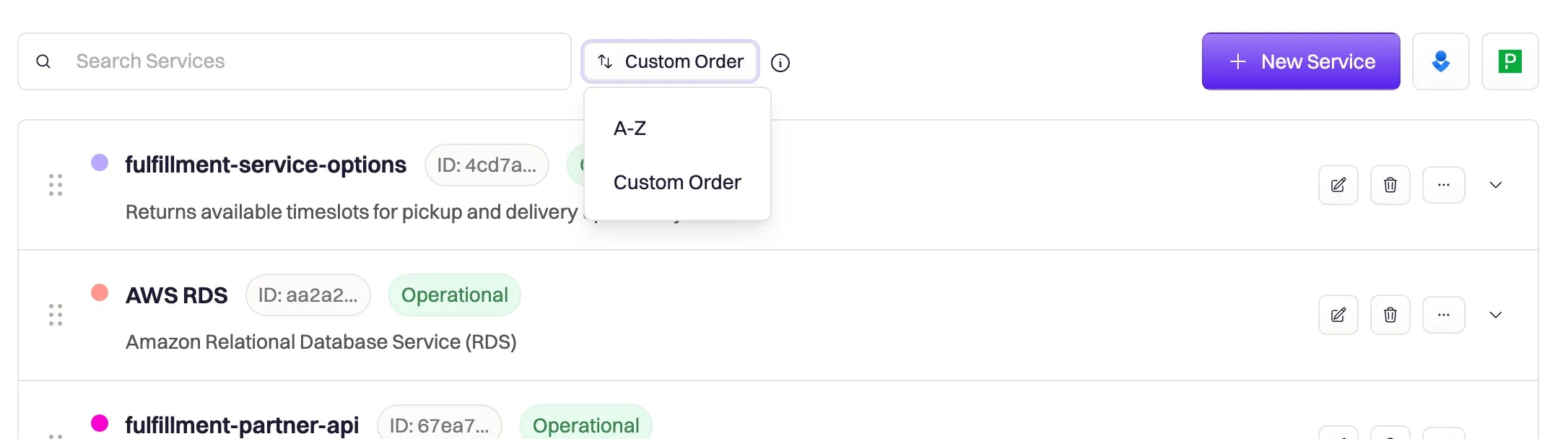
## Property Order

The ordering of values within configurable properties determines how they appear in dropdown menus and forms.

Ordering is **global** and affects all users.

You can:

* Drag and drop values manually
* Sort values alphabetically
<img src="https://mintcdn.com/rootly/OVd58onR8faXRZwf/images/configuration/configuration.webp?fit=max&auto=format&n=OVd58onR8faXRZwf&q=85&s=c85943b2f9460960eb61e7f7514e1b4c" alt="Property order example" width="2172" height="608" data-path="images/configuration/configuration.webp" />

***

# Custom Fields

When built-in properties are insufficient to meet your organization’s needs, you can create **Custom Fields** to extend the incident schema.

Custom Fields allow you to:

* Capture structured or unstructured metadata
* Apply validation and defaults
* Power advanced workflow automation
* Reference values using Liquid syntax
* Enforce organization-specific incident taxonomy

For full configuration details, see the [Custom Fields](/configuration/custom-fields) documentation.

***

# Frequently Asked Questions

<AccordionGroup>
  <Accordion title="Can I change an incident's Kind after it's created?" icon="lock">
    No. The **Kind** property is immutable after an incident is created. It determines the incident's structural behavior, workflow triggers, and status page eligibility at creation time. If you need a different kind, you must create a new incident with the desired kind.

    For example, you cannot convert a **Test Incident** to a **normal** incident, or change a **Scheduled Maintenance** to a standard incident after creation.
  </Accordion>

  <Accordion title="What's the difference between Kind and Type?" icon="acorn">
    **Kind** is a fixed, system-defined property that controls how an incident behaves structurally (e.g., `normal`, `test`, `scheduled`). It cannot be customized and determines workflow execution, lifecycle, and status page eligibility.

    **Type** (Incident Types) is a configurable property that allows organizations to define their own categorization taxonomy (e.g., "UI Bug", "Infrastructure Failure", "Security Event"). Types are fully customizable and can be used for filtering, reporting, and workflow conditions, but they don't affect the fundamental behavior of the incident.

    Think of **Kind** as "what kind of incident is this structurally?" and **Type** as "what category does this incident fall into for our organization?"
  </Accordion>

  <Accordion title="Can I reopen a resolved or closed incident?" icon="book-bookmark">
    Yes. Terminal statuses (**Resolved**, **Closed**, **Cancelled**) can be reopened to **Started** status. This restarts active response tracking and allows the incident to progress through its lifecycle again.

    Reopening is useful when:

    * An incident recurs after resolution
    * Additional investigation reveals the original resolution was incomplete
    * A cancelled incident turns out to be a real issue
  </Accordion>

  <Accordion title="Why can't I transition directly from Triage to Resolved?" icon="shuffle">
    Status transitions are validated to preserve logical lifecycle progression. Incidents in **Triage** or **Cancelled** cannot skip directly to **Mitigated**, **Resolved**, or **Closed** because these statuses require the incident to have been actively responded to (i.e., in **Started** status first).

    To resolve an incident that's in Triage, you must first transition it to **Started**, then proceed through **Mitigated** (optional) to **Resolved**.
  </Accordion>

  <Accordion title="What happens if I set a timestamp that violates chronological order?" icon="clock">
    Rootly validates timestamp relationships to maintain chronological integrity. If you attempt to set `mitigated_at`, `resolved_at`, or `closed_at` to a time before `started_at`, the system will reject the change and display a validation error.

    Timestamps must follow this order:

    * `started_at` ≤ `mitigated_at` ≤ `resolved_at` ≤ `closed_at`

    This ensures incident timelines remain accurate and reportable.
  </Accordion>

  <Accordion title="Can I delete or modify fixed properties like Kind or Status?" icon="shield">
    No. Fixed properties (**Kind** and **Status**) are system-defined and cannot be modified, deleted, or customized. They exist to ensure consistency across the platform and maintain the integrity of workflow automation and reporting.

    If you need different categorization options, use **Configurable Properties** (like Incident Types) or **Custom Fields**, which can be fully customized to meet your organization's needs.
  </Accordion>

  <Accordion title="What's the difference between Resolved and Closed status?" icon="check-circle">
    **Resolved** indicates that active incident response has completed and service impact has ended. At this stage, retrospective processes typically begin.

    **Closed** (when enabled via team configuration) is an optional terminal status used to mark incidents as fully finalized after review. It requires the incident to already be in **Resolved** status and provides a clear distinction between incidents that are resolved but still under review versus incidents that are completely closed.

    Not all teams use the Closed status. If it's not enabled, **Resolved** serves as the terminal status.
  </Accordion>

  <Accordion title="Do test incidents trigger workflows?" icon="flask">
    Yes. Test incidents trigger workflows just like normal incidents, allowing you to test workflow automation safely without affecting production metrics or status pages. However, test incidents are excluded from status page publication and production reporting.

    This makes test incidents ideal for:

    * Validating workflow configurations
    * Training team members on incident response
    * Testing integrations without production impact
  </Accordion>

  <Accordion title="How do sub-statuses affect workflow execution?" icon="computer-mouse">
    Sub-statuses provide granular tracking within parent statuses (like **Started** or **Resolved**) but don't change the fundamental status-based workflow triggers. Workflows that trigger on "Status Updated" will still fire when the parent status changes, regardless of sub-status transitions.

    However, you can use sub-statuses in workflow **run conditions** to create more specific automation logic. For example, a workflow could run only when an incident is in **Started** status with a specific Active sub-status.

    Sub-statuses are particularly useful for enforcing sequential workflows within a status.
  </Accordion>

  <Accordion title="Can I use custom fields in workflow conditions?" icon="code">
    Yes. Custom fields can be referenced in workflow run conditions and Liquid templates, allowing you to create sophisticated automation based on organization-specific data.

    Custom fields are accessible via Liquid syntax:

    ```liquid theme={null}
    {{ incident.custom_fields | find: 'custom_field.slug', 'your-field-slug' | get: 'value' }}
    ```

    This enables workflows to react to custom field values, trigger actions based on custom data, and include custom field information in notifications and integrations.
  </Accordion>

  <Accordion title="Why are backfill incidents automatically resolved?" icon="archive">
    Backfill incidents are designed to document incidents retroactively—after they've already been resolved. Since the incident has already concluded, they are created directly in a **Resolved** state.

    Workflows triggered on **Incident Created** still execute for backfill incidents, but active lifecycle stages (like **Started** or **Mitigated**) are skipped because the incident is already resolved.
  </Accordion>

  <Accordion title="Can scheduled maintenance incidents use standard incident statuses?" icon="calendar">
    No. Scheduled Maintenance incidents follow a separate lifecycle with dedicated statuses (**Scheduled**, **In Progress**, **Completed**, etc.). They cannot use standard incident statuses like **Started**, **Mitigated**, or **Resolved**.

    This separation exists because maintenance windows have different lifecycle requirements than unplanned incidents.
  </Accordion>

  <Accordion title="What happens if I change the order of configurable property values?" icon="down-from-bracket">
    Property ordering is **global**, meaning changes affect all users immediately. When you reorder values (e.g., Severities or Environments), the new order appears in:

    * Dropdown menus when creating or editing incidents
    * Form fields across the platform
    * Any interface where that property is displayed

    You can reorder manually via drag-and-drop or sort alphabetically.
  </Accordion>
</AccordionGroup>

***

<Callout icon="life-ring" color="#FFC107">
  **Need help or have a question?**

  Contact us anytime at **[support@rootly.com](mailto:support@rootly.com)**, use the `/rootly support` Slack command, or visit **Getting Help** to start a chat.
</Callout>
