> ## Documentation Index
> Fetch the complete documentation index at: https://docs.rootly.com/llms.txt
> Use this file to discover all available pages before exploring further.
# Custom Domain Names For Status Pages
> Configure custom domain names for your public status pages to maintain brand consistency and provide a seamless customer experience.
## Overview
You can attach one or multiple custom domain names such as status.acme.me using the custom domain names input. This allows you to brand your status page with your own domain while maintaining all the functionality of Rootly's status page system.
**Note**: External domain names are only configurable for public status pages. Private status pages cannot use custom domain names and will only be accessible through the default Rootly URL.
## Prerequisites
Before setting up a custom domain, ensure you have:
* Administrative access to your domain's DNS settings
* A public status page configured in Rootly (private pages are not supported)
* Access to your DNS provider's management interface
## Getting Your CNAME Target
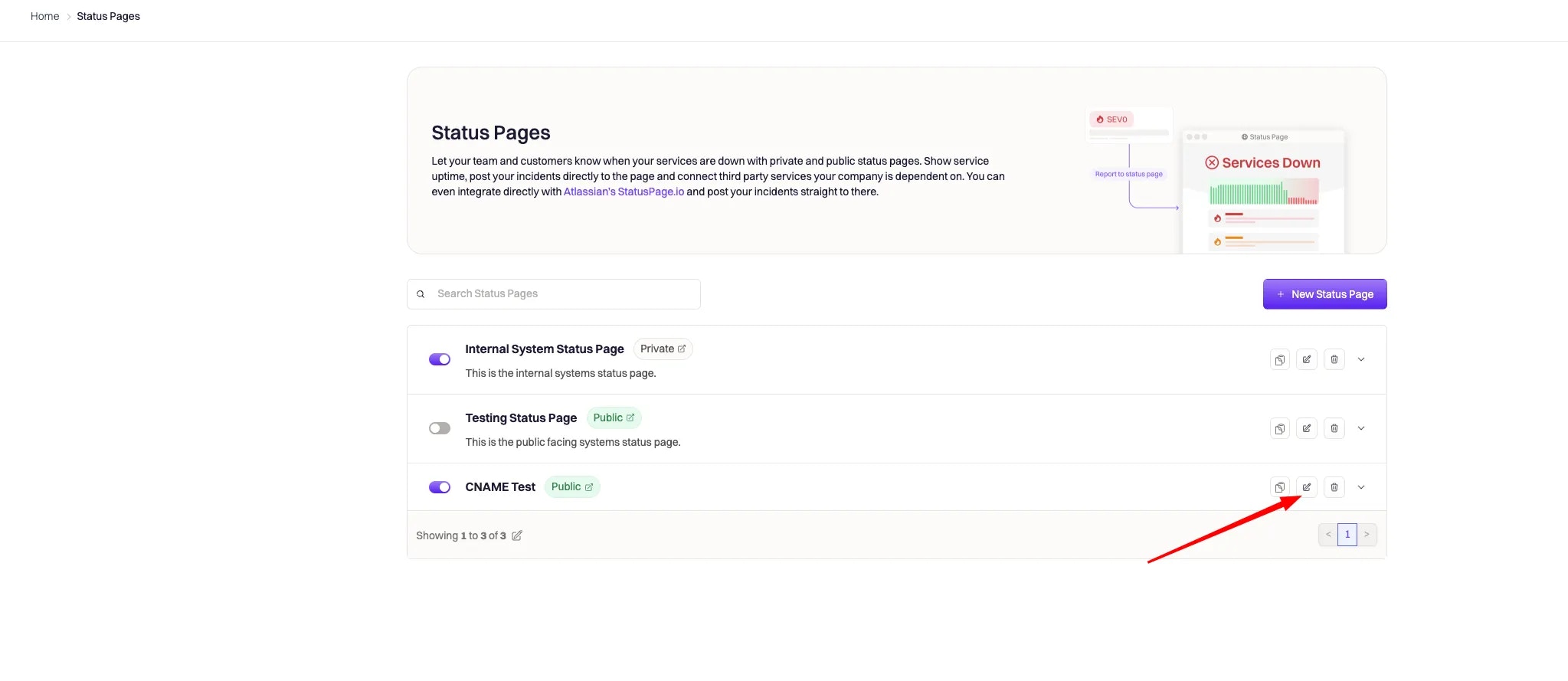
Once you save your page, you can obtain the CNAME target by clicking on the link for the status page you want to configure, as in the example below:
 The CNAME can be found at the bottom of the screen on the right side, as shown here:
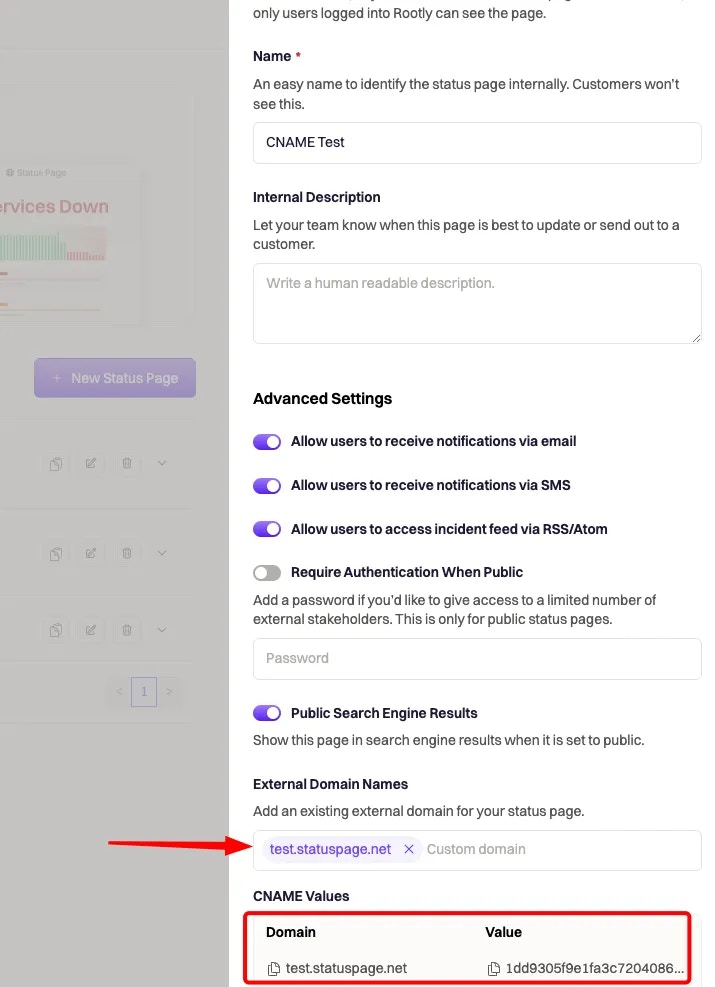 It provides the **Domain** you entered along with the **Value** needed for your DNS records.
## How Custom Domains Work
1. You set up the CNAME record in your DNS provider with:
* **Domain**: test.statuspage.net
* **Value**: (rootly-provided-value).external-sp.rootly.com
2. When someone visits test.statuspage.net:
* The DNS system looks up the CNAME record and directs the request to (rootly-provided-value).external-sp.rootly.com.
3. Rootly serves the corresponding status page associated with the unique identifier in the CNAME.
## DNS Configuration Steps
### Step 1: Configure CNAME Record
Set up the CNAME record in your DNS provider with the values obtained from Rootly:
* **Domain**: Your custom domain (e.g., status.your-domain.com)
* **Value**: The Rootly-provided CNAME target (e.g., unique-id.external-sp.rootly.com)
### Step 2: Add CAA Record (Required)
You must add a CAA (Certificate Authority Authorization) record to your DNS configuration for SSL certificate validation to work properly:
1. Add a CAA record to your **parent domain** (not the subdomain) with the following format:
```
0 issue "pki.goog; cansignhttpexchanges=yes"
```
For example, if your custom domain is `status.your-domain.com`, add the CAA record to `your-domain.com`.
**Important**: Place the CAA record on the parent domain because domains with CNAME records cannot have other record types. The Certificate Authority will check for CAA records starting from the subdomain and work up to the parent domain, stopping at the first CAA record it finds.
2. Test your CAA record configuration using the `dig` command:
```bash theme={null}
dig +short CAA your-domain.com
```
This CAA record authorizes Google's PKI to issue certificates for your domain and enables HTTP Exchange signing, which can improve performance for your status page.
### Step 3: Verify Configuration
After setting up both records, verify your configuration:
1. **Test CNAME resolution**:
```bash theme={null}
dig +short CNAME status.your-domain.com
```
2. **Check SSL certificate**:
```bash theme={null}
curl -I https://status.your-domain.com
```
3. **Verify page accessibility**: Visit your custom domain in a browser
## Provider-Specific Configuration Guides
To configure the DNS records, you will need to either work with your company's DNS administrator or configure it yourself if you have access.
Since configuring DNS varies by provider, here are guides for the most common services:
* [Amazon Web Services Route 53](https://aws.amazon.com/premiumsupport/knowledge-center/route-53-create-alias-records/ "Amazon Web Services Route 53")
* [Azure DNS](https://docs.microsoft.com/en-us/azure/dns/dns-web-sites-custom-domain "Azure DNS")
* [Google Cloud Identity](https://cloud.google.com/identity/docs/add-cname "Google Cloud Identity")
* [GoDaddy Domains DNS](https://www.godaddy.com/help/add-a-cname-record-19236 "GoDaddy Domains DNS")
## Troubleshooting
### Common Issues
**Domain not resolving**
* Verify CNAME record is correctly configured
* Check DNS propagation (can take up to 48 hours)
* Ensure there are no conflicting A records
* Remember: domains with CNAME records cannot have other record types on the same subdomain
**SSL certificate errors**
* Confirm CAA record is properly set on the parent domain (not subdomain)
* Wait for certificate provisioning (can take up to 24 hours)
* Verify the CAA record uses the correct format: `0 issue "pki.goog; cansignhttpexchanges=yes"`
* Check that the CAA record is placed on the parent domain, not the subdomain with the CNAME
**Page shows "Not Found" error**
* Double-check the CNAME target value from Rootly
* Ensure the status page is set to public
* Verify the custom domain is correctly entered in Rootly
### DNS Propagation Check
Use these tools to check DNS propagation across different regions:
* [What's My DNS](https://www.whatsmydns.net/)
* [DNS Checker](https://dnschecker.org/)
### Getting Help
If you continue experiencing issues:
1. Check the Rootly status page configuration
2. Verify DNS records with your provider
3. Contact Rootly support with your domain and error details
It provides the **Domain** you entered along with the **Value** needed for your DNS records.
## How Custom Domains Work
1. You set up the CNAME record in your DNS provider with:
* **Domain**: test.statuspage.net
* **Value**: (rootly-provided-value).external-sp.rootly.com
2. When someone visits test.statuspage.net:
* The DNS system looks up the CNAME record and directs the request to (rootly-provided-value).external-sp.rootly.com.
3. Rootly serves the corresponding status page associated with the unique identifier in the CNAME.
## DNS Configuration Steps
### Step 1: Configure CNAME Record
Set up the CNAME record in your DNS provider with the values obtained from Rootly:
* **Domain**: Your custom domain (e.g., status.your-domain.com)
* **Value**: The Rootly-provided CNAME target (e.g., unique-id.external-sp.rootly.com)
### Step 2: Add CAA Record (Required)
You must add a CAA (Certificate Authority Authorization) record to your DNS configuration for SSL certificate validation to work properly:
1. Add a CAA record to your **parent domain** (not the subdomain) with the following format:
```
0 issue "pki.goog; cansignhttpexchanges=yes"
```
For example, if your custom domain is `status.your-domain.com`, add the CAA record to `your-domain.com`.
**Important**: Place the CAA record on the parent domain because domains with CNAME records cannot have other record types. The Certificate Authority will check for CAA records starting from the subdomain and work up to the parent domain, stopping at the first CAA record it finds.
2. Test your CAA record configuration using the `dig` command:
```bash theme={null}
dig +short CAA your-domain.com
```
This CAA record authorizes Google's PKI to issue certificates for your domain and enables HTTP Exchange signing, which can improve performance for your status page.
### Step 3: Verify Configuration
After setting up both records, verify your configuration:
1. **Test CNAME resolution**:
```bash theme={null}
dig +short CNAME status.your-domain.com
```
2. **Check SSL certificate**:
```bash theme={null}
curl -I https://status.your-domain.com
```
3. **Verify page accessibility**: Visit your custom domain in a browser
## Provider-Specific Configuration Guides
To configure the DNS records, you will need to either work with your company's DNS administrator or configure it yourself if you have access.
Since configuring DNS varies by provider, here are guides for the most common services:
* [Amazon Web Services Route 53](https://aws.amazon.com/premiumsupport/knowledge-center/route-53-create-alias-records/ "Amazon Web Services Route 53")
* [Azure DNS](https://docs.microsoft.com/en-us/azure/dns/dns-web-sites-custom-domain "Azure DNS")
* [Google Cloud Identity](https://cloud.google.com/identity/docs/add-cname "Google Cloud Identity")
* [GoDaddy Domains DNS](https://www.godaddy.com/help/add-a-cname-record-19236 "GoDaddy Domains DNS")
## Troubleshooting
### Common Issues
**Domain not resolving**
* Verify CNAME record is correctly configured
* Check DNS propagation (can take up to 48 hours)
* Ensure there are no conflicting A records
* Remember: domains with CNAME records cannot have other record types on the same subdomain
**SSL certificate errors**
* Confirm CAA record is properly set on the parent domain (not subdomain)
* Wait for certificate provisioning (can take up to 24 hours)
* Verify the CAA record uses the correct format: `0 issue "pki.goog; cansignhttpexchanges=yes"`
* Check that the CAA record is placed on the parent domain, not the subdomain with the CNAME
**Page shows "Not Found" error**
* Double-check the CNAME target value from Rootly
* Ensure the status page is set to public
* Verify the custom domain is correctly entered in Rootly
### DNS Propagation Check
Use these tools to check DNS propagation across different regions:
* [What's My DNS](https://www.whatsmydns.net/)
* [DNS Checker](https://dnschecker.org/)
### Getting Help
If you continue experiencing issues:
1. Check the Rootly status page configuration
2. Verify DNS records with your provider
3. Contact Rootly support with your domain and error details