> ## Documentation Index
> Fetch the complete documentation index at: https://docs.rootly.com/llms.txt
> Use this file to discover all available pages before exploring further.
# Environments
> Define environment values (Production, Staging, Development) to distinguish incident scope, drive workflow conditions, and segment metrics in Rootly.
## Overview
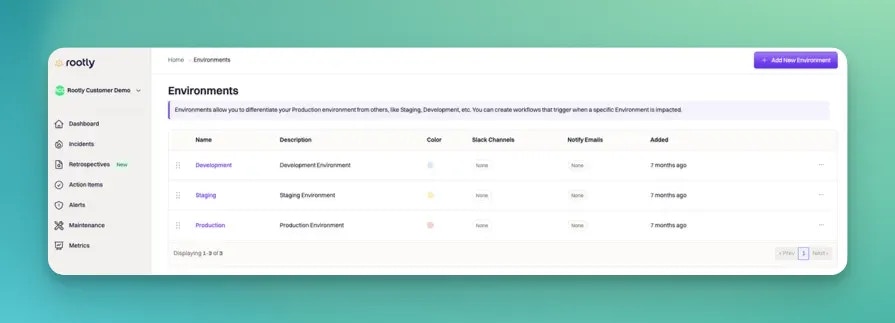
**Environments** classify incidents by the deployment tier they impact — most commonly Production, Staging, and Development, though larger organizations often extend the list to include Sandbox, QA, Preview, or region-specific tiers like `prod-us-east` and `prod-eu-west`.
Environment is often the second field responders reach for after Severity, because it's the fastest way to answer "does this need to page people right now?" A SEV0 in Development is a bug to triage during business hours; the same SEV0 in Production is an all-hands emergency. Environment is what carries that distinction into every downstream automation.
 ***
## How Environments Are Used
Environments drive routing, urgency, and reporting throughout Rootly:
| Feature | How Environment is used |
| ------------------------------------------------ | --------------------------------------------------------------------------------------------------------------------------------------------------------------------------------------------------------------------------------------- |
| **[Workflow conditions](/workflows/conditions)** | The most common paging pattern is "Severity is SEV0 **and** Environments contains Production" — Environment scopes urgency to real customer-impacting tiers. |
| **Slack channel + alias notifications** | Each Environment can be linked to Slack channels and user groups. Workflows use these to route Production incidents to `#incidents-prod` and non-production incidents to a lower-priority channel. |
| **Notify emails** | Each Environment can be linked to email addresses. Useful for stakeholder groups that only care about Production events (executive comms, customer support). |
| **Metrics + reporting** | Environment is a top-level filter in every dashboard. MTTR-by-Environment reveals whether your Production incidents resolve faster than Staging ones (they should — otherwise your Production incident response process isn't working). |
| **Status page publication** | Not automatic — status page publication is decided by workflow conditions that typically check both Severity and Environment. Most teams auto-publish SEV0/SEV1 **in Production only**. |
| **Retrospective triggers** | Different Environments can trigger different retrospective templates. Production incidents get the full customer-impact review; Staging incidents get a lightweight regression tracker. |
Because Environment gates so much automation urgency, **an incorrectly-tagged Environment is the fastest way to page the wrong people (or nobody at all)**. Making sure responders can tell the Environment field from the Severity field on the incident form matters — see Best Practices below.
***
## Choosing Your Environment List
Most teams start with three environments and add more as their infrastructure grows.
### Standard Three-Tier
The default for most SaaS teams:
* **Production** — live, customer-facing infrastructure. All customer-visible urgency lives here.
* **Staging** — pre-production tier used for release verification. Incidents here delay releases but don't affect customers directly.
* **Development** — engineering-owned tier used for feature work. Incidents here are usually contained to internal workflows.
If you're just starting out, three is enough. Adding more environments only pays off when your organization actually operates them distinctly (different on-call rotations, different SLAs, different notification patterns).
### Extended Sets
Larger organizations extend the list for real operational reasons — not just to add labels:
| Additional Environment | When it's worth adding |
| ---------------------------------------- | ------------------------------------------------------------------------------------------------------------------------------------------------------------------- |
| **Sandbox** | You give customers or partners isolated test environments that can have their own incidents. |
| **QA** | Your QA team owns a distinct pre-release tier separate from Staging. |
| **Preview** | Branch- or PR-specific ephemeral environments (Vercel, Netlify, Heroku pipeline apps). Rarely worth incidents unless you have production customers on Preview URLs. |
| **`prod-us-east`, `prod-eu-west`, etc.** | You operate genuinely regional Production stacks with independent on-call rotations. Adding regions as separate Environments lets workflows route by geography. |
| **Internal / Corporate** | Employee-facing internal systems (HR platforms, expense tools) that are distinct from customer-facing infrastructure. |
### Single-Select vs Multi-Select
Environment can be configured as **single-select** (one Environment per incident) or **multi-select** (multiple Environments per incident). Which you choose changes both the picker and the workflow conditions available.
* **Single-select** — cleaner and matches most teams' actual usage. An outage is either in Production or it isn't. Workflows filter with `is` / `is one of`.
* **Multi-select** — useful when incidents span multiple deployment tiers simultaneously (e.g., a shared dependency failing across `prod-us-east` and `prod-eu-west`). Workflows filter with `contains any of` / `contains all of`.
Most teams start single-select. Switch to multi-select only when you regularly have incidents affecting more than one tier at once.
***
## Field Type
Configure Environment as either **single-select** or **multi-select** in **Configuration → Environments**. The setting affects all new incidents; historical incidents keep their existing values.
***
## How Environments Are Used
Environments drive routing, urgency, and reporting throughout Rootly:
| Feature | How Environment is used |
| ------------------------------------------------ | --------------------------------------------------------------------------------------------------------------------------------------------------------------------------------------------------------------------------------------- |
| **[Workflow conditions](/workflows/conditions)** | The most common paging pattern is "Severity is SEV0 **and** Environments contains Production" — Environment scopes urgency to real customer-impacting tiers. |
| **Slack channel + alias notifications** | Each Environment can be linked to Slack channels and user groups. Workflows use these to route Production incidents to `#incidents-prod` and non-production incidents to a lower-priority channel. |
| **Notify emails** | Each Environment can be linked to email addresses. Useful for stakeholder groups that only care about Production events (executive comms, customer support). |
| **Metrics + reporting** | Environment is a top-level filter in every dashboard. MTTR-by-Environment reveals whether your Production incidents resolve faster than Staging ones (they should — otherwise your Production incident response process isn't working). |
| **Status page publication** | Not automatic — status page publication is decided by workflow conditions that typically check both Severity and Environment. Most teams auto-publish SEV0/SEV1 **in Production only**. |
| **Retrospective triggers** | Different Environments can trigger different retrospective templates. Production incidents get the full customer-impact review; Staging incidents get a lightweight regression tracker. |
Because Environment gates so much automation urgency, **an incorrectly-tagged Environment is the fastest way to page the wrong people (or nobody at all)**. Making sure responders can tell the Environment field from the Severity field on the incident form matters — see Best Practices below.
***
## Choosing Your Environment List
Most teams start with three environments and add more as their infrastructure grows.
### Standard Three-Tier
The default for most SaaS teams:
* **Production** — live, customer-facing infrastructure. All customer-visible urgency lives here.
* **Staging** — pre-production tier used for release verification. Incidents here delay releases but don't affect customers directly.
* **Development** — engineering-owned tier used for feature work. Incidents here are usually contained to internal workflows.
If you're just starting out, three is enough. Adding more environments only pays off when your organization actually operates them distinctly (different on-call rotations, different SLAs, different notification patterns).
### Extended Sets
Larger organizations extend the list for real operational reasons — not just to add labels:
| Additional Environment | When it's worth adding |
| ---------------------------------------- | ------------------------------------------------------------------------------------------------------------------------------------------------------------------- |
| **Sandbox** | You give customers or partners isolated test environments that can have their own incidents. |
| **QA** | Your QA team owns a distinct pre-release tier separate from Staging. |
| **Preview** | Branch- or PR-specific ephemeral environments (Vercel, Netlify, Heroku pipeline apps). Rarely worth incidents unless you have production customers on Preview URLs. |
| **`prod-us-east`, `prod-eu-west`, etc.** | You operate genuinely regional Production stacks with independent on-call rotations. Adding regions as separate Environments lets workflows route by geography. |
| **Internal / Corporate** | Employee-facing internal systems (HR platforms, expense tools) that are distinct from customer-facing infrastructure. |
### Single-Select vs Multi-Select
Environment can be configured as **single-select** (one Environment per incident) or **multi-select** (multiple Environments per incident). Which you choose changes both the picker and the workflow conditions available.
* **Single-select** — cleaner and matches most teams' actual usage. An outage is either in Production or it isn't. Workflows filter with `is` / `is one of`.
* **Multi-select** — useful when incidents span multiple deployment tiers simultaneously (e.g., a shared dependency failing across `prod-us-east` and `prod-eu-west`). Workflows filter with `contains any of` / `contains all of`.
Most teams start single-select. Switch to multi-select only when you regularly have incidents affecting more than one tier at once.
***
## Field Type
Configure Environment as either **single-select** or **multi-select** in **Configuration → Environments**. The setting affects all new incidents; historical incidents keep their existing values.
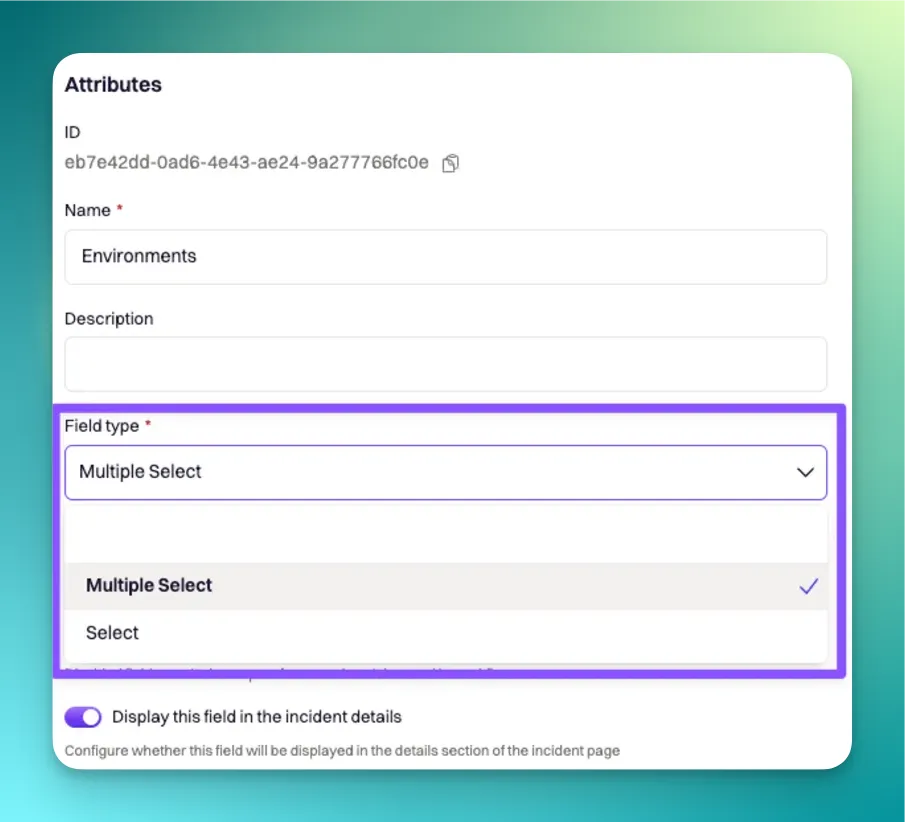 Liquid syntax differs slightly between the two modes. Single-select uses `{{ incident.raw_environments | get: '' }}` for the one value. Multi-select uses `{{ incident.raw_environments[index] | get: '' }}` where `index` references a specific Environment in the list. Both are covered in the attribute reference below.
***
## Configuring Environment Attributes
Each Environment can be configured with the attributes below. All are available in Liquid syntax for use in workflows, retrospective templates, and status page updates.
Unique identifier assigned automatically by Rootly on creation. **Not customizable.** Used in Liquid references and API calls.
```liquid theme={null}
{{ incident.environment_ids }}
{{ incident.raw_environments | get: 'id' }} {/* single-select */}
{{ incident.raw_environments[0] | get: 'id' }} {/* multi-select, first Environment */}
```
The display name shown throughout the Rootly UI. Fully customizable — `Production`, `Prod`, `Live`, `prod-us-east`, whatever your team calls it.
```liquid theme={null}
{{ incident.environments }}
{{ incident.raw_environments | get: 'name' }}
{{ incident.raw_environments[0] | get: 'name' }}
```
Auto-generated by lower-casing and hyphenating the name. Used in Liquid references and in workflow condition matches.
**Slugs regenerate when you rename an Environment.** Anything referencing the old slug — workflow conditions, saved metrics dashboards, third-party integrations that filter by slug — needs to be updated after a rename.
```liquid theme={null}
{{ incident.environment_slugs }}
{{ incident.raw_environments | get: 'slug' }}
{{ incident.raw_environments[0] | get: 'slug' }}
```
Additional context shown alongside the Environment in the UI. Best used to remind responders what "Production" means specifically for your team ("prod-us-east handling all US customer traffic" vs. a vague "Prod").
```liquid theme={null}
{{ incident.raw_environments | get: 'description' }}
{{ incident.raw_environments[0] | get: 'description' }}
```
Six-digit hex color code used for Environment-tinted UI accents and metrics-graph color coding. Convention: red or brand red for Production, orange/yellow for Staging, blue/gray for Development.
```liquid theme={null}
{{ incident.raw_environments | get: 'color' }}
{{ incident.raw_environments[0] | get: 'color' }}
```
Rootly expects six-digit hex codes (e.g., `#c4231c`). Use a color picker if you're not sure — [color-hex.com](https://www.color-hex.com/) is a common choice.
One or more Slack channels linked to the Environment. **Linking alone doesn't post to the channels** — a workflow action (typically "Attached Environment Channels") reads this list and performs the notification.
```liquid theme={null}
{{ incident.raw_environments | get: 'slack_channels' }}
{{ incident.raw_environments[0] | get: 'slack_channels' }}
```
One or more Slack user groups (aka aliases) linked to the Environment. **Linking alone doesn't invite users** — a workflow action (typically "Attached Environment Aliases") reads this list and performs the invitation.
```liquid theme={null}
{{ incident.raw_environments | get: 'slack_aliases' }}
{{ incident.raw_environments[0] | get: 'slack_aliases' }}
```
One or more email addresses linked to the Environment. **Linking alone doesn't send email** — a workflow action reads this list and sends the notification.
```liquid theme={null}
{{ incident.raw_environments | get: 'notify_emails' }}
{{ incident.raw_environments[0] | get: 'notify_emails' }}
```
For workflow-driven use, most teams reference the flattened list:
```liquid theme={null}
{{ incident.raw_environments | map: 'notify_emails' | flatten | join: ',' }}
```
***
## Best Practices
* **Always require Environment on incident creation.** An unspecified Environment is the fastest way to route a Production incident to the wrong Slack channel. Make Environment a required field on your incident-creation forms.
* **Use color to reinforce Environment on the incident details view.** Red for Production, orange for Staging, blue for Development is the standard convention. Responders read the color before the label — a mis-colored Environment gets miscategorized more often.
* **Gate every high-urgency workflow on Environment.** Workflows that page on-call, send stakeholder emails, or auto-publish the status page should always include an Environment condition. `Severity is SEV0` alone will page the team for a SEV0 in Dev, which nobody wants.
* **Don't invent Environments for scope you don't operate distinctly.** Adding "QA" as an Environment only pays off if your QA team has an on-call rotation, distinct SLAs, or a separate notification pattern. Otherwise it's just a tag that fragments metrics.
* **Test workflow conditions with Test Incidents in each Environment.** After adding a new Environment or reworking existing ones, `/rootly test` in each Environment and confirm the workflows route correctly. Do this before the next real incident hits the new definitions.
* **Audit rare Environments quarterly.** If an Environment sees fewer than 5% of incidents over 90 days, it's probably not distinct enough — consider merging it with a peer or removing it.
***
## Troubleshooting
Confirm the Environment is enabled under Configuration → Environments. Archived Environments remain visible on historical incidents but don't appear as options on new incidents. Also check team-level restrictions — some teams scope which Environments their responders can select.
Two common causes: (1) the workflow's condition uses `is` on a multi-select Environment field — switch to `contains any of` (see [Workflow Conditions](/workflows/conditions) for the operator reference); (2) the Environment slug was regenerated after a rename and the workflow still references the old slug. Update the workflow condition to match the new slug.
Linking a Slack channel to an Environment doesn't cause auto-notification on its own — a workflow with an "Attached Environment Channels" action is required. Check that the workflow exists, is enabled, and has run conditions that match the Environment you're testing. The Environment Updated trigger is a good candidate.
The metrics dashboard filters by Environment slug (not name). If your dashboard is grouping incidents incorrectly, check the filter query — it may still reference the pre-rename slug. Environment renames don't automatically update saved dashboards.
Two common fixes: (1) Add a description on each Environment that clarifies what qualifies — "Production = live customer traffic. Not Staging, even if Staging is in-warranty." (2) Reorder the picker so Production is at the top (most common) and less-common Environments are further down. Alphabetical ordering isn't always the right default.
***
## Frequently Asked Questions
Most teams start with three (Production, Staging, Development) and add more only when their operations actually differentiate. Adding Environments is only worth it if each new Environment has a distinct on-call rotation, SLA, or notification pattern — otherwise it's just a label that fragments metrics.
Yes. Adding regions as separate Environments (e.g., `prod-us-east`, `prod-eu-west`, `prod-asia`) is a common pattern for teams with independent regional on-call rotations. Workflows can then route incidents to the right regional team based on the Environment field.
Yes. Environment is fully mutable — change it via the incident details page or a workflow action. Changes are logged in the incident timeline. This is different from Kind, which is immutable after declaration.
Historical incidents keep the Environment value they were created with, even after the Environment is deleted from the picker. Only new incidents lose access to the removed Environment. For overhauls, archive rather than delete so historical metrics stay readable.
Yes — Environments belong to a Team. Each team maintains its own Environment list, and the picker on an incident form shows the Environments defined for that incident's team. If your workspace uses multiple teams, define the Environments each team actually deploys to; there's no single org-wide Environment list.
No. Test incidents (declared via `/rootly test`) are excluded from production metrics regardless of Environment. This is a Kind-level behavior — see [Incident Kind](/configuration/incident-kind) for the full exclusion matrix.
Yes. In your incident-creation form (Configuration → Forms), mark the Environment field as required. This prevents responders from creating incidents without an Environment tag, which is important because Environment gates so much downstream routing.
***
## Related Pages
The other most-used incident field. Severity + Environment together drive most workflow conditions.
Use Environment in workflow run conditions to route Production incidents differently from non-Production.
The customizable classification for what's broken, complementing Environment's answer to where it's broken.
Liquid syntax differs slightly between the two modes. Single-select uses `{{ incident.raw_environments | get: '' }}` for the one value. Multi-select uses `{{ incident.raw_environments[index] | get: '' }}` where `index` references a specific Environment in the list. Both are covered in the attribute reference below.
***
## Configuring Environment Attributes
Each Environment can be configured with the attributes below. All are available in Liquid syntax for use in workflows, retrospective templates, and status page updates.
Unique identifier assigned automatically by Rootly on creation. **Not customizable.** Used in Liquid references and API calls.
```liquid theme={null}
{{ incident.environment_ids }}
{{ incident.raw_environments | get: 'id' }} {/* single-select */}
{{ incident.raw_environments[0] | get: 'id' }} {/* multi-select, first Environment */}
```
The display name shown throughout the Rootly UI. Fully customizable — `Production`, `Prod`, `Live`, `prod-us-east`, whatever your team calls it.
```liquid theme={null}
{{ incident.environments }}
{{ incident.raw_environments | get: 'name' }}
{{ incident.raw_environments[0] | get: 'name' }}
```
Auto-generated by lower-casing and hyphenating the name. Used in Liquid references and in workflow condition matches.
**Slugs regenerate when you rename an Environment.** Anything referencing the old slug — workflow conditions, saved metrics dashboards, third-party integrations that filter by slug — needs to be updated after a rename.
```liquid theme={null}
{{ incident.environment_slugs }}
{{ incident.raw_environments | get: 'slug' }}
{{ incident.raw_environments[0] | get: 'slug' }}
```
Additional context shown alongside the Environment in the UI. Best used to remind responders what "Production" means specifically for your team ("prod-us-east handling all US customer traffic" vs. a vague "Prod").
```liquid theme={null}
{{ incident.raw_environments | get: 'description' }}
{{ incident.raw_environments[0] | get: 'description' }}
```
Six-digit hex color code used for Environment-tinted UI accents and metrics-graph color coding. Convention: red or brand red for Production, orange/yellow for Staging, blue/gray for Development.
```liquid theme={null}
{{ incident.raw_environments | get: 'color' }}
{{ incident.raw_environments[0] | get: 'color' }}
```
Rootly expects six-digit hex codes (e.g., `#c4231c`). Use a color picker if you're not sure — [color-hex.com](https://www.color-hex.com/) is a common choice.
One or more Slack channels linked to the Environment. **Linking alone doesn't post to the channels** — a workflow action (typically "Attached Environment Channels") reads this list and performs the notification.
```liquid theme={null}
{{ incident.raw_environments | get: 'slack_channels' }}
{{ incident.raw_environments[0] | get: 'slack_channels' }}
```
One or more Slack user groups (aka aliases) linked to the Environment. **Linking alone doesn't invite users** — a workflow action (typically "Attached Environment Aliases") reads this list and performs the invitation.
```liquid theme={null}
{{ incident.raw_environments | get: 'slack_aliases' }}
{{ incident.raw_environments[0] | get: 'slack_aliases' }}
```
One or more email addresses linked to the Environment. **Linking alone doesn't send email** — a workflow action reads this list and sends the notification.
```liquid theme={null}
{{ incident.raw_environments | get: 'notify_emails' }}
{{ incident.raw_environments[0] | get: 'notify_emails' }}
```
For workflow-driven use, most teams reference the flattened list:
```liquid theme={null}
{{ incident.raw_environments | map: 'notify_emails' | flatten | join: ',' }}
```
***
## Best Practices
* **Always require Environment on incident creation.** An unspecified Environment is the fastest way to route a Production incident to the wrong Slack channel. Make Environment a required field on your incident-creation forms.
* **Use color to reinforce Environment on the incident details view.** Red for Production, orange for Staging, blue for Development is the standard convention. Responders read the color before the label — a mis-colored Environment gets miscategorized more often.
* **Gate every high-urgency workflow on Environment.** Workflows that page on-call, send stakeholder emails, or auto-publish the status page should always include an Environment condition. `Severity is SEV0` alone will page the team for a SEV0 in Dev, which nobody wants.
* **Don't invent Environments for scope you don't operate distinctly.** Adding "QA" as an Environment only pays off if your QA team has an on-call rotation, distinct SLAs, or a separate notification pattern. Otherwise it's just a tag that fragments metrics.
* **Test workflow conditions with Test Incidents in each Environment.** After adding a new Environment or reworking existing ones, `/rootly test` in each Environment and confirm the workflows route correctly. Do this before the next real incident hits the new definitions.
* **Audit rare Environments quarterly.** If an Environment sees fewer than 5% of incidents over 90 days, it's probably not distinct enough — consider merging it with a peer or removing it.
***
## Troubleshooting
Confirm the Environment is enabled under Configuration → Environments. Archived Environments remain visible on historical incidents but don't appear as options on new incidents. Also check team-level restrictions — some teams scope which Environments their responders can select.
Two common causes: (1) the workflow's condition uses `is` on a multi-select Environment field — switch to `contains any of` (see [Workflow Conditions](/workflows/conditions) for the operator reference); (2) the Environment slug was regenerated after a rename and the workflow still references the old slug. Update the workflow condition to match the new slug.
Linking a Slack channel to an Environment doesn't cause auto-notification on its own — a workflow with an "Attached Environment Channels" action is required. Check that the workflow exists, is enabled, and has run conditions that match the Environment you're testing. The Environment Updated trigger is a good candidate.
The metrics dashboard filters by Environment slug (not name). If your dashboard is grouping incidents incorrectly, check the filter query — it may still reference the pre-rename slug. Environment renames don't automatically update saved dashboards.
Two common fixes: (1) Add a description on each Environment that clarifies what qualifies — "Production = live customer traffic. Not Staging, even if Staging is in-warranty." (2) Reorder the picker so Production is at the top (most common) and less-common Environments are further down. Alphabetical ordering isn't always the right default.
***
## Frequently Asked Questions
Most teams start with three (Production, Staging, Development) and add more only when their operations actually differentiate. Adding Environments is only worth it if each new Environment has a distinct on-call rotation, SLA, or notification pattern — otherwise it's just a label that fragments metrics.
Yes. Adding regions as separate Environments (e.g., `prod-us-east`, `prod-eu-west`, `prod-asia`) is a common pattern for teams with independent regional on-call rotations. Workflows can then route incidents to the right regional team based on the Environment field.
Yes. Environment is fully mutable — change it via the incident details page or a workflow action. Changes are logged in the incident timeline. This is different from Kind, which is immutable after declaration.
Historical incidents keep the Environment value they were created with, even after the Environment is deleted from the picker. Only new incidents lose access to the removed Environment. For overhauls, archive rather than delete so historical metrics stay readable.
Yes — Environments belong to a Team. Each team maintains its own Environment list, and the picker on an incident form shows the Environments defined for that incident's team. If your workspace uses multiple teams, define the Environments each team actually deploys to; there's no single org-wide Environment list.
No. Test incidents (declared via `/rootly test`) are excluded from production metrics regardless of Environment. This is a Kind-level behavior — see [Incident Kind](/configuration/incident-kind) for the full exclusion matrix.
Yes. In your incident-creation form (Configuration → Forms), mark the Environment field as required. This prevents responders from creating incidents without an Environment tag, which is important because Environment gates so much downstream routing.
***
## Related Pages
The other most-used incident field. Severity + Environment together drive most workflow conditions.
Use Environment in workflow run conditions to route Production incidents differently from non-Production.
The customizable classification for what's broken, complementing Environment's answer to where it's broken.