> ## Documentation Index
> Fetch the complete documentation index at: https://docs.rootly.com/llms.txt
> Use this file to discover all available pages before exploring further.

# GitHub Configuration

> Configure GitHub integration to automatically capture push events and pull request merges as contextual pulses during incident triage and analysis.

The GitHub integration records repository activity as [pulses](/configuration/pulses) in Rootly, giving responders a timeline of recent code changes alongside their incidents. When something breaks, pulses help you correlate the incident with the pushes and pull requests that landed just before it.

Rootly will **automatically** add the following GitHub events as pulses:

* Push to any repositories

* Merged pull requests

* More to come...
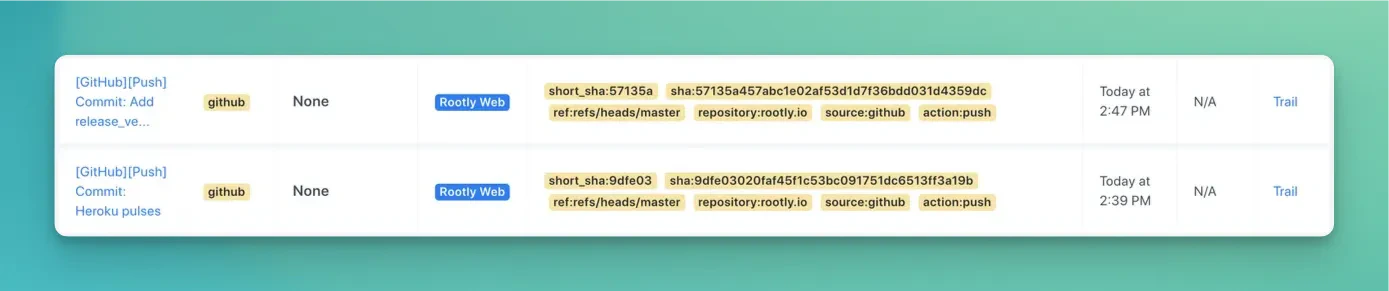
<Frame caption="GitHub Integration">
  <img src="https://mintcdn.com/rootly/7PwamMJIAOaYlZ7c/images/integrations/github.webp?fit=max&auto=format&n=7PwamMJIAOaYlZ7c&q=85&s=07e80668ce57850195ddb403f1f884a6" alt="GitHub integration" width="1389" height="291" data-path="images/integrations/github.webp" />
</Frame>

## How it works

Once the GitHub integration is connected, Rootly receives push, pull request, and issue events from your repositories and surfaces them as pulses on the incident timeline and service activity feed. No extra configuration is needed for individual events — activity is captured automatically as it happens.

Beyond pulses, the GitHub integration also lets you create and update GitHub issues from incident workflows, fetch recent commits across repositories during an incident, and automatically enrich GitHub pull request links shared in incident Slack channels with live status updates.

## Getting the most out of GitHub pulses

* Use pulses during triage to answer "what changed?" — a deploy or merge shortly before an incident is often the fastest lead.
* Pair the integration with [workflows](/workflows/workflows) to automate issue creation and keep GitHub in sync as incidents progress.

Ready to configure the GitHub integration? See [GitHub integration setup](/integrations/github/github).

## Related pages

* [GitHub integration setup](/integrations/github/github) — installation, permissions, and workflow actions
* [Pulses](/configuration/pulses) — how change events appear in Rootly
* [Workflows](/workflows/workflows) — automate incident response with GitHub actions
