> ## Documentation Index
> Fetch the complete documentation index at: https://docs.rootly.com/llms.txt
> Use this file to discover all available pages before exploring further.

# Heroku Configuration

> Configure Heroku integration to automatically capture build events and release deployments as contextual pulses for incident correlation.

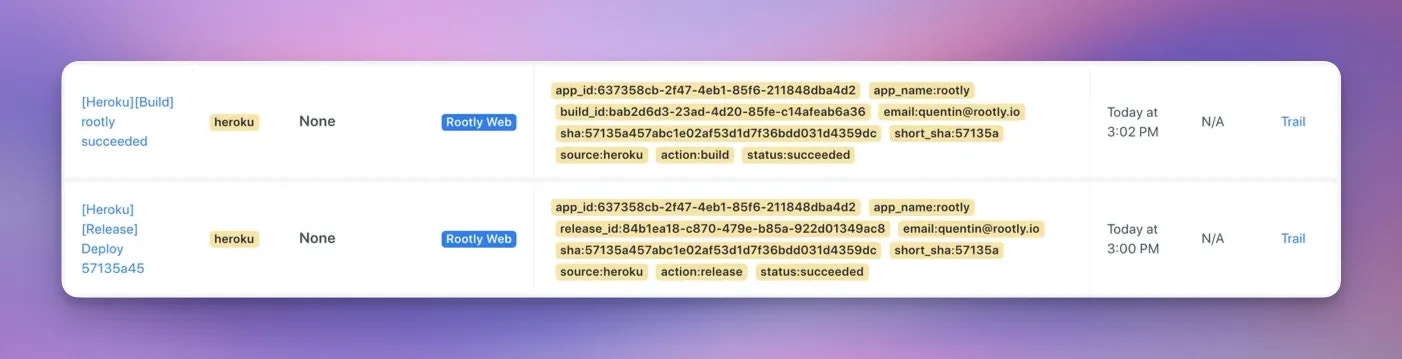
The Heroku integration records build and release events from your Heroku apps as [pulses](/configuration/pulses) in Rootly, so responders can correlate deployments with incidents directly on the incident timeline. If an incident starts shortly after a release, the pulse feed makes that connection obvious.

Rootly will **automatically** add the following Heroku events as pulses:

* A build starts

* A build ends ( Failed or succeeded )

* A release is deployed

* More to come...
<Frame caption="Heroku integration">
  <img src="https://mintcdn.com/rootly/DEGWl8qg20zbzmSF/images/integrations/heroku.webp?fit=max&auto=format&n=DEGWl8qg20zbzmSF&q=85&s=ce62dc7f3f69e60f3ddfce5da4c04fff" alt="Heroku integration" width="1402" height="359" data-path="images/integrations/heroku.webp" />
</Frame>

## How it works

Once connected via OAuth, Rootly creates webhooks on the Heroku apps you list in the integration settings and ingests their build and release events. Each pulse includes context like the commit SHA and the user who triggered the build, and pulses are automatically linked to Rootly [services](/configuration/services) with a matching **Heroku App Name** field — set this field on each service you want correlated with deployments.

Only explicitly listed apps are monitored, so you control exactly which deployment activity shows up in Rootly.

Beyond pulses, the integration also provides a **Run Command on Heroku** workflow action that executes one-off commands on a dyno — useful for rollbacks or diagnostic scripts mid-incident — and posts the output to Slack.

Ready to configure the Heroku integration? See [Heroku integration setup](/integrations/heroku).

## Related pages

* [Heroku integration setup](/integrations/heroku) — installation, pulse events, and the Run Command action
* [Pulses](/configuration/pulses) — how deployment events appear in Rootly
* [Services](/configuration/services) — link Heroku apps to the services they power
