> ## Documentation Index
> Fetch the complete documentation index at: https://docs.rootly.com/llms.txt
> Use this file to discover all available pages before exploring further.
# Incident Causes
> Define and track root causes of incidents to identify patterns, prioritize improvements, and guide post-incident learning initiatives.
## Overview
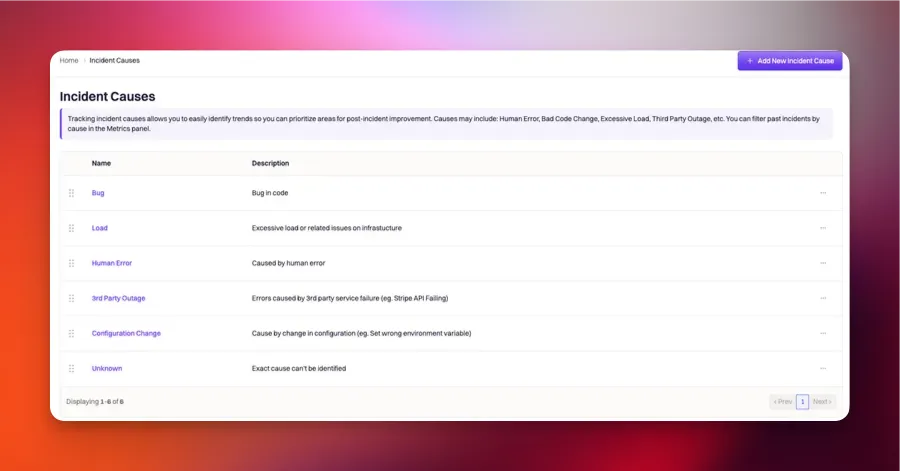
**Incident causes** allow you to track the root cause of incidents. This is particularly helpful when identifying trends, allowing you to prioritize areas for post-incident improvement.
 ## Creating Incident Causes
Incident causes are managed from **Configuration → Incident Causes** in the Rootly dashboard sidebar. (The Catalogs section is for service/component catalogs from tools like Backstage and Cortex — it does not create incident causes.)
In the Rootly sidebar, navigate to **Configuration → Incident Causes**. The page lists every cause already defined for your organization.
Click **Add New** (or the equivalent create button at the top of the list). Fill in:
* **Name** — the display label that responders see on the incident form (e.g., `Database deadlock`, `Third-party outage`, `Deployment regression`).
* **Description** — optional context shown when the cause is selected, useful for ambiguous categories.
* **Color** — optional visual tag for dashboards and reports.
The **Slug** is generated automatically from the Name by lower-casing and hyphenating — used in Liquid references and the API.
Click **Save**. The new cause becomes immediately available as an option on the incident form's **Causes** multi-select field for all team members.
Causes are multi-select per incident — responders can attach more than one cause when the root cause is genuinely shared between failure modes (e.g., `Third-party outage` and `Insufficient monitoring`). Keep the list short and orthogonal to encourage selection rather than freeform notes.
## Field Type
**Incident causes** is strictly a **multi-select** field type. This means you'll be able to select multiple cause values for a single incident.
## Attributes
**Incident causes** can be configured with the following attributes. Each cause attribute can be referenced via Liquid syntax.
Since the *incident cause* field is a **multi-select** field type, the Liquid reference will follow an array syntax. Where `index` references the specific cause object in the list of causes.
`{{incident.raw_causes[index] | get: ''}}`
### ID
This is the unique identifier of the incident cause. This field **cannot be customized**. Rootly will automatically assign the *ID* upon creation. It is typically used in Liquid references and API calls.
The following Liquid syntax will allow you to list out the incident cause *ID*(s) that are selected for an incident:
`{{ incident.cause_ids }}`
**OR**
* `{{ incident.raw_causes | get: 'id'}}` for the select field type
* `{{ incident.raw_causes[index] | get: 'id' }}` for a multi-select field type
### Name
This is the value that is displayed on the UI for the incident causes. This field is customizable.
The following Liquid syntax will allow you to list out the incident cause *name*(s) that are selected for an incident:
`{{ incident.causes }}`
**OR**
* `{{ incident.raw_causes | get: 'name'}}` for the select field type
* `{{ incident.raw_causes[index] | get: 'name' }}` for a multi-select field type
### Slug
This is the string that is used to reference the incident causes in Liquid references. This field is automatically generated by lower-casing and hyphenating the incident cause *name*.
The following Liquid syntax will allow you to list out the incident causes *slug*(s) that are selected for an incident:
`{{ incident.cause_slugs }}`
**OR**
* `{{ incident.raw_causes | get: 'slug'}}` for the select field type
* `{{ incident.raw_causes[index] | get: 'slug' }}` for a multi-select field type
### Description
This value is displayed on the UI to further explain each incident cause. This field is customizable.
The following Liquid syntax will allow you to list out the incident causes *description*(s) that are selected for an incident:
* `{{ incident.raw_causes | get: 'description'}}` for the select field type
* `{{ incident.raw_causes[index] | get: 'description' }}` for a multi-select field type
## Creating Incident Causes
Incident causes are managed from **Configuration → Incident Causes** in the Rootly dashboard sidebar. (The Catalogs section is for service/component catalogs from tools like Backstage and Cortex — it does not create incident causes.)
In the Rootly sidebar, navigate to **Configuration → Incident Causes**. The page lists every cause already defined for your organization.
Click **Add New** (or the equivalent create button at the top of the list). Fill in:
* **Name** — the display label that responders see on the incident form (e.g., `Database deadlock`, `Third-party outage`, `Deployment regression`).
* **Description** — optional context shown when the cause is selected, useful for ambiguous categories.
* **Color** — optional visual tag for dashboards and reports.
The **Slug** is generated automatically from the Name by lower-casing and hyphenating — used in Liquid references and the API.
Click **Save**. The new cause becomes immediately available as an option on the incident form's **Causes** multi-select field for all team members.
Causes are multi-select per incident — responders can attach more than one cause when the root cause is genuinely shared between failure modes (e.g., `Third-party outage` and `Insufficient monitoring`). Keep the list short and orthogonal to encourage selection rather than freeform notes.
## Field Type
**Incident causes** is strictly a **multi-select** field type. This means you'll be able to select multiple cause values for a single incident.
## Attributes
**Incident causes** can be configured with the following attributes. Each cause attribute can be referenced via Liquid syntax.
Since the *incident cause* field is a **multi-select** field type, the Liquid reference will follow an array syntax. Where `index` references the specific cause object in the list of causes.
`{{incident.raw_causes[index] | get: ''}}`
### ID
This is the unique identifier of the incident cause. This field **cannot be customized**. Rootly will automatically assign the *ID* upon creation. It is typically used in Liquid references and API calls.
The following Liquid syntax will allow you to list out the incident cause *ID*(s) that are selected for an incident:
`{{ incident.cause_ids }}`
**OR**
* `{{ incident.raw_causes | get: 'id'}}` for the select field type
* `{{ incident.raw_causes[index] | get: 'id' }}` for a multi-select field type
### Name
This is the value that is displayed on the UI for the incident causes. This field is customizable.
The following Liquid syntax will allow you to list out the incident cause *name*(s) that are selected for an incident:
`{{ incident.causes }}`
**OR**
* `{{ incident.raw_causes | get: 'name'}}` for the select field type
* `{{ incident.raw_causes[index] | get: 'name' }}` for a multi-select field type
### Slug
This is the string that is used to reference the incident causes in Liquid references. This field is automatically generated by lower-casing and hyphenating the incident cause *name*.
The following Liquid syntax will allow you to list out the incident causes *slug*(s) that are selected for an incident:
`{{ incident.cause_slugs }}`
**OR**
* `{{ incident.raw_causes | get: 'slug'}}` for the select field type
* `{{ incident.raw_causes[index] | get: 'slug' }}` for a multi-select field type
### Description
This value is displayed on the UI to further explain each incident cause. This field is customizable.
The following Liquid syntax will allow you to list out the incident causes *description*(s) that are selected for an incident:
* `{{ incident.raw_causes | get: 'description'}}` for the select field type
* `{{ incident.raw_causes[index] | get: 'description' }}` for a multi-select field type