> ## Documentation Index
> Fetch the complete documentation index at: https://docs.rootly.com/llms.txt
> Use this file to discover all available pages before exploring further.
# Severities
> Learn how to configure severity levels to categorize incident impact and prioritize response efforts with customizable attributes and integrations.
## Overview
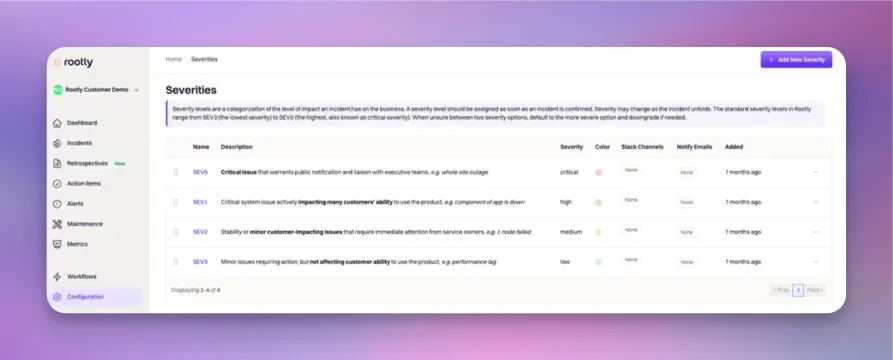
**Severity** helps you categorize the impact level of incidents. SEV0 incidents should be handled with priority over SEV3 incidents.
 ## Field Type
**Severity** is strictly a **select** field type. This means only one severity value can be assigned per incident.
## Attributes
**Severities** can be configured with the following attributes. Each severity attribute can be referenced via Liquid syntax.
### ID
This is the unique identifier of the severity. This field **cannot be customized**. Rootly will automatically assign the *ID* upon creation. It is typically used in Liquid references and API calls.
The following Liquid syntax will allow you to retrieve the severity *ID* that is selected for an incident:
`{{ incident.severity_id }}`
**OR**
`{{ incident.raw_severity | get: 'id'}}`
### Name
This is the value that is displayed on the UI for the severity. This field is customizable.
The following Liquid syntax will allow you to retrieve the severity *name* that is selected for an incident:
`{{ incident.severity }}`
**OR**
`{{ incident.raw_severity | get: 'name'}}`
### Slug
This is the string that is used to reference the severity in Liquid references. This field is automatically generated by lower-casing and hyphenating the severity *name*.
The following Liquid syntax will allow you to retrieve the severity *slug* that is selected for an incident:
`{{ incident.severity_slug }}`
**OR**
`{{ incident.raw_severity | get: 'slug'}}`
### Description
This value is displayed on the UI to further explain each severity. This field is customizable.
The following Liquid syntax will allow you to retrieve the severity *description* that is selected for an incident:
`{{ incident.raw_severity | get: 'description'}}`
### Color
Each severity can be assigned a color, which will be used for color-coding on metrics graphs.
Rootly uses **color-hex codes**. E.g. #000000 is black, #ffffff is white. Use [this page](https://www.color-hex.com/) to help you find the exact hex code for the color you want.
The following Liquid syntax will allow you to retrieve the severity *color* that is selected for an incident:
`{{ incident.raw_severity | get: 'color'}}`
### Slack Channels
Each severity can be linked to one or more Slack channels. By default, Rootly does not notify the linked channel(s) when a severity is selected for an incident. Notification needs to be explicitly called out as Attached Severity Channels in workflow configurations.
Systematically, each Slack channel is stored as an object containing an ID and name.
The following Liquid syntax will allow you to list out the severity *Slack Channel*(s) that are selected for an incident:
`{{ incident.raw_severity | get: 'slack_channels'}}`
### Slack Aliases
Each severity can be linked to one or more Slack user groups (aka aliases). By default, Rootly does not invite users in the linked user group(s) when a severity is selected for an incident. Invitations need to be explicitly called out as Attached Severity Aliases in workflow configurations.
The following Liquid syntax will allow you to list out the severity *Slack Alias*(es) that are selected for an incident:
`{{ incident.raw_severity | get: 'slack_aliases'}}`
### Notify Emails
Each severity can be linked to one or more emails. By default, Rootly does not send emails to the linked address(es) when a severity is selected for an incident. Notification needs to be explicitly called out as `{{ incident.raw_severity | map: 'notify_emails' | flatten | join: ',' }}` in workflow configurations.
The following Liquid syntax will allow you to list out the severity *Notify Email*(s) that are selected for an incident:
`{{ incident.raw_severity | get: 'notify_emails'}}`
## Field Type
**Severity** is strictly a **select** field type. This means only one severity value can be assigned per incident.
## Attributes
**Severities** can be configured with the following attributes. Each severity attribute can be referenced via Liquid syntax.
### ID
This is the unique identifier of the severity. This field **cannot be customized**. Rootly will automatically assign the *ID* upon creation. It is typically used in Liquid references and API calls.
The following Liquid syntax will allow you to retrieve the severity *ID* that is selected for an incident:
`{{ incident.severity_id }}`
**OR**
`{{ incident.raw_severity | get: 'id'}}`
### Name
This is the value that is displayed on the UI for the severity. This field is customizable.
The following Liquid syntax will allow you to retrieve the severity *name* that is selected for an incident:
`{{ incident.severity }}`
**OR**
`{{ incident.raw_severity | get: 'name'}}`
### Slug
This is the string that is used to reference the severity in Liquid references. This field is automatically generated by lower-casing and hyphenating the severity *name*.
The following Liquid syntax will allow you to retrieve the severity *slug* that is selected for an incident:
`{{ incident.severity_slug }}`
**OR**
`{{ incident.raw_severity | get: 'slug'}}`
### Description
This value is displayed on the UI to further explain each severity. This field is customizable.
The following Liquid syntax will allow you to retrieve the severity *description* that is selected for an incident:
`{{ incident.raw_severity | get: 'description'}}`
### Color
Each severity can be assigned a color, which will be used for color-coding on metrics graphs.
Rootly uses **color-hex codes**. E.g. #000000 is black, #ffffff is white. Use [this page](https://www.color-hex.com/) to help you find the exact hex code for the color you want.
The following Liquid syntax will allow you to retrieve the severity *color* that is selected for an incident:
`{{ incident.raw_severity | get: 'color'}}`
### Slack Channels
Each severity can be linked to one or more Slack channels. By default, Rootly does not notify the linked channel(s) when a severity is selected for an incident. Notification needs to be explicitly called out as Attached Severity Channels in workflow configurations.
Systematically, each Slack channel is stored as an object containing an ID and name.
The following Liquid syntax will allow you to list out the severity *Slack Channel*(s) that are selected for an incident:
`{{ incident.raw_severity | get: 'slack_channels'}}`
### Slack Aliases
Each severity can be linked to one or more Slack user groups (aka aliases). By default, Rootly does not invite users in the linked user group(s) when a severity is selected for an incident. Invitations need to be explicitly called out as Attached Severity Aliases in workflow configurations.
The following Liquid syntax will allow you to list out the severity *Slack Alias*(es) that are selected for an incident:
`{{ incident.raw_severity | get: 'slack_aliases'}}`
### Notify Emails
Each severity can be linked to one or more emails. By default, Rootly does not send emails to the linked address(es) when a severity is selected for an incident. Notification needs to be explicitly called out as `{{ incident.raw_severity | map: 'notify_emails' | flatten | join: ',' }}` in workflow configurations.
The following Liquid syntax will allow you to list out the severity *Notify Email*(s) that are selected for an incident:
`{{ incident.raw_severity | get: 'notify_emails'}}`