> ## Documentation Index
> Fetch the complete documentation index at: https://docs.rootly.com/llms.txt
> Use this file to discover all available pages before exploring further.
# Teams
> Configure team attributes in Rootly including Slack channels, user groups, escalation policies, on-call schedules, and imports from PagerDuty or Opsgenie.
## Overview
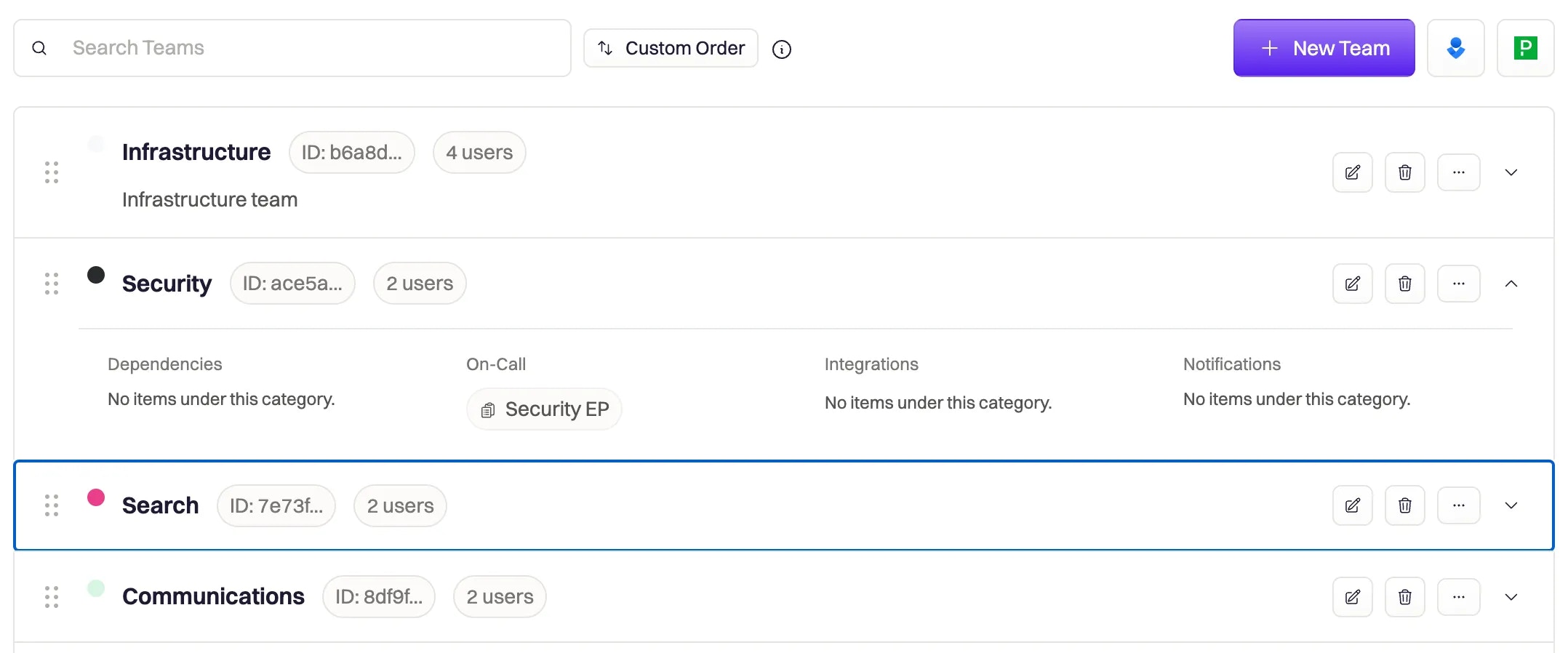
Teams in Rootly let you organize your on-call and incident response processes around your organization's teams. Teams can be paged, assigned to an incident, and be used to build powerful workflow automations.
This section outlines how Teams can be used as an attribute in your incident response processes. Learn more about building and managing your Teams in the Rootly Admin [here](/managing-teams/managing-teams).
 ## Field Type
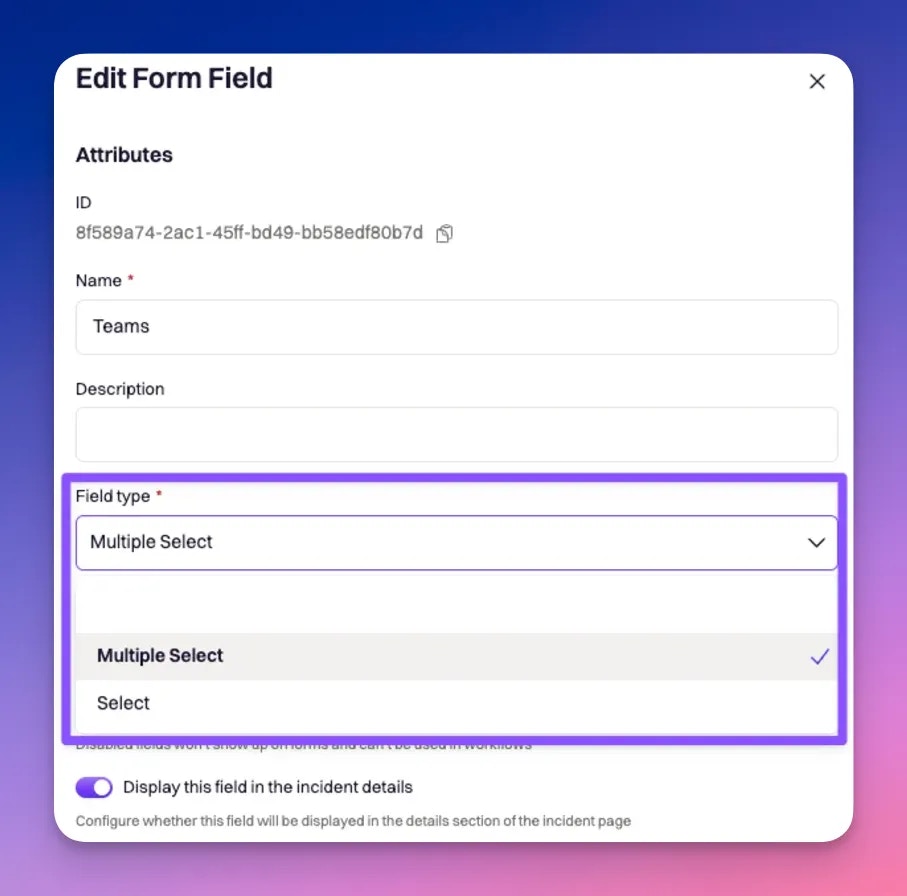
**Teams** can be customized to be either a **select** or **multi-select** field type. This means you can configure it to allow only one team value to be selected per incident or allow multiple team values to be selected for a single incident.
## Field Type
**Teams** can be customized to be either a **select** or **multi-select** field type. This means you can configure it to allow only one team value to be selected per incident or allow multiple team values to be selected for a single incident.
 ## Attributes
**Teams** can be configured with the following attributes. Each team attribute can be referenced via Liquid syntax.
*Team* originally was called *group*. Hence all data values you see references groups. Due to the risk of changing data values, we have elected to keep referencing teams as groups from a data point of view.
From a UI display point of view, you will see the term "*teams*" being used.
Since the *team* field can be either a **select** or **multi-select** field type, the Liquid syntax to reference each field type will differ.
Select will follow a single-value syntax
`{{incident.raw_groups | get: ''}}`
Multi-select will follow an array syntax. Where i references the specific team object in the list of teams.
`{{incident.raw_groups[index] | get: ''}}`
### ID
This is the unique identifier of the team. This field **cannot be customized**. Rootly will automatically assign the *ID* upon creation. It is typically used in Liquid references and API calls.
The following Liquid syntax will allow you to list out the team *ID*(s) that are selected for an incident:
`{{ incident.group_ids }}`
**OR**
* `{{ incident.raw_groups | get: 'id'}}` for select field type
* `{{ incident.raw_groups[index] | get: 'id' }}` for multi-select field type
### Name
This is the value that is displayed on the UI for the team. This field is customizable.
The following Liquid syntax will allow you to list out the team *name*(s) that are selected for an incident:
`{{ incident.groups }}`
**OR**
* `{{ incident.raw_groups | get: 'name'}}` for select field type
* `{{ incident.raw_groups[index] | get: 'name' }}` for multi-select field type
### Slug
This is the string that is used to reference the team in Liquid references. This field is automatically generated by lower-casing and hyphenating the team *name*.
The following Liquid syntax will allow you to list out the team *slug*(s) that are selected for an incident:
`{{ incident.group_slugs }}`
**OR**
* `{{ incident.raw_groups | get: 'slug'}}` for select field type
* `{{ incident.raw_groups[index] | get: 'slug' }}` for multi-select field type
### Description
This value is displayed on the UI to further explain each team. This field is customizable.
The following Liquid syntax will allow you to list out the team *description*(s) that are selected for an incident:
* `{{ incident.raw_groups | get: 'description'}}` for select field type
* `{{ incident.raw_groups[index] | get: 'description' }}` for multi-select field type
### Color
Each team can be assigned a color, which will be used for color-coding on metrics graphs.
Rootly uses **color-hex codes**. E.g. #000000 is black, #ffffff is white. Use [this page](https://www.color-hex.com/) to help you find the exact hex code for the color you want.
The following Liquid syntax will allow you to list out the team *color*(s) that are selected for an incident:
* `{{ incident.raw_groups | get: 'color'}}` for select field type
* `{{ incident.raw_groups[index] | get: 'color' }}` for multi-select field type
### Slack Channels
Each team can be linked to one or more Slack channels. By default, Rootly does not notify the linked channel(s) when a team is selected for an incident. Notification needs to be explicitly called out as Attached Teams Channels in workflow configurations.
Systematically, each Slack channel is stored as an object containing an ID and name.
The following Liquid syntax will allow you to list out the team *Slack Channel*(s) that are selected for an incident:
* `{{ incident.raw_groups | get: 'slack_channels'}}` for select field type
* `{{ incident.raw_groups[index] | get: 'slack_channels' }}` for multi-select field type
### Slack Aliases
Each team can be linked to one or more Slack user groups (aka aliases). By default, Rootly does not invite users in the linked user group(s) when a team is selected for an incident. Invitations need to be explicitly called out as Attached Teams Aliases in workflow configurations.
The following Liquid syntax will allow you to list out the team *Slack Alias*(es) that are selected for an incident:
* `{{ incident.raw_groups | get: 'slack_aliases'}}` for select field type
* `{{ incident.raw_groups[index] | get: 'slack_aliases' }}` for multi-select field type
### Notify Emails
Each team can be linked to one or more emails. By default, Rootly does not send emails to the linked address(es) when a team is selected for an incident. Notification needs to be explicitly called out as `{{ incident.raw_groups | map: 'notify_emails' | flatten | join: ',' }}` in workflow configurations.
The following Liquid syntax will allow you to list out the team *Notify Email*(s) that are selected for an incident:
* `{{ incident.raw_groups | get: 'notify_emails'}}` for select field type
* `{{ incident.raw_groups[index] | get: 'notify_emails' }}` for multi-select field type
## Import Teams
Instead of creating teams from scratch, Rootly allows you to import teams from **PagerDuty**, **Opsgenie**, **VictorOps**, or **PagerTree**. Imported teams will be automatically kept in sync on a daily basis.
The ability to import teams will only become available once you have PagerDuty, Opsgenie, VictorOps, or PagerTree installed on the [integrations page](https://rootly.com/account/integrations).
The following Liquid syntax will allow you to list out the corresponding IDs from each of the external paging applications:
**PagerDuty**
* `{{ incident.raw_groups | get: 'pagerduty_id' }}` for select field type
* `{{ incident.raw_groups\[0\] | get: 'pagerduty_id' }}` for multi-select field type
**Opsgenie**
* `{{ incident.raw_groups | get: 'opsgenie_id' }}` for select field type
* `{{ incident.raw_groups\[0\] | get: 'opsgenie_id' }}` for multi-select field type
**VictorOps**
* `{{ incident.raw_groups | get: 'victor_ops_id' }}` for select field type
* `{{ incident.raw_groups\[0\] | get: 'victor_ops_id' }}` for multi-select field type
**PagerTree**
* `{{ incident.raw_groups | get: 'pagertree_id' }}` for select field type
* `{{ incident.raw_groups\[0\] | get: 'pagertree_id' }}` for multi-select field type
## Attributes
**Teams** can be configured with the following attributes. Each team attribute can be referenced via Liquid syntax.
*Team* originally was called *group*. Hence all data values you see references groups. Due to the risk of changing data values, we have elected to keep referencing teams as groups from a data point of view.
From a UI display point of view, you will see the term "*teams*" being used.
Since the *team* field can be either a **select** or **multi-select** field type, the Liquid syntax to reference each field type will differ.
Select will follow a single-value syntax
`{{incident.raw_groups | get: ''}}`
Multi-select will follow an array syntax. Where i references the specific team object in the list of teams.
`{{incident.raw_groups[index] | get: ''}}`
### ID
This is the unique identifier of the team. This field **cannot be customized**. Rootly will automatically assign the *ID* upon creation. It is typically used in Liquid references and API calls.
The following Liquid syntax will allow you to list out the team *ID*(s) that are selected for an incident:
`{{ incident.group_ids }}`
**OR**
* `{{ incident.raw_groups | get: 'id'}}` for select field type
* `{{ incident.raw_groups[index] | get: 'id' }}` for multi-select field type
### Name
This is the value that is displayed on the UI for the team. This field is customizable.
The following Liquid syntax will allow you to list out the team *name*(s) that are selected for an incident:
`{{ incident.groups }}`
**OR**
* `{{ incident.raw_groups | get: 'name'}}` for select field type
* `{{ incident.raw_groups[index] | get: 'name' }}` for multi-select field type
### Slug
This is the string that is used to reference the team in Liquid references. This field is automatically generated by lower-casing and hyphenating the team *name*.
The following Liquid syntax will allow you to list out the team *slug*(s) that are selected for an incident:
`{{ incident.group_slugs }}`
**OR**
* `{{ incident.raw_groups | get: 'slug'}}` for select field type
* `{{ incident.raw_groups[index] | get: 'slug' }}` for multi-select field type
### Description
This value is displayed on the UI to further explain each team. This field is customizable.
The following Liquid syntax will allow you to list out the team *description*(s) that are selected for an incident:
* `{{ incident.raw_groups | get: 'description'}}` for select field type
* `{{ incident.raw_groups[index] | get: 'description' }}` for multi-select field type
### Color
Each team can be assigned a color, which will be used for color-coding on metrics graphs.
Rootly uses **color-hex codes**. E.g. #000000 is black, #ffffff is white. Use [this page](https://www.color-hex.com/) to help you find the exact hex code for the color you want.
The following Liquid syntax will allow you to list out the team *color*(s) that are selected for an incident:
* `{{ incident.raw_groups | get: 'color'}}` for select field type
* `{{ incident.raw_groups[index] | get: 'color' }}` for multi-select field type
### Slack Channels
Each team can be linked to one or more Slack channels. By default, Rootly does not notify the linked channel(s) when a team is selected for an incident. Notification needs to be explicitly called out as Attached Teams Channels in workflow configurations.
Systematically, each Slack channel is stored as an object containing an ID and name.
The following Liquid syntax will allow you to list out the team *Slack Channel*(s) that are selected for an incident:
* `{{ incident.raw_groups | get: 'slack_channels'}}` for select field type
* `{{ incident.raw_groups[index] | get: 'slack_channels' }}` for multi-select field type
### Slack Aliases
Each team can be linked to one or more Slack user groups (aka aliases). By default, Rootly does not invite users in the linked user group(s) when a team is selected for an incident. Invitations need to be explicitly called out as Attached Teams Aliases in workflow configurations.
The following Liquid syntax will allow you to list out the team *Slack Alias*(es) that are selected for an incident:
* `{{ incident.raw_groups | get: 'slack_aliases'}}` for select field type
* `{{ incident.raw_groups[index] | get: 'slack_aliases' }}` for multi-select field type
### Notify Emails
Each team can be linked to one or more emails. By default, Rootly does not send emails to the linked address(es) when a team is selected for an incident. Notification needs to be explicitly called out as `{{ incident.raw_groups | map: 'notify_emails' | flatten | join: ',' }}` in workflow configurations.
The following Liquid syntax will allow you to list out the team *Notify Email*(s) that are selected for an incident:
* `{{ incident.raw_groups | get: 'notify_emails'}}` for select field type
* `{{ incident.raw_groups[index] | get: 'notify_emails' }}` for multi-select field type
## Import Teams
Instead of creating teams from scratch, Rootly allows you to import teams from **PagerDuty**, **Opsgenie**, **VictorOps**, or **PagerTree**. Imported teams will be automatically kept in sync on a daily basis.
The ability to import teams will only become available once you have PagerDuty, Opsgenie, VictorOps, or PagerTree installed on the [integrations page](https://rootly.com/account/integrations).
The following Liquid syntax will allow you to list out the corresponding IDs from each of the external paging applications:
**PagerDuty**
* `{{ incident.raw_groups | get: 'pagerduty_id' }}` for select field type
* `{{ incident.raw_groups\[0\] | get: 'pagerduty_id' }}` for multi-select field type
**Opsgenie**
* `{{ incident.raw_groups | get: 'opsgenie_id' }}` for select field type
* `{{ incident.raw_groups\[0\] | get: 'opsgenie_id' }}` for multi-select field type
**VictorOps**
* `{{ incident.raw_groups | get: 'victor_ops_id' }}` for select field type
* `{{ incident.raw_groups\[0\] | get: 'victor_ops_id' }}` for multi-select field type
**PagerTree**
* `{{ incident.raw_groups | get: 'pagertree_id' }}` for select field type
* `{{ incident.raw_groups\[0\] | get: 'pagertree_id' }}` for multi-select field type