> ## Documentation Index
> Fetch the complete documentation index at: https://docs.rootly.com/llms.txt
> Use this file to discover all available pages before exploring further.
# Creating Incidents via PagerDuty Integration
> Create Rootly incidents from PagerDuty alerts with automatic service mapping, resolution sync, severity translation, and troubleshooting tips.
### Overview
Rootly can ingest alerts from PagerDuty to power a complete, end-to-end incident lifecycle. PagerDuty remains responsible for **alerting and escalation**, while Rootly handles **incident coordination, communication, workflows, timelines, and retrospectives**.
Use this integration when:
* Your alerts originate in PagerDuty
* You want Rootly to manage the lifecycle, collaboration, and post-incident processes
* You need Slack channels, workflows, automations, and retrospectives built off PD alerts
Rootly supports:
* Ingesting alerts directly from PagerDuty
* Creating Rootly incidents from PagerDuty alerts
* Linking Rootly incidents to PagerDuty incidents
* Syncing resolution back to PagerDuty when the Rootly incident is resolved
Resolving an incident in Rootly automatically resolves the linked PagerDuty incident and all associated PagerDuty alerts.
Resolving directly in PagerDuty does *not* resolve the corresponding Rootly incident.
### Before You Begin
Before creating incidents from PagerDuty, ensure:
* You have installed and authorized the Rootly ↔ PagerDuty integration
* Your PagerDuty services are mapped to Rootly services
* On-call coverage exists for the PagerDuty service (PagerDuty won’t trigger incidents without coverage)
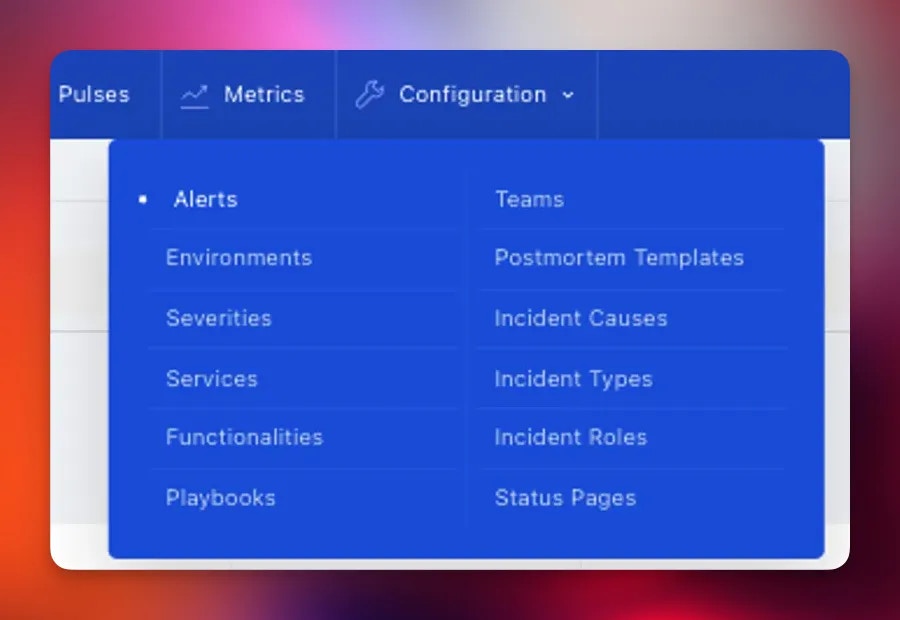
* Your Rootly team is ready to ingest alerts under **Configuration → Alerts**
Correct service mapping (via `pagerduty_id`) ensures alerts land in the right Rootly service. If mapping is missing or incorrect, incidents may not route as expected.
### Creating an Incident from PagerDuty
You can use any method you normally use in PagerDuty:
**Option 1 — Create an incident manually**
1. Open PagerDuty and navigate to the New Incident flow by selecting the **New Incident** button from the top navigation.
 2. In the Create New Incident dialog, select the **Impacted Service**, which should be one of the services you integrated earlier with Rootly. Add a descriptive Title, and fill in any other fields as needed.
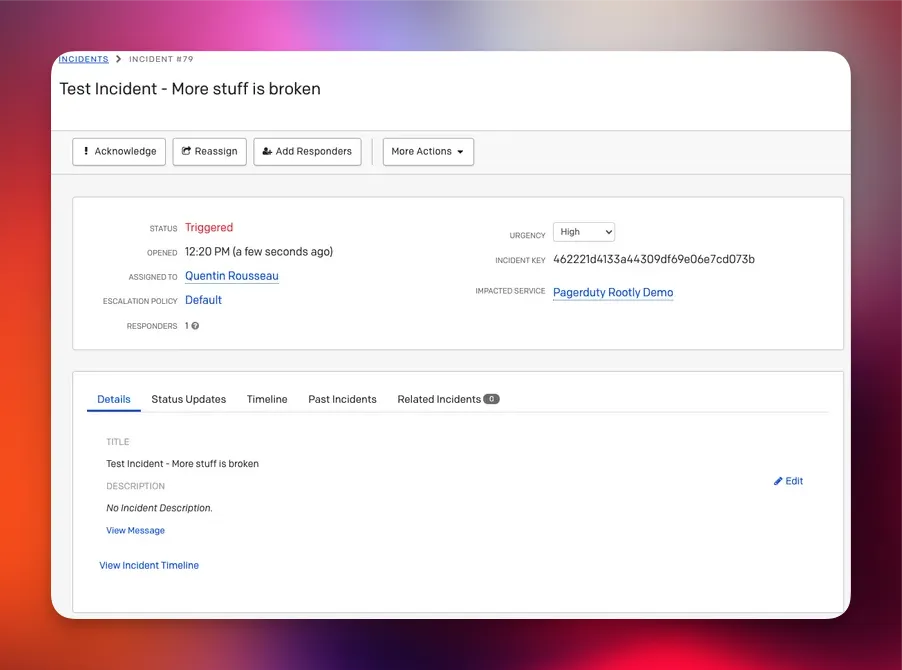
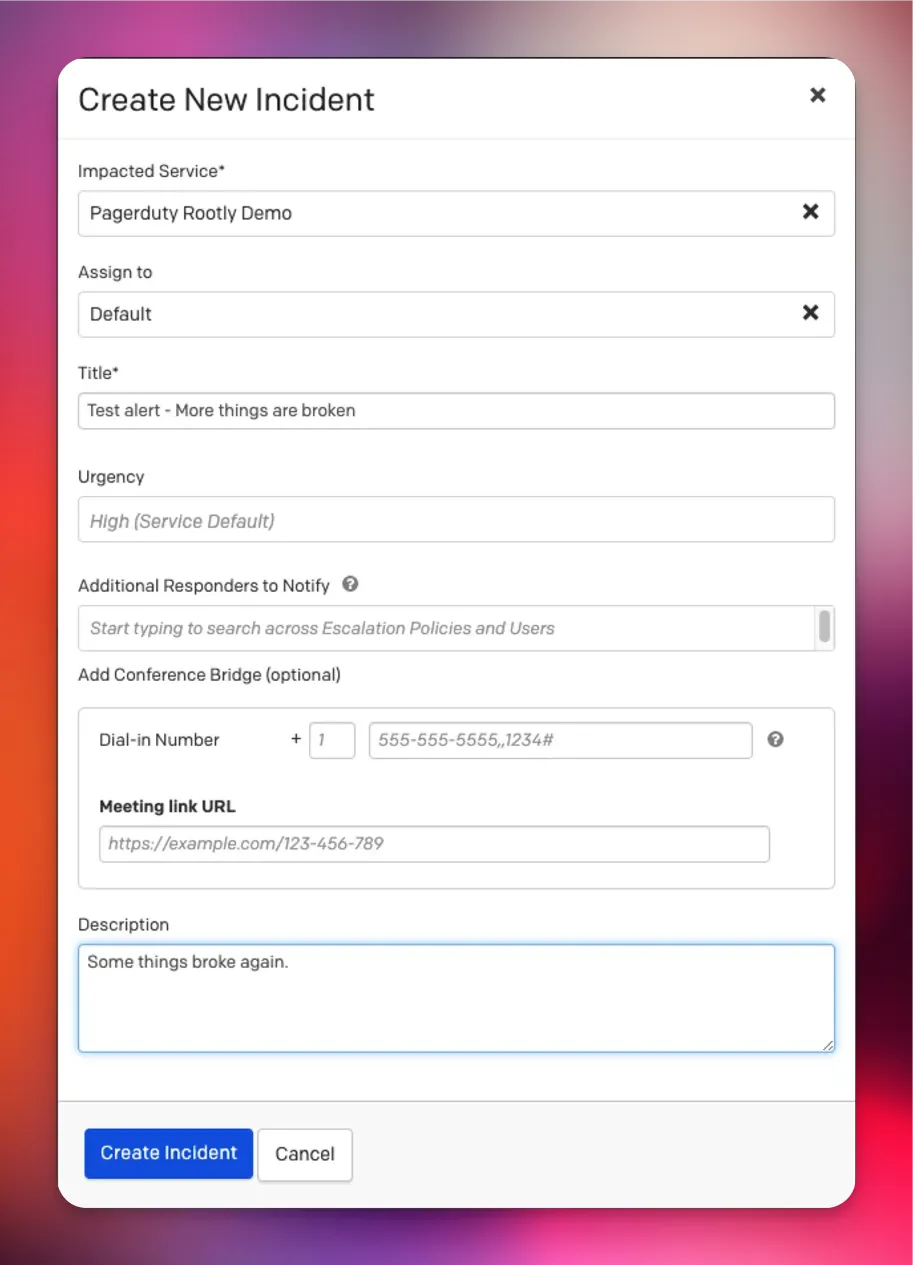 3. Click *Create Incident*. PagerDuty will create the incident and redirect you to its detail page, where you can view the incident’s status, responders, and associated alerts.
 After creating the incident in PagerDuty, log in to Rootly and navigate to:
**Configuration → Alerts**
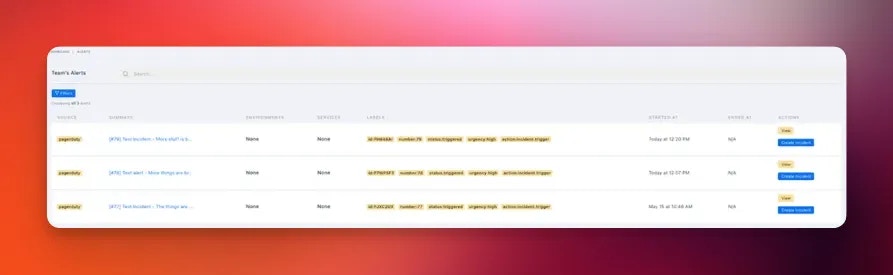
Here, you’ll see:
* All incoming alerts ingested from PagerDuty
* Alerts routed to the Rootly services you previously mapped
* A clear option to create a Rootly incident from any alert
This view is your starting point for turning PagerDuty alerts into fully managed Rootly incidents.
After creating the incident in PagerDuty, log in to Rootly and navigate to:
**Configuration → Alerts**
Here, you’ll see:
* All incoming alerts ingested from PagerDuty
* Alerts routed to the Rootly services you previously mapped
* A clear option to create a Rootly incident from any alert
This view is your starting point for turning PagerDuty alerts into fully managed Rootly incidents.
 Locate the PagerDuty alert you want to escalate and click:
**Create Incident**
This opens Rootly’s standard incident creation workflow, where you can:
* Set severity
* Provide an incident summary
* Choose the incident type
* Mark the incident as private (if needed)
* Trigger any relevant workflows
When you submit the form, Rootly will:
* Create the new incident
* Generate initial timeline entries
* Create and link a Slack incident channel (if configured)
* Run any incident-creation workflows you have enabled
* Attach and link the Rootly incident to the originating PagerDuty alert
Locate the PagerDuty alert you want to escalate and click:
**Create Incident**
This opens Rootly’s standard incident creation workflow, where you can:
* Set severity
* Provide an incident summary
* Choose the incident type
* Mark the incident as private (if needed)
* Trigger any relevant workflows
When you submit the form, Rootly will:
* Create the new incident
* Generate initial timeline entries
* Create and link a Slack incident channel (if configured)
* Run any incident-creation workflows you have enabled
* Attach and link the Rootly incident to the originating PagerDuty alert
 Once created, the Rootly incident becomes the **source of truth** for lifecycle status, workflows, communication, timelines, and retrospectives.
### How Resolution Works
Resolution behavior between Rootly and PagerDuty is intentionally **one-directional**. This ensures that Rootly remains the authoritative system for lifecycle status, workflows, timelines, and retrospectives.
**Rootly → PagerDuty (Supported)**
Resolving the incident in Rootly will:
* Mark the linked PagerDuty incident as **Resolved**
* Resolve all associated PagerDuty alerts linked to that incident
**PagerDuty → Rootly (Not Supported)**
Resolving the incident directly in PagerDuty will **not** update or resolve the corresponding incident in Rootly.
This directional behavior ensures:
* Rootly timelines remain accurate and complete
* Required fields and lifecycle rules are enforced
* Retrospective and follow-up processes function properly
Always resolve incidents in Rootly to maintain consistent lifecycle data, ensure workflows run correctly, and preserve accurate analytics.
### Additional Details & Behaviors
**Service Mapping**
PagerDuty alerts are routed into Rootly based on the `pagerduty_id` configured on each Rootly Service (and sometimes Teams).
Correct mapping ensures:
* Alerts appear under the correct Rootly service
* Workflows trigger for the right teams
* Rootly knows which PagerDuty incidents to update upon resolution
If you recently migrated or reorganized services, re-run the Rootly PagerDuty import to refresh all mappings.
**On-Call Requirements (PagerDuty Behavior)**
PagerDuty only triggers incidents if **someone is on call** for the escalation policy tied to that service.
If a PagerDuty alert appears in Rootly but PD did not create an incident, verify that the correct on-call schedule was in place.
**Temporary Migration Flags (Advanced)**
For complex migrations, Rootly can temporarily allow overlapping PagerDuty IDs using:
* `disable_service_pagerduty_id_unique_validation`
* `disable_group_pagerduty_id_unique_validation`
These are advanced, temporary options—duplicate IDs can cause ambiguous routing.
### Troubleshooting
Rootly does not auto-create incidents from PD alerts unless you configure an Alert Workflow.\
To proceed:
* Click **Create Incident** manually, or
* Enable an Alert Workflow to auto-create incidents for selected conditions
Check that the Rootly incident is linked to a mapped PD service.\
Resolution syncing only works when a valid mapping exists.
Verify and correct the `pagerduty_id` mapping under:
**Services → Edit Service**
Your workspace may have temporarily disabled unique ID validation.\
Re-enable uniqueness once the transition is complete.
### Best Practices
* Treat Rootly as the **source of truth** for lifecycle, communication, timelines, and analytics
* Use PagerDuty for **alerting and escalation only**
* Keep service mapping clean and up to date
* Automate incident creation via Alert Workflows for critical services
* Always resolve incidents in Rootly
* Avoid resolving directly from PagerDuty unless the alert is non-critical or PD-local
Once created, the Rootly incident becomes the **source of truth** for lifecycle status, workflows, communication, timelines, and retrospectives.
### How Resolution Works
Resolution behavior between Rootly and PagerDuty is intentionally **one-directional**. This ensures that Rootly remains the authoritative system for lifecycle status, workflows, timelines, and retrospectives.
**Rootly → PagerDuty (Supported)**
Resolving the incident in Rootly will:
* Mark the linked PagerDuty incident as **Resolved**
* Resolve all associated PagerDuty alerts linked to that incident
**PagerDuty → Rootly (Not Supported)**
Resolving the incident directly in PagerDuty will **not** update or resolve the corresponding incident in Rootly.
This directional behavior ensures:
* Rootly timelines remain accurate and complete
* Required fields and lifecycle rules are enforced
* Retrospective and follow-up processes function properly
Always resolve incidents in Rootly to maintain consistent lifecycle data, ensure workflows run correctly, and preserve accurate analytics.
### Additional Details & Behaviors
**Service Mapping**
PagerDuty alerts are routed into Rootly based on the `pagerduty_id` configured on each Rootly Service (and sometimes Teams).
Correct mapping ensures:
* Alerts appear under the correct Rootly service
* Workflows trigger for the right teams
* Rootly knows which PagerDuty incidents to update upon resolution
If you recently migrated or reorganized services, re-run the Rootly PagerDuty import to refresh all mappings.
**On-Call Requirements (PagerDuty Behavior)**
PagerDuty only triggers incidents if **someone is on call** for the escalation policy tied to that service.
If a PagerDuty alert appears in Rootly but PD did not create an incident, verify that the correct on-call schedule was in place.
**Temporary Migration Flags (Advanced)**
For complex migrations, Rootly can temporarily allow overlapping PagerDuty IDs using:
* `disable_service_pagerduty_id_unique_validation`
* `disable_group_pagerduty_id_unique_validation`
These are advanced, temporary options—duplicate IDs can cause ambiguous routing.
### Troubleshooting
Rootly does not auto-create incidents from PD alerts unless you configure an Alert Workflow.\
To proceed:
* Click **Create Incident** manually, or
* Enable an Alert Workflow to auto-create incidents for selected conditions
Check that the Rootly incident is linked to a mapped PD service.\
Resolution syncing only works when a valid mapping exists.
Verify and correct the `pagerduty_id` mapping under:
**Services → Edit Service**
Your workspace may have temporarily disabled unique ID validation.\
Re-enable uniqueness once the transition is complete.
### Best Practices
* Treat Rootly as the **source of truth** for lifecycle, communication, timelines, and analytics
* Use PagerDuty for **alerting and escalation only**
* Keep service mapping clean and up to date
* Automate incident creation via Alert Workflows for critical services
* Always resolve incidents in Rootly
* Avoid resolving directly from PagerDuty unless the alert is non-critical or PD-local