> ## Documentation Index
> Fetch the complete documentation index at: https://docs.rootly.com/llms.txt
> Use this file to discover all available pages before exploring further.
# Incident Title Generator
> Learn how Rootly automatically generates unique incident titles using random adjective–noun combinations while allowing full customization and manual editing.
### How the Incident Title Generator Works
Rootly can automatically generate a unique title for an incident when you leave the **Title** field blank. The generator creates a memorable two-word phrase by combining:
* An adjective
* A noun
Both words come from your organization’s **configurable word banks**.
This ensures that every incident—manual or automated—has a distinct title, even if responders forget to provide one. Users may edit the title at any time during the incident lifecycle.
If a user does not enter a title, Rootly automatically assigns one using the team’s configured adjective and noun lists.
***
### Title Generation Logic
When Rootly generates a title:
1. It collects adjectives and nouns used in incident titles **within the last year**.
2. These recently used words are added to an exclusion list to reduce repeats.
3. Rootly selects a random adjective and noun from your team’s configured word banks.
4. The result is **titleized** (e.g., `"sleepy server"` → `"Sleepy Server"`).
5. The incident is marked with `title_autogenerated = true`.
This logic applies to:
* Incidents created in the Web UI
* Incidents created via Slack
* Incidents created via the API
API-created incidents also auto-generate titles if the payload omits the `title`.\
The API response includes `title_autogenerated` so automation can detect system-generated titles.
***
### Configuring the Word Banks
Admins may customize the adjective and noun lists used for generation.
You can update these from:
**Organization Settings → Show Advanced Settings → Incident Title Generator**
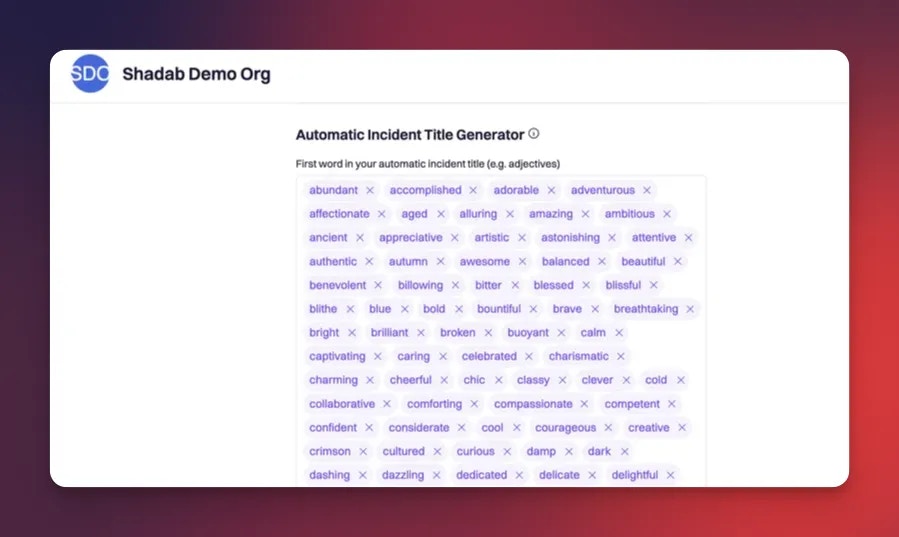
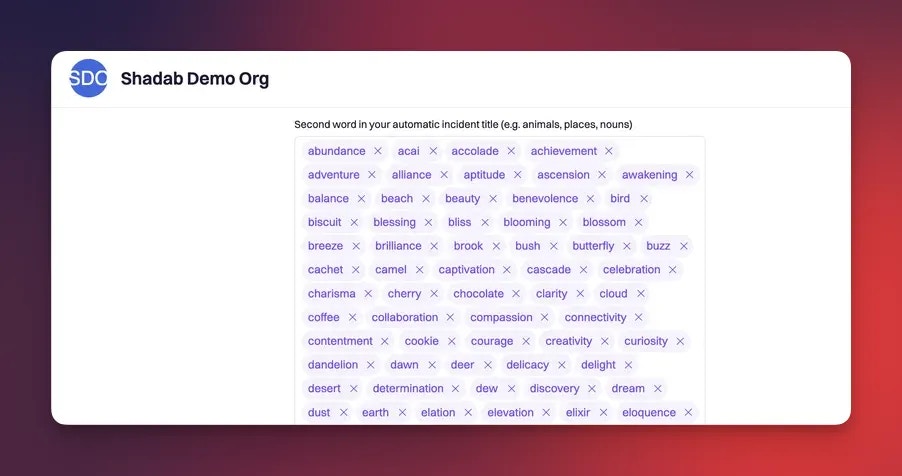 Configuration options include:
* **config\_adjectives** — list of allowed adjectives
* **config\_nouns** — list of allowed nouns
* Exclusion logic is automatic (based on 1 year of past incidents)
Customizing your word banks allows incident names to better reflect your organization’s culture, domains, and terminology.
***
### Optional: AI-Generated Titles
Teams with Rootly AI enabled can use **Generate Title with Rootly AI** directly from the incident page.\
This feature:
* Suggests a clearer or more contextual title
* Uses incident metadata (summary, severity, type, services, timeline context)
* Is permission-gated based on AI configuration
AI title generation requires:
* Rootly AI enabled for the team
* AI title generation feature toggled on
* Permission to generate titles (`:generate_title`)
***
### Titles in External Integrations
When exporting incidents to tools like PagerDuty or Opsgenie:
* If the title was auto-generated, Rootly may prefer using the **summary** as the outbound title.
* Rootly prepends the **severity** to outbound titles when appropriate.
Example:
\[SEV2] Database Latency Degradation
This ensures external systems receive clear, actionable titles.
***
### Best Practices
* **Let Rootly auto-generate titles** when responders are busy—clean-up can happen later.
* **Customize your adjective/noun lists** to improve clarity and team culture.
* **Use AI generation** for complex or ambiguous incidents.
* **Edit titles manually** once the incident scope is understood.
* **Avoid relying solely on the title** for operational details—pair it with a strong summary.
***
### FAQ
Yes. Titles can be edited at any point during the incident lifecycle.
Rootly excludes adjectives and nouns used in the past year to reduce duplication.
Yes. If `title` is omitted, Rootly generates one automatically and marks it as auto-generated (`title_autogenerated: true`).
Not currently. Titles always follow the adjective + noun format unless manually edited or overwritten by AI.
External integrations may use the summary instead when the title is autogenerated. Severity may also be prefixed automatically.
Configuration options include:
* **config\_adjectives** — list of allowed adjectives
* **config\_nouns** — list of allowed nouns
* Exclusion logic is automatic (based on 1 year of past incidents)
Customizing your word banks allows incident names to better reflect your organization’s culture, domains, and terminology.
***
### Optional: AI-Generated Titles
Teams with Rootly AI enabled can use **Generate Title with Rootly AI** directly from the incident page.\
This feature:
* Suggests a clearer or more contextual title
* Uses incident metadata (summary, severity, type, services, timeline context)
* Is permission-gated based on AI configuration
AI title generation requires:
* Rootly AI enabled for the team
* AI title generation feature toggled on
* Permission to generate titles (`:generate_title`)
***
### Titles in External Integrations
When exporting incidents to tools like PagerDuty or Opsgenie:
* If the title was auto-generated, Rootly may prefer using the **summary** as the outbound title.
* Rootly prepends the **severity** to outbound titles when appropriate.
Example:
\[SEV2] Database Latency Degradation
This ensures external systems receive clear, actionable titles.
***
### Best Practices
* **Let Rootly auto-generate titles** when responders are busy—clean-up can happen later.
* **Customize your adjective/noun lists** to improve clarity and team culture.
* **Use AI generation** for complex or ambiguous incidents.
* **Edit titles manually** once the incident scope is understood.
* **Avoid relying solely on the title** for operational details—pair it with a strong summary.
***
### FAQ
Yes. Titles can be edited at any point during the incident lifecycle.
Rootly excludes adjectives and nouns used in the past year to reduce duplication.
Yes. If `title` is omitted, Rootly generates one automatically and marks it as auto-generated (`title_autogenerated: true`).
Not currently. Titles always follow the adjective + noun format unless manually edited or overwritten by AI.
External integrations may use the summary instead when the title is autogenerated. Severity may also be prefixed automatically.