> ## Documentation Index
> Fetch the complete documentation index at: https://docs.rootly.com/llms.txt
> Use this file to discover all available pages before exploring further.
# Creating Sub-Incidents
> Learn how to split large incidents into sub-incidents for better organization across multiple teams, with workflow automation support.
### Overview
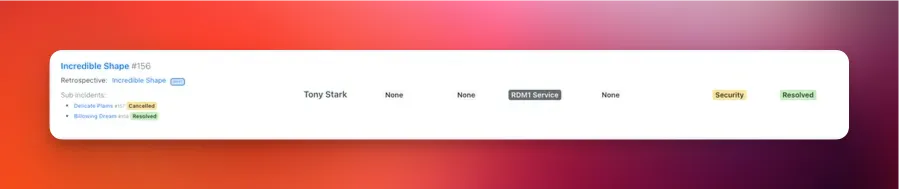
For larger or cross-functional incidents, you may want to break work into **sub-incidents**.\
A sub-incident allows a team to investigate, coordinate, and track their scope independently—while maintaining shared context with the parent incident.
Each parent incident can have **multiple sub-incidents**.
 ***
### What Is a Sub-Incident?
A sub-incident is a normal incident that is linked to a parent using `parent_incident_id`.\
Rootly automatically assigns the sub-incident a kind based on its parent:
* `normal_sub`
* `test_sub`
* `scheduled_sub`
Sub-incidents are **not** the same as duplicate incidents.\
Duplicates link via `duplicate_incident_id` and do *not* form a hierarchy.
***
### Restrictions
* Sub-incidents **cannot be split further** (no nested sub-incidents).
* A sub-incident **must have** a parent incident.
* You cannot create a sub-incident **from an existing sub-incident**.
* Some UI options (like “Attach to Parent Incident”) only appear when:
* The incident is not already a sub-incident
* It has no existing sub-incidents
* You have permission to create incidents
***
### Creating Sub-Incidents
Rootly supports creating sub-incidents through two interfaces:
1. **Slack** – Use commands such as `/rootly sub`, `/rootly split`, `/rootly fork`, or `/rootly swimlane`\
→ [**See the Slack guide →**](/incidents/incident-operations/slack-creating-a-sub-incident)
2. **Web** – Use **Create Sub-Incident** or **Attach to Parent Incident** from the incident menu\
→ [**See the Web guide →**](/incidents/incident-operations/web-creating-a-sub-incident)
***
#### Slack Creation
Use any of the following commands in the **parent incident’s Slack channel**:
```
/rootly split
/rootly sub
/rootly fork
/rootly swimlane
```
This opens the **Create Sub-Incident** modal, already linked to the parent.
Slack enforces:
* You must be in an incident channel
* The parent cannot itself be a sub-incident
* You must have permission to create incidents
Slack-created sub-incidents use the same logic as Web-created sub-incidents, including workflow triggers and automatic Slack-channel creation (when enabled).
***
#### Web Creation
From the parent incident:
* Click **…** → **Create Sub-Incident**, or
* Use **Attach to Parent Incident** to convert an existing incident into a sub-incident
***
### What Is a Sub-Incident?
A sub-incident is a normal incident that is linked to a parent using `parent_incident_id`.\
Rootly automatically assigns the sub-incident a kind based on its parent:
* `normal_sub`
* `test_sub`
* `scheduled_sub`
Sub-incidents are **not** the same as duplicate incidents.\
Duplicates link via `duplicate_incident_id` and do *not* form a hierarchy.
***
### Restrictions
* Sub-incidents **cannot be split further** (no nested sub-incidents).
* A sub-incident **must have** a parent incident.
* You cannot create a sub-incident **from an existing sub-incident**.
* Some UI options (like “Attach to Parent Incident”) only appear when:
* The incident is not already a sub-incident
* It has no existing sub-incidents
* You have permission to create incidents
***
### Creating Sub-Incidents
Rootly supports creating sub-incidents through two interfaces:
1. **Slack** – Use commands such as `/rootly sub`, `/rootly split`, `/rootly fork`, or `/rootly swimlane`\
→ [**See the Slack guide →**](/incidents/incident-operations/slack-creating-a-sub-incident)
2. **Web** – Use **Create Sub-Incident** or **Attach to Parent Incident** from the incident menu\
→ [**See the Web guide →**](/incidents/incident-operations/web-creating-a-sub-incident)
***
#### Slack Creation
Use any of the following commands in the **parent incident’s Slack channel**:
```
/rootly split
/rootly sub
/rootly fork
/rootly swimlane
```
This opens the **Create Sub-Incident** modal, already linked to the parent.
Slack enforces:
* You must be in an incident channel
* The parent cannot itself be a sub-incident
* You must have permission to create incidents
Slack-created sub-incidents use the same logic as Web-created sub-incidents, including workflow triggers and automatic Slack-channel creation (when enabled).
***
#### Web Creation
From the parent incident:
* Click **…** → **Create Sub-Incident**, or
* Use **Attach to Parent Incident** to convert an existing incident into a sub-incident
 When attaching an existing incident, Rootly updates its kind and sets its parent relationship.
***
### What Gets Inherited?
Depending on your configuration, sub-incidents may inherit:
* Severity
* Status
* Privacy settings
* Incident types
* Attached services, functionalities, environments
* Teams / groups
* Jira epic or Google Drive folder links
* Slack channel creation settings
* Parent → sub or sub → parent timeline syncing (feature-flag dependent)
When **timeline syncing** is enabled, updates may automatically propagate between related incidents—excluding internal-only events.
***
### Configuring Workflows for Sub-Incidents
Sub-incidents are fully compatible with Rootly Workflows.
To target sub-incidents, set a workflow condition such as:
```
Kind → is one of → normal_sub, test_sub, scheduled_sub
```
Use cases include:
* Creating role assignments for sub-incident teams
* Syncing updates to the parent incident
* Auto-generating investigative tasks
* Auto-creating a Slack channel for each sub-incident
***
### Best Practices
* **Use sub-incidents to delegate ownership** to teams like SRE, Security, or Networking.
* **Keep the parent incident customer-facing**, using sub-incidents to track internal workstreams.
* **Use workflows to create structure**, such as templated tasks, roles, or Slack-channel creation.
* Use the `Create a sub incident` Workflow Action to automatically create a sub-incident for specific scenarios, like being able to coordinate with stakeholders outside of your engineering response teams. [See this in action here](https://www.loom.com/share/e6f038a78d8e4dec8a51c06e557e4298).
* **Avoid unnecessary splitting**—small tasks can often stay in the parent incident.
* **Name sub-incidents cleanly and consistently**, reflecting the scope of work.
***
### Troubleshooting
This occurs when:
* The incident is **already a sub-incident**
* It has its **own sub-incidents**
* You do not have **permission to create incidents**
Slack prevents splitting when:
* You are not in an incident channel
* The incident is a **sub-incident**
* You lack required permissions
Inheritance depends on:
* Feature flags (parent/sub sync)
* Workflows that override defaults
* Creation method (Slack vs Web)
* Privacy restrictions
Timeline syncing requires:
* `enable_parent_and_sub_incident_sync` feature flag
* `parent_to_sub_incident_sync` enabled on the incident\
Only **non-internal** timeline events sync.
This happens when:
* The incident is already a sub-incident
* It has existing sub-incidents
* It is a scheduled maintenance incident
* Permissions prevent linking
When attaching an existing incident, Rootly updates its kind and sets its parent relationship.
***
### What Gets Inherited?
Depending on your configuration, sub-incidents may inherit:
* Severity
* Status
* Privacy settings
* Incident types
* Attached services, functionalities, environments
* Teams / groups
* Jira epic or Google Drive folder links
* Slack channel creation settings
* Parent → sub or sub → parent timeline syncing (feature-flag dependent)
When **timeline syncing** is enabled, updates may automatically propagate between related incidents—excluding internal-only events.
***
### Configuring Workflows for Sub-Incidents
Sub-incidents are fully compatible with Rootly Workflows.
To target sub-incidents, set a workflow condition such as:
```
Kind → is one of → normal_sub, test_sub, scheduled_sub
```
Use cases include:
* Creating role assignments for sub-incident teams
* Syncing updates to the parent incident
* Auto-generating investigative tasks
* Auto-creating a Slack channel for each sub-incident
***
### Best Practices
* **Use sub-incidents to delegate ownership** to teams like SRE, Security, or Networking.
* **Keep the parent incident customer-facing**, using sub-incidents to track internal workstreams.
* **Use workflows to create structure**, such as templated tasks, roles, or Slack-channel creation.
* Use the `Create a sub incident` Workflow Action to automatically create a sub-incident for specific scenarios, like being able to coordinate with stakeholders outside of your engineering response teams. [See this in action here](https://www.loom.com/share/e6f038a78d8e4dec8a51c06e557e4298).
* **Avoid unnecessary splitting**—small tasks can often stay in the parent incident.
* **Name sub-incidents cleanly and consistently**, reflecting the scope of work.
***
### Troubleshooting
This occurs when:
* The incident is **already a sub-incident**
* It has its **own sub-incidents**
* You do not have **permission to create incidents**
Slack prevents splitting when:
* You are not in an incident channel
* The incident is a **sub-incident**
* You lack required permissions
Inheritance depends on:
* Feature flags (parent/sub sync)
* Workflows that override defaults
* Creation method (Slack vs Web)
* Privacy restrictions
Timeline syncing requires:
* `enable_parent_and_sub_incident_sync` feature flag
* `parent_to_sub_incident_sync` enabled on the incident\
Only **non-internal** timeline events sync.
This happens when:
* The incident is already a sub-incident
* It has existing sub-incidents
* It is a scheduled maintenance incident
* Permissions prevent linking