> ## Documentation Index
> Fetch the complete documentation index at: https://docs.rootly.com/llms.txt
> Use this file to discover all available pages before exploring further.
# Creating Sub-Incidents via Web Interface
> Create sub-incidents through the Rootly web interface using the incident menu and creation form to track related child issues under a parent incident.
### How It Works
You can create a sub-incident directly from an existing incident in the Rootly web interface.\
This is useful when multiple teams need to investigate different parts of a larger incident while keeping everything linked and coordinated.
***
### Step 1 — Open the Sub-Incident Action
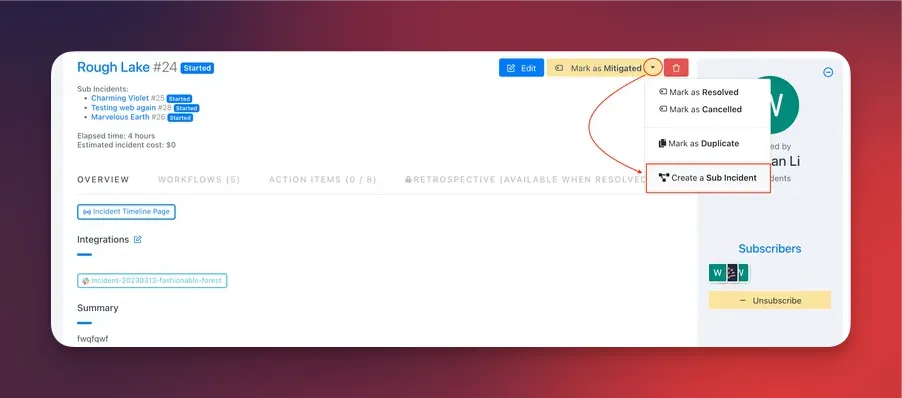
In any parent incident, click the **⋯ (More)** menu next to the incident title or status.\
You will see **Create Sub-Incident** when:
* The incident is **not already a sub-incident**
* The incident is **not a scheduled maintenance incident**
* You have **permission to create incidents**
 ***
### Step 2 — Complete the Sub-Incident Form
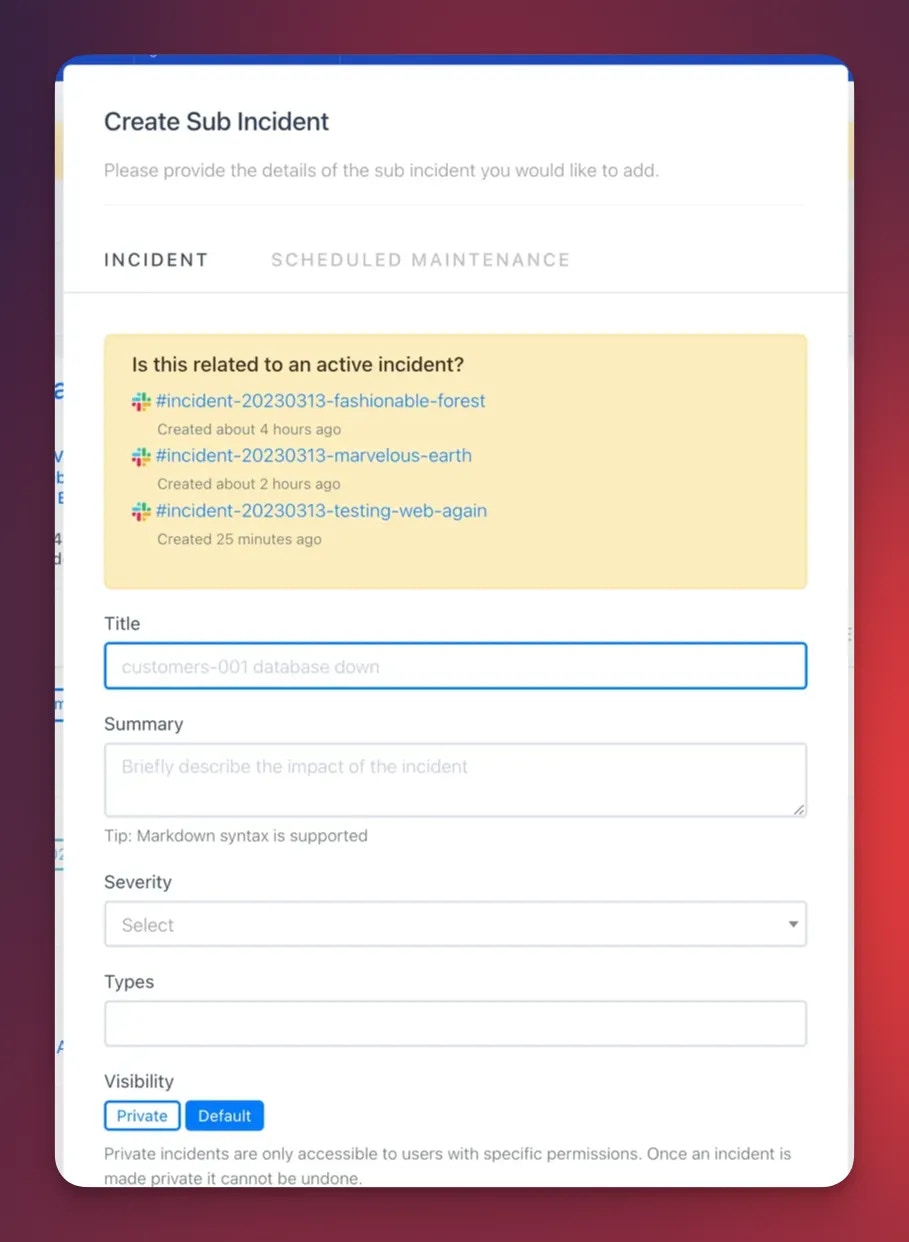
Selecting **Create Sub-Incident** opens the standard **New Incident** form.\
Rootly automatically injects a hidden `parent_incident_id`, ensuring the new incident is created as a sub-incident.
You can customize:
* Summary
* Severity
* Impacted services & functionalities
* Roles, assignees, and metadata
* Any fields defined in **Configuration → Forms & Fields**
***
### Step 2 — Complete the Sub-Incident Form
Selecting **Create Sub-Incident** opens the standard **New Incident** form.\
Rootly automatically injects a hidden `parent_incident_id`, ensuring the new incident is created as a sub-incident.
You can customize:
* Summary
* Severity
* Impacted services & functionalities
* Roles, assignees, and metadata
* Any fields defined in **Configuration → Forms & Fields**
 Click **Create Incident** to finish.
***
### What Happens After Creation
Once saved:
* The new incident becomes a **sub-incident** of the parent
* Its **kind** is automatically derived (e.g., `normal_sub`, `scheduled_sub`)
* The parent incident displays a **Sub-Incidents** panel linking to all sub-incidents
Sub-incidents cannot themselves create further sub-incidents.\
They represent the lowest level in an incident hierarchy.
***
### Optional: Attach an Existing Incident as a Sub-Incident
If you already have an incident you want to convert into a sub-incident:
1. Open the child incident
2. Go to **⋯ → Attach to Parent Incident**
3. Choose a parent incident from the autocomplete search
4. Save
This option appears only when:
* The incident is **not already a sub-incident**
* It has **no sub-incidents of its own**
* You have permission to create incidents
***
### Best Practices
* **Use sub-incidents when multiple teams or domains are involved**\
Helps isolate workstreams while maintaining a unified parent incident.
* **Keep naming clear and scoped**\
Example: “Database Failover Sub-Incident (SRE)” or “Authentication Latency (Identity Team)”.
* **Enable workflows**\
Many teams auto-assign roles, create tasks, or spin up Slack channels for sub-incidents.
* **Avoid unnecessary sub-incidents**\
If the effort is small or tightly scoped, keep work in the main incident.
* **Review sub-incidents together during retrospectives**\
They provide excellent insight into how different teams contributed to resolution.
***
### Troubleshooting
This usually occurs when:
* The incident is **already a sub-incident**
* The incident is a **scheduled maintenance incident**
* You lack **create incident** permissions
* Your team has feature restrictions
This happens if:
* The incident **already has a parent**
* It has its **own sub-incidents** (nested sub-incidents are not allowed)
* The incident was created as **scheduled maintenance**
* You don’t have adequate permissions
Inheritance varies depending on:
* Workflow automation
* Feature flags (e.g., parent/sub synchronization)
* Privacy rules
* Origin of creation (Slack vs Web)
Timeline sync requires:
* `enable_parent_and_sub_incident_sync` feature flag
* `parent_to_sub_incident_sync` enabled on the incident\
Only **non-internal** timeline events sync across related incidents.
Click **Create Incident** to finish.
***
### What Happens After Creation
Once saved:
* The new incident becomes a **sub-incident** of the parent
* Its **kind** is automatically derived (e.g., `normal_sub`, `scheduled_sub`)
* The parent incident displays a **Sub-Incidents** panel linking to all sub-incidents
Sub-incidents cannot themselves create further sub-incidents.\
They represent the lowest level in an incident hierarchy.
***
### Optional: Attach an Existing Incident as a Sub-Incident
If you already have an incident you want to convert into a sub-incident:
1. Open the child incident
2. Go to **⋯ → Attach to Parent Incident**
3. Choose a parent incident from the autocomplete search
4. Save
This option appears only when:
* The incident is **not already a sub-incident**
* It has **no sub-incidents of its own**
* You have permission to create incidents
***
### Best Practices
* **Use sub-incidents when multiple teams or domains are involved**\
Helps isolate workstreams while maintaining a unified parent incident.
* **Keep naming clear and scoped**\
Example: “Database Failover Sub-Incident (SRE)” or “Authentication Latency (Identity Team)”.
* **Enable workflows**\
Many teams auto-assign roles, create tasks, or spin up Slack channels for sub-incidents.
* **Avoid unnecessary sub-incidents**\
If the effort is small or tightly scoped, keep work in the main incident.
* **Review sub-incidents together during retrospectives**\
They provide excellent insight into how different teams contributed to resolution.
***
### Troubleshooting
This usually occurs when:
* The incident is **already a sub-incident**
* The incident is a **scheduled maintenance incident**
* You lack **create incident** permissions
* Your team has feature restrictions
This happens if:
* The incident **already has a parent**
* It has its **own sub-incidents** (nested sub-incidents are not allowed)
* The incident was created as **scheduled maintenance**
* You don’t have adequate permissions
Inheritance varies depending on:
* Workflow automation
* Feature flags (e.g., parent/sub synchronization)
* Privacy rules
* Origin of creation (Slack vs Web)
Timeline sync requires:
* `enable_parent_and_sub_incident_sync` feature flag
* `parent_to_sub_incident_sync` enabled on the incident\
Only **non-internal** timeline events sync across related incidents.