> ## Documentation Index
> Fetch the complete documentation index at: https://docs.rootly.com/llms.txt
> Use this file to discover all available pages before exploring further.
# Adding Events to Timeline via Email
> Add events to incident timelines by responding to incident emails through the Rootly Email integration, capturing context from external stakeholders.
### Overview
Using our [Email integration](/integrations/email), you can add timeline events simply by **replying to an incident email**.\
This makes it easy for stakeholders—especially those who don’t live in Slack or the web interface—to contribute updates directly to the incident record.
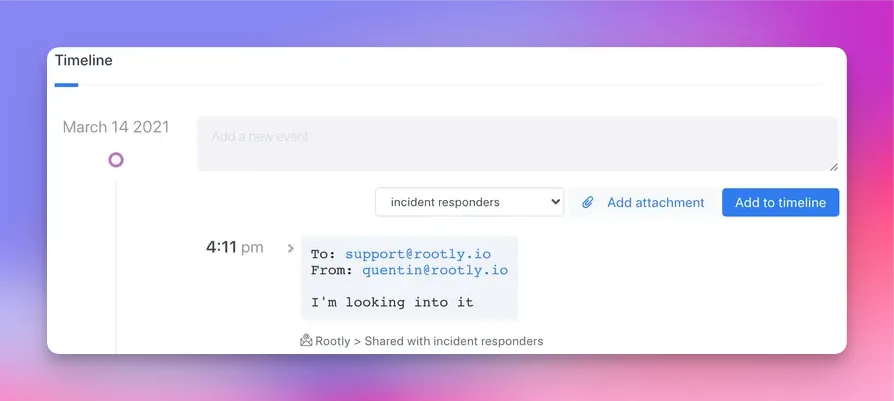
When you reply to an incident email, Rootly automatically logs that message as a timeline entry, preserving its content, sender information, and relevant metadata.
 ***
### How It Works
#### **Replying to an Existing Incident**
When you reply to an incident’s email thread:
* A new **Email** timeline event is automatically created
* The event includes:
* The parsed message body
* Sender information (matched to a Rootly user if possible)
* The To/From header values
* A permalink-style reference to the inbound message
* The event is timestamped using the time the email was received
* The event is **non-editable**, ensuring integrity
Rootly determines which incident the message belongs to by scanning the email’s **References** header, which preserves threading.
#### **Starting a New Incident by Email**
If an email is not part of an existing thread, Rootly can create a **new incident** using:
* The subject → incident title
* The body → summary
* Best-effort parsing to extract:
* Severity
* Services
* Functionalities
* Environments
* Incident types
Metadata parsing works best when your teams follow consistent subject/body formatting conventions.
***
### Setup Requirements
To ensure reliable processing of inbound email:
* Confirm the Email integration is **enabled**
* Ensure all expected sender domains are listed under **Allowed Domains**
* If provenance enforcement is enabled, only whitelisted domains may send emails
* Provide the incident thread’s email address to anyone who needs to contribute via email
Emails from unapproved domains may be rejected when provenance checks are enabled.
***
### Behavior & Limitations
* Email-created timeline events are **not editable**
* Forwarded emails or replies that strip the **References** header cannot be attached to the existing incident
* If a sender’s email does not match any Rootly user, Rootly assigns attribution to the **Rootly bot**
* Email events default to **internal visibility**
* Attachments are not ingested as timeline files (only the text body is added)
***
### Troubleshooting
The reply may have lost the critical **References** header, which Rootly uses to link messages to incidents.\
Other causes include:
* Sender domain not whitelisted
* Email integration disabled
* Message rejected due to provenance enforcement
This occurs when Rootly cannot match the sender’s email address to a user in your workspace.\
In those cases, the system defaults to the Rootly bot.
No. Email-created timeline events are immutable and always internal.
Yes. When an inbound message does not belong to an existing thread, Rootly creates a new incident using its subject, body, and any auto-parsed metadata.
***
### How It Works
#### **Replying to an Existing Incident**
When you reply to an incident’s email thread:
* A new **Email** timeline event is automatically created
* The event includes:
* The parsed message body
* Sender information (matched to a Rootly user if possible)
* The To/From header values
* A permalink-style reference to the inbound message
* The event is timestamped using the time the email was received
* The event is **non-editable**, ensuring integrity
Rootly determines which incident the message belongs to by scanning the email’s **References** header, which preserves threading.
#### **Starting a New Incident by Email**
If an email is not part of an existing thread, Rootly can create a **new incident** using:
* The subject → incident title
* The body → summary
* Best-effort parsing to extract:
* Severity
* Services
* Functionalities
* Environments
* Incident types
Metadata parsing works best when your teams follow consistent subject/body formatting conventions.
***
### Setup Requirements
To ensure reliable processing of inbound email:
* Confirm the Email integration is **enabled**
* Ensure all expected sender domains are listed under **Allowed Domains**
* If provenance enforcement is enabled, only whitelisted domains may send emails
* Provide the incident thread’s email address to anyone who needs to contribute via email
Emails from unapproved domains may be rejected when provenance checks are enabled.
***
### Behavior & Limitations
* Email-created timeline events are **not editable**
* Forwarded emails or replies that strip the **References** header cannot be attached to the existing incident
* If a sender’s email does not match any Rootly user, Rootly assigns attribution to the **Rootly bot**
* Email events default to **internal visibility**
* Attachments are not ingested as timeline files (only the text body is added)
***
### Troubleshooting
The reply may have lost the critical **References** header, which Rootly uses to link messages to incidents.\
Other causes include:
* Sender domain not whitelisted
* Email integration disabled
* Message rejected due to provenance enforcement
This occurs when Rootly cannot match the sender’s email address to a user in your workspace.\
In those cases, the system defaults to the Rootly bot.
No. Email-created timeline events are immutable and always internal.
Yes. When an inbound message does not belong to an existing thread, Rootly creates a new incident using its subject, body, and any auto-parsed metadata.