> ## Documentation Index
> Fetch the complete documentation index at: https://docs.rootly.com/llms.txt
> Use this file to discover all available pages before exploring further.
# Prometheus Alertmanager
> Connect Prometheus Alertmanager to Rootly to ingest firing alerts, automatically resolve them when restored, and page on-call escalation targets.
## Introduction
The Prometheus Alertmanager integration connects Rootly with your existing Prometheus alerting pipeline so teams can receive alerts in Rootly and trigger on-call paging directly from Alertmanager.
This integration is a strong fit for teams already using Prometheus and Alertmanager for infrastructure monitoring who want Rootly to handle incident coordination and on-call response.
With the Prometheus Alertmanager integration, you can:
* Ingest Alertmanager firing alerts into Rootly as alerts
* Automatically resolve Rootly alerts when Alertmanager sends a resolved notification
* Page Rootly on-call targets directly from Alertmanager using webhook URLs or Prometheus rule annotations
* Use alert workflows to create incidents and automate follow-up actions
## Before You Begin
Before setting up the integration, make sure you have:
* A Rootly account with permission to manage integrations and alert sources
* Access to your Alertmanager configuration file (`alertmanager.yml`)
* The webhook URL and bearer token secret from the Rootly Alertmanager integration page
You can find your webhook URL and bearer token secret by navigating to **Integrations** > **Prometheus Alertmanager** > **Configure** in Rootly.
## Installation
Navigate to the integrations page in Rootly and select **Prometheus Alertmanager**. Copy the webhook URL and bearer token secret shown in the configuration modal.
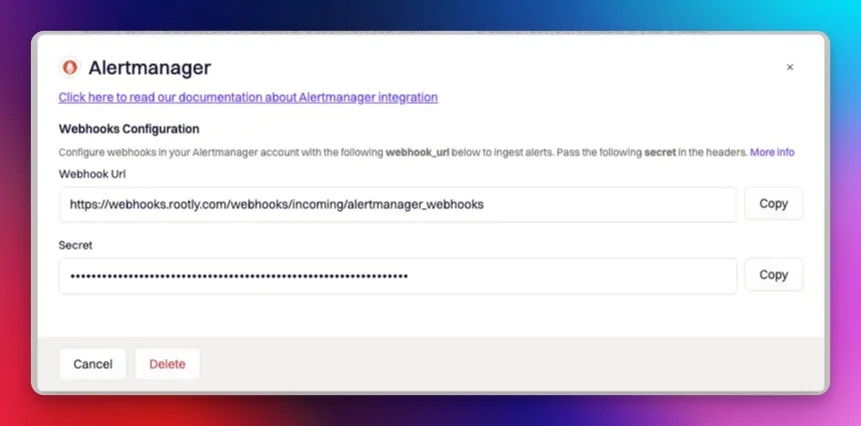 Add a Rootly receiver to your `alertmanager.yml` configuration file. Set the `url` to the Rootly webhook URL and the `credentials` to your bearer token secret.
```yaml theme={null}
route:
receiver: default
group_by:
- job
routes:
- receiver: rootly
match:
alertname: Rootly
repeat_interval: 1m
receivers:
- name: rootly
webhook_configs:
- url: 'https://webhooks.rootly.com/webhooks/incoming/alertmanager_webhooks'
send_resolved: true
http_config:
authorization:
type: Bearer
credentials:
```
Setting `send_resolved: true` is required for Rootly to automatically resolve alerts when Alertmanager sends a resolved notification.
## Page Rootly On-Call
Alertmanager can page Rootly on-call targets directly. There are two ways to configure this.
### Via Receiver URL
Append a notification target to the webhook URL in your `alertmanager.yml`. This routes the alert to the specified Rootly resource for paging.
```yaml theme={null}
receivers:
- name: rootly
webhook_configs:
- url: 'https://webhooks.rootly.com/webhooks/incoming/alertmanager_webhooks/notify//'
send_resolved: true
http_config:
authorization:
type: Bearer
credentials:
```
Replace `` and `` with one of the following:
| Resource Type | Description |
| ------------------ | -------------------------- |
| `User` | A specific Rootly user |
| `Group` | A Rootly team |
| `EscalationPolicy` | A Rootly escalation policy |
| `Service` | A Rootly service |
The resource ID can be found by editing the resource in Rootly.
### Via Prometheus Rule Annotations
If you use Prometheus alerting rules, you can set the notification target through annotations in your `prometheus.rules.yml` file. This lets you define the paging target per rule rather than per receiver.
```yaml theme={null}
groups:
- name: ./rules.conf
rules:
- alert: HighCPUUsage
expr: cpu_usage > 90
labels:
severity: critical
annotations:
summary: "High CPU usage detected"
rootly: '{"notification_target":{"type":"User","id":""}}'
```
To page multiple targets from a single rule, use `alerting_targets` (an array) instead of `notification_target`:
```yaml theme={null}
rootly: '{"alerting_targets":[{"type":"User","id":""},{"type":"EscalationPolicy","id":""}]}'
```
The `type` and `id` values follow the same options as the receiver URL approach above.
## How Alerts Are Mapped
Rootly extracts the following fields from each Alertmanager alert:
* **Summary** — taken from the alert's `alertname` label, falling back to `commonLabels.alertname`, then `commonLabels.description`
* **Labels** — all key-value pairs from `commonLabels` are attached as Rootly alert labels, making them available for routing, filtering, and display. Individual labels like `instance`, `dc`, `job`, and `status` are also extracted.
* **External ID** — the `alertname` label, used to deduplicate and match resolve events
* **External URL** — the `generatorURL` from the alert, or the `externalURL` from the webhook envelope
## How Auto-Resolution Works
When `send_resolved: true` is set in your Alertmanager configuration, Alertmanager sends a resolved notification to Rootly when a firing alert returns to a normal state. Rootly uses the `endsAt` timestamp in the resolved payload to mark the corresponding alert as resolved.
Alerts are matched by their external identifier — if an alert fires and resolves multiple times, Rootly updates the existing alert rather than creating duplicates.
You can also explicitly set the alert status by including `rootly_alert_status` in the webhook payload. Valid values are `open`, `triggered`, and `resolved`.
## Troubleshooting
Verify that the webhook URL in your `alertmanager.yml` matches the one shown in your Rootly integration settings. Confirm that the bearer token secret is correctly set under `credentials` and that the Alertmanager receiver is being triggered by your routing rules.
Confirm that `send_resolved: true` is set in your webhook configuration. Without this, Alertmanager will not send resolved notifications to Rootly and alerts will remain open until manually resolved.
Check that the `resource_type` and `resource_id` in the notification target URL are correct. The resource ID can be found by editing the target resource in Rootly. Ensure the resource type is one of `User`, `Group`, `EscalationPolicy`, or `Service`.
Confirm the `rootly` annotation is valid JSON and that the `type` and `id` values match an existing Rootly resource. Invalid JSON or a missing resource will cause the notification target to be ignored.
## Uninstall
To remove the Alertmanager integration, open the integrations panel in Rootly and select **Configure > Delete**.
Add a Rootly receiver to your `alertmanager.yml` configuration file. Set the `url` to the Rootly webhook URL and the `credentials` to your bearer token secret.
```yaml theme={null}
route:
receiver: default
group_by:
- job
routes:
- receiver: rootly
match:
alertname: Rootly
repeat_interval: 1m
receivers:
- name: rootly
webhook_configs:
- url: 'https://webhooks.rootly.com/webhooks/incoming/alertmanager_webhooks'
send_resolved: true
http_config:
authorization:
type: Bearer
credentials:
```
Setting `send_resolved: true` is required for Rootly to automatically resolve alerts when Alertmanager sends a resolved notification.
## Page Rootly On-Call
Alertmanager can page Rootly on-call targets directly. There are two ways to configure this.
### Via Receiver URL
Append a notification target to the webhook URL in your `alertmanager.yml`. This routes the alert to the specified Rootly resource for paging.
```yaml theme={null}
receivers:
- name: rootly
webhook_configs:
- url: 'https://webhooks.rootly.com/webhooks/incoming/alertmanager_webhooks/notify//'
send_resolved: true
http_config:
authorization:
type: Bearer
credentials:
```
Replace `` and `` with one of the following:
| Resource Type | Description |
| ------------------ | -------------------------- |
| `User` | A specific Rootly user |
| `Group` | A Rootly team |
| `EscalationPolicy` | A Rootly escalation policy |
| `Service` | A Rootly service |
The resource ID can be found by editing the resource in Rootly.
### Via Prometheus Rule Annotations
If you use Prometheus alerting rules, you can set the notification target through annotations in your `prometheus.rules.yml` file. This lets you define the paging target per rule rather than per receiver.
```yaml theme={null}
groups:
- name: ./rules.conf
rules:
- alert: HighCPUUsage
expr: cpu_usage > 90
labels:
severity: critical
annotations:
summary: "High CPU usage detected"
rootly: '{"notification_target":{"type":"User","id":""}}'
```
To page multiple targets from a single rule, use `alerting_targets` (an array) instead of `notification_target`:
```yaml theme={null}
rootly: '{"alerting_targets":[{"type":"User","id":""},{"type":"EscalationPolicy","id":""}]}'
```
The `type` and `id` values follow the same options as the receiver URL approach above.
## How Alerts Are Mapped
Rootly extracts the following fields from each Alertmanager alert:
* **Summary** — taken from the alert's `alertname` label, falling back to `commonLabels.alertname`, then `commonLabels.description`
* **Labels** — all key-value pairs from `commonLabels` are attached as Rootly alert labels, making them available for routing, filtering, and display. Individual labels like `instance`, `dc`, `job`, and `status` are also extracted.
* **External ID** — the `alertname` label, used to deduplicate and match resolve events
* **External URL** — the `generatorURL` from the alert, or the `externalURL` from the webhook envelope
## How Auto-Resolution Works
When `send_resolved: true` is set in your Alertmanager configuration, Alertmanager sends a resolved notification to Rootly when a firing alert returns to a normal state. Rootly uses the `endsAt` timestamp in the resolved payload to mark the corresponding alert as resolved.
Alerts are matched by their external identifier — if an alert fires and resolves multiple times, Rootly updates the existing alert rather than creating duplicates.
You can also explicitly set the alert status by including `rootly_alert_status` in the webhook payload. Valid values are `open`, `triggered`, and `resolved`.
## Troubleshooting
Verify that the webhook URL in your `alertmanager.yml` matches the one shown in your Rootly integration settings. Confirm that the bearer token secret is correctly set under `credentials` and that the Alertmanager receiver is being triggered by your routing rules.
Confirm that `send_resolved: true` is set in your webhook configuration. Without this, Alertmanager will not send resolved notifications to Rootly and alerts will remain open until manually resolved.
Check that the `resource_type` and `resource_id` in the notification target URL are correct. The resource ID can be found by editing the target resource in Rootly. Ensure the resource type is one of `User`, `Group`, `EscalationPolicy`, or `Service`.
Confirm the `rootly` annotation is valid JSON and that the `type` and `id` values match an existing Rootly resource. Invalid JSON or a missing resource will cause the notification target to be ignored.
## Uninstall
To remove the Alertmanager integration, open the integrations panel in Rootly and select **Configure > Delete**.