> ## Documentation Index
> Fetch the complete documentation index at: https://docs.rootly.com/llms.txt
> Use this file to discover all available pages before exploring further.
# Workflows
> Configure Asana workflow actions in Rootly to create and update tasks from incidents, with project assignment, custom fields, and follow-up tracking.
## Overview
The Asana integration provides three workflow actions for managing tasks directly from Rootly incidents. If you are unfamiliar with how Genius workflows work, visit the [Workflows](/workflows) documentation first.
## Available Workflow Actions
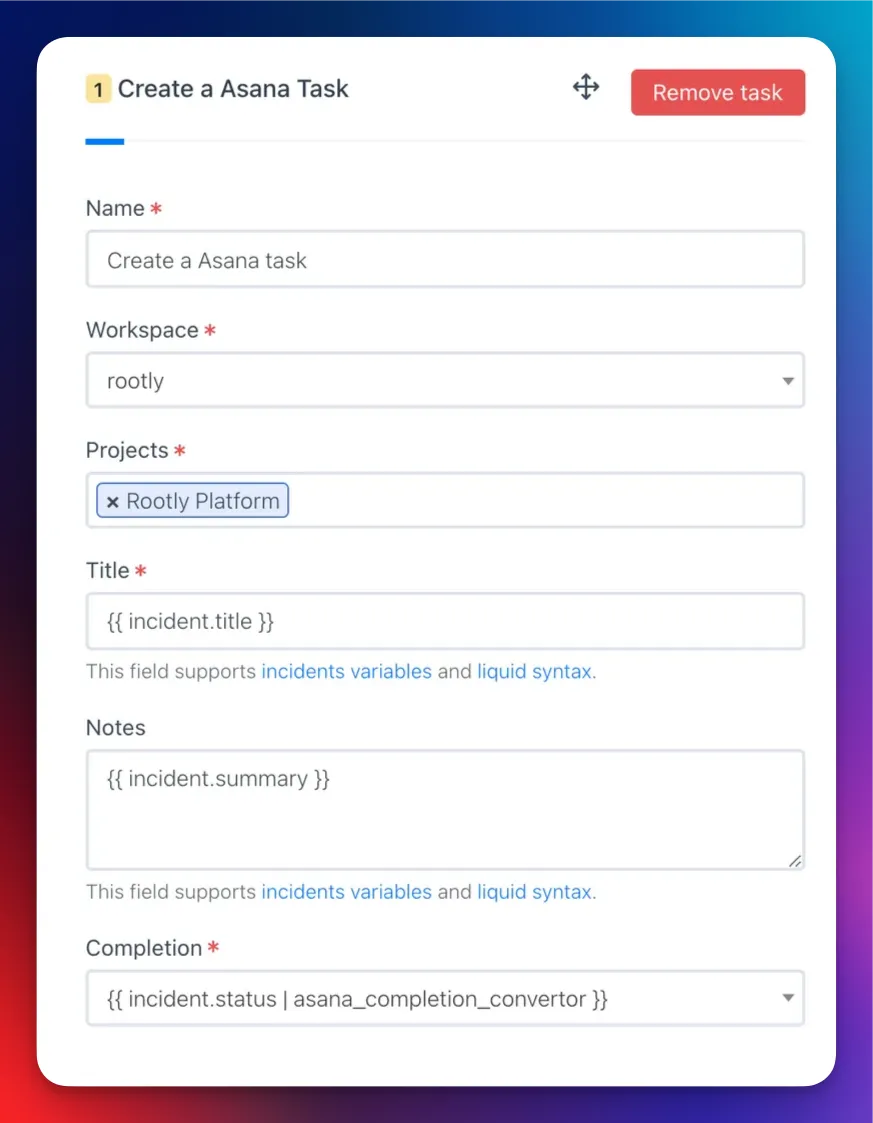
### Create an Asana Task
This action creates a new task in a specified Asana project.
| Field | Description | Required |
| ------------------------- | --------------------------------------------------------------------------- | -------- |
| **Name** | Display name for this workflow action | |
| **Workspace** | Asana workspace where the task will be created | Yes |
| **Team** | Asana team used to filter available projects | |
| **Projects** | One or more Asana projects to associate the task with | Yes |
| **Title** | Task title. Defaults to `{{ incident.title }}`. Supports Liquid | Yes |
| **Notes** | Task description. Supports Liquid | |
| **Assign User Email** | Email of the Asana user to assign the task to. Supports Liquid | |
| **Completion** | Task completion status. **Auto** mirrors the incident or action item status | Yes |
| **Due Date** | Task due date. Supports Liquid | |
| **Custom Fields Mapping** | JSON mapping Asana custom field IDs to values. Supports Liquid | |
| **Dependency Direction** | Whether this task is **blocking** or **blocked by** the dependent tasks | |
| **Dependent Task IDs** | Asana task IDs that this task has a dependency relationship with | |
 Use the [Incident Variable Explorer](https://rootly.com/account/help/liquid-explorer) to preview what Liquid variables return for your incidents.
***
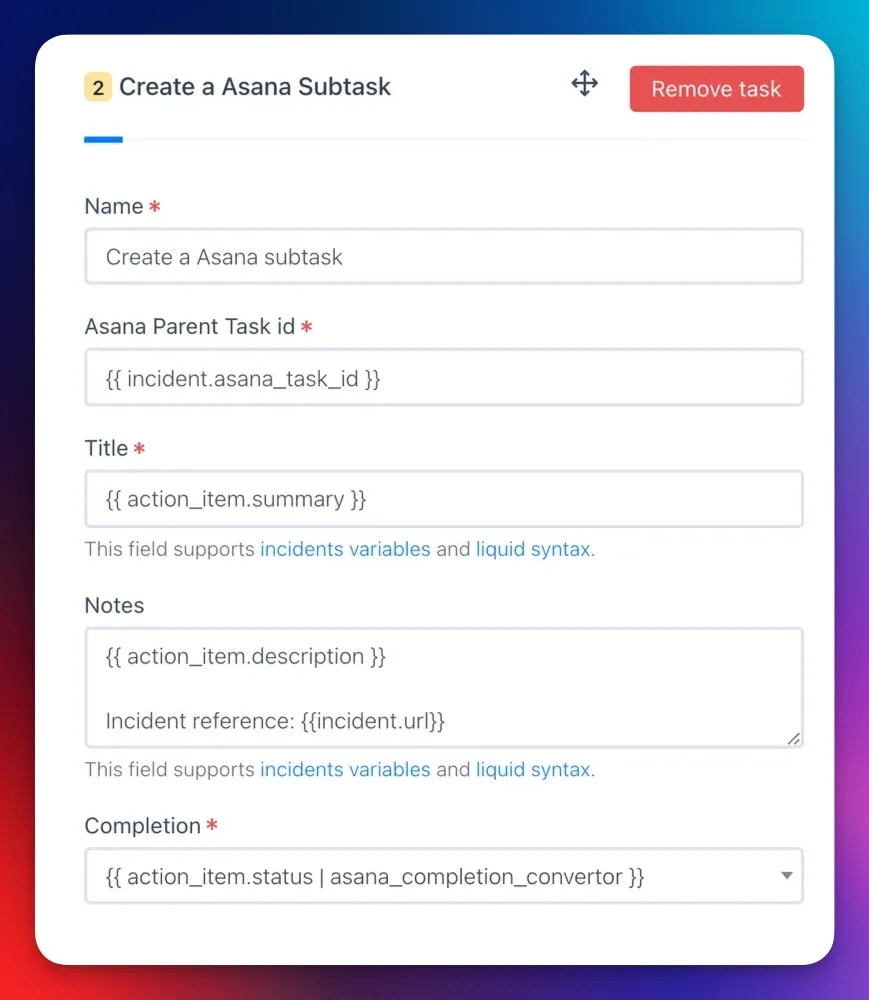
### Create an Asana Subtask
This action creates a subtask under an existing Asana task.
When a **Create an Asana Task** action runs, Rootly stores the resulting task ID on the incident record. Reference it in subsequent subtask actions using Liquid variables.
| Field | Description | Required |
| ------------------------- | -------------------------------------------------------------------------- | -------- |
| **Name** | Display name for this workflow action | |
| **Parent Task ID** | Asana task ID of the parent task. Supports Liquid | Yes |
| **Title** | Subtask title. Supports Liquid | Yes |
| **Notes** | Subtask description. Supports Liquid | |
| **Assign User Email** | Email of the Asana user to assign the subtask to. Supports Liquid | |
| **Completion** | Subtask completion status | Yes |
| **Due Date** | Subtask due date. Supports Liquid | |
| **Custom Fields Mapping** | JSON mapping Asana custom field IDs to values. Supports Liquid | |
| **Dependency Direction** | Whether this subtask is **blocking** or **blocked by** the dependent tasks | |
| **Dependent Task IDs** | Asana task IDs this subtask depends on | |
Use the [Incident Variable Explorer](https://rootly.com/account/help/liquid-explorer) to preview what Liquid variables return for your incidents.
***
### Create an Asana Subtask
This action creates a subtask under an existing Asana task.
When a **Create an Asana Task** action runs, Rootly stores the resulting task ID on the incident record. Reference it in subsequent subtask actions using Liquid variables.
| Field | Description | Required |
| ------------------------- | -------------------------------------------------------------------------- | -------- |
| **Name** | Display name for this workflow action | |
| **Parent Task ID** | Asana task ID of the parent task. Supports Liquid | Yes |
| **Title** | Subtask title. Supports Liquid | Yes |
| **Notes** | Subtask description. Supports Liquid | |
| **Assign User Email** | Email of the Asana user to assign the subtask to. Supports Liquid | |
| **Completion** | Subtask completion status | Yes |
| **Due Date** | Subtask due date. Supports Liquid | |
| **Custom Fields Mapping** | JSON mapping Asana custom field IDs to values. Supports Liquid | |
| **Dependency Direction** | Whether this subtask is **blocking** or **blocked by** the dependent tasks | |
| **Dependent Task IDs** | Asana task IDs this subtask depends on | |
 ***
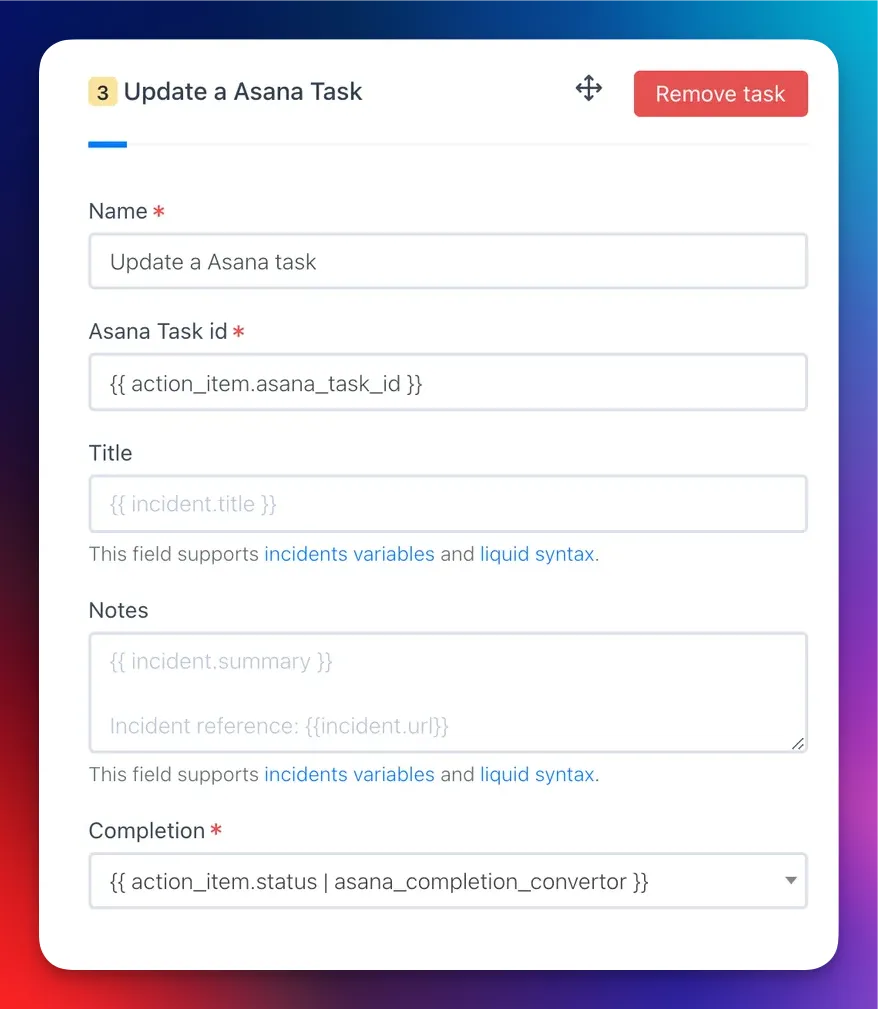
### Update an Asana Task
This action updates an existing Asana task with new values.
| Field | Description | Required |
| ------------------------- | ----------------------------------------------------------------- | -------- |
| **Name** | Display name for this workflow action | |
| **Task ID** | Asana task ID to update. Supports Liquid | Yes |
| **Title** | Updated task title. Supports Liquid. Leave blank to keep existing | |
| **Assign User Email** | Updated assignee email. Supports Liquid | |
| **Completion** | Updated completion status | Yes |
| **Due Date** | Updated due date. Supports Liquid | |
| **Custom Fields Mapping** | Updated custom field values as JSON. Supports Liquid | |
| **Dependency Direction** | Updated dependency direction: **blocking** or **blocked by** | |
| **Dependent Task IDs** | Updated list of dependent Asana task IDs | |
***
### Update an Asana Task
This action updates an existing Asana task with new values.
| Field | Description | Required |
| ------------------------- | ----------------------------------------------------------------- | -------- |
| **Name** | Display name for this workflow action | |
| **Task ID** | Asana task ID to update. Supports Liquid | Yes |
| **Title** | Updated task title. Supports Liquid. Leave blank to keep existing | |
| **Assign User Email** | Updated assignee email. Supports Liquid | |
| **Completion** | Updated completion status | Yes |
| **Due Date** | Updated due date. Supports Liquid | |
| **Custom Fields Mapping** | Updated custom field values as JSON. Supports Liquid | |
| **Dependency Direction** | Updated dependency direction: **blocking** or **blocked by** | |
| **Dependent Task IDs** | Updated list of dependent Asana task IDs | |
 ***
## Custom Fields
Use the **Custom Fields Mapping** field to set Asana custom field values using a JSON object. The key is the Asana custom field ID and the value depends on the field type.
**Text fields**
```json theme={null}
{
"4578152156": "Not Started",
"5678904321": "On Hold"
}
```
**Liquid syntax in text fields**
```json theme={null}
{
"4578152156": "{{ incident.severity }}",
"5678904321": "{{ incident.status }}"
}
```
**Single-select enum fields** — use the Asana enum option ID as the value:
```json theme={null}
{
"5678904322": "1004598149"
}
```
**Multi-select enum fields** — use an array of enum option IDs:
```json theme={null}
{
"5678904322": ["459021796", "1004598149"]
}
```
**Conditional enum mapping with Liquid**
```json theme={null}
{
"4578152156": "{{ incident.severity }}",
{% if incident.severity == "sev0" %}
"5678904322": "1004598149"
{% elsif incident.severity == "sev1" %}
"5678904322": "2005678230"
{% endif %}
}
```
To find custom field IDs and enum option IDs, use the Asana API or inspect the URL when editing a custom field in Asana.
***
## Custom Fields
Use the **Custom Fields Mapping** field to set Asana custom field values using a JSON object. The key is the Asana custom field ID and the value depends on the field type.
**Text fields**
```json theme={null}
{
"4578152156": "Not Started",
"5678904321": "On Hold"
}
```
**Liquid syntax in text fields**
```json theme={null}
{
"4578152156": "{{ incident.severity }}",
"5678904321": "{{ incident.status }}"
}
```
**Single-select enum fields** — use the Asana enum option ID as the value:
```json theme={null}
{
"5678904322": "1004598149"
}
```
**Multi-select enum fields** — use an array of enum option IDs:
```json theme={null}
{
"5678904322": ["459021796", "1004598149"]
}
```
**Conditional enum mapping with Liquid**
```json theme={null}
{
"4578152156": "{{ incident.severity }}",
{% if incident.severity == "sev0" %}
"5678904322": "1004598149"
{% elsif incident.severity == "sev1" %}
"5678904322": "2005678230"
{% endif %}
}
```
To find custom field IDs and enum option IDs, use the Asana API or inspect the URL when editing a custom field in Asana.