> ## Documentation Index
> Fetch the complete documentation index at: https://docs.rootly.com/llms.txt
> Use this file to discover all available pages before exploring further.
# ClickUp
> Connect ClickUp to Rootly to create tasks from incidents and receive ClickUp task events as alerts in your incident response process.
The ClickUp integration connects Rootly with your ClickUp workspace so teams can automatically create and update tasks through Genius workflows. Rootly also receives task events from ClickUp as alerts, enabling bidirectional workflows between the two systems.
With the ClickUp integration, you can:
* Automatically create ClickUp tasks when incidents are declared or reach a certain state
* Create tasks as subtasks of an existing ClickUp task using a parent task ID
* Update task title, description, priority, and custom fields as incidents evolve
* Receive ClickUp task events (created, updated, deleted) as Rootly alerts
## Before You Begin
Before setting up the integration, make sure you have:
* A Rootly account with admin permission to manage integrations
* A ClickUp account with access to the workspace you want to use
* A ClickUp Personal API Token (PAT)
This integration requires a **Personal API Token (PAT)**, not an OAuth app token. You can generate one from your ClickUp account settings under **Apps > API Token > Generate**.
Rootly recommends installing with a dedicated ClickUp service account so the integration does not break if an individual user leaves your organization.
## Installation
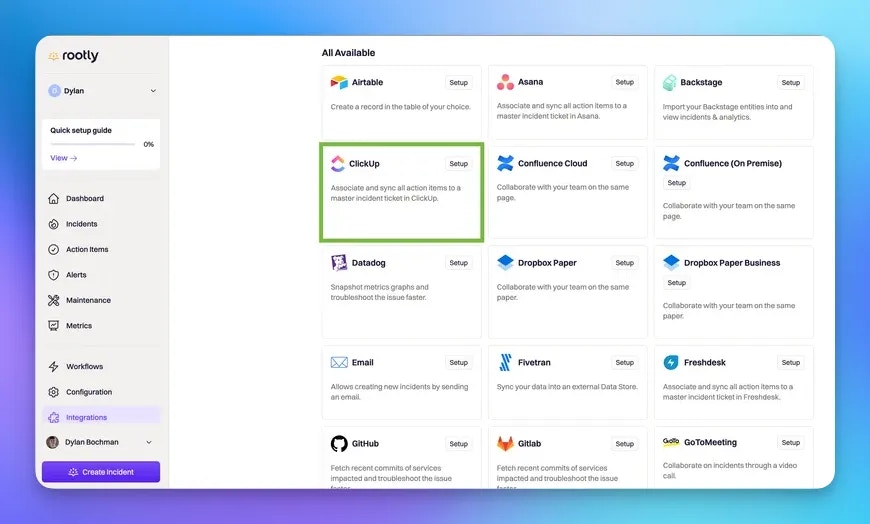
Navigate to the integrations page in Rootly and select **ClickUp**.
 Paste your ClickUp Personal API Token into the **API Key** field and select **Connect**.
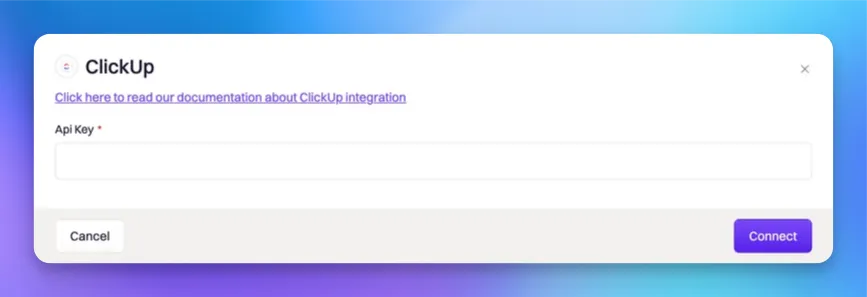 Rootly validates the token and registers a webhook with ClickUp to receive task events. Once connected, the installation is complete.
After installation, the **Create a ClickUp Task** and **Update a ClickUp Task** workflow actions are available in your Genius workflows. ClickUp task events will also appear as alerts in Rootly.
## Workflow Actions
ClickUp organizes content in a hierarchy: **Workspaces (Teams) → Spaces → Folders → Lists**. When configuring workflow actions, select each level to narrow down the target list.
### Outbound Actions (Rootly → ClickUp)
The actions in this section are used in **Incident Workflows**. They execute on changes to the Rootly incident or action item.
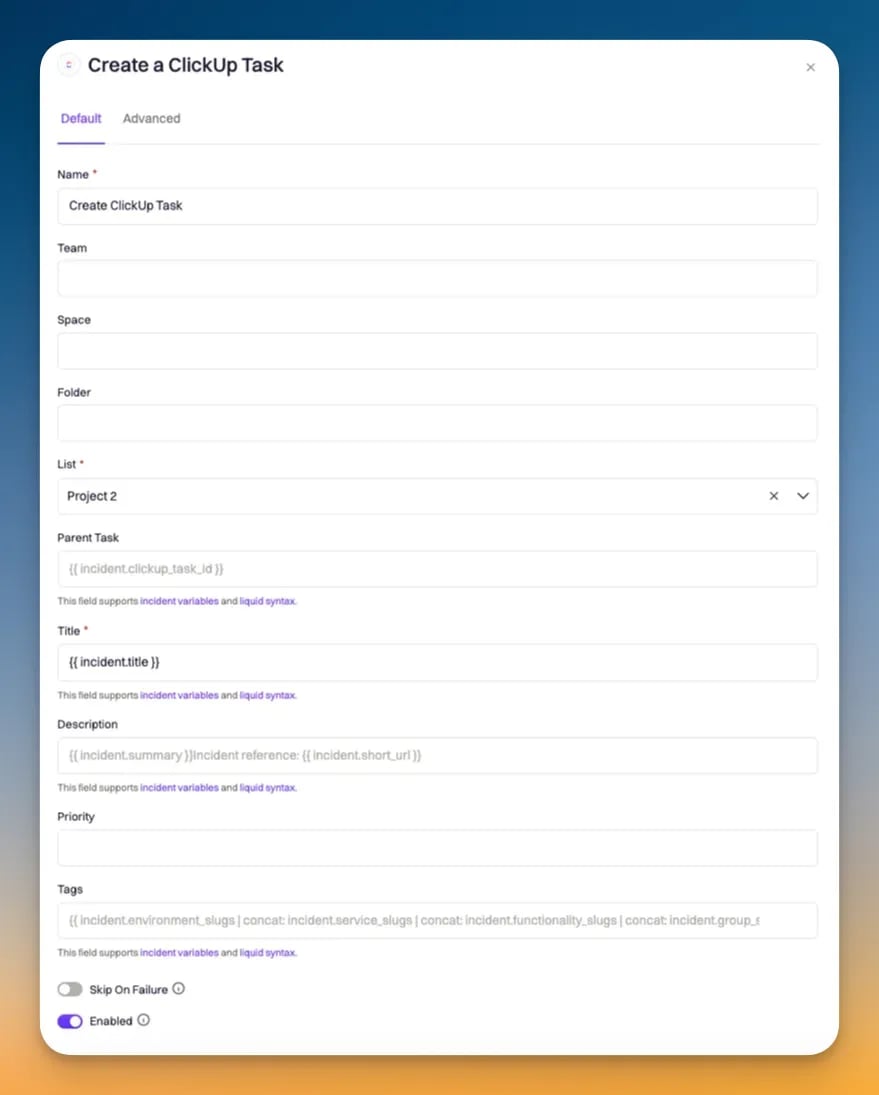
#### Create a ClickUp Task for Incident
Creates a new task in a ClickUp list, linked to the Rootly incident.
| Field | Description | Required |
| ------------------------- | ------------------------------------------------------------------------------- | -------- |
| **Team** | ClickUp workspace (Team) to use | Yes |
| **Space** | ClickUp space within the selected team | Yes |
| **Folder** | Folder within the selected space. Leave blank if the list is at the space level | |
| **List** | ClickUp list where the task will be created | Yes |
| **Title** | Task title. Defaults to `{{ incident.title }}`. Supports Liquid | Yes |
| **Description** | Task description. Supports Liquid | |
| **Priority** | Task priority. **Auto** mirrors the incident severity | |
| **Due Date** | Task due date. Supports Liquid | |
| **Tags** | Comma-separated tags to apply to the task | |
| **Custom Fields Mapping** | JSON mapping ClickUp custom field IDs to values. Supports Liquid | |
| **Task Payload** | Advanced JSON merged into the task creation request. Supports Liquid | |
**Priority mapping (Auto)**
| Rootly Severity | ClickUp Priority |
| --------------- | ---------------- |
| Critical | Urgent (1) |
| High | High (2) |
| Medium | Normal (3) |
| Low | Low (4) |
Rootly validates the token and registers a webhook with ClickUp to receive task events. Once connected, the installation is complete.
After installation, the **Create a ClickUp Task** and **Update a ClickUp Task** workflow actions are available in your Genius workflows. ClickUp task events will also appear as alerts in Rootly.
## Workflow Actions
ClickUp organizes content in a hierarchy: **Workspaces (Teams) → Spaces → Folders → Lists**. When configuring workflow actions, select each level to narrow down the target list.
### Outbound Actions (Rootly → ClickUp)
The actions in this section are used in **Incident Workflows**. They execute on changes to the Rootly incident or action item.
#### Create a ClickUp Task for Incident
Creates a new task in a ClickUp list, linked to the Rootly incident.
| Field | Description | Required |
| ------------------------- | ------------------------------------------------------------------------------- | -------- |
| **Team** | ClickUp workspace (Team) to use | Yes |
| **Space** | ClickUp space within the selected team | Yes |
| **Folder** | Folder within the selected space. Leave blank if the list is at the space level | |
| **List** | ClickUp list where the task will be created | Yes |
| **Title** | Task title. Defaults to `{{ incident.title }}`. Supports Liquid | Yes |
| **Description** | Task description. Supports Liquid | |
| **Priority** | Task priority. **Auto** mirrors the incident severity | |
| **Due Date** | Task due date. Supports Liquid | |
| **Tags** | Comma-separated tags to apply to the task | |
| **Custom Fields Mapping** | JSON mapping ClickUp custom field IDs to values. Supports Liquid | |
| **Task Payload** | Advanced JSON merged into the task creation request. Supports Liquid | |
**Priority mapping (Auto)**
| Rootly Severity | ClickUp Priority |
| --------------- | ---------------- |
| Critical | Urgent (1) |
| High | High (2) |
| Medium | Normal (3) |
| Low | Low (4) |
 #### Create a ClickUp Subtask for Action Item
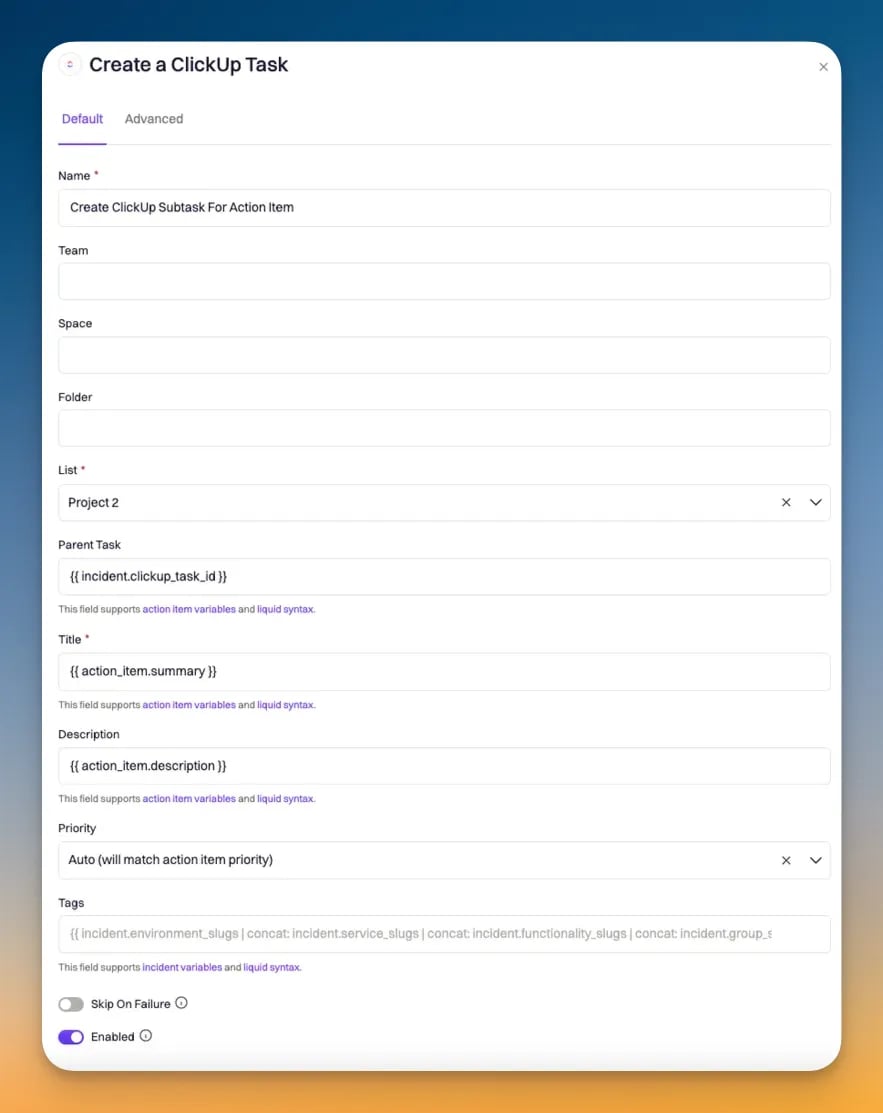
Creates a new task as a subtask of an existing ClickUp task, linked to a Rootly action item.
When a **Create a ClickUp Task for Incident** action runs, Rootly stores the resulting task ID on the incident record. Reference it in the **Parent Task ID** field using Liquid to nest this subtask under the incident task.
| Field | Description | Required |
| ------------------------- | ------------------------------------------------------------------ | -------- |
| **Team** | ClickUp workspace (Team) to use | Yes |
| **Space** | ClickUp space within the selected team | Yes |
| **Folder** | Folder within the selected space | |
| **List** | ClickUp list where the subtask will be created | Yes |
| **Parent Task ID** | ID of the ClickUp task to nest this subtask under. Supports Liquid | Yes |
| **Title** | Subtask title. Supports Liquid | Yes |
| **Description** | Subtask description. Supports Liquid | |
| **Completion** | Subtask completion. **Auto** mirrors the action item status | Yes |
| **Due Date** | Subtask due date. Supports Liquid | |
| **Tags** | Comma-separated tags to apply | |
| **Custom Fields Mapping** | JSON mapping ClickUp custom field IDs to values. Supports Liquid | |
#### Create a ClickUp Subtask for Action Item
Creates a new task as a subtask of an existing ClickUp task, linked to a Rootly action item.
When a **Create a ClickUp Task for Incident** action runs, Rootly stores the resulting task ID on the incident record. Reference it in the **Parent Task ID** field using Liquid to nest this subtask under the incident task.
| Field | Description | Required |
| ------------------------- | ------------------------------------------------------------------ | -------- |
| **Team** | ClickUp workspace (Team) to use | Yes |
| **Space** | ClickUp space within the selected team | Yes |
| **Folder** | Folder within the selected space | |
| **List** | ClickUp list where the subtask will be created | Yes |
| **Parent Task ID** | ID of the ClickUp task to nest this subtask under. Supports Liquid | Yes |
| **Title** | Subtask title. Supports Liquid | Yes |
| **Description** | Subtask description. Supports Liquid | |
| **Completion** | Subtask completion. **Auto** mirrors the action item status | Yes |
| **Due Date** | Subtask due date. Supports Liquid | |
| **Tags** | Comma-separated tags to apply | |
| **Custom Fields Mapping** | JSON mapping ClickUp custom field IDs to values. Supports Liquid | |
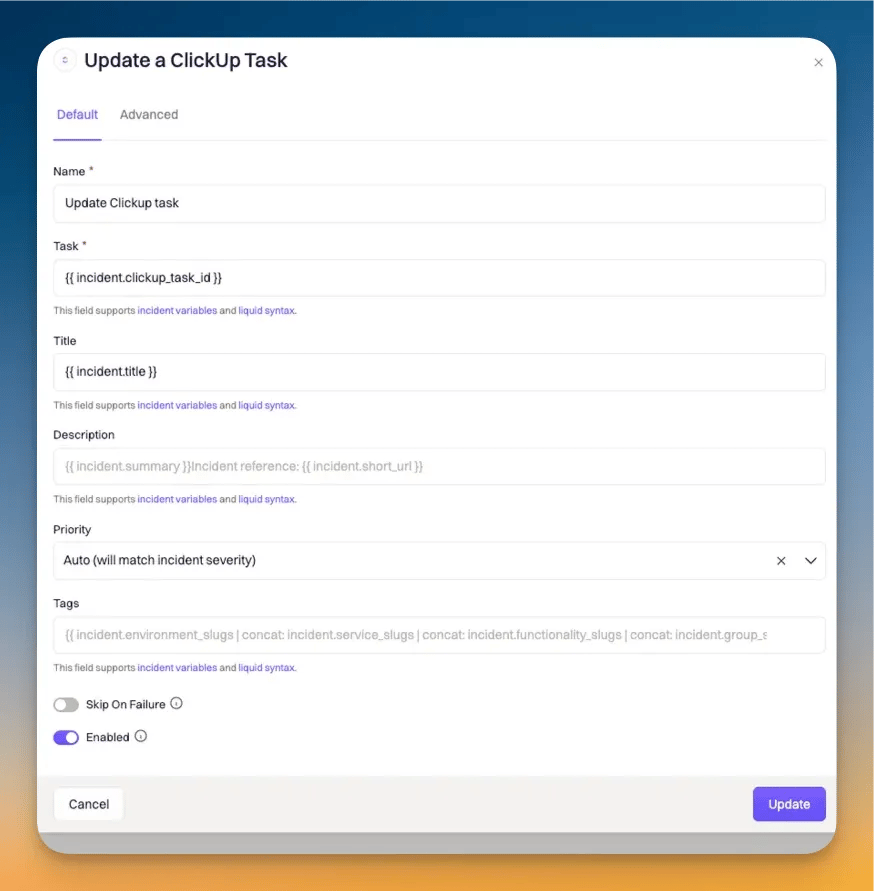
 #### Update a ClickUp Task
Updates an existing ClickUp task linked to a Rootly incident.
| Field | Description | Required |
| ------------------------- | ------------------------------------------------------------------ | -------- |
| **Task ID** | ClickUp task ID to update. Supports Liquid | Yes |
| **Title** | Updated task title. Supports Liquid. Leave blank to keep existing | |
| **Description** | Updated task description. Supports Liquid | |
| **Priority** | Updated priority | |
| **Due Date** | Updated due date. Supports Liquid | |
| **Tags** | Updated tags | |
| **Custom Fields Mapping** | Updated custom field values as JSON. Supports Liquid | |
| **Task Payload** | Advanced JSON merged into the task update request. Supports Liquid | |
#### Update a ClickUp Task
Updates an existing ClickUp task linked to a Rootly incident.
| Field | Description | Required |
| ------------------------- | ------------------------------------------------------------------ | -------- |
| **Task ID** | ClickUp task ID to update. Supports Liquid | Yes |
| **Title** | Updated task title. Supports Liquid. Leave blank to keep existing | |
| **Description** | Updated task description. Supports Liquid | |
| **Priority** | Updated priority | |
| **Due Date** | Updated due date. Supports Liquid | |
| **Tags** | Updated tags | |
| **Custom Fields Mapping** | Updated custom field values as JSON. Supports Liquid | |
| **Task Payload** | Advanced JSON merged into the task update request. Supports Liquid | |
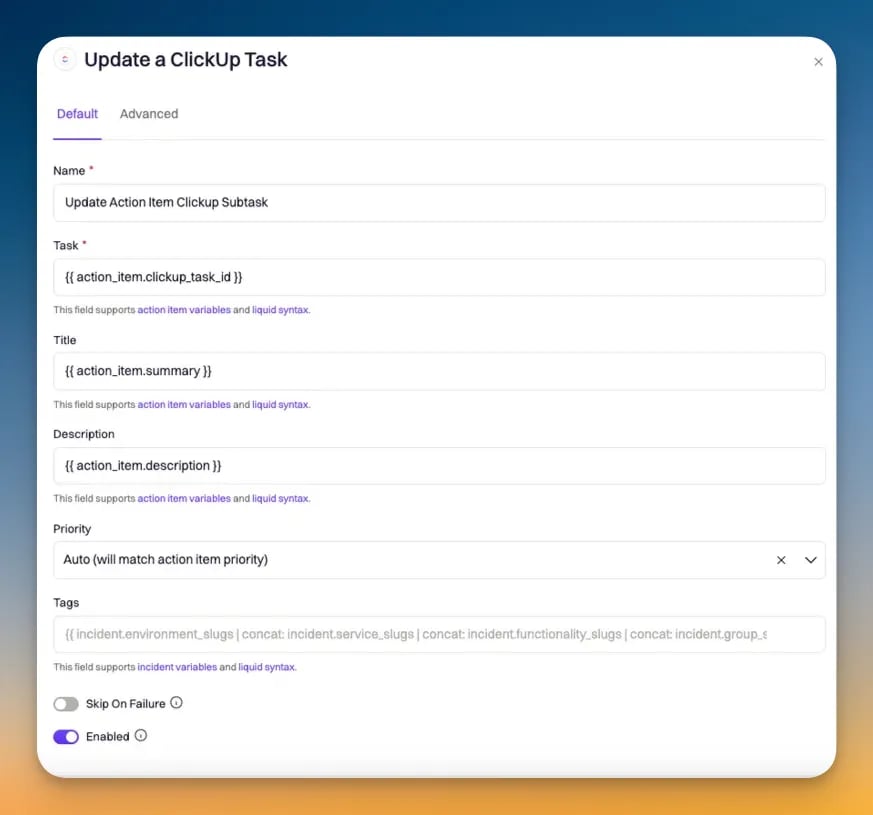
 #### Update a ClickUp Subtask
Updates an existing ClickUp subtask linked to a Rootly action item.
| Field | Description | Required |
| ------------------------- | ------------------------------------------------------------------ | -------- |
| **Task ID** | ClickUp subtask ID to update. Supports Liquid | Yes |
| **Title** | Updated subtask title. Supports Liquid | |
| **Description** | Updated subtask description. Supports Liquid | |
| **Completion** | Updated completion status. **Auto** mirrors the action item status | Yes |
| **Due Date** | Updated due date. Supports Liquid | |
| **Tags** | Updated tags | |
| **Custom Fields Mapping** | Updated custom field values as JSON. Supports Liquid | |
#### Update a ClickUp Action Item
Updates a ClickUp task that represents a Rootly action item.
| Field | Description | Required |
| ------------------------- | ------------------------------------------------------------------ | -------- |
| **Task ID** | ClickUp task ID to update. Supports Liquid | Yes |
| **Title** | Updated title. Supports Liquid | |
| **Description** | Updated description. Supports Liquid | |
| **Completion** | Updated completion status. **Auto** mirrors the action item status | Yes |
| **Due Date** | Updated due date. Supports Liquid | |
| **Custom Fields Mapping** | Updated custom field values as JSON. Supports Liquid | |
#### Update a ClickUp Subtask
Updates an existing ClickUp subtask linked to a Rootly action item.
| Field | Description | Required |
| ------------------------- | ------------------------------------------------------------------ | -------- |
| **Task ID** | ClickUp subtask ID to update. Supports Liquid | Yes |
| **Title** | Updated subtask title. Supports Liquid | |
| **Description** | Updated subtask description. Supports Liquid | |
| **Completion** | Updated completion status. **Auto** mirrors the action item status | Yes |
| **Due Date** | Updated due date. Supports Liquid | |
| **Tags** | Updated tags | |
| **Custom Fields Mapping** | Updated custom field values as JSON. Supports Liquid | |
#### Update a ClickUp Action Item
Updates a ClickUp task that represents a Rootly action item.
| Field | Description | Required |
| ------------------------- | ------------------------------------------------------------------ | -------- |
| **Task ID** | ClickUp task ID to update. Supports Liquid | Yes |
| **Title** | Updated title. Supports Liquid | |
| **Description** | Updated description. Supports Liquid | |
| **Completion** | Updated completion status. **Auto** mirrors the action item status | Yes |
| **Due Date** | Updated due date. Supports Liquid | |
| **Custom Fields Mapping** | Updated custom field values as JSON. Supports Liquid | |
 ### Inbound Events (ClickUp → Rootly)
The actions in this section are used in **Alert Workflows**. They execute on update events sent from ClickUp via webhook.
When the integration is installed, Rootly registers a webhook with ClickUp to receive task events. The following events create alerts in Rootly:
| ClickUp Event | Description |
| ------------- | ------------------------ |
| `taskCreated` | A new task was created |
| `taskUpdated` | A task field was changed |
| `taskDeleted` | A task was deleted |
Each event creates a Rootly alert with the following labels:
| Label | Source |
| ---------- | -------------------------------------------------------- |
| `task_id` | ClickUp task ID |
| `event` | Event type (`taskCreated`, `taskUpdated`, `taskDeleted`) |
| `field` | The field that changed (for `taskUpdated` events) |
| `username` | The user who made the change |
| `id` | The history item ID (for `taskUpdated` events) |
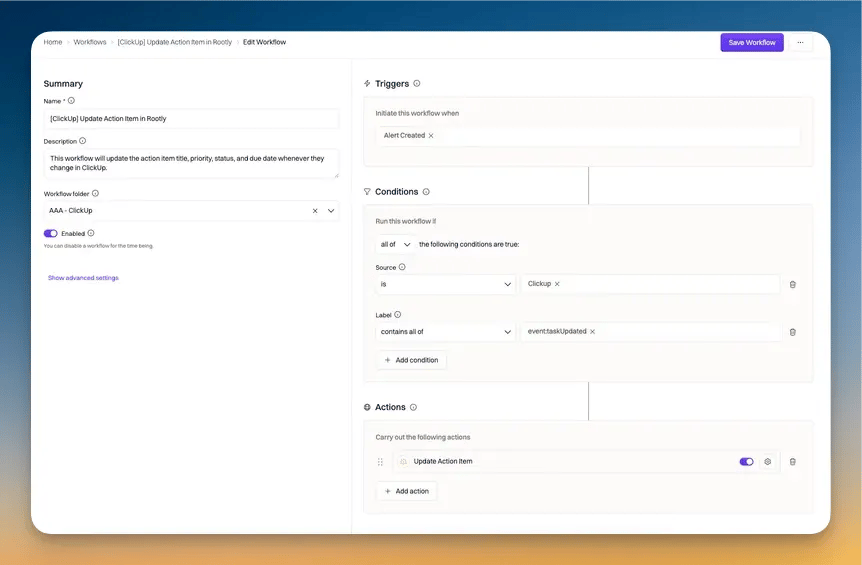
#### Update Action Item
Use an **Alert Workflow** with the **Update Action Item** action to sync ClickUp task changes back to Rootly action items.
### Inbound Events (ClickUp → Rootly)
The actions in this section are used in **Alert Workflows**. They execute on update events sent from ClickUp via webhook.
When the integration is installed, Rootly registers a webhook with ClickUp to receive task events. The following events create alerts in Rootly:
| ClickUp Event | Description |
| ------------- | ------------------------ |
| `taskCreated` | A new task was created |
| `taskUpdated` | A task field was changed |
| `taskDeleted` | A task was deleted |
Each event creates a Rootly alert with the following labels:
| Label | Source |
| ---------- | -------------------------------------------------------- |
| `task_id` | ClickUp task ID |
| `event` | Event type (`taskCreated`, `taskUpdated`, `taskDeleted`) |
| `field` | The field that changed (for `taskUpdated` events) |
| `username` | The user who made the change |
| `id` | The history item ID (for `taskUpdated` events) |
#### Update Action Item
Use an **Alert Workflow** with the **Update Action Item** action to sync ClickUp task changes back to Rootly action items.
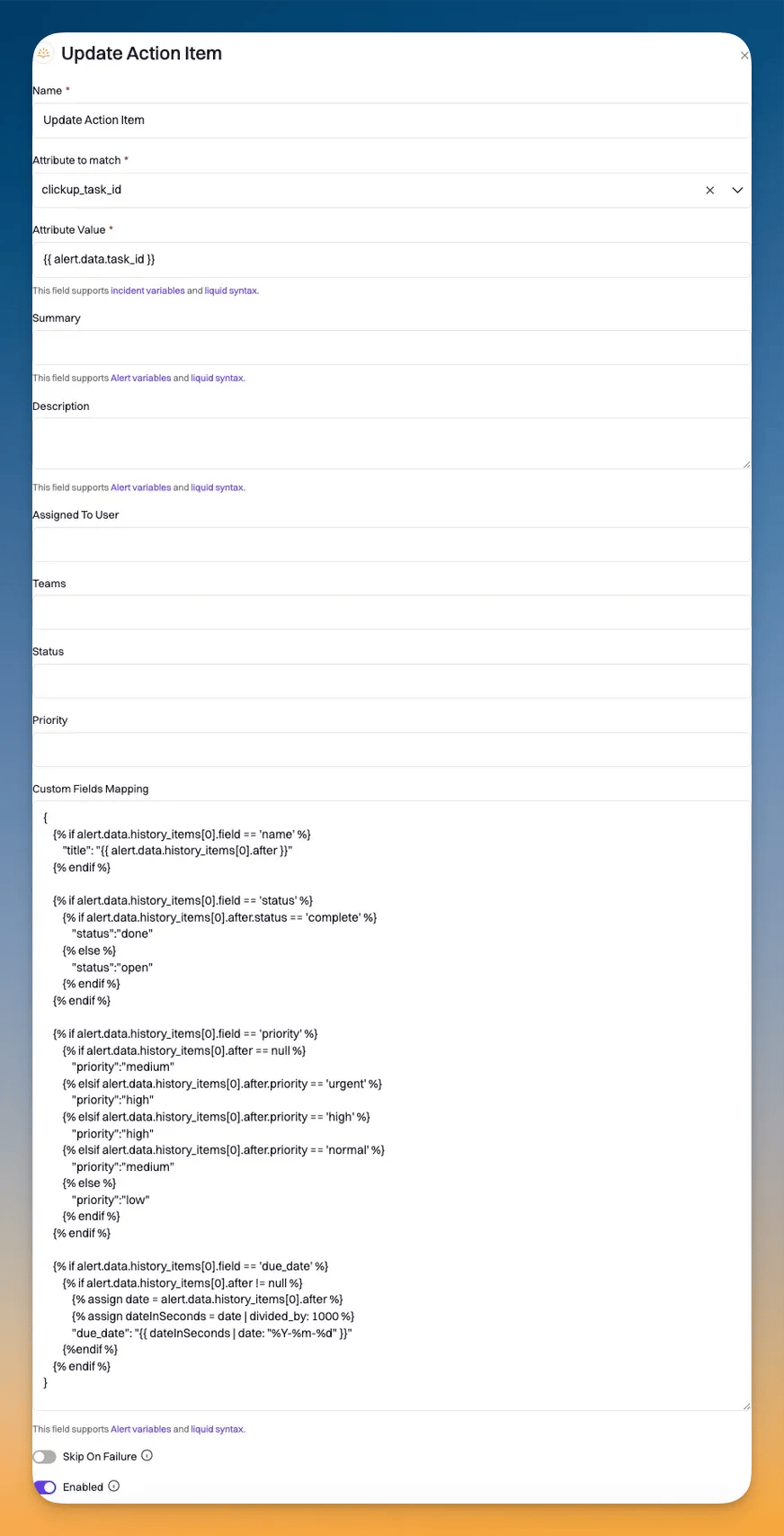 #### Data Mapping Syntax
Use the following Liquid template in the **Data Mapping** field to map ClickUp task update fields to Rootly action item fields:
```json theme={null}
{
{% if alert.data.history_items[0].field == 'name' %}
"title": "{{ alert.data.history_items[0].after }}"
{% endif %}
{% if alert.data.history_items[0].field == 'status' %}
{% if alert.data.history_items[0].after.status == 'complete' %}
"status": "done"
{% else %}
"status": "open"
{% endif %}
{% endif %}
{% if alert.data.history_items[0].field == 'priority' %}
{% if alert.data.history_items[0].after == null %}
"priority": "medium"
{% elsif alert.data.history_items[0].after.priority == 'urgent' %}
"priority": "high"
{% elsif alert.data.history_items[0].after.priority == 'high' %}
"priority": "high"
{% elsif alert.data.history_items[0].after.priority == 'normal' %}
"priority": "medium"
{% else %}
"priority": "low"
{% endif %}
{% endif %}
{% if alert.data.history_items[0].field == 'due_date' %}
{% if alert.data.history_items[0].after != null %}
{% assign date = alert.data.history_items[0].after %}
{% assign dateInSeconds = date | divided_by: 1000 %}
"due_date": "{{ dateInSeconds | date: "%Y-%m-%d" }}"
{% endif %}
{% endif %}
}
```
ClickUp sends due dates as Unix timestamps in milliseconds. Divide by 1000 and apply the `date` filter to convert to a readable format.
## Uninstall
To remove the ClickUp integration, open the integrations panel in Rootly and select **Configure > Delete**. Rootly will also remove the registered ClickUp webhook on deletion.
## Related Resources
* [Workflows](/workflows/workflows)
* [Alert workflows](/workflows/alert-workflows)
* [Integrations overview](/integrations/overview)
#### Data Mapping Syntax
Use the following Liquid template in the **Data Mapping** field to map ClickUp task update fields to Rootly action item fields:
```json theme={null}
{
{% if alert.data.history_items[0].field == 'name' %}
"title": "{{ alert.data.history_items[0].after }}"
{% endif %}
{% if alert.data.history_items[0].field == 'status' %}
{% if alert.data.history_items[0].after.status == 'complete' %}
"status": "done"
{% else %}
"status": "open"
{% endif %}
{% endif %}
{% if alert.data.history_items[0].field == 'priority' %}
{% if alert.data.history_items[0].after == null %}
"priority": "medium"
{% elsif alert.data.history_items[0].after.priority == 'urgent' %}
"priority": "high"
{% elsif alert.data.history_items[0].after.priority == 'high' %}
"priority": "high"
{% elsif alert.data.history_items[0].after.priority == 'normal' %}
"priority": "medium"
{% else %}
"priority": "low"
{% endif %}
{% endif %}
{% if alert.data.history_items[0].field == 'due_date' %}
{% if alert.data.history_items[0].after != null %}
{% assign date = alert.data.history_items[0].after %}
{% assign dateInSeconds = date | divided_by: 1000 %}
"due_date": "{{ dateInSeconds | date: "%Y-%m-%d" }}"
{% endif %}
{% endif %}
}
```
ClickUp sends due dates as Unix timestamps in milliseconds. Divide by 1000 and apply the `date` filter to convert to a readable format.
## Uninstall
To remove the ClickUp integration, open the integrations panel in Rootly and select **Configure > Delete**. Rootly will also remove the registered ClickUp webhook on deletion.
## Related Resources
* [Workflows](/workflows/workflows)
* [Alert workflows](/workflows/alert-workflows)
* [Integrations overview](/integrations/overview)