> ## Documentation Index
> Fetch the complete documentation index at: https://docs.rootly.com/llms.txt
> Use this file to discover all available pages before exploring further.
# Cortex to Rootly
> Sync your Rootly catalog with Cortex to keep entities definitions, ownership, and metadata consistent across your incident workflow and on-call.
This integration imports catalogs from Cortex into Rootly, making Cortex the source of truth for your entities.
## Prerequisites
* **Cortex account** with API access
* **Rootly admin or owner** permissions
* **Cortex API key** (you'll generate this below)
## Installation
### Step 1: Generate a Cortex Access Token
1. Log into your **Cortex** account
2. Navigate to **Settings** > **My access tokens**
3. Click **Create new token**
4. Give it a descriptive name like "Rootly Integration"
5. Copy the generated API key
We recommend using a service account token to ensure uninterrupted access if team members change roles.
Make sure to copy the API key immediately - Cortex will only show it once for security purposes.
### Step 2: Connect Cortex to Rootly
1. Log into your **Rootly** account as an Admin
2. Navigate to **Configurations** > **Integrations** > **Cortex**
3. Click **Setup** to open the configuration modal
4. Enter your Access Token from Step 1 into the Access Token field
5. Click **Connect**
If successful, you'll see a confirmation message and the Cortex integration card will show as **Connected**.
### Step 3: Enable Catalog Sync (Optional)
By default, the integration connects to Cortex but doesn't automatically sync your Cortex Catalogs with Rootly's Catalog.
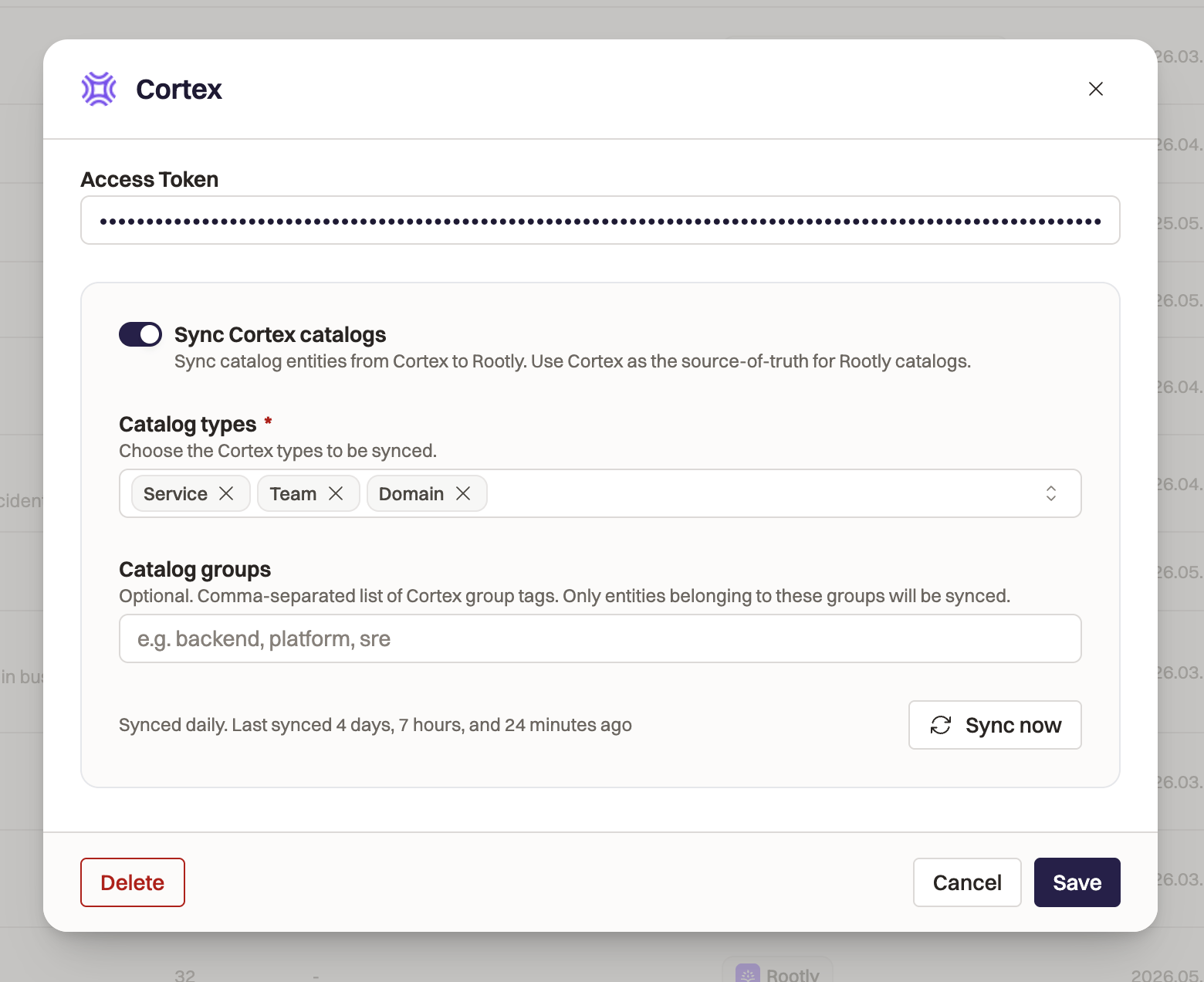 To enable automatic synchronization:
1. Navigate to your Cortex integration settings in Rootly.
2. Toggle **Sync Cortex Catalogs** on.
3. Select the Cortex Catalogs you want to pull into Rootly in the **Cortex types** field.
4. Add any **Catalog Groups** filters. This is optional: if the field is left blank, all entities in the defined Catalogs will be pulled into Rootly. Filter in specific Groups with this field.
5. Click **Save.**
Rootly automatically syncs with Cortex every 24 hours to keep your data accurate and up-to-date. You can manually run a sync at anytime.
## What Gets Synced
When Cortex sync is enabled in step 3, Rootly will:
* Map Cortex Types to Rootly Catalogs by name. If you've already defined a Catalog in Rootly called "Domain", Rootly will map your Cortex "Domain" to the Rootly "Domain" Catalog.
* Create new Catalogs in Rootly for any Cortex Types that don't have existing matching Rootly Catalogs.
* Add new properties to Rootly Catalogs to store all entity data in Rootly for your teams to use.
* Create new entities in Rootly in the corresponding Catalogs. Rootly will ingest all property data from Cortex.
* Update any existing entities in Rootly that were previously synced with Cortex with new data.
* Archive existing entities that have been removed from Cortex.
## Using Synced Entities
Once entities are synced from Cortex:
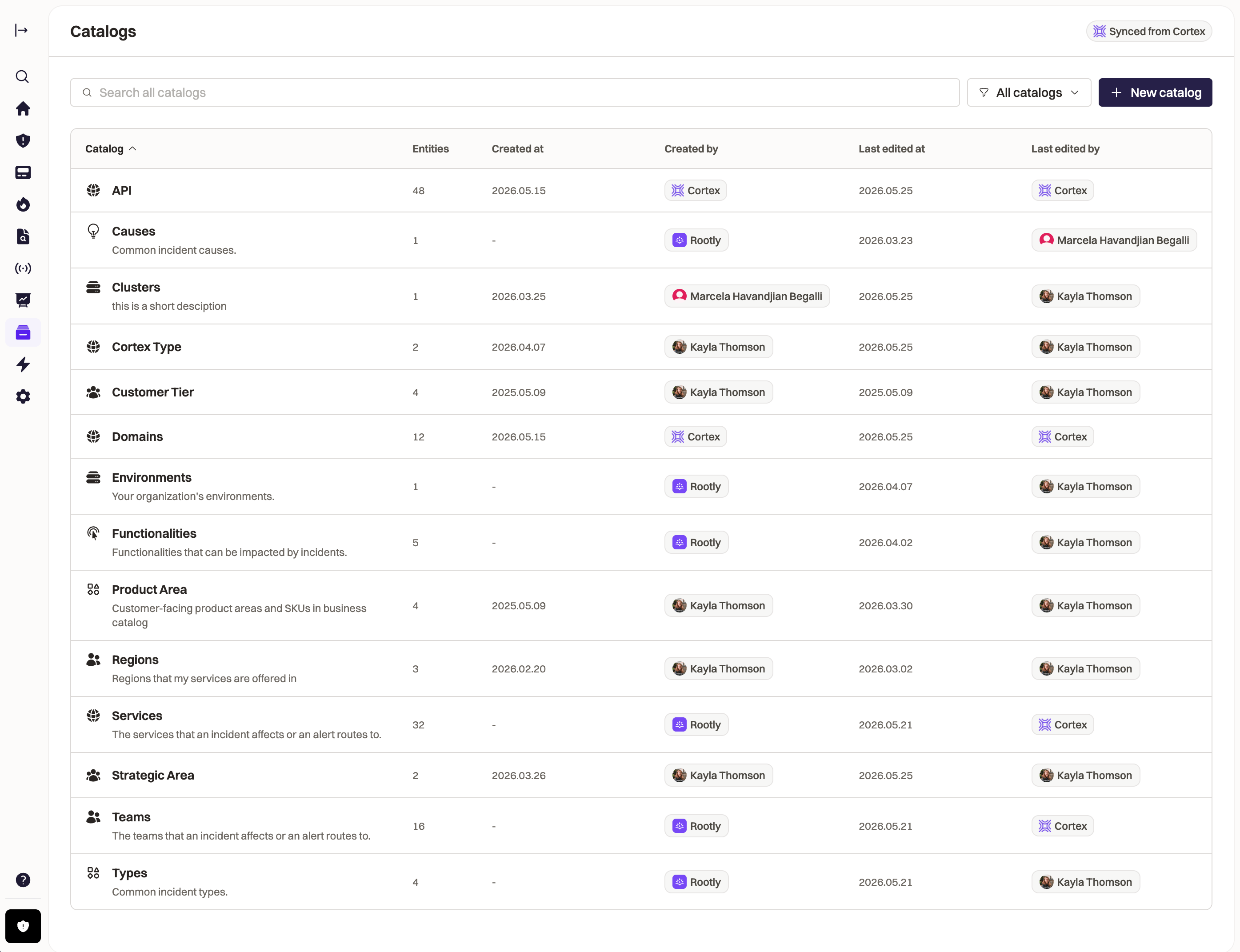
* They appear in your Rootly catalogs with a Cortex badge
* You can track the impact of incidents against your entities with incident fields
* Build workflows to automate your incident response process around your business entities
To enable automatic synchronization:
1. Navigate to your Cortex integration settings in Rootly.
2. Toggle **Sync Cortex Catalogs** on.
3. Select the Cortex Catalogs you want to pull into Rootly in the **Cortex types** field.
4. Add any **Catalog Groups** filters. This is optional: if the field is left blank, all entities in the defined Catalogs will be pulled into Rootly. Filter in specific Groups with this field.
5. Click **Save.**
Rootly automatically syncs with Cortex every 24 hours to keep your data accurate and up-to-date. You can manually run a sync at anytime.
## What Gets Synced
When Cortex sync is enabled in step 3, Rootly will:
* Map Cortex Types to Rootly Catalogs by name. If you've already defined a Catalog in Rootly called "Domain", Rootly will map your Cortex "Domain" to the Rootly "Domain" Catalog.
* Create new Catalogs in Rootly for any Cortex Types that don't have existing matching Rootly Catalogs.
* Add new properties to Rootly Catalogs to store all entity data in Rootly for your teams to use.
* Create new entities in Rootly in the corresponding Catalogs. Rootly will ingest all property data from Cortex.
* Update any existing entities in Rootly that were previously synced with Cortex with new data.
* Archive existing entities that have been removed from Cortex.
## Using Synced Entities
Once entities are synced from Cortex:
* They appear in your Rootly catalogs with a Cortex badge
* You can track the impact of incidents against your entities with incident fields
* Build workflows to automate your incident response process around your business entities
 ## Uninstall
To disconnect the Cortex integration:
1. Navigate to **Configurations** > **Integrations** > **Cortex**
2. Click **Delete**
3. Confirm the removal
Removing the integration will stop service synchronization. Existing entities imported from Cortex will remain in Rootly but will no longer update automatically.
## Uninstall
To disconnect the Cortex integration:
1. Navigate to **Configurations** > **Integrations** > **Cortex**
2. Click **Delete**
3. Confirm the removal
Removing the integration will stop service synchronization. Existing entities imported from Cortex will remain in Rootly but will no longer update automatically.