> ## Documentation Index
> Fetch the complete documentation index at: https://docs.rootly.com/llms.txt
> Use this file to discover all available pages before exploring further.
# Heroku
> Track Heroku builds and releases as pulses in Rootly, and run commands on dynos directly from incident workflows for deployment context and rollback.
## Overview
The Heroku integration connects Rootly to your Heroku apps via OAuth. Build and release events are automatically tracked as pulses so your team can correlate deployments with incidents — and the **Run Command on Heroku** workflow action lets you execute rollbacks or diagnostic scripts on a live dyno without leaving the incident response flow.
Build starts, completions, and release events are automatically tracked as Rootly pulses and linked to matching services.
Execute one-off commands on a Heroku dyno from a workflow — output is streamed and posted to Slack.
Pulses are automatically associated with Rootly services that have a matching Heroku app name configured.
Choose which Heroku apps to monitor — Rootly only creates webhooks on the apps you explicitly list.
## Before You Begin
* You must be a Rootly admin to set up the integration
* You need a Heroku account with access to the apps you want to monitor
Connect using a **Heroku service account** rather than a personal user account. If the connecting user leaves your organization, the OAuth token becomes invalid and the integration will stop working.
## Installation
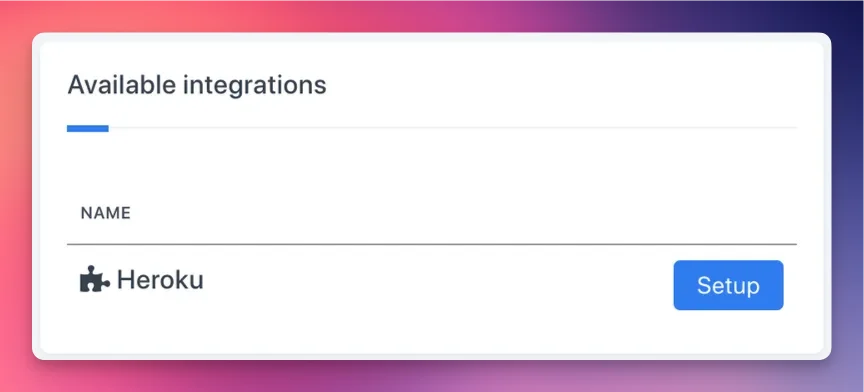
Go to **Configuration → Integrations**, find **Heroku**, and click **Setup**.
 Click **Connect Heroku Account**. You'll be redirected to Heroku to authorize Rootly's OAuth application. After approving, you'll be returned to Rootly with the integration connected.
 In the integration settings, add the names of the Heroku apps you want to track. Rootly creates webhooks on each listed app to receive build and release events.
If you leave the app list empty, no webhooks are created and no pulses will be tracked. Add app names to enable pulse tracking.
## Pulse Events
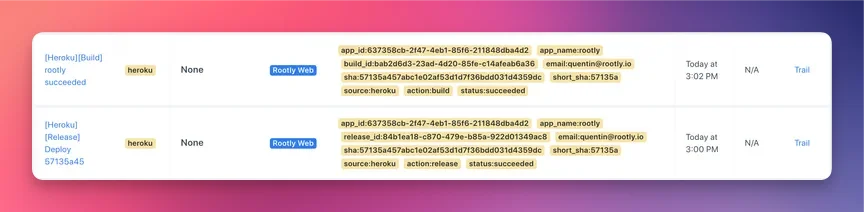
Rootly ingests Heroku webhook events and records them as pulses on the incident timeline and service activity feed. Pulses are automatically linked to Rootly services with a matching **Heroku App Name** field.
### Build Events
| Event | Pulse Summary |
| --------------- | -------------------------------------- |
| Build started | `[Heroku][Build] {app_name} pending` |
| Build succeeded | `[Heroku][Build] {app_name} succeeded` |
| Build failed | `[Heroku][Build] {app_name} failed` |
Each pulse includes the build ID, commit SHA, and the email of the user who triggered the build.
### Release Events
| Event | Pulse Summary |
| ---------------- | ----------------------------------------- |
| Release deployed | `[Heroku][Release] {release description}` |
Each pulse includes the release version, status, commit SHA, and app name. Rootly filters out non-current release updates to avoid duplicate pulses from Heroku's release phase behavior.
Rootly tracks `api:build` and `api:release` webhook events. Dyno events (`api:dyno`) are received but not currently converted into pulses.
## Workflow Action
### Run Command on Heroku
Executes a one-off command on a Heroku dyno and streams the output to Slack. Useful for running rollbacks, querying database state, or executing diagnostic scripts mid-incident.
The command to run on the dyno. Supports [Liquid variables](/liquid/incident-variables) — for example, use `{{ incident.title }}` to reference the active incident.
The name of the Heroku app to run the command against.
The size of the one-off dyno to spin up:
* `standard-1X`
* `standard-2X`
Defaults to `standard-1X`.
Maximum run time for the command in seconds. Capped at **1800 seconds (30 minutes)** regardless of the value set. Defaults to `1800`.
When enabled, records the command run as an event on the incident timeline.
One or more Slack channels to receive the command output as a file attachment once execution completes.
Rootly connects to the dyno over TLS using the Rendezvous protocol, streams all output lines, and posts the collected output to Slack once the command completes or the dyno exits.
## Uninstall
To remove the Heroku integration:
1. Go to **Configuration → Integrations** and find **Heroku**
2. Click **Connected** to reveal the disconnect option
3. Click **Disconnect**
In the integration settings, add the names of the Heroku apps you want to track. Rootly creates webhooks on each listed app to receive build and release events.
If you leave the app list empty, no webhooks are created and no pulses will be tracked. Add app names to enable pulse tracking.
## Pulse Events
Rootly ingests Heroku webhook events and records them as pulses on the incident timeline and service activity feed. Pulses are automatically linked to Rootly services with a matching **Heroku App Name** field.
### Build Events
| Event | Pulse Summary |
| --------------- | -------------------------------------- |
| Build started | `[Heroku][Build] {app_name} pending` |
| Build succeeded | `[Heroku][Build] {app_name} succeeded` |
| Build failed | `[Heroku][Build] {app_name} failed` |
Each pulse includes the build ID, commit SHA, and the email of the user who triggered the build.
### Release Events
| Event | Pulse Summary |
| ---------------- | ----------------------------------------- |
| Release deployed | `[Heroku][Release] {release description}` |
Each pulse includes the release version, status, commit SHA, and app name. Rootly filters out non-current release updates to avoid duplicate pulses from Heroku's release phase behavior.
Rootly tracks `api:build` and `api:release` webhook events. Dyno events (`api:dyno`) are received but not currently converted into pulses.
## Workflow Action
### Run Command on Heroku
Executes a one-off command on a Heroku dyno and streams the output to Slack. Useful for running rollbacks, querying database state, or executing diagnostic scripts mid-incident.
The command to run on the dyno. Supports [Liquid variables](/liquid/incident-variables) — for example, use `{{ incident.title }}` to reference the active incident.
The name of the Heroku app to run the command against.
The size of the one-off dyno to spin up:
* `standard-1X`
* `standard-2X`
Defaults to `standard-1X`.
Maximum run time for the command in seconds. Capped at **1800 seconds (30 minutes)** regardless of the value set. Defaults to `1800`.
When enabled, records the command run as an event on the incident timeline.
One or more Slack channels to receive the command output as a file attachment once execution completes.
Rootly connects to the dyno over TLS using the Rendezvous protocol, streams all output lines, and posts the collected output to Slack once the command completes or the dyno exits.
## Uninstall
To remove the Heroku integration:
1. Go to **Configuration → Integrations** and find **Heroku**
2. Click **Connected** to reveal the disconnect option
3. Click **Disconnect**
 Disconnecting removes the integration and deletes all Rootly-managed webhooks from your Heroku apps.
## Frequently Asked Questions
Confirm the app names are listed in the integration settings. Rootly only creates webhooks on explicitly listed apps. Also check that the connected Heroku account still has access to those apps — if permissions have changed, webhooks may have been removed.
Rootly links Heroku pulses to services by matching the **Heroku App Name** field on each service. Go to the affected service and confirm the field exactly matches the Heroku app name (case-sensitive).
Confirm the app name is correct and the connected OAuth account has permission to create dynos on that app. If the command exits immediately, check that it's compatible with the app's runtime environment, buildpack, and Procfile.
Heroku OAuth tokens can expire or be revoked if the authorizing user's account access changes. Reconnect using a service account to prevent future disruption. After reconnecting, verify webhooks have been re-created on your monitored apps.
Heroku sends multiple webhook events during the release phase. Rootly filters out non-current updates, but each pipeline promotion generates its own release event — so deploys through multiple pipeline stages will produce multiple pulses by design.
Disconnecting removes the integration and deletes all Rootly-managed webhooks from your Heroku apps.
## Frequently Asked Questions
Confirm the app names are listed in the integration settings. Rootly only creates webhooks on explicitly listed apps. Also check that the connected Heroku account still has access to those apps — if permissions have changed, webhooks may have been removed.
Rootly links Heroku pulses to services by matching the **Heroku App Name** field on each service. Go to the affected service and confirm the field exactly matches the Heroku app name (case-sensitive).
Confirm the app name is correct and the connected OAuth account has permission to create dynos on that app. If the command exits immediately, check that it's compatible with the app's runtime environment, buildpack, and Procfile.
Heroku OAuth tokens can expire or be revoked if the authorizing user's account access changes. Reconnect using a service account to prevent future disruption. After reconnecting, verify webhooks have been re-created on your monitored apps.
Heroku sends multiple webhook events during the release phase. Rootly filters out non-current updates, but each pipeline promotion generates its own release event — so deploys through multiple pipeline stages will produce multiple pulses by design.