> ## Documentation Index
> Fetch the complete documentation index at: https://docs.rootly.com/llms.txt
> Use this file to discover all available pages before exploring further.
# Rootly to Jira Sync
> Configure Rootly workflows to create and update Jira issues from incidents with native and custom field mapping, project routing, and assignee logic.
This page covers the Rootly workflow actions for writing to Jira — creating issues, updating them, and creating subtasks. For the reverse direction (Jira events updating Rootly), see [Jira → Rootly Sync](/integrations/jira/jira-to-rootly-sync).
## Workflow Actions
Creates a new ticket in a Jira project. You must select the **Project Key** and **Issue Type** for the ticket to be created correctly.
This action can be used for both incidents and action items. For action items, using **Create Jira Subtask** is recommended if your team uses subtasks — but if not, this action works as well.
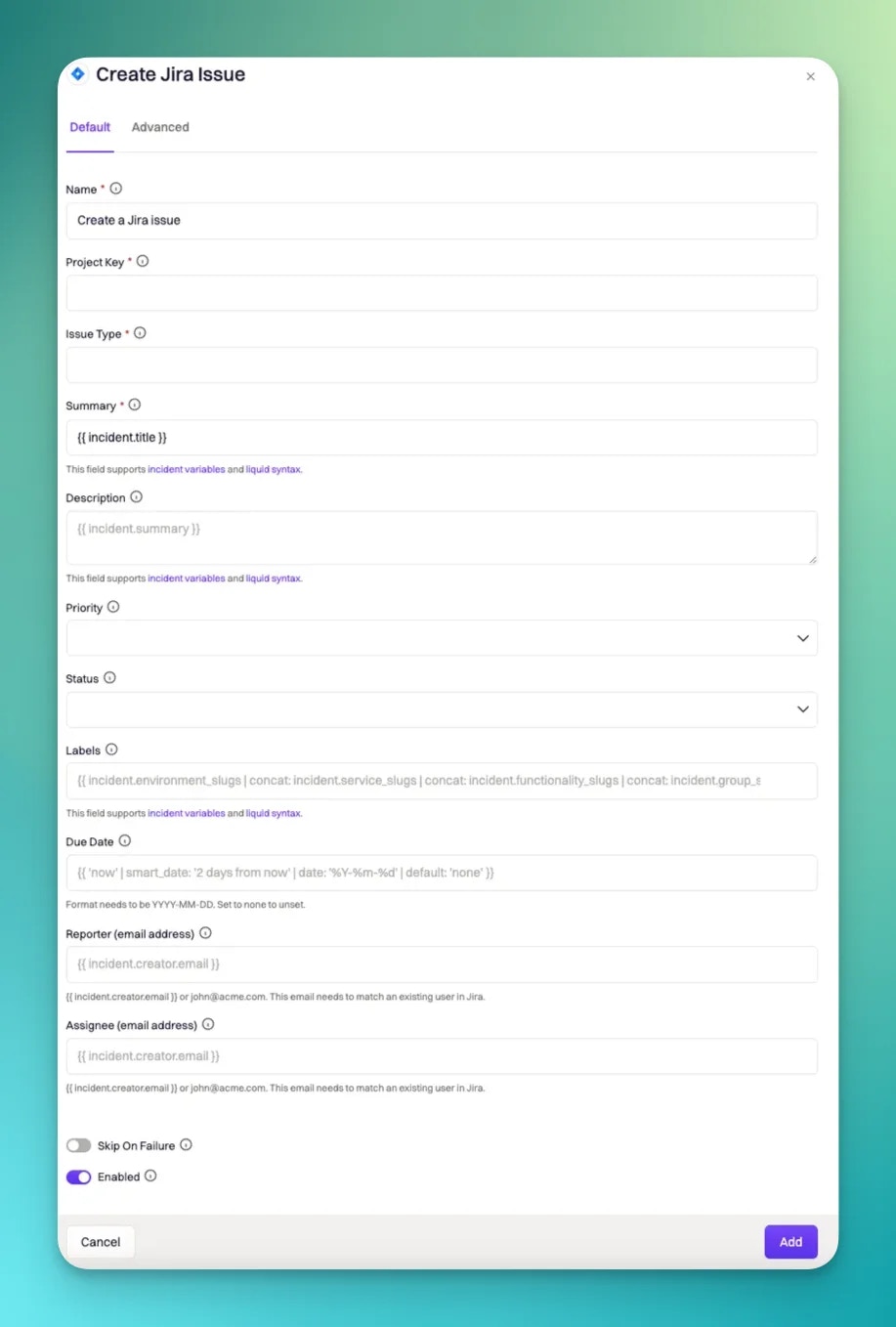 The Jira project where the issue will be created.
The type of Jira issue to create. Options are pulled from the selected project.
The title of the Jira issue. Supports Liquid syntax (e.g., `{{ incident.title }}`).
The description of the Jira issue. Supports Liquid syntax (e.g., `{{ incident.summary }}`).
Assign the Jira issue to a user by email. Supports Liquid syntax.
Updates an existing ticket in Jira. You must reference the issue in the **Jira Issue to Update** field using `{{ incident.jira_issue_id }}`.
The Jira project where the issue will be created.
The type of Jira issue to create. Options are pulled from the selected project.
The title of the Jira issue. Supports Liquid syntax (e.g., `{{ incident.title }}`).
The description of the Jira issue. Supports Liquid syntax (e.g., `{{ incident.summary }}`).
Assign the Jira issue to a user by email. Supports Liquid syntax.
Updates an existing ticket in Jira. You must reference the issue in the **Jira Issue to Update** field using `{{ incident.jira_issue_id }}`.
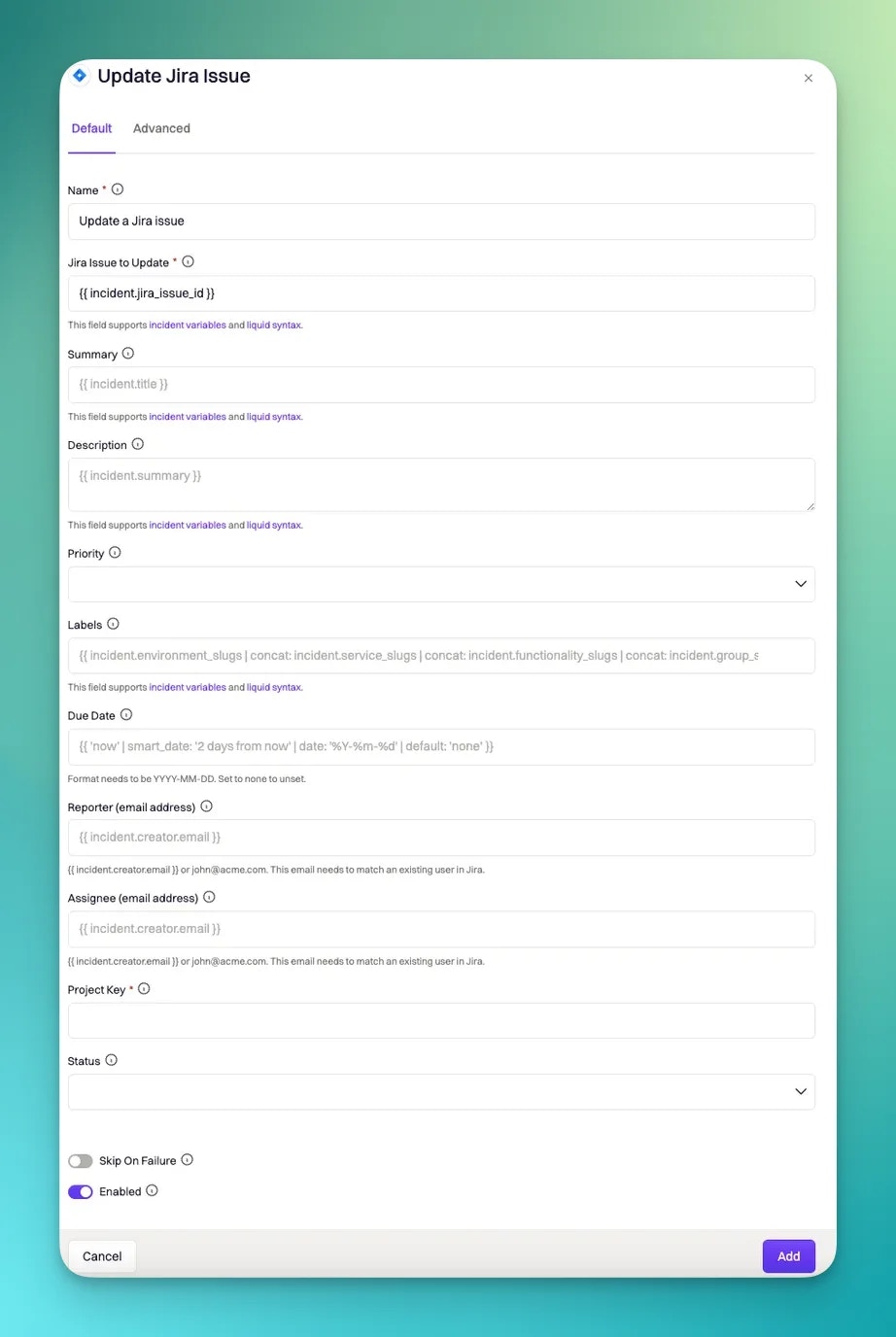 This action only works if a Jira issue has already been created and linked to the incident.
Reference to the existing Jira issue. Use `{{ incident.jira_issue_id }}` to dynamically target the issue linked to the current incident.
Updated title of the Jira issue. Supports Liquid syntax.
Updated description. Supports Liquid syntax.
Transition the issue to a new status. Options are pulled from the selected project and issue type.
Reassign the Jira issue to a different user. Supports Liquid syntax.
Creates a subtask under an existing Jira issue. Intended for **action items** or **sub-incidents**. The **Project Key** must match the one used when creating the parent issue.
This action only works if a Jira issue has already been created and linked to the incident.
Reference to the existing Jira issue. Use `{{ incident.jira_issue_id }}` to dynamically target the issue linked to the current incident.
Updated title of the Jira issue. Supports Liquid syntax.
Updated description. Supports Liquid syntax.
Transition the issue to a new status. Options are pulled from the selected project and issue type.
Reassign the Jira issue to a different user. Supports Liquid syntax.
Creates a subtask under an existing Jira issue. Intended for **action items** or **sub-incidents**. The **Project Key** must match the one used when creating the parent issue.
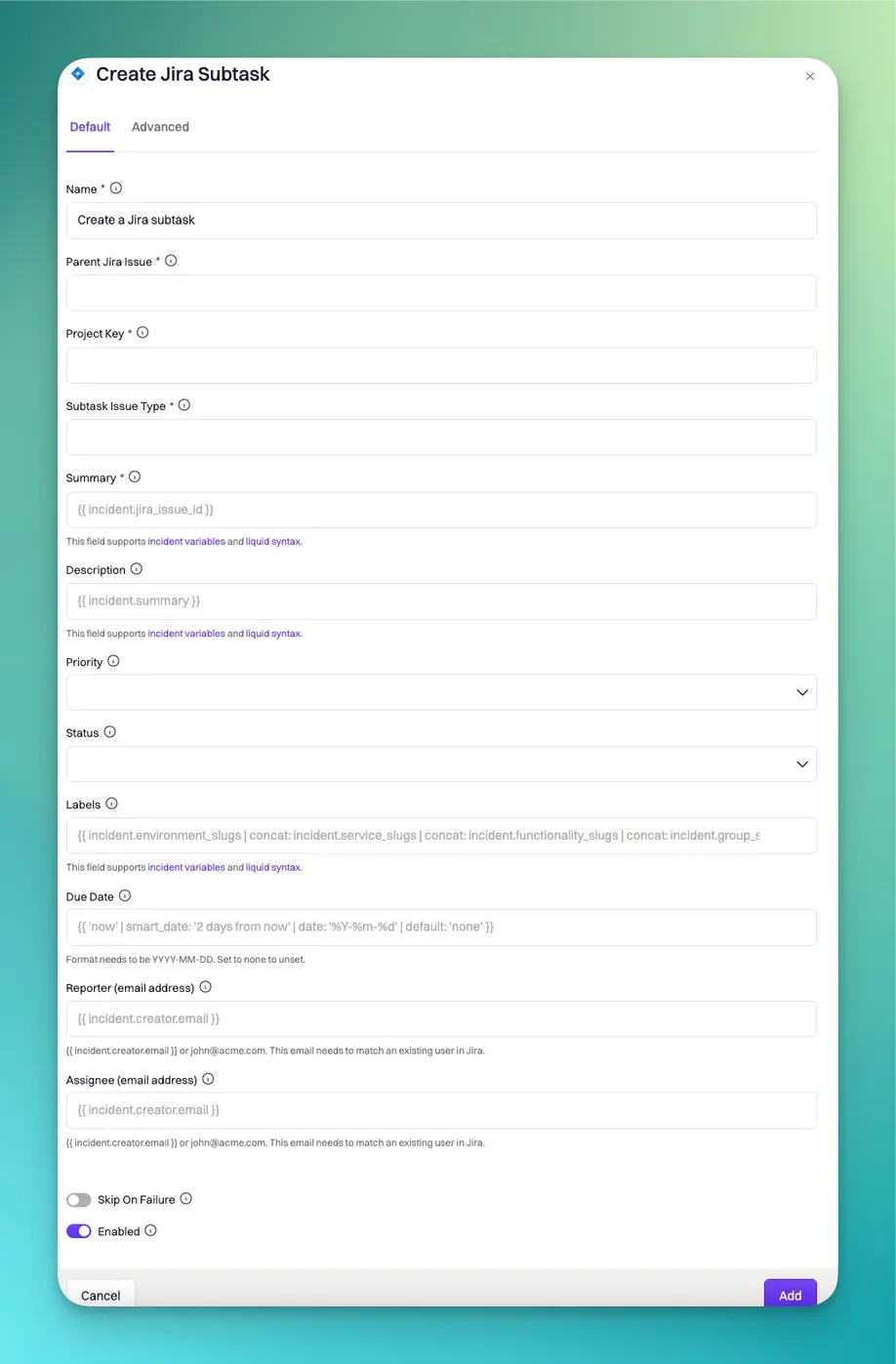 Reference to the parent Jira issue. Use `{{ incident.jira_issue_id }}` to link the subtask to the current incident's issue.
Must match the project used to create the parent issue.
Title of the subtask. Supports Liquid syntax.
Description of the subtask. Supports Liquid syntax.
Assign the subtask to a user by email. Supports Liquid syntax.
***
## Jira Native Field Mapping
Some Jira fields behave differently than standard custom fields.
These mappings go in the **Custom Fields Mapping** section of the Jira action, not the API Payload section.
Jira's native Labels field uses a different syntax than custom label-type fields.
Reference to the parent Jira issue. Use `{{ incident.jira_issue_id }}` to link the subtask to the current incident's issue.
Must match the project used to create the parent issue.
Title of the subtask. Supports Liquid syntax.
Description of the subtask. Supports Liquid syntax.
Assign the subtask to a user by email. Supports Liquid syntax.
***
## Jira Native Field Mapping
Some Jira fields behave differently than standard custom fields.
These mappings go in the **Custom Fields Mapping** section of the Jira action, not the API Payload section.
Jira's native Labels field uses a different syntax than custom label-type fields.
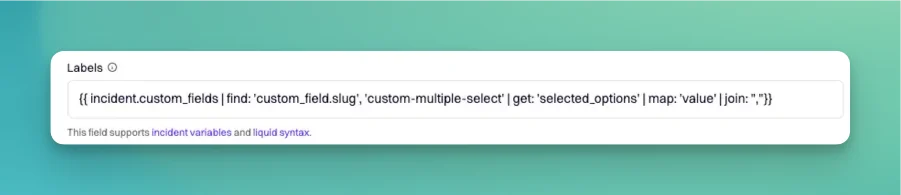 ```json theme={null}
// Rootly native multi-select → Jira native Labels
"customfield_12345": {{ incident.service_slugs | join: ","}}
// Rootly custom multi-select → Jira native Labels
"customfield_10033": {{ incident.custom_fields | find: 'custom_field.slug', 'your_custom_field_slug' | get: 'selected_options' | map: 'value' | join: "," }}
```
Jira's native Team field is stored as a custom field and only allows a single team selection.
```json theme={null}
// Static Jira Team ID
"customfield_10001": ""
// Dynamic: Rootly team → Jira Team (using description field to store the Jira team ID)
"customfield_10001": "{{ incident.raw_groups[0] | get: 'description' }}"
```
***
## Custom Fields Mapping
The **Custom Fields Mapping** section lets you map Rootly incident data to Jira custom fields dynamically. To access it, open the **Advanced** tab in any Jira workflow action.
```json theme={null}
// Rootly native multi-select → Jira native Labels
"customfield_12345": {{ incident.service_slugs | join: ","}}
// Rootly custom multi-select → Jira native Labels
"customfield_10033": {{ incident.custom_fields | find: 'custom_field.slug', 'your_custom_field_slug' | get: 'selected_options' | map: 'value' | join: "," }}
```
Jira's native Team field is stored as a custom field and only allows a single team selection.
```json theme={null}
// Static Jira Team ID
"customfield_10001": ""
// Dynamic: Rootly team → Jira Team (using description field to store the Jira team ID)
"customfield_10001": "{{ incident.raw_groups[0] | get: 'description' }}"
```
***
## Custom Fields Mapping
The **Custom Fields Mapping** section lets you map Rootly incident data to Jira custom fields dynamically. To access it, open the **Advanced** tab in any Jira workflow action.
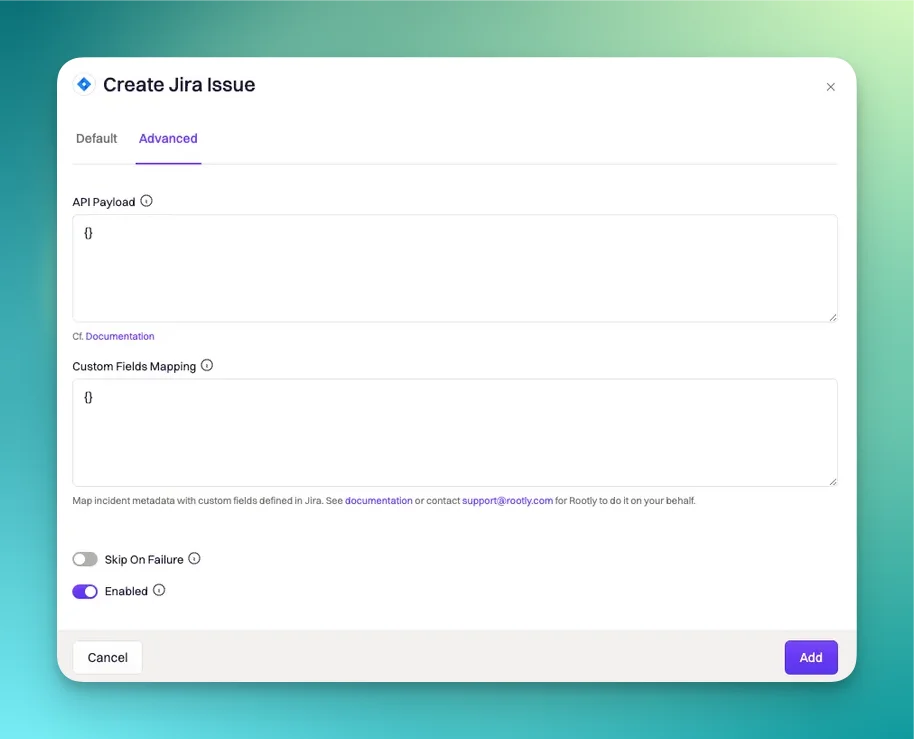 To use custom field mapping, you'll need to know:
* The **custom field ID** in Jira (e.g., `customfield_12345`)
* The **field type** in Jira
* The **incident property** in Rootly to map from
Find Jira custom field IDs with this [Atlassian article](https://confluence.atlassian.com/jirakb/how-to-find-id-for-custom-field-s-744522503.html). Browse Rootly's available Liquid variables in the [Liquid Variable Explorer](https://rootly.com/account/help/liquid-explorer).
```json theme={null}
// Rootly native field → Jira text
"customfield_12345": "{{ incident.functionalities }}"
// Rootly custom field → Jira text
"customfield_12345": "{{ incident.custom_fields | find: 'custom_field.slug', 'your-slug' | get: 'selected_options' | map: 'value' }}"
```
Note the `{ "value": ... }` wrapper required by Jira:
```json theme={null}
// Rootly team name → Jira single select
"customfield_12345": { "value": "{{ incident.raw_groups | first | get: 'name' }}" }
// Rootly custom field → Jira single select
"customfield_12345": { "value": "{{ incident.custom_fields | find: 'custom_field.slug', 'your_custom_field_slug' | get: 'selected_options' | map: 'value' }}" }
```
**Simple approach (Rootly custom multi-select):**
```json theme={null}
"customfield_12345": {{ incident.custom_fields | find: 'custom_field.slug', 'your_custom_field_slug' | get: 'selected_options' | to_values }}
```
**Manual array building (Rootly native fields):**
```liquid theme={null}
{% assign functions = incident.functionalities %}
{% assign array = "" %}
{% for function in functions %}
{% assign item = '{"value":"' | append: function | append: '"}' %}
{% assign array = array | append: item | append: "," %}
{% endfor %}
{% capture final_array %}[{{ array | remove_last: ',' }}]{% endcapture %}
"customfield_12345": {{ final_array }}
```
For Jira custom fields of type "Labels" (different from the native Labels field):
```json theme={null}
// Rootly native multi-select → Jira labels
"customfield_12345": {{ incident.service_slugs | to_json }}
// Rootly custom multi-select → Jira labels
"customfield_10033": {{ incident.custom_fields | find: 'custom_field.slug', 'your_custom_field_slug' | get: 'selected_options' | map: 'value' | to_json }}
```
```json theme={null}
"customfield_26117": {{ incident.custom_fields | find: 'custom_field.slug', 'your_custom_field_slug' | get: 'selected_options.value' }}
```
Must use ISO 8601 format:
```json theme={null}
// Rootly incident start time → Jira datetime
"customfield_10030": "{{ incident.started_at | date: '%FT%T%:z' }}"
// Rootly custom datetime → Jira datetime
"customfield_26218": "{{ incident.custom_fields | find: 'custom_field.slug', 'your_custom_field_slug' | get: 'selected_options.value' | date: '%Y-%m-%dT%H:%M:%S.%d%z' }}"
```
**Single user:**
```json theme={null}
{% assign jira_email = incident.roles | find: 'incident_role.slug', 'incident-commander' | get: 'user.email' %}
"customfield_20825": { "id": "{{ team.jira_users | where: 'email', jira_email | first | get: 'account_id' }}" }
```
**Multiple users:**
```json theme={null}
{% assign jira_email = incident.roles | find: 'incident_role.slug', 'incident-commander' | get: 'user.email' %}
"customfield_20825": [{ "id": "{{ team.jira_users | where: 'email', jira_email | first | get: 'account_id' }}" }]
```
***
## API Payload
The **API Payload** section provides direct access to Jira's REST API for advanced field updates not available through Custom Fields Mapping.
```liquid theme={null}
{% if incident.severity_slug == 'sev0' %}
{ "priority": [ { "set": { "name" : "High" } } ] }
{% elsif incident.severity_slug == 'sev1' %}
{ "priority": [ { "set": { "name" : "Medium" } } ] }
{% elsif incident.severity_slug == 'sev2' %}
{ "priority": [ { "set": { "name" : "Low" } } ] }
{% endif %}
```
Add a comment to an existing Jira issue. Only works with the **Update Jira Issue** action.
```json theme={null}
{
"comment": [
{
"add": {
"body": "Enter your message here. Liquid syntax is supported."
}
}
]
}
```
Link a Jira issue (e.g., for an action item) to the parent incident issue.
**"Relates to" link:**
```json theme={null}
{
"issuelinks": [
{
"add": {
"type": { "name": "Relates", "outward": "relates to" },
"outwardIssue": { "id": "{{ incident.jira_issue_id }}" }
}
}
]
}
```
**Custom "Action item for" link:**
```json theme={null}
{
"issuelinks": [
{
"add": {
"type": { "name": "Action", "outward": "action item for" },
"outwardIssue": { "id": "{{ incident.jira_issue_id }}" }
}
}
]
}
```
```json theme={null}
{
"labels": [{ "set": ["label1", "label2"] }]
}
```
Maps Rootly services to Jira Components. Service names in Rootly must match component names in Jira exactly.
```liquid theme={null}
{% assign components = incident.services %}
{
"components": [
{
"set": [
{% for component in components %}
{ "name": "{{ component }}" }{% unless forloop.last %},{% endunless %}
{% endfor %}
]
}
]
}
```
If a component name doesn't exist in Jira, the update will fail.
***
## Debugging
To view error details, locate the workflow in Rootly, then select **... → View Runs → View**.
| Error | Cause | Fix |
| -------------------------------------------------- | ------------------------------------------------------------- | --------------------------------------------------------- |
| `issue_id cannot be null.` | The Jira issue you're trying to update doesn't exist yet | Ensure the Create action runs before the Update action |
| `"customfield_12345": "Custom Field is required."` | A required Jira custom field isn't being populated | Add a mapping for the field, or make it optional in Jira |
| `unexpected token at '{ "customfield_10032": }'` | Custom mapping syntax is invalid | Fix your JSON syntax |
| `Specify a valid project ID or key` | The selected Project Key isn't available in the Jira instance | Reselect the Jira instance, then reselect the Project Key |
| `The issue type selected is invalid.` | The selected issue type doesn't exist in the project | Reselect the Project Key, then reselect the Issue Type |
To use custom field mapping, you'll need to know:
* The **custom field ID** in Jira (e.g., `customfield_12345`)
* The **field type** in Jira
* The **incident property** in Rootly to map from
Find Jira custom field IDs with this [Atlassian article](https://confluence.atlassian.com/jirakb/how-to-find-id-for-custom-field-s-744522503.html). Browse Rootly's available Liquid variables in the [Liquid Variable Explorer](https://rootly.com/account/help/liquid-explorer).
```json theme={null}
// Rootly native field → Jira text
"customfield_12345": "{{ incident.functionalities }}"
// Rootly custom field → Jira text
"customfield_12345": "{{ incident.custom_fields | find: 'custom_field.slug', 'your-slug' | get: 'selected_options' | map: 'value' }}"
```
Note the `{ "value": ... }` wrapper required by Jira:
```json theme={null}
// Rootly team name → Jira single select
"customfield_12345": { "value": "{{ incident.raw_groups | first | get: 'name' }}" }
// Rootly custom field → Jira single select
"customfield_12345": { "value": "{{ incident.custom_fields | find: 'custom_field.slug', 'your_custom_field_slug' | get: 'selected_options' | map: 'value' }}" }
```
**Simple approach (Rootly custom multi-select):**
```json theme={null}
"customfield_12345": {{ incident.custom_fields | find: 'custom_field.slug', 'your_custom_field_slug' | get: 'selected_options' | to_values }}
```
**Manual array building (Rootly native fields):**
```liquid theme={null}
{% assign functions = incident.functionalities %}
{% assign array = "" %}
{% for function in functions %}
{% assign item = '{"value":"' | append: function | append: '"}' %}
{% assign array = array | append: item | append: "," %}
{% endfor %}
{% capture final_array %}[{{ array | remove_last: ',' }}]{% endcapture %}
"customfield_12345": {{ final_array }}
```
For Jira custom fields of type "Labels" (different from the native Labels field):
```json theme={null}
// Rootly native multi-select → Jira labels
"customfield_12345": {{ incident.service_slugs | to_json }}
// Rootly custom multi-select → Jira labels
"customfield_10033": {{ incident.custom_fields | find: 'custom_field.slug', 'your_custom_field_slug' | get: 'selected_options' | map: 'value' | to_json }}
```
```json theme={null}
"customfield_26117": {{ incident.custom_fields | find: 'custom_field.slug', 'your_custom_field_slug' | get: 'selected_options.value' }}
```
Must use ISO 8601 format:
```json theme={null}
// Rootly incident start time → Jira datetime
"customfield_10030": "{{ incident.started_at | date: '%FT%T%:z' }}"
// Rootly custom datetime → Jira datetime
"customfield_26218": "{{ incident.custom_fields | find: 'custom_field.slug', 'your_custom_field_slug' | get: 'selected_options.value' | date: '%Y-%m-%dT%H:%M:%S.%d%z' }}"
```
**Single user:**
```json theme={null}
{% assign jira_email = incident.roles | find: 'incident_role.slug', 'incident-commander' | get: 'user.email' %}
"customfield_20825": { "id": "{{ team.jira_users | where: 'email', jira_email | first | get: 'account_id' }}" }
```
**Multiple users:**
```json theme={null}
{% assign jira_email = incident.roles | find: 'incident_role.slug', 'incident-commander' | get: 'user.email' %}
"customfield_20825": [{ "id": "{{ team.jira_users | where: 'email', jira_email | first | get: 'account_id' }}" }]
```
***
## API Payload
The **API Payload** section provides direct access to Jira's REST API for advanced field updates not available through Custom Fields Mapping.
```liquid theme={null}
{% if incident.severity_slug == 'sev0' %}
{ "priority": [ { "set": { "name" : "High" } } ] }
{% elsif incident.severity_slug == 'sev1' %}
{ "priority": [ { "set": { "name" : "Medium" } } ] }
{% elsif incident.severity_slug == 'sev2' %}
{ "priority": [ { "set": { "name" : "Low" } } ] }
{% endif %}
```
Add a comment to an existing Jira issue. Only works with the **Update Jira Issue** action.
```json theme={null}
{
"comment": [
{
"add": {
"body": "Enter your message here. Liquid syntax is supported."
}
}
]
}
```
Link a Jira issue (e.g., for an action item) to the parent incident issue.
**"Relates to" link:**
```json theme={null}
{
"issuelinks": [
{
"add": {
"type": { "name": "Relates", "outward": "relates to" },
"outwardIssue": { "id": "{{ incident.jira_issue_id }}" }
}
}
]
}
```
**Custom "Action item for" link:**
```json theme={null}
{
"issuelinks": [
{
"add": {
"type": { "name": "Action", "outward": "action item for" },
"outwardIssue": { "id": "{{ incident.jira_issue_id }}" }
}
}
]
}
```
```json theme={null}
{
"labels": [{ "set": ["label1", "label2"] }]
}
```
Maps Rootly services to Jira Components. Service names in Rootly must match component names in Jira exactly.
```liquid theme={null}
{% assign components = incident.services %}
{
"components": [
{
"set": [
{% for component in components %}
{ "name": "{{ component }}" }{% unless forloop.last %},{% endunless %}
{% endfor %}
]
}
]
}
```
If a component name doesn't exist in Jira, the update will fail.
***
## Debugging
To view error details, locate the workflow in Rootly, then select **... → View Runs → View**.
| Error | Cause | Fix |
| -------------------------------------------------- | ------------------------------------------------------------- | --------------------------------------------------------- |
| `issue_id cannot be null.` | The Jira issue you're trying to update doesn't exist yet | Ensure the Create action runs before the Update action |
| `"customfield_12345": "Custom Field is required."` | A required Jira custom field isn't being populated | Add a mapping for the field, or make it optional in Jira |
| `unexpected token at '{ "customfield_10032": }'` | Custom mapping syntax is invalid | Fix your JSON syntax |
| `Specify a valid project ID or key` | The selected Project Key isn't available in the Jira instance | Reselect the Jira instance, then reselect the Project Key |
| `The issue type selected is invalid.` | The selected issue type doesn't exist in the project | Reselect the Project Key, then reselect the Issue Type |