> ## Documentation Index
> Fetch the complete documentation index at: https://docs.rootly.com/llms.txt
> Use this file to discover all available pages before exploring further.
# Workflows
> Use Rootly workflow actions to create and update ServiceNow incident records from Rootly incidents with field mapping, assignment groups, and category support.
## Overview
The ServiceNow integration provides workflow actions for creating and updating ServiceNow incidents from Rootly. If you are unfamiliar with how Genius workflows work, visit the [Workflows](/workflows) documentation first.
## Available Workflow Actions
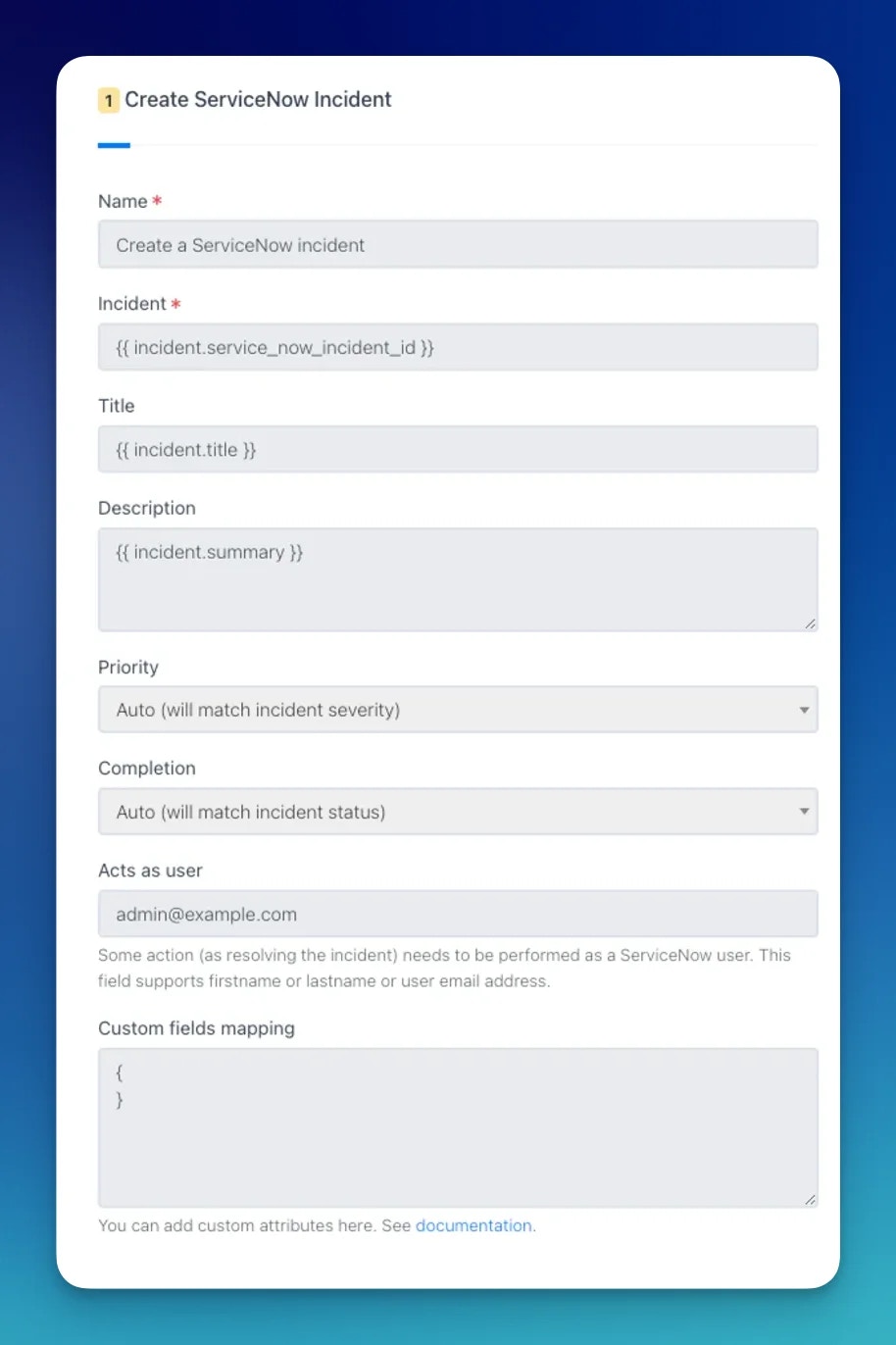
### Create a ServiceNow Incident
This action creates a new record in the ServiceNow `Incident` table (e.g. `INC0010001`) and links it to the Rootly incident.
| Field | Description | Required |
| ------------------------- | ------------------------------------------------------------------------------------------------------------- | -------- |
| **Name** | Display name for this workflow action | |
| **Title** | Maps to `short_description` in ServiceNow. Supports Liquid | Yes |
| **Description** | Maps to `description` in ServiceNow. Supports Liquid | |
| **Priority** | Maps to `urgency`. **Auto** mirrors the incident severity | |
| **Status** | Maps to `state`. **Auto** mirrors the incident status | |
| **Acts As User** | Name or email of the ServiceNow user to set as caller when resolving. Only active when status is Resolved (6) | |
| **Custom Fields Mapping** | JSON of additional ServiceNow fields. Merged directly into the incident payload. Supports Liquid | |
**Priority mapping (Auto)**
| Rootly Severity | ServiceNow Urgency |
| --------------- | ------------------ |
| Critical | High (1) |
| High | High (1) |
| Medium | Medium (2) |
| Low | Low (3) |
**Status mapping (Auto)**
| Rootly Status | ServiceNow State |
| ------------- | ---------------- |
| Started | New (1) |
| Mitigated | In Progress (2) |
| Resolved | Resolved (6) |
Available states: New (1), In Progress (2), On Hold (3), Resolved (6), Closed (7), Canceled (8).
**Acts As User** triggers a Zendesk user lookup by first name, last name, or email. When matched, Rootly sets `caller_id`, `close_code`, and `close_notes` automatically. It only applies when the state is set to Resolved (6).
 ***
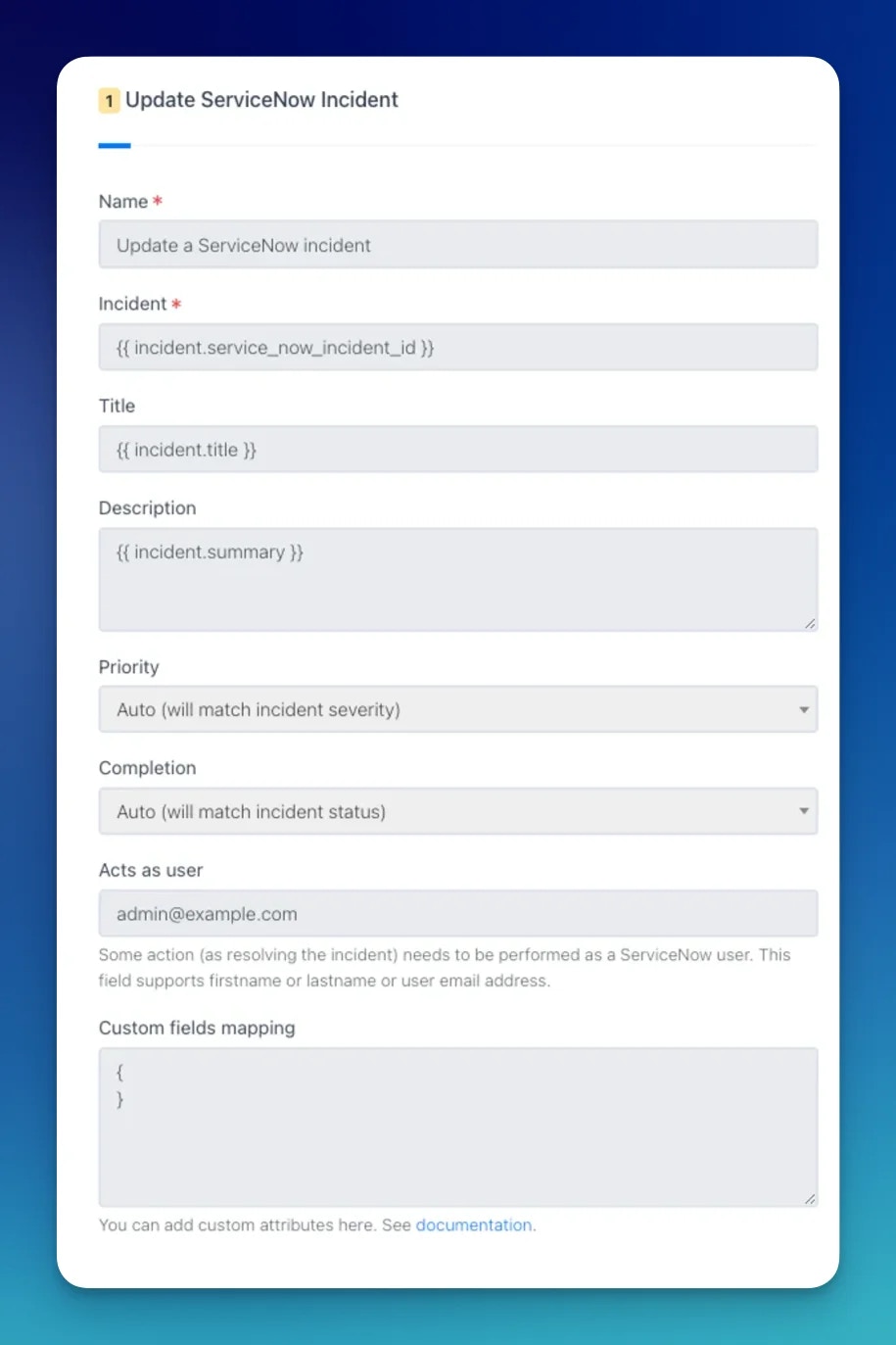
### Update a ServiceNow Incident
This action updates an existing record in the ServiceNow `Incident` table.
When a **Create a ServiceNow Incident** action runs, Rootly stores the resulting `sys_id` and incident number on the incident record. Reference them in subsequent update actions using Liquid variables.
| Field | Description | Required |
| ------------------------- | -------------------------------------------------------------- | -------- |
| **Name** | Display name for this workflow action | |
| **Incident ID** | ServiceNow `sys_id` of the incident to update. Supports Liquid | Yes |
| **Title** | Updated `short_description`. Supports Liquid | |
| **Description** | Updated `description`. Supports Liquid | |
| **Priority** | Updated urgency level | |
| **Status** | Updated incident state | |
| **Acts As User** | Name or email of the caller to set when resolving | |
| **Custom Fields Mapping** | Updated custom field values as JSON. Supports Liquid | |
***
### Update a ServiceNow Incident
This action updates an existing record in the ServiceNow `Incident` table.
When a **Create a ServiceNow Incident** action runs, Rootly stores the resulting `sys_id` and incident number on the incident record. Reference them in subsequent update actions using Liquid variables.
| Field | Description | Required |
| ------------------------- | -------------------------------------------------------------- | -------- |
| **Name** | Display name for this workflow action | |
| **Incident ID** | ServiceNow `sys_id` of the incident to update. Supports Liquid | Yes |
| **Title** | Updated `short_description`. Supports Liquid | |
| **Description** | Updated `description`. Supports Liquid | |
| **Priority** | Updated urgency level | |
| **Status** | Updated incident state | |
| **Acts As User** | Name or email of the caller to set when resolving | |
| **Custom Fields Mapping** | Updated custom field values as JSON. Supports Liquid | |
 ***
## Common Custom Field Examples
### Work Notes (Internal)
Work notes are visible only to ServiceNow agents, not customers.
```json theme={null}
{
"work_notes": "{{ incident.events[0].event_raw }}"
}
```
### Comments (Customer-Visible)
```json theme={null}
{
"comments": "{{ incident.events[0].event_raw }}"
}
```
### Major Incident
```json theme={null}
{
"assignment_group": "3De45d9ebc3b333200fe02c9bb34efc434",
"major_incident_state": "proposed"
}
```
Major incident state changes may require specific ACL permissions in ServiceNow. See the [ServiceNow community](https://community.servicenow.com/community?id=community_question\&sys_id=fae73aeb1b7370900b8a9979b04bcb1a) for details.
***
## Add Configuration Items (CIs) to an Incident
Adding configuration items to a ServiceNow incident requires multiple API calls (one per CI). Use Rootly's **HTTP Client** workflow action with the ServiceNow Batch API to consolidate them into a single request.
***
## Common Custom Field Examples
### Work Notes (Internal)
Work notes are visible only to ServiceNow agents, not customers.
```json theme={null}
{
"work_notes": "{{ incident.events[0].event_raw }}"
}
```
### Comments (Customer-Visible)
```json theme={null}
{
"comments": "{{ incident.events[0].event_raw }}"
}
```
### Major Incident
```json theme={null}
{
"assignment_group": "3De45d9ebc3b333200fe02c9bb34efc434",
"major_incident_state": "proposed"
}
```
Major incident state changes may require specific ACL permissions in ServiceNow. See the [ServiceNow community](https://community.servicenow.com/community?id=community_question\&sys_id=fae73aeb1b7370900b8a9979b04bcb1a) for details.
***
## Add Configuration Items (CIs) to an Incident
Adding configuration items to a ServiceNow incident requires multiple API calls (one per CI). Use Rootly's **HTTP Client** workflow action with the ServiceNow Batch API to consolidate them into a single request.
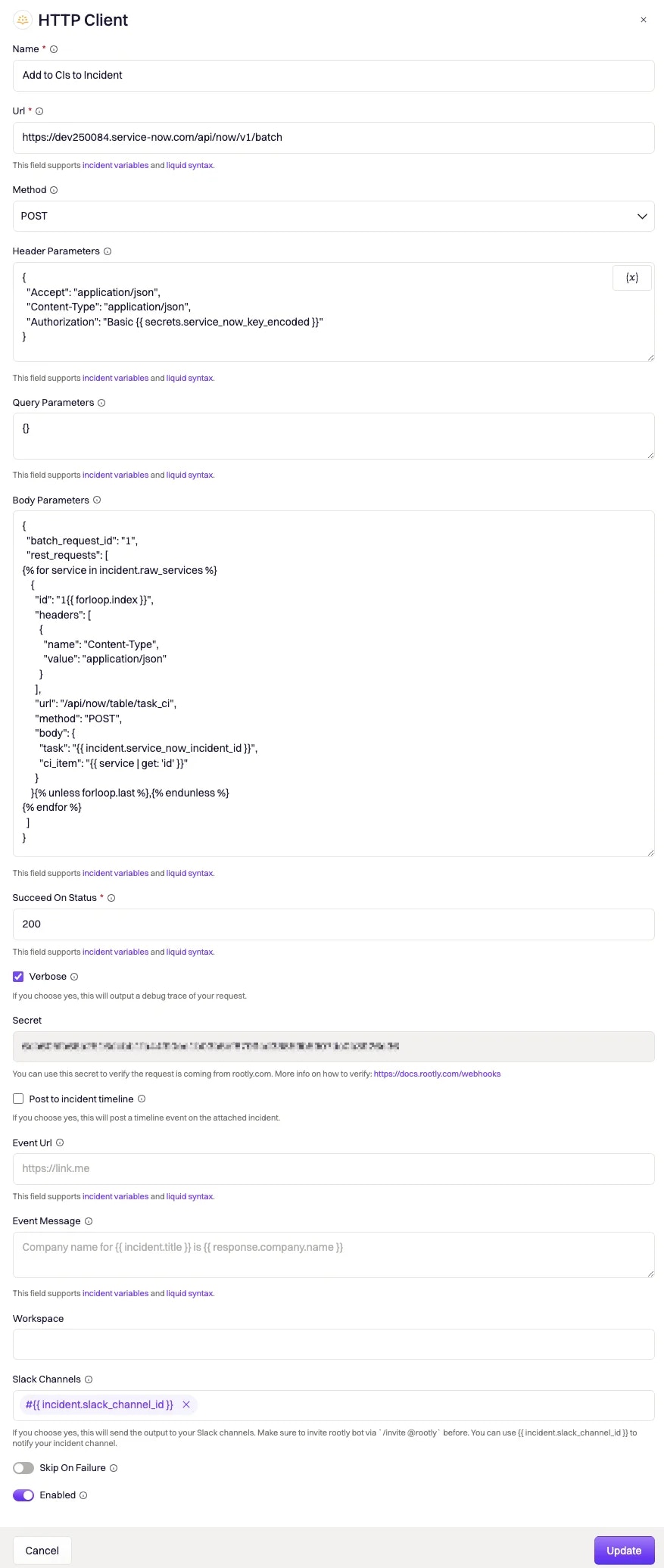 ### Endpoint
```
POST https://.com/api/now/v1/batch
```
### Headers
```json theme={null}
{
"Accept": "application/json",
"Content-Type": "application/json",
"Authorization": "Basic {{ secrets.service_now_key_encoded }}"
}
```
Store your Base64-encoded `username:password` as a [Rootly Secret](https://rootly.com/account/secrets) to keep credentials out of plain-text workflow configurations.
### Body
Each individual Table API call must have its `body` Base64-encoded. The following Liquid template dynamically generates one batch entry per service associated with the incident:
```json theme={null}
{
"batch_request_id": "1",
"rest_requests": [
{% for service in genius_workflow_run.newly_added_services %}
{% assign task_value = incident.service_now_incident_id %}
{% assign ci_item_value = service | get: 'service_now_ci_sys_id' %}
{% assign body_string = '{ "task": "' | append: task_value | append: '", "ci_item": "' | append: ci_item_value | append: '" }' %}
{
"id": "1{{ forloop.index }}",
"headers": [{ "name": "Content-Type", "value": "application/json" }],
"url": "/api/now/table/task_ci",
"method": "POST",
"body": "{{ body_string | base64_encode }}"
}{% unless forloop.last %},{% endunless %}
{% endfor %}
]
}
```
To use this template, each ServiceNow CI's `sys_id` must be linked to the equivalent Rootly service using the `service_now_ci_sys_id` field.
### Succeed On Status
Set to `200`. The ServiceNow Batch API returns `200` (not `201`) on success.
### Endpoint
```
POST https://.com/api/now/v1/batch
```
### Headers
```json theme={null}
{
"Accept": "application/json",
"Content-Type": "application/json",
"Authorization": "Basic {{ secrets.service_now_key_encoded }}"
}
```
Store your Base64-encoded `username:password` as a [Rootly Secret](https://rootly.com/account/secrets) to keep credentials out of plain-text workflow configurations.
### Body
Each individual Table API call must have its `body` Base64-encoded. The following Liquid template dynamically generates one batch entry per service associated with the incident:
```json theme={null}
{
"batch_request_id": "1",
"rest_requests": [
{% for service in genius_workflow_run.newly_added_services %}
{% assign task_value = incident.service_now_incident_id %}
{% assign ci_item_value = service | get: 'service_now_ci_sys_id' %}
{% assign body_string = '{ "task": "' | append: task_value | append: '", "ci_item": "' | append: ci_item_value | append: '" }' %}
{
"id": "1{{ forloop.index }}",
"headers": [{ "name": "Content-Type", "value": "application/json" }],
"url": "/api/now/table/task_ci",
"method": "POST",
"body": "{{ body_string | base64_encode }}"
}{% unless forloop.last %},{% endunless %}
{% endfor %}
]
}
```
To use this template, each ServiceNow CI's `sys_id` must be linked to the equivalent Rootly service using the `service_now_ci_sys_id` field.
### Succeed On Status
Set to `200`. The ServiceNow Batch API returns `200` (not `201`) on success.