> ## Documentation Index
> Fetch the complete documentation index at: https://docs.rootly.com/llms.txt
> Use this file to discover all available pages before exploring further.
# Smart Defaults
> Pre-configured Rootly settings that automate Slack channel creation, notifications, bookmarks, and topic updates without manual workflow configuration.
Smart Defaults let you configure automatic Slack behaviors without building custom workflows. Enable channel creation, set up announcements, configure reminders, and manage archiving from a single settings panel.
**New vs Existing Customers:**
* **New customers** have Smart Defaults enabled by default and can manage incidents immediately
* **Existing customers** have Smart Defaults disabled to avoid disrupting existing workflow configurations
***
## How to Access
1. Go to **Configuration → Integrations → Slack**
2. Click **Configure**
3. You'll see the Smart Defaults panel
***
## Workspace Setup
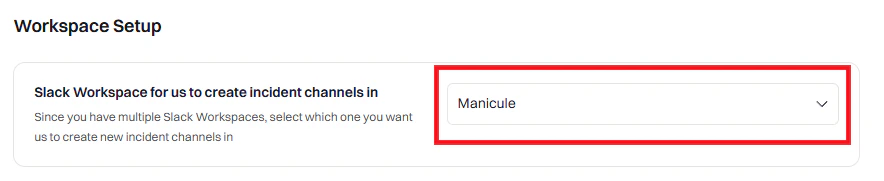 Select the Slack workspace where incident channels will be created.
Most users see one workspace. **Enterprise Grid** customers may see multiple workspaces.
The selected workspace determines which users, groups, and channels appear in Rootly dropdowns.
***
## Notifications
Configure what messages Rootly sends to Slack.
### Team Notifications
Select the Slack workspace where incident channels will be created.
Most users see one workspace. **Enterprise Grid** customers may see multiple workspaces.
The selected workspace determines which users, groups, and channels appear in Rootly dropdowns.
***
## Notifications
Configure what messages Rootly sends to Slack.
### Team Notifications
 Announces every new incident in a specified channel.
 Rootly refreshes channels daily. Click **Refresh channels** if a channel doesn't appear.
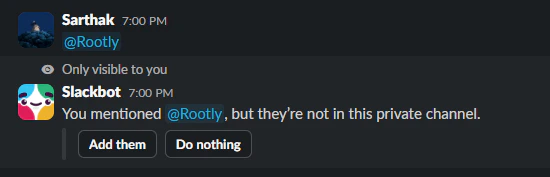
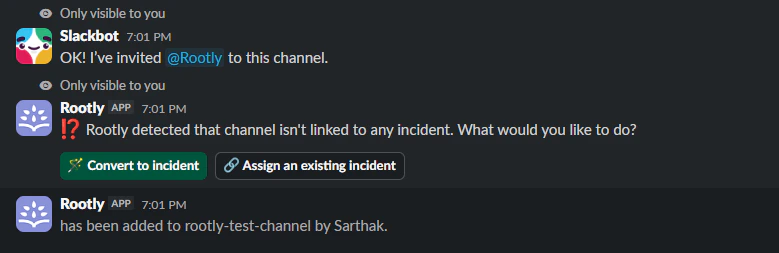
For **private channels**, the Rootly bot must be added first. Send `@Rootly` in the channel to invite the bot.
Rootly refreshes channels daily. Click **Refresh channels** if a channel doesn't appear.
For **private channels**, the Rootly bot must be added first. Send `@Rootly` in the channel to invite the bot.
 Notify specific users, groups, or channels when high-severity incidents are declared.
See [Severities](/configuration/severities) to configure severity levels.
Announces new alerts in a specified channel. Messages auto-update as alerts are acknowledged, escalated, or resolved.
For conditional routing (e.g., different channels per team), use a [Custom Workflow](/integrations/slack/workflows/custom-workflows).
### Smart Reminders
Notify specific users, groups, or channels when high-severity incidents are declared.
See [Severities](/configuration/severities) to configure severity levels.
Announces new alerts in a specified channel. Messages auto-update as alerts are acknowledged, escalated, or resolved.
For conditional routing (e.g., different channels per team), use a [Custom Workflow](/integrations/slack/workflows/custom-workflows).
### Smart Reminders
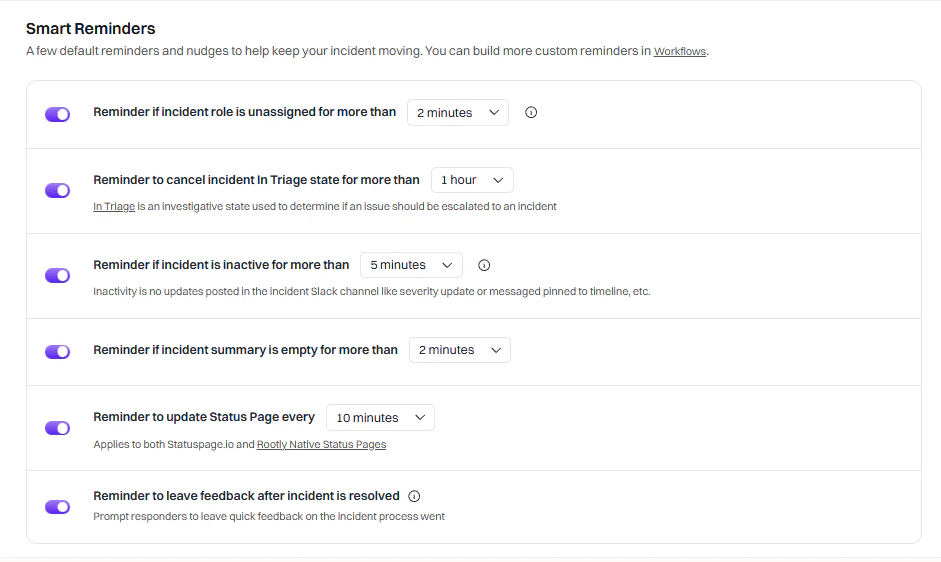 | Reminder | What It Does |
| ---------------------- | ------------------------------------------------------------ |
| **Unassigned roles** | Notifies if no incident roles are assigned within a set time |
| **Triage timeout** | Notifies if incident stays in Triage state too long |
| **Inactive incident** | Notifies if no activity occurs within a set time |
| **Empty summary** | Notifies if incident summary remains blank |
| **Status page update** | Periodic reminder to update status pages |
| **Leave feedback** | Reminder to log feedback after resolution |
**What counts as "activity"?**
* Updating the incident summary ✓
* Using 📌 emoji to log timeline events ✓
* Regular messages in the channel ✗ (does not count)
### Updates
| Reminder | What It Does |
| ---------------------- | ------------------------------------------------------------ |
| **Unassigned roles** | Notifies if no incident roles are assigned within a set time |
| **Triage timeout** | Notifies if incident stays in Triage state too long |
| **Inactive incident** | Notifies if no activity occurs within a set time |
| **Empty summary** | Notifies if incident summary remains blank |
| **Status page update** | Periodic reminder to update status pages |
| **Leave feedback** | Reminder to log feedback after resolution |
**What counts as "activity"?**
* Updating the incident summary ✓
* Using 📌 emoji to log timeline events ✓
* Regular messages in the channel ✗ (does not count)
### Updates
 | Setting | What It Does |
| ------------------------------------- | ---------------------------------------------- |
| **Status change notifications** | Post to channel when incident status changes |
| **Status page notifications** | Post when a status page is updated |
| **Draft communication notifications** | Post when a draft communication is created |
| **Timeline pin reaction** | Add ✅ emoji when events are pinned to timeline |
| **Pin timeline events** | Pin timeline updates to the Slack channel |
### Advanced
| Setting | What It Does |
| ------------------------------------- | ---------------------------------------------- |
| **Status change notifications** | Post to channel when incident status changes |
| **Status page notifications** | Post when a status page is updated |
| **Draft communication notifications** | Post when a draft communication is created |
| **Timeline pin reaction** | Add ✅ emoji when events are pinned to timeline |
| **Pin timeline events** | Pin timeline updates to the Slack channel |
### Advanced
 | Setting | What It Does |
| ----------------------------- | -------------------------------------------------------------------------------------------- |
| **Broadcast incident events** | Post timeline updates as new messages instead of threading them. Noisier but harder to miss. |
| **Mention and tag @user** | Tag users mentioned by Rootly in timeline updates. Disable to reduce notification fatigue. |
***
## Incident Channel
Configure how incident channels are created and managed.
### Channel Settings
| Setting | What It Does |
| ----------------------------- | -------------------------------------------------------------------------------------------- |
| **Broadcast incident events** | Post timeline updates as new messages instead of threading them. Noisier but harder to miss. |
| **Mention and tag @user** | Tag users mentioned by Rootly in timeline updates. Disable to reduce notification fatigue. |
***
## Incident Channel
Configure how incident channels are created and managed.
### Channel Settings
 | Setting | What It Does |
| ------------------------------- | ---------------------------------------------------------------------------------------------------------- |
| **Create incident channel** | Auto-create a Slack channel for each new incident. Highly recommended. |
| **Channel naming convention** | Select from predefined formats or create custom names using [Liquid variables](/liquid/incident-variables) |
| **Auto-bookmark incident link** | Add a bookmark linking to the incident in Rootly web UI |
| **Auto-update channel topic** | Update topic when severity, status, type, or environment changes |
Slack doesn't allow duplicate channel names. Predefined options ensure uniqueness. For custom names, include unique identifiers like `{{ incident.sequential_id }}`.
**Example custom channel names:**
* `inc-{{ incident.sequential_id }}-{{ incident.title | slugify }}`
* `{{ incident.severity | downcase }}-{{ incident.created_at | date: '%Y%m%d' }}-{{ incident.title | truncate: 20 }}`
### Bypass Slack Permissions
| Setting | What It Does |
| ------------------------------- | ---------------------------------------------------------------------------------------------------------- |
| **Create incident channel** | Auto-create a Slack channel for each new incident. Highly recommended. |
| **Channel naming convention** | Select from predefined formats or create custom names using [Liquid variables](/liquid/incident-variables) |
| **Auto-bookmark incident link** | Add a bookmark linking to the incident in Rootly web UI |
| **Auto-update channel topic** | Update topic when severity, status, type, or environment changes |
Slack doesn't allow duplicate channel names. Predefined options ensure uniqueness. For custom names, include unique identifiers like `{{ incident.sequential_id }}`.
**Example custom channel names:**
* `inc-{{ incident.sequential_id }}-{{ incident.title | slugify }}`
* `{{ incident.severity | downcase }}-{{ incident.created_at | date: '%Y%m%d' }}-{{ incident.title | truncate: 20 }}`
### Bypass Slack Permissions
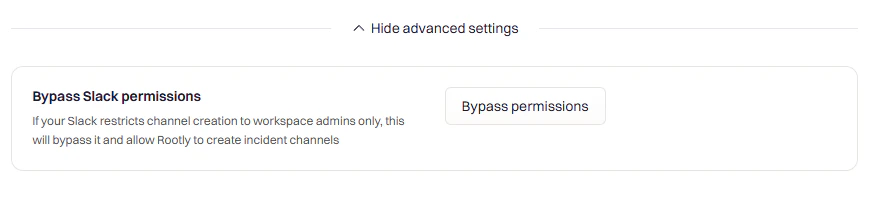 Some workspaces restrict channel creation to admins. Enable this to let Rootly create channels on behalf of admin users.
Check with your Slack admin before enabling. This requires additional user scopes.
### Emoji Shortcuts
Some workspaces restrict channel creation to admins. Enable this to let Rootly create channels on behalf of admin users.
Check with your Slack admin before enabling. This requires additional user scopes.
### Emoji Shortcuts
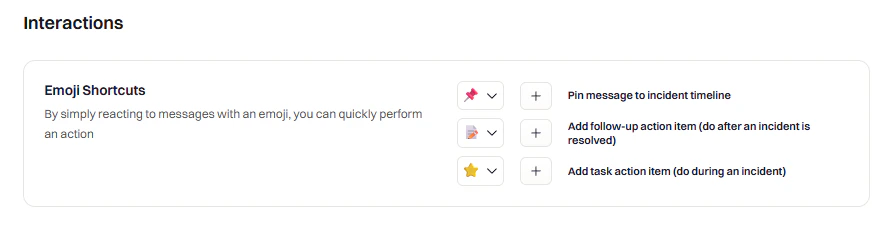 Configure emoji reactions to trigger actions:
| Default Emoji | Action |
| ------------- | -------------------------------- |
| 📌 | Add message to incident timeline |
| 🔧 | Create a follow-up action item |
| ⭐ | Create a task |
Choose uncommon emojis to avoid accidental triggers. Avoid 👍, 😄, or other frequently used reactions.
### Archive Channels
Configure emoji reactions to trigger actions:
| Default Emoji | Action |
| ------------- | -------------------------------- |
| 📌 | Add message to incident timeline |
| 🔧 | Create a follow-up action item |
| ⭐ | Create a task |
Choose uncommon emojis to avoid accidental triggers. Avoid 👍, 😄, or other frequently used reactions.
### Archive Channels
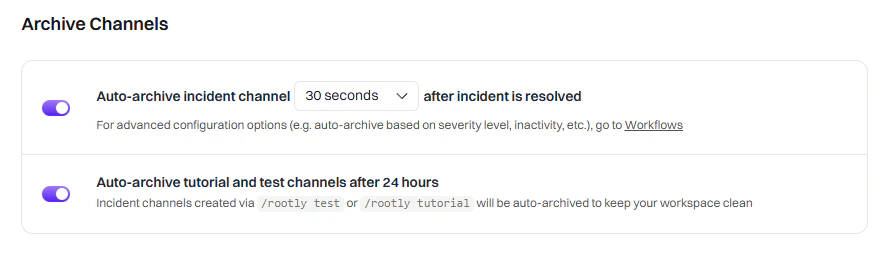 | Setting | What It Does |
| ---------------------------------- | --------------------------------------------------------------------------------------- |
| **Auto-archive incident channels** | Archive channels after resolution. Set a delay (1-2 days recommended) to allow cleanup. |
| **Auto-archive test incidents** | Archive test/tutorial channels 24 hours after creation |
### Member Tracking
| Setting | What It Does |
| ---------------------------------- | --------------------------------------------------------------------------------------- |
| **Auto-archive incident channels** | Archive channels after resolution. Set a delay (1-2 days recommended) to allow cleanup. |
| **Auto-archive test incidents** | Archive test/tutorial channels 24 hours after creation |
### Member Tracking
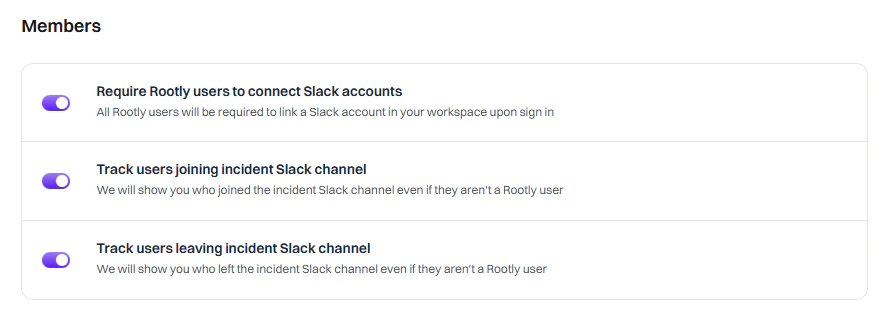 | Setting | What It Does |
| ---------------------------- | ------------------------------------------------------ |
| **Require Slack connection** | Force all Rootly users to connect their Slack accounts |
| **Track joins** | Log when users join incident channels to the timeline |
| **Track leaves** | Log when users leave incident channels to the timeline |
***
## When to Use Custom Workflows Instead
Smart Defaults cover common scenarios, but use [Custom Workflows](/integrations/slack/workflows/custom-workflows) when you need:
* **Conditional logic** — Different channels for different teams or severities
* **Multi-step automations** — Invite users, then send a message, then add a bookmark
* **Integration actions** — Create Jira tickets, page PagerDuty, update status pages
* **Scheduled/delayed actions** — Send reminders at specific intervals
* **Custom message formatting** — Use Block Kit for rich interactive messages
| Setting | What It Does |
| ---------------------------- | ------------------------------------------------------ |
| **Require Slack connection** | Force all Rootly users to connect their Slack accounts |
| **Track joins** | Log when users join incident channels to the timeline |
| **Track leaves** | Log when users leave incident channels to the timeline |
***
## When to Use Custom Workflows Instead
Smart Defaults cover common scenarios, but use [Custom Workflows](/integrations/slack/workflows/custom-workflows) when you need:
* **Conditional logic** — Different channels for different teams or severities
* **Multi-step automations** — Invite users, then send a message, then add a bookmark
* **Integration actions** — Create Jira tickets, page PagerDuty, update status pages
* **Scheduled/delayed actions** — Send reminders at specific intervals
* **Custom message formatting** — Use Block Kit for rich interactive messages