> ## Documentation Index
> Fetch the complete documentation index at: https://docs.rootly.com/llms.txt
> Use this file to discover all available pages before exploring further.
# Zapier
> Connect Rootly with thousands of apps through Zapier to automate incident workflows without code, including ticketing, notifications, CRM, and reporting.
## Introduction
The Rootly–Zapier integration lets you connect Rootly to thousands of apps without writing any code. You can trigger Zaps when incident events occur in Rootly, and take actions on Rootly — creating incidents, updating their status, and more — from any app in the Zapier ecosystem.
## Before You Begin
Before building Zaps with Rootly, make sure you have:
* A Rootly account with permission to manage integrations
* A Zapier account
* A Rootly API key — generate one in **Account** > **Manage API keys** > **Generate New API Key**
## Installation
Go to [zapier.com/apps/rootly/integrations](https://zapier.com/apps/rootly/integrations) and select **Connect Rootly**.
When prompted, paste your Rootly API key. Zapier uses this to authenticate all trigger and action calls on your behalf.
Rootly is connected. You can now select any Rootly trigger or action when building a Zap.
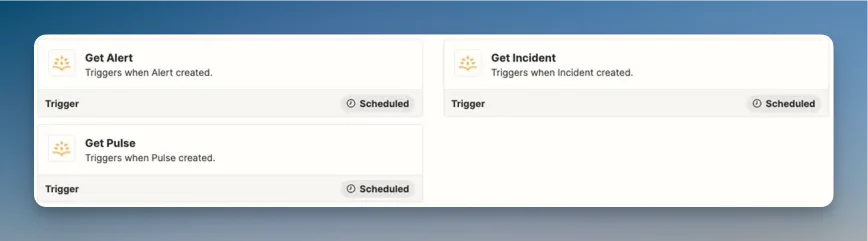
## Triggers
Rootly sends webhook events to Zapier when the following events occur. Use these as the starting point for your Zaps.
 ### Incident Events
| Event | Description |
| -------------------- | ---------------------------------- |
| `incident.created` | A new incident was opened |
| `incident.updated` | An incident's fields were modified |
| `incident.in_triage` | An incident moved to in triage |
| `incident.mitigated` | An incident was mitigated |
| `incident.resolved` | An incident was resolved |
| `incident.cancelled` | An incident was cancelled |
| `incident.deleted` | An incident was deleted |
### Scheduled Incident Events
| Event | Description |
| -------------------------------- | -------------------------------- |
| `incident.scheduled.created` | A scheduled incident was created |
| `incident.scheduled.updated` | A scheduled incident was updated |
| `incident.scheduled.in_progress` | A scheduled incident started |
| `incident.scheduled.completed` | A scheduled incident completed |
| `incident.scheduled.deleted` | A scheduled incident was deleted |
### Other Events
| Event | Description |
| -------------------------------------------------------------- | ---------------------------- |
| `incident_post_mortem.created/updated/published/deleted` | Post-mortem lifecycle events |
| `incident_status_page_event.created/updated/deleted` | Status page event changes |
| `incident_event.created/updated/deleted` | Incident timeline events |
| `alert.created` | A new alert was received |
| `genius_workflow_run.queued/started/completed/failed/canceled` | Workflow run state changes |
| `pulse.created` | A new pulse was created |
## Actions
Use Rootly actions as steps in any Zap to manage incidents from external apps.
### Incident Events
| Event | Description |
| -------------------- | ---------------------------------- |
| `incident.created` | A new incident was opened |
| `incident.updated` | An incident's fields were modified |
| `incident.in_triage` | An incident moved to in triage |
| `incident.mitigated` | An incident was mitigated |
| `incident.resolved` | An incident was resolved |
| `incident.cancelled` | An incident was cancelled |
| `incident.deleted` | An incident was deleted |
### Scheduled Incident Events
| Event | Description |
| -------------------------------- | -------------------------------- |
| `incident.scheduled.created` | A scheduled incident was created |
| `incident.scheduled.updated` | A scheduled incident was updated |
| `incident.scheduled.in_progress` | A scheduled incident started |
| `incident.scheduled.completed` | A scheduled incident completed |
| `incident.scheduled.deleted` | A scheduled incident was deleted |
### Other Events
| Event | Description |
| -------------------------------------------------------------- | ---------------------------- |
| `incident_post_mortem.created/updated/published/deleted` | Post-mortem lifecycle events |
| `incident_status_page_event.created/updated/deleted` | Status page event changes |
| `incident_event.created/updated/deleted` | Incident timeline events |
| `alert.created` | A new alert was received |
| `genius_workflow_run.queued/started/completed/failed/canceled` | Workflow run state changes |
| `pulse.created` | A new pulse was created |
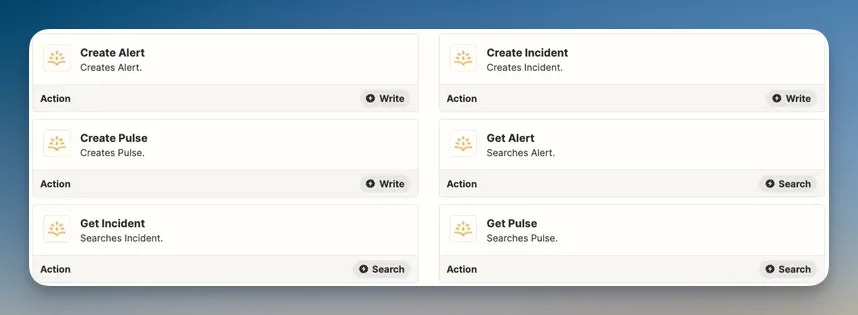
## Actions
Use Rootly actions as steps in any Zap to manage incidents from external apps.
 ### Create Incident
Creates a new Rootly incident. Supports setting the title, summary, and severity.
### Update Incident
Modifies an existing incident — title, summary, severity, status, services, teams, and labels are all updatable.
### Incident State Transitions
Trigger status changes on existing incidents:
* Mark as **In Triage**
* Mark as **Mitigated**
* Mark as **Resolved**
* Mark as **Cancelled**
### Create Alert
Creates or updates an alert in Rootly.
## Troubleshooting
Confirm the API key is active and has not been revoked. Go to **Account** > **Manage API keys** in Rootly and verify the key exists. Zapier authenticates each request using the key you provided during setup — if the key was regenerated or deleted, you'll need to reconnect the Rootly app in Zapier.
Zapier polls for new trigger data on a schedule based on your Zapier plan. Events are not delivered in real time on all plans. If you need immediate delivery, check your Zapier plan's polling frequency. Also confirm your Zap is turned on and the trigger step is configured with the correct event type.
Rootly's API requires that all fields passed to actions are valid. Check the error message returned by Zapier for details — common causes include an invalid incident ID, an unsupported severity value, or a missing required field. Refer to the [Rootly API reference](/api-reference/overview) for valid field values.
The events available in Zapier reflect what Rootly publishes via webhooks. If you need an event type that is not available, contact [support@rootly.com](mailto:support@rootly.com).
## Related Pages
Build native Rootly workflows for automation that doesn't require Zapier.
The full API reference — all endpoints Zapier actions call are documented here.
Browse all available Rootly triggers and actions in the Zapier app directory.
### Create Incident
Creates a new Rootly incident. Supports setting the title, summary, and severity.
### Update Incident
Modifies an existing incident — title, summary, severity, status, services, teams, and labels are all updatable.
### Incident State Transitions
Trigger status changes on existing incidents:
* Mark as **In Triage**
* Mark as **Mitigated**
* Mark as **Resolved**
* Mark as **Cancelled**
### Create Alert
Creates or updates an alert in Rootly.
## Troubleshooting
Confirm the API key is active and has not been revoked. Go to **Account** > **Manage API keys** in Rootly and verify the key exists. Zapier authenticates each request using the key you provided during setup — if the key was regenerated or deleted, you'll need to reconnect the Rootly app in Zapier.
Zapier polls for new trigger data on a schedule based on your Zapier plan. Events are not delivered in real time on all plans. If you need immediate delivery, check your Zapier plan's polling frequency. Also confirm your Zap is turned on and the trigger step is configured with the correct event type.
Rootly's API requires that all fields passed to actions are valid. Check the error message returned by Zapier for details — common causes include an invalid incident ID, an unsupported severity value, or a missing required field. Refer to the [Rootly API reference](/api-reference/overview) for valid field values.
The events available in Zapier reflect what Rootly publishes via webhooks. If you need an event type that is not available, contact [support@rootly.com](mailto:support@rootly.com).
## Related Pages
Build native Rootly workflows for automation that doesn't require Zapier.
The full API reference — all endpoints Zapier actions call are documented here.
Browse all available Rootly triggers and actions in the Zapier app directory.