> ## Documentation Index
> Fetch the complete documentation index at: https://docs.rootly.com/llms.txt
> Use this file to discover all available pages before exploring further.
# Zoom
> Automatically create Zoom meetings for Rootly incidents and share meeting links in Slack channels and notifications for fast responder collaboration.
## Overview
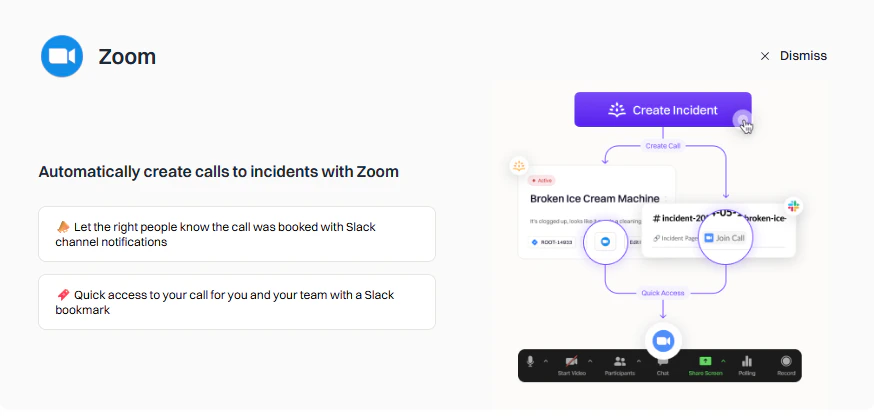
Rootly's Zoom integration automatically creates a Zoom meeting when an incident starts and posts the link directly in the incident's Slack channel. Responders can join instantly without manual setup — no time wasted creating or sharing meeting links during a critical incident.
 ## Features
Zoom calls created automatically when incidents start.
Meeting links posted directly in the incident Slack channel.
Configure local or cloud recording and AI meeting capture.
Configure triggers, conditions, hosts, and recording options per workflow.
## Meeting Scribe on Zoom
The Zoom integration powers **[Rootly AI Meeting Scribe](/ai/meeting-scribe)** on your Zoom incident bridges — automatic recording, live transcription, PII-redacted transcripts, and Rootly AI meeting summaries fed straight into the incident's post-incident artifacts.
To enable:
1. Go to **Integrations → Zoom** in Rootly.
2. Toggle on **Meeting transcript and summary**.
3. **Enable Auto-join bot** — highly recommended. Without this, someone needs to manually admit the scribe on every call, and it drops off after 10 minutes if no one does.
Auto-join is the single biggest lever for reliable Zoom scribe behavior. If you're seeing intermittent "the bot never joined" reports, check this first.
Running into issues? See **[Zoom Meeting Scribe Troubleshooting](/integrations/zoom/troubleshooting)** for the common failure modes and fixes.
***
## Next Steps
Connect your Zoom account to Rootly via OAuth.
Configure automatic meeting creation for incidents.
Recording, transcription, and AI summaries for Zoom incident bridges.
Fixes for the most common Zoom + Meeting Scribe issues.
## Features
Zoom calls created automatically when incidents start.
Meeting links posted directly in the incident Slack channel.
Configure local or cloud recording and AI meeting capture.
Configure triggers, conditions, hosts, and recording options per workflow.
## Meeting Scribe on Zoom
The Zoom integration powers **[Rootly AI Meeting Scribe](/ai/meeting-scribe)** on your Zoom incident bridges — automatic recording, live transcription, PII-redacted transcripts, and Rootly AI meeting summaries fed straight into the incident's post-incident artifacts.
To enable:
1. Go to **Integrations → Zoom** in Rootly.
2. Toggle on **Meeting transcript and summary**.
3. **Enable Auto-join bot** — highly recommended. Without this, someone needs to manually admit the scribe on every call, and it drops off after 10 minutes if no one does.
Auto-join is the single biggest lever for reliable Zoom scribe behavior. If you're seeing intermittent "the bot never joined" reports, check this first.
Running into issues? See **[Zoom Meeting Scribe Troubleshooting](/integrations/zoom/troubleshooting)** for the common failure modes and fixes.
***
## Next Steps
Connect your Zoom account to Rootly via OAuth.
Configure automatic meeting creation for incidents.
Recording, transcription, and AI summaries for Zoom incident bridges.
Fixes for the most common Zoom + Meeting Scribe issues.