> ## Documentation Index
> Fetch the complete documentation index at: https://docs.rootly.com/llms.txt
> Use this file to discover all available pages before exploring further.
# Importing Teams
> Import team names and structure from connected integrations like PagerDuty, Opsgenie, and Slack to quickly populate your Rootly teams without manual setup.
You can import teams from connected integrations such as [PagerDuty](/integrations/pagerduty) and [Opsgenie](/integrations/opsgenie) to quickly create your team structure in Rootly.
Importing teams helps you get started faster by creating Rootly teams from your external team configuration instead of rebuilding them manually.
## Before You Begin
Before importing teams, make sure:
* Your integration is already configured in Rootly
* You have permission to create teams
* You are importing team structure only
This import flow creates or updates team records in Rootly using the external team’s name and description. It does not import members, schedules, or escalation policies.
## Import Teams
To import teams from a connected integration:
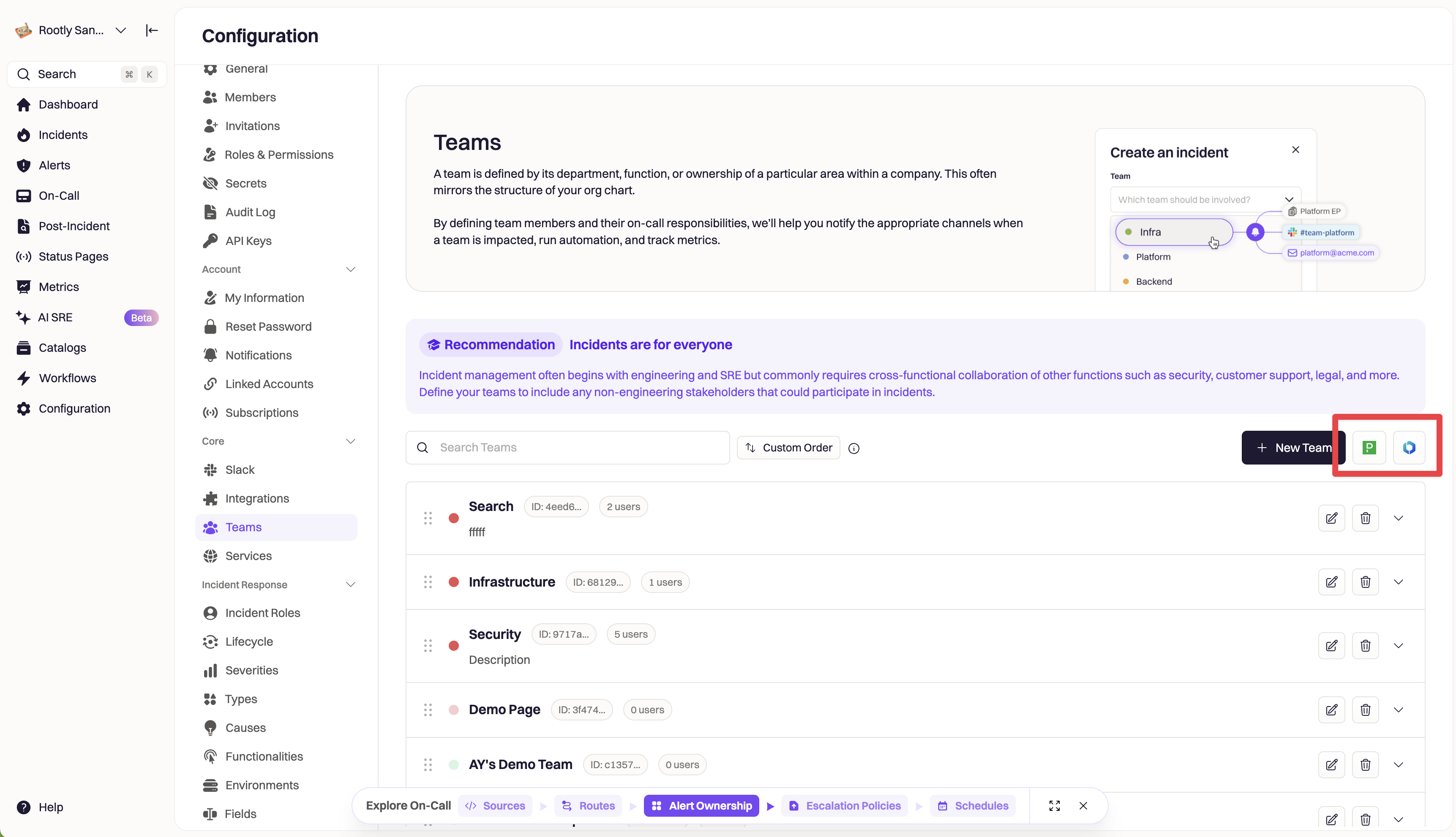
1. Navigate to **Configuration → Teams**
2. In the top-right corner, click the integration button for the service you want to import from, such as **PagerDuty** or **Opsgenie**
3. In the import modal, review the list of available teams
4. Select the teams you want to import
5. Click **Import**
After the import finishes, the selected teams appear on the **Teams** page.
If a team is already linked to the external integration, Rootly updates the existing team instead of creating a duplicate.
 Team import does not include members, on-call schedules, or escalation policies. Use the separate migration flow if you need to bring over on-call configuration.
## What Gets Imported
This flow imports the following team details:
* Team name
* Team description
* External integration link
This flow does not import:
* Team members
* On-call schedules
* Escalation policies
If you need to migrate on-call configuration, use the dedicated migration flow for that integration.
## Other Supported Integrations
Depending on which integrations are configured in your workspace, you may also be able to import teams from other providers using the same workflow.
## Troubleshooting
### I don’t see the import buttons
Confirm that the integration is connected and that you have permission to create teams. If either requirement is missing, the import option may not appear.
### I get an error when opening the import modal
Check that the integration is configured correctly and that Rootly can successfully connect to the provider. Configuration or authorization issues can prevent the import list from loading.
### I imported a team, but expected more data
This import only creates or updates the team record itself. Members, schedules, and escalation policies are not included in this step.
## Frequently Asked Questions
When you import a team, Rootly creates a new team or updates an existing linked team using the external team’s information. This helps you quickly mirror your team structure in Rootly without recreating each team manually.
No. If Rootly finds an existing team already linked to the same external team, it updates that team instead of creating a duplicate.
No. This flow imports team structure only. If you need members, schedules, or escalation policies, use the separate migration or on-call import flow for that integration.
PagerDuty and Opsgenie support team import, and other integrations may also support the same workflow when configured in your workspace.
The most common reasons are that the integration is not configured yet or your role does not have permission to create teams.
Team import does not include members, on-call schedules, or escalation policies. Use the separate migration flow if you need to bring over on-call configuration.
## What Gets Imported
This flow imports the following team details:
* Team name
* Team description
* External integration link
This flow does not import:
* Team members
* On-call schedules
* Escalation policies
If you need to migrate on-call configuration, use the dedicated migration flow for that integration.
## Other Supported Integrations
Depending on which integrations are configured in your workspace, you may also be able to import teams from other providers using the same workflow.
## Troubleshooting
### I don’t see the import buttons
Confirm that the integration is connected and that you have permission to create teams. If either requirement is missing, the import option may not appear.
### I get an error when opening the import modal
Check that the integration is configured correctly and that Rootly can successfully connect to the provider. Configuration or authorization issues can prevent the import list from loading.
### I imported a team, but expected more data
This import only creates or updates the team record itself. Members, schedules, and escalation policies are not included in this step.
## Frequently Asked Questions
When you import a team, Rootly creates a new team or updates an existing linked team using the external team’s information. This helps you quickly mirror your team structure in Rootly without recreating each team manually.
No. If Rootly finds an existing team already linked to the same external team, it updates that team instead of creating a duplicate.
No. This flow imports team structure only. If you need members, schedules, or escalation policies, use the separate migration or on-call import flow for that integration.
PagerDuty and Opsgenie support team import, and other integrations may also support the same workflow when configured in your workspace.
The most common reasons are that the integration is not configured yet or your role does not have permission to create teams.