> ## Documentation Index
> Fetch the complete documentation index at: https://docs.rootly.com/llms.txt
> Use this file to discover all available pages before exploring further.
# Alert Muting
> Temporarily mute automated Rootly alert notifications to yourself from the mobile app during an alert storm, without affecting escalations or teammates.
## Overview
Alert Muting lets you temporarily stop automated alert notifications addressed to you — push, SMS, phone calls, email, and Slack or Google Chat direct messages — for a short, fixed window. It's built for [alert storms](/glossary/alert-fatigue): when dozens of alerts fire at once, muting lets you actually use your phone to triage, communicate, and resolve instead of dismissing a page every few seconds.
A few things deliberately still reach you while muted: manually triggered pages, live call routing calls, and messages posted to shared Slack channels, Teams channels, or Google Chat spaces. See [What gets muted](#what-gets-muted) for the full breakdown.
Muting is controlled entirely from the **Rootly mobile app** and only affects you. Alerts are still created, routed, and escalated exactly as configured, and your teammates are paged as normal.
 ***
## How alert muting works
* **It's personal.** A mute only suppresses notifications sent to *you*. Everyone else on the escalation policy is notified as usual.
* **It applies to your account, not a single device.** Muting from one phone mutes notifications to all your devices and channels, and the mute state syncs to your other logged-in devices.
* **Alerts keep flowing.** Alert creation, routing, grouping, and [escalation policies](/on-call/escalation-policies) are unaffected. Alerts remain visible on the Alerts screen in the mobile app and on the web while you're muted.
* **Muted notifications are dropped, not delayed.** Anything suppressed during the mute is *not* re-delivered when the mute ends. You'll only be notified again if the escalation policy fires a new notification.
* **Mutes end on their own.** Every mute has a fixed end time and expires automatically — there's no way to mute indefinitely.
You won't be notified of automated alerts while muted. Unacknowledged alerts can still escalate to the next step of the escalation policy — potentially paging your teammates. Use short mute windows and keep an eye on the Alerts screen.
***
## What gets muted
| Muted while active | Never muted |
| ------------------------------------- | --------------------------------------------------------------------------------- |
| Push notifications | Manually triggered pages (a person deliberately paging you from Rootly) |
| SMS | [Live call routing](/on-call/live-call-routing) calls and voicemail callbacks |
| Phone calls | Messages posted to a Slack channel, Microsoft Teams channel, or Google Chat space |
| Email | |
| Slack and Google Chat direct messages | |
Muting only suppresses notifications addressed to you personally. Messages posted to a shared channel or space are team-wide, so they're never suppressed — even if you're the only person watching that channel.
The other two exceptions are deliberate: a manual page means a human decided you specifically need to know, and live call routing would otherwise leave a caller waiting on hold for someone who can't hear the phone ring.
***
## Mute alerts from the mobile app
You can open the mute screen from several places in the app:
* **Settings → Mute alert notifications**
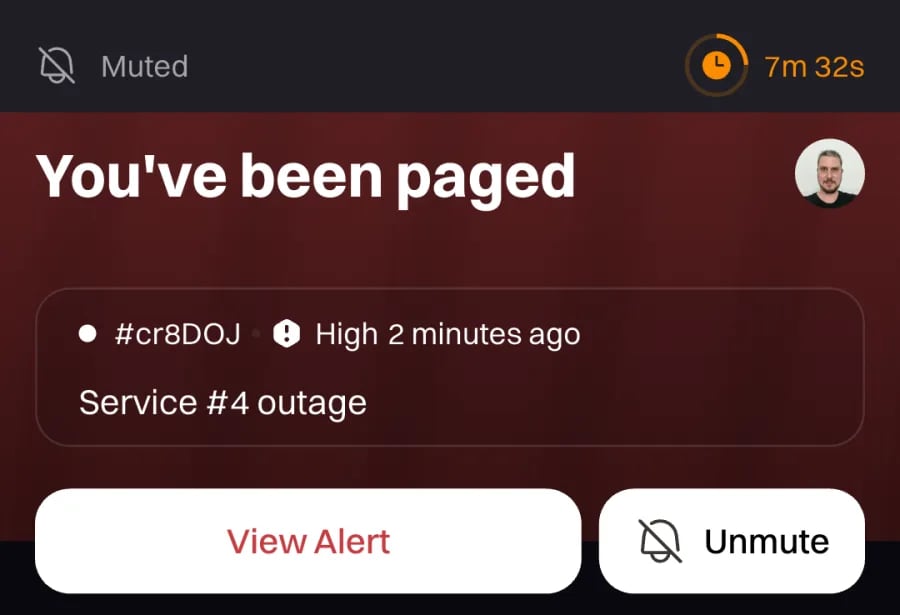
* The **Mute** button next to **View Alert** on the *You've been paged* card
* The **mute button** on an alert's detail screen (in the action menu at the bottom)
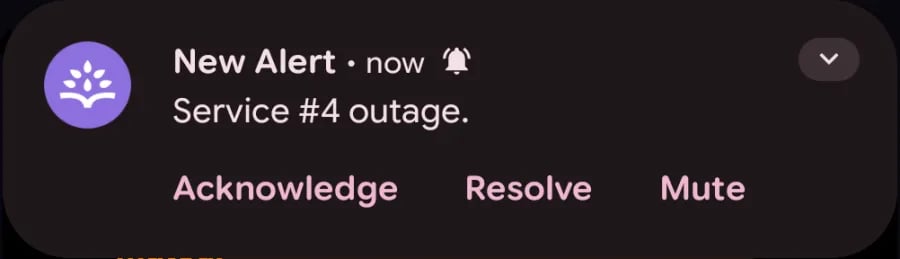
* The **Mute** action on an incoming alert push notification
Use any of the entry points above. The quickest during a storm is the **Mute** action directly on the push notification itself.
***
## How alert muting works
* **It's personal.** A mute only suppresses notifications sent to *you*. Everyone else on the escalation policy is notified as usual.
* **It applies to your account, not a single device.** Muting from one phone mutes notifications to all your devices and channels, and the mute state syncs to your other logged-in devices.
* **Alerts keep flowing.** Alert creation, routing, grouping, and [escalation policies](/on-call/escalation-policies) are unaffected. Alerts remain visible on the Alerts screen in the mobile app and on the web while you're muted.
* **Muted notifications are dropped, not delayed.** Anything suppressed during the mute is *not* re-delivered when the mute ends. You'll only be notified again if the escalation policy fires a new notification.
* **Mutes end on their own.** Every mute has a fixed end time and expires automatically — there's no way to mute indefinitely.
You won't be notified of automated alerts while muted. Unacknowledged alerts can still escalate to the next step of the escalation policy — potentially paging your teammates. Use short mute windows and keep an eye on the Alerts screen.
***
## What gets muted
| Muted while active | Never muted |
| ------------------------------------- | --------------------------------------------------------------------------------- |
| Push notifications | Manually triggered pages (a person deliberately paging you from Rootly) |
| SMS | [Live call routing](/on-call/live-call-routing) calls and voicemail callbacks |
| Phone calls | Messages posted to a Slack channel, Microsoft Teams channel, or Google Chat space |
| Email | |
| Slack and Google Chat direct messages | |
Muting only suppresses notifications addressed to you personally. Messages posted to a shared channel or space are team-wide, so they're never suppressed — even if you're the only person watching that channel.
The other two exceptions are deliberate: a manual page means a human decided you specifically need to know, and live call routing would otherwise leave a caller waiting on hold for someone who can't hear the phone ring.
***
## Mute alerts from the mobile app
You can open the mute screen from several places in the app:
* **Settings → Mute alert notifications**
* The **Mute** button next to **View Alert** on the *You've been paged* card
* The **mute button** on an alert's detail screen (in the action menu at the bottom)
* The **Mute** action on an incoming alert push notification
Use any of the entry points above. The quickest during a storm is the **Mute** action directly on the push notification itself.
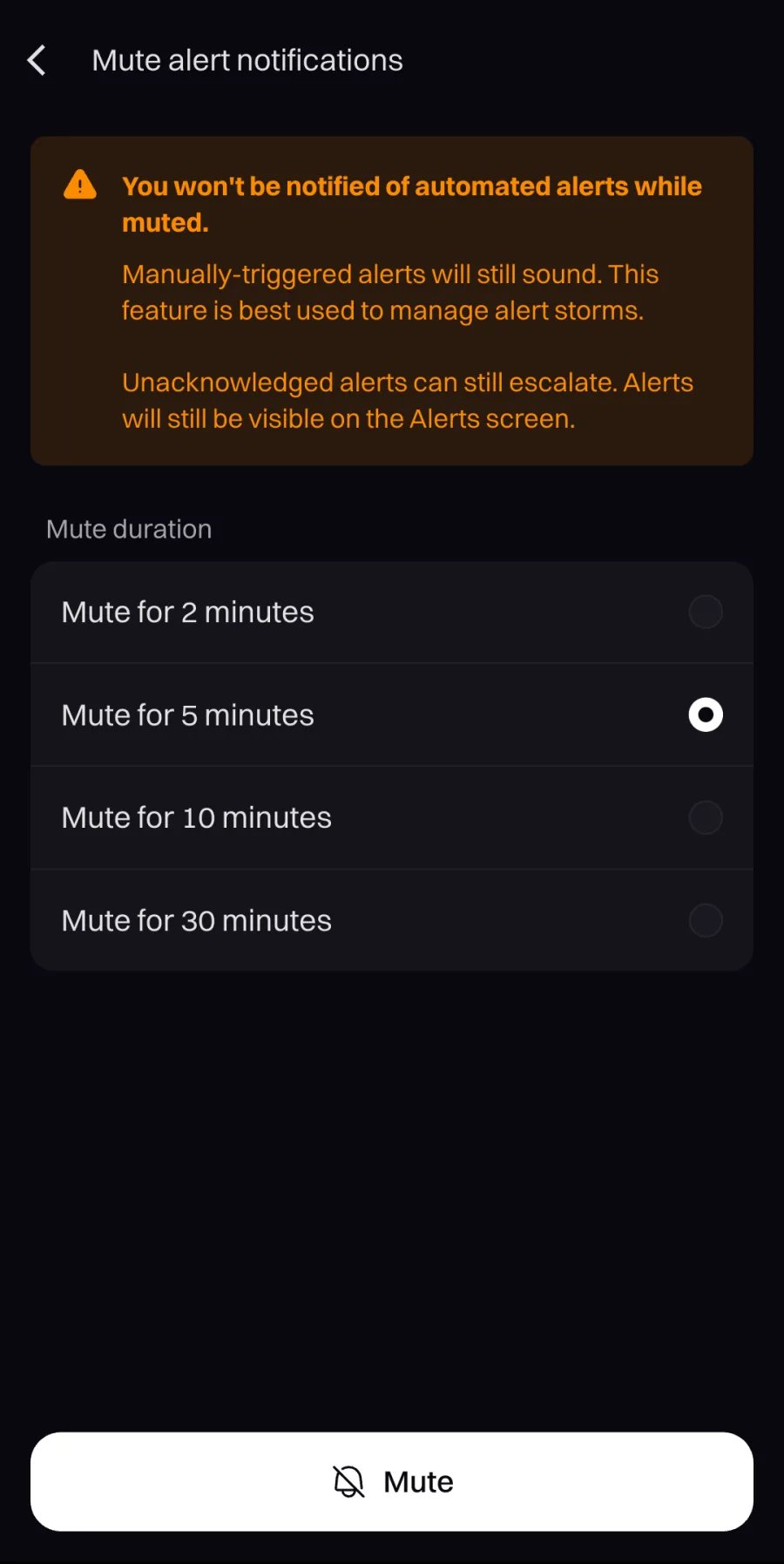
 Choose how long to mute: **2, 5, 10, or 30 minutes** (5 minutes is preselected). Durations are fixed presets — there's no custom value.
Tap **Mute**. The mute takes effect immediately across your muted notification channels and all your devices, and a confirmation shows when it ends.
Need a longer or shorter window after muting? A mute can't be extended or shortened in place — unmute, then start a new mute with the duration you want.
***
## While you're muted
Rootly makes the muted state hard to miss so you never silently stay unreachable:
* **In-app banner** — a persistent **Muted** banner appears above the app's main tabs, with a countdown until the mute ends and a running count of alerts that would have paged you (for example, *Muted · 3 missed alerts*). Tap it to review the mute or unmute.
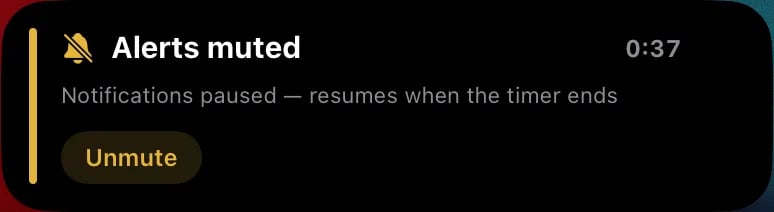
* **iOS Live Activity** — a Lock Screen card (and Dynamic Island on supported iPhones) shows a live countdown, the most recent alert, and an **Unmute** button.
* **Android ongoing notification** — a pinned notification shows the same countdown with an **Unmute** action.
Choose how long to mute: **2, 5, 10, or 30 minutes** (5 minutes is preselected). Durations are fixed presets — there's no custom value.
Tap **Mute**. The mute takes effect immediately across your muted notification channels and all your devices, and a confirmation shows when it ends.
Need a longer or shorter window after muting? A mute can't be extended or shortened in place — unmute, then start a new mute with the duration you want.
***
## While you're muted
Rootly makes the muted state hard to miss so you never silently stay unreachable:
* **In-app banner** — a persistent **Muted** banner appears above the app's main tabs, with a countdown until the mute ends and a running count of alerts that would have paged you (for example, *Muted · 3 missed alerts*). Tap it to review the mute or unmute.
* **iOS Live Activity** — a Lock Screen card (and Dynamic Island on supported iPhones) shows a live countdown, the most recent alert, and an **Unmute** button.
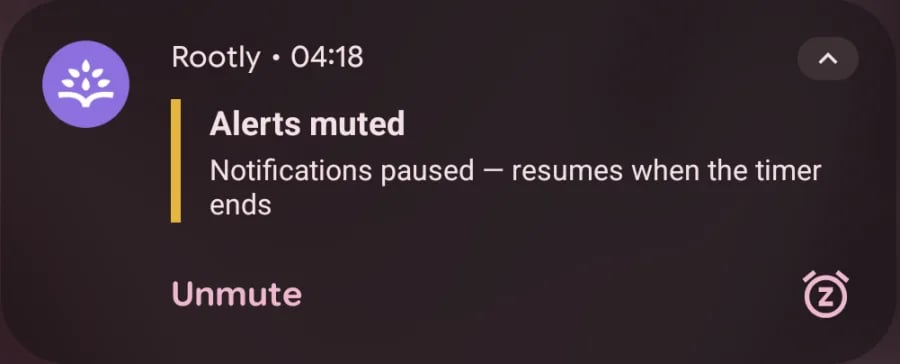
* **Android ongoing notification** — a pinned notification shows the same countdown with an **Unmute** action.
 ***
## Unmute
Notifications resume as soon as any of these happens:
* The mute window **expires** (automatic).
* You tap **Unmute** on the in-app banner's mute sheet. While a mute is active, the **Mute** button on the *You've been paged* card also reads **Unmute** and opens the same sheet.
* You tap **Clear mute** on the mute screen (**Settings → Mute alert notifications**).
* You tap **Unmute** on the iOS Live Activity or the Android ongoing notification — no need to open the app.
Unmuting applies to all your devices and channels at once.
***
## What your team sees
Muting yourself never hides an alert from the rest of the team — alerts are created, routed, and escalated normally, and other responders are notified as usual.
Every notification that was suppressed by your mute is recorded on the alert's timeline as a skipped notification event, visible on both web and mobile — for example: *Skipped push notification: skipped due to user notifications being muted*. This gives your team a clear audit trail of who wasn't paged and why.
Alert Muting is different from muting paging for a **service under maintenance**, which suppresses paging for a service's alerts for all responders during a scheduled maintenance window. Alert Muting only affects notifications sent to you.
***
## Requirements
* Rootly mobile app **2.15.0 or later**.
* On-call/alerting must be enabled for your organization — the mute entry points are hidden otherwise.
* An on-call seat, like all mobile app functionality — see [Mobile App](/on-call/mobile-app).
***
## Frequently Asked Questions
No. To change the duration, unmute first and then start a new mute with the window you want.
No. Suppressed notifications are dropped, not queued. After the mute ends you'll only be notified of new activity — including any notification the escalation policy fires again on an unacknowledged alert.
Yes. When someone deliberately pages you from Rootly, that page bypasses your mute on every channel. Live call routing calls also always come through.
No. Escalation policies run on their normal timers, and everyone else is notified as usual. If you don't acknowledge an alert while muted, it escalates exactly as it would have if you'd simply not responded.
No. Muting is self-service only — each user can only mute and unmute themselves, from their own mobile app.
Not currently. Muting is available only in the mobile app. The web shows the skipped notification events on alert timelines but has no mute controls.
***
## Related Pages
Download, log in, and configure push notifications — the home of alert muting.
What keeps running while you're muted — and why unacknowledged alerts still escalate.
Your audible and quiet notification rules for each channel.
***
## Unmute
Notifications resume as soon as any of these happens:
* The mute window **expires** (automatic).
* You tap **Unmute** on the in-app banner's mute sheet. While a mute is active, the **Mute** button on the *You've been paged* card also reads **Unmute** and opens the same sheet.
* You tap **Clear mute** on the mute screen (**Settings → Mute alert notifications**).
* You tap **Unmute** on the iOS Live Activity or the Android ongoing notification — no need to open the app.
Unmuting applies to all your devices and channels at once.
***
## What your team sees
Muting yourself never hides an alert from the rest of the team — alerts are created, routed, and escalated normally, and other responders are notified as usual.
Every notification that was suppressed by your mute is recorded on the alert's timeline as a skipped notification event, visible on both web and mobile — for example: *Skipped push notification: skipped due to user notifications being muted*. This gives your team a clear audit trail of who wasn't paged and why.
Alert Muting is different from muting paging for a **service under maintenance**, which suppresses paging for a service's alerts for all responders during a scheduled maintenance window. Alert Muting only affects notifications sent to you.
***
## Requirements
* Rootly mobile app **2.15.0 or later**.
* On-call/alerting must be enabled for your organization — the mute entry points are hidden otherwise.
* An on-call seat, like all mobile app functionality — see [Mobile App](/on-call/mobile-app).
***
## Frequently Asked Questions
No. To change the duration, unmute first and then start a new mute with the window you want.
No. Suppressed notifications are dropped, not queued. After the mute ends you'll only be notified of new activity — including any notification the escalation policy fires again on an unacknowledged alert.
Yes. When someone deliberately pages you from Rootly, that page bypasses your mute on every channel. Live call routing calls also always come through.
No. Escalation policies run on their normal timers, and everyone else is notified as usual. If you don't acknowledge an alert while muted, it escalates exactly as it would have if you'd simply not responded.
No. Muting is self-service only — each user can only mute and unmute themselves, from their own mobile app.
Not currently. Muting is available only in the mobile app. The web shows the skipped notification events on alert timelines but has no mute controls.
***
## Related Pages
Download, log in, and configure push notifications — the home of alert muting.
What keeps running while you're muted — and why unacknowledged alerts still escalate.
Your audible and quiet notification rules for each channel.