> ## Documentation Index
> Fetch the complete documentation index at: https://docs.rootly.com/llms.txt
> Use this file to discover all available pages before exploring further.
# Heartbeats
> Continuously verify system health using Rootly Heartbeats and automatically trigger alerts on missed pings from cron jobs, schedulers, and background workers.
### Overview
Heartbeats allow you to monitor critical systems by requiring them to “check in” on a regular cadence.\
If a heartbeat fails to ping within the expected interval, Rootly automatically triggers an alert and notifies the appropriate on-call responders.
This ensures:
* Early detection of system failures
* Automatic paging when checks go silent
* Reliable uptime verification across services
* Zero reliance on external monitoring tools for liveness checks
***
### How Heartbeats Work
Each Heartbeat cycles through three statuses:
* **waiting** — newly created or recently updated; awaiting first ping
* **active** — successfully pinged and within its valid interval
* **expired** — missed its expected check-in; triggers a Heartbeat Alert
Each heartbeat is **disabled by default**. When enabled, Rootly tracks pings and expiration windows.
When a ping is received:
* `last_pinged_at` is updated
* `expires_at` is set to `now + interval`
* Status becomes **active**
* If transitioning from non-active → active, Rootly **resolves all open heartbeat alerts**
***
### Creating & Configuring Heartbeats
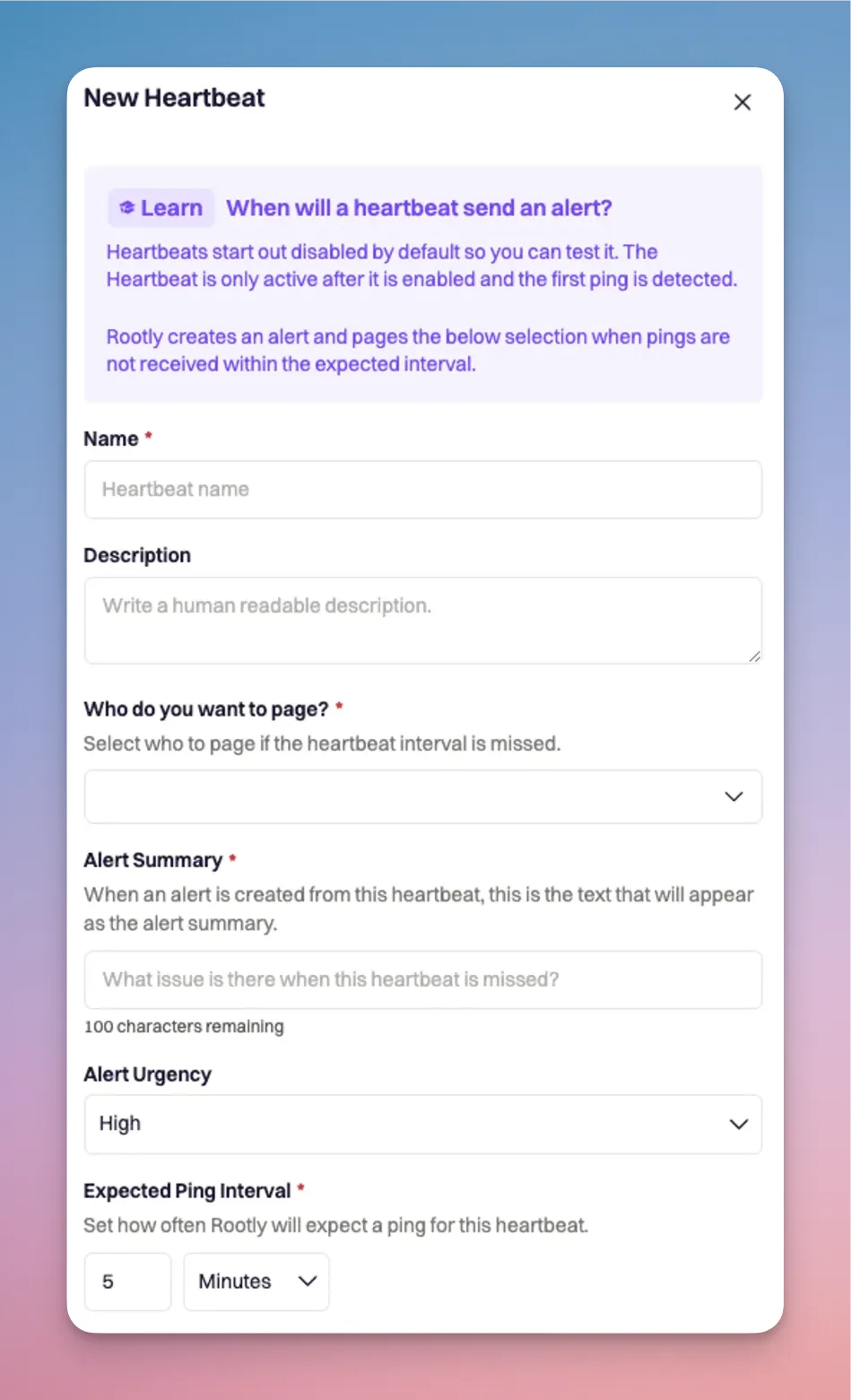
Navigate to **On-Call → Heartbeats** and click **+ New Heartbeat**.
You must configure:
* **Name** (required, unique per team)
* **Description** (optional)
* **Notification Target** (required)
* Escalation Policy
* Service
* Team (Group)
* User
* **Alert Summary** (required, 1–100 chars)
* **Alert Urgency** (optional, recommended)
* **Expected Ping Interval**
* Interval: `1–300`
* Unit: seconds, minutes, or hours
Heartbeats start in **waiting** and **disabled** until explicitly enabled.
 Enabling a heartbeat begins the monitoring cycle. Note:
* Changing **interval**, **interval unit**, or **enabling** a heartbeat resets it back to **waiting**
* A heartbeat becomes **active** only after its **first successful ping**
***
### Pinging Heartbeats
Systems can ping heartbeats using **HTTP** or **email**.\
Both methods behave identically: they reset the timer and, if previously expired, will **resolve all heartbeat alerts**.
#### HTTP Ping (recommended)
Use the automatically generated ping URL:
```bash theme={null}
curl -X POST https://api.rootly.com/v1/heartbeats/{heartbeat_id}/ping \
--header 'Authorization: Bearer {heartbeat_token}'
```
Replace `{heartbeat_id}` with your Heartbeat’s UUID and `{heartbeat_token}` your Heartbeat's Auth token.\
Both are displayed directly in the Heartbeat’s configuration page.
Authorization header is required to send HTTP pings
HTTP pings are ideal for scripts, cron jobs, containers, CI pipelines, and any system capable of making HTTP requests.
***
#### Email Ping
Every Heartbeat is also assigned a **unique email address**:
```text theme={null}
heartbeat-@
```
Sending *any* email to this address counts as a valid ping.
**Common use cases:**
* Legacy systems that only support email notifications
* Backup/cron jobs that already send “success” emails
* Air-gapped or restricted systems that cannot perform HTTP requests
Behavior:
* Email subject/body do **not** matter
* Each valid email resets the Heartbeat’s timer
* Invalid addresses return a bounce notification
You can find the Heartbeat’s email address directly in its configuration panel.
***
### Heartbeat Expiration & Recovery
#### When does a heartbeat expire?
A Heartbeat transitions to **expired** when:
```text theme={null}
current_time > expires_at
```
When expired:
* A **Heartbeat Alert** is created
* Routing rules determine who gets paged
* Escalation Policies and Alert Urgency define notification behavior
***
#### Automatic Recovery
If an expired heartbeat receives a ping:
1. Status transitions **expired → active**
2. All open Heartbeat Alerts are **automatically resolved**
3. A recovery event is added to the alert timeline
This avoids noisy follow-up alerts and validates system recovery.
Rootly guarantees that recovery events propagate even when grouped alerts are involved.
***
### Special Behavior: Rootly API Heartbeat
Rootly includes a special internal Heartbeat named:
```text theme={null}
rootly-api-heartbeat
```
When pinged:
* **All** Heartbeats in the workspace reset to **waiting**
* Their timers and expiration windows are cleared
This is used internally for environment-wide health resets and should not be modified.
***
### Who Gets Paged for a Missed Heartbeat
Every Heartbeat must be configured with **one notification target**:
* **Escalation Policy**
* **Service**
* **Team (Group)**
* **User**
Rootly applies your workspace’s:
* Escalation rules
* Working hours
* Alert urgency
* Notification channels (SMS, phone, push, Slack, email)
This ensures missed pings integrate seamlessly with on-call workflows.
***
### Best Practices
* Use **short intervals** (1–5 minutes) for critical services
* Set **High urgency** for production-impacting checks
* Use **email pings** for legacy or offline systems
* Name Heartbeats clearly (e.g., `api-liveness`, `db-backup-success`)
* Use separate Heartbeats for independent components
* Review heartbeat alerts weekly to detect flapping or missing pings
***
### Troubleshooting
* Heartbeat may not be **enabled**
* Interval or unit was recently changed → resets to waiting
* No valid pings received yet
* Verify ping URL or email address is correct
* Interval may be too large
* System may be sending frequent pings
* Verify whether alert resolution is immediately resetting intervals
* Check whether status transitioned `expired → active`
* Ensure ping reached the correct Heartbeat ID
* Review timeline for recovery events
* Inbound email domain may not be configured
* MX records could be missing or misconfigured
* Invalid email formats will bounce
***
Enabling a heartbeat begins the monitoring cycle. Note:
* Changing **interval**, **interval unit**, or **enabling** a heartbeat resets it back to **waiting**
* A heartbeat becomes **active** only after its **first successful ping**
***
### Pinging Heartbeats
Systems can ping heartbeats using **HTTP** or **email**.\
Both methods behave identically: they reset the timer and, if previously expired, will **resolve all heartbeat alerts**.
#### HTTP Ping (recommended)
Use the automatically generated ping URL:
```bash theme={null}
curl -X POST https://api.rootly.com/v1/heartbeats/{heartbeat_id}/ping \
--header 'Authorization: Bearer {heartbeat_token}'
```
Replace `{heartbeat_id}` with your Heartbeat’s UUID and `{heartbeat_token}` your Heartbeat's Auth token.\
Both are displayed directly in the Heartbeat’s configuration page.
Authorization header is required to send HTTP pings
HTTP pings are ideal for scripts, cron jobs, containers, CI pipelines, and any system capable of making HTTP requests.
***
#### Email Ping
Every Heartbeat is also assigned a **unique email address**:
```text theme={null}
heartbeat-@
```
Sending *any* email to this address counts as a valid ping.
**Common use cases:**
* Legacy systems that only support email notifications
* Backup/cron jobs that already send “success” emails
* Air-gapped or restricted systems that cannot perform HTTP requests
Behavior:
* Email subject/body do **not** matter
* Each valid email resets the Heartbeat’s timer
* Invalid addresses return a bounce notification
You can find the Heartbeat’s email address directly in its configuration panel.
***
### Heartbeat Expiration & Recovery
#### When does a heartbeat expire?
A Heartbeat transitions to **expired** when:
```text theme={null}
current_time > expires_at
```
When expired:
* A **Heartbeat Alert** is created
* Routing rules determine who gets paged
* Escalation Policies and Alert Urgency define notification behavior
***
#### Automatic Recovery
If an expired heartbeat receives a ping:
1. Status transitions **expired → active**
2. All open Heartbeat Alerts are **automatically resolved**
3. A recovery event is added to the alert timeline
This avoids noisy follow-up alerts and validates system recovery.
Rootly guarantees that recovery events propagate even when grouped alerts are involved.
***
### Special Behavior: Rootly API Heartbeat
Rootly includes a special internal Heartbeat named:
```text theme={null}
rootly-api-heartbeat
```
When pinged:
* **All** Heartbeats in the workspace reset to **waiting**
* Their timers and expiration windows are cleared
This is used internally for environment-wide health resets and should not be modified.
***
### Who Gets Paged for a Missed Heartbeat
Every Heartbeat must be configured with **one notification target**:
* **Escalation Policy**
* **Service**
* **Team (Group)**
* **User**
Rootly applies your workspace’s:
* Escalation rules
* Working hours
* Alert urgency
* Notification channels (SMS, phone, push, Slack, email)
This ensures missed pings integrate seamlessly with on-call workflows.
***
### Best Practices
* Use **short intervals** (1–5 minutes) for critical services
* Set **High urgency** for production-impacting checks
* Use **email pings** for legacy or offline systems
* Name Heartbeats clearly (e.g., `api-liveness`, `db-backup-success`)
* Use separate Heartbeats for independent components
* Review heartbeat alerts weekly to detect flapping or missing pings
***
### Troubleshooting
* Heartbeat may not be **enabled**
* Interval or unit was recently changed → resets to waiting
* No valid pings received yet
* Verify ping URL or email address is correct
* Interval may be too large
* System may be sending frequent pings
* Verify whether alert resolution is immediately resetting intervals
* Check whether status transitioned `expired → active`
* Ensure ping reached the correct Heartbeat ID
* Review timeline for recovery events
* Inbound email domain may not be configured
* MX records could be missing or misconfigured
* Invalid email formats will bounce
***