> ## Documentation Index
> Fetch the complete documentation index at: https://docs.rootly.com/llms.txt
> Use this file to discover all available pages before exploring further.
# On-Call Readiness
> Ensure responders are prepared to receive alerts with the Rootly On-Call Readiness report, which surfaces missing contact methods and rules.
## Overview
The **On-Call Readiness** report gives you a centralized view into whether your responders are actually reachable when it matters most.\
It surfaces every Rootly user who participates in an on-call schedule and evaluates whether their notification preferences are properly configured to receive alerts.
This report is designed for **schedule owners, managers, and reliability leaders** who want confidence that on-call coverage is not only defined—but operationally effective. A schedule is only as reliable as the responders behind it, and this report helps you identify gaps *before* an incident occurs.
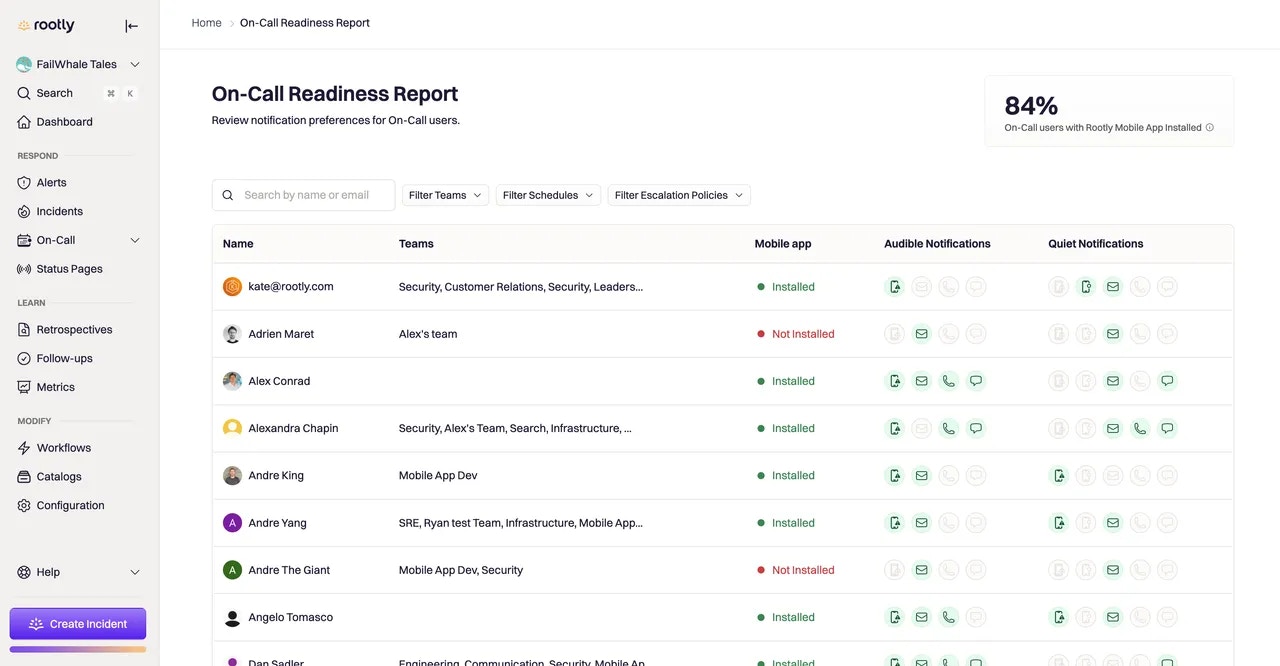 Each row in the report represents a responder, and each icon represents a notification method they can be reached through. Green icons indicate that the notification method is fully configured and enabled. Gray icons indicate that the method is missing or incomplete.
Hovering over an icon reveals the exact destination Rootly will use—such as the phone number, email address, or mobile device—so you can quickly validate accuracy without leaving the page.
Responders cannot opt out of **critical alerts** for audible notifications. Rootly enforces this to ensure on-call coverage remains reliable during high-urgency incidents.
## Understanding the Indicators
The readiness table is split across **audible** and **quiet** notification contexts, reflecting how responders are contacted for urgent versus low-priority alerts.
For **audible notifications**, the report shows whether a responder can receive:
* Critical mobile push notifications (that bypass Do Not Disturb)
* Phone calls
* SMS messages
* Email notifications
For **quiet notifications**, the report shows whether a responder can receive:
* Non-critical mobile push notifications (that respect Do Not Disturb)
* Phone calls
* SMS messages
* Email notifications
If at least one valid delivery method exists for the notification type, the corresponding icon appears green. This makes it easy to spot responders who may not be fully reachable for certain alert types.
## Using Filters to Assess Coverage
As teams and schedules grow, reviewing readiness manually becomes harder. The On-Call Readiness report includes filters that let you narrow the view to what matters most:
You can filter responders by **team**, **schedule**, or **escalation policy**, and you can also search by name or email. This allows you to answer questions like:
* Are all responders on this critical service reachable?
* Does this escalation policy include anyone without a working phone number?
* Are new team members fully set up before joining on-call?
Only users with an **on-call seat** appear in this report, ensuring the data reflects responders who may actually be paged.
## Exporting the Readiness Report
If you need to review readiness outside of Rootly, you can export the report as a CSV file.\
Exports are generated asynchronously and delivered via email with a secure download link. This makes it easy to share readiness data with managers, leadership, or auditors without requiring direct access to Rootly.
## Best Practices
Use the On-Call Readiness report proactively—not just during incidents—to keep your on-call program healthy.
* **Review readiness before adding someone to a rotation**\
Ensure responders have at least one working audible notification method configured before their first shift.
* **Make readiness checks part of onboarding**\
New hires should install the Rootly mobile app, verify contact details, and confirm notifications before shadowing or going on-call.
* **Re-audit after notification or policy changes**\
Changes to escalation policies, schedules, or alerting rules can introduce gaps. A quick readiness scan helps catch them early.
* **Encourage mobile app installation**\
Mobile push notifications provide the fastest and most reliable alert delivery, especially for critical incidents.
## Frequently Asked Questions
By default, **Admins and Owners** can view the On-Call Readiness report.\
Other on-call roles can be granted access through **Organization Settings → Roles and Permissions**, allowing teams to delegate readiness ownership without granting full admin access.
Gray icons indicate that a notification method has not been configured or verified.\
This may mean a phone number is missing, the mobile app is not installed, or the responder has not enabled that delivery method in their notification preferences.
This indicator reflects whether the responder has at least one registered mobile device connected to Rootly.\
Installing the mobile app is strongly recommended, as it enables critical push notifications that bypass Do Not Disturb settings.
No. For audible notifications, Rootly enforces at least one guaranteed delivery method—either a critical push notification or a phone call.\
This ensures that responders cannot accidentally make themselves unreachable during high-severity incidents.
Yes. The readiness report reflects responders’ current notification settings.\
If a user updates their contact information or notification rules, the report will update automatically.
Each row in the report represents a responder, and each icon represents a notification method they can be reached through. Green icons indicate that the notification method is fully configured and enabled. Gray icons indicate that the method is missing or incomplete.
Hovering over an icon reveals the exact destination Rootly will use—such as the phone number, email address, or mobile device—so you can quickly validate accuracy without leaving the page.
Responders cannot opt out of **critical alerts** for audible notifications. Rootly enforces this to ensure on-call coverage remains reliable during high-urgency incidents.
## Understanding the Indicators
The readiness table is split across **audible** and **quiet** notification contexts, reflecting how responders are contacted for urgent versus low-priority alerts.
For **audible notifications**, the report shows whether a responder can receive:
* Critical mobile push notifications (that bypass Do Not Disturb)
* Phone calls
* SMS messages
* Email notifications
For **quiet notifications**, the report shows whether a responder can receive:
* Non-critical mobile push notifications (that respect Do Not Disturb)
* Phone calls
* SMS messages
* Email notifications
If at least one valid delivery method exists for the notification type, the corresponding icon appears green. This makes it easy to spot responders who may not be fully reachable for certain alert types.
## Using Filters to Assess Coverage
As teams and schedules grow, reviewing readiness manually becomes harder. The On-Call Readiness report includes filters that let you narrow the view to what matters most:
You can filter responders by **team**, **schedule**, or **escalation policy**, and you can also search by name or email. This allows you to answer questions like:
* Are all responders on this critical service reachable?
* Does this escalation policy include anyone without a working phone number?
* Are new team members fully set up before joining on-call?
Only users with an **on-call seat** appear in this report, ensuring the data reflects responders who may actually be paged.
## Exporting the Readiness Report
If you need to review readiness outside of Rootly, you can export the report as a CSV file.\
Exports are generated asynchronously and delivered via email with a secure download link. This makes it easy to share readiness data with managers, leadership, or auditors without requiring direct access to Rootly.
## Best Practices
Use the On-Call Readiness report proactively—not just during incidents—to keep your on-call program healthy.
* **Review readiness before adding someone to a rotation**\
Ensure responders have at least one working audible notification method configured before their first shift.
* **Make readiness checks part of onboarding**\
New hires should install the Rootly mobile app, verify contact details, and confirm notifications before shadowing or going on-call.
* **Re-audit after notification or policy changes**\
Changes to escalation policies, schedules, or alerting rules can introduce gaps. A quick readiness scan helps catch them early.
* **Encourage mobile app installation**\
Mobile push notifications provide the fastest and most reliable alert delivery, especially for critical incidents.
## Frequently Asked Questions
By default, **Admins and Owners** can view the On-Call Readiness report.\
Other on-call roles can be granted access through **Organization Settings → Roles and Permissions**, allowing teams to delegate readiness ownership without granting full admin access.
Gray icons indicate that a notification method has not been configured or verified.\
This may mean a phone number is missing, the mobile app is not installed, or the responder has not enabled that delivery method in their notification preferences.
This indicator reflects whether the responder has at least one registered mobile device connected to Rootly.\
Installing the mobile app is strongly recommended, as it enables critical push notifications that bypass Do Not Disturb settings.
No. For audible notifications, Rootly enforces at least one guaranteed delivery method—either a critical push notification or a phone call.\
This ensures that responders cannot accidentally make themselves unreachable during high-severity incidents.
Yes. The readiness report reflects responders’ current notification settings.\
If a user updates their contact information or notification rules, the report will update automatically.