> ## Documentation Index
> Fetch the complete documentation index at: https://docs.rootly.com/llms.txt
> Use this file to discover all available pages before exploring further.
# On-Call Widget
> See your live on-call status in the Rootly web sidebar—whether you're on call now, your next shift, active pages, and notification-setup gaps—from any page.
## Overview
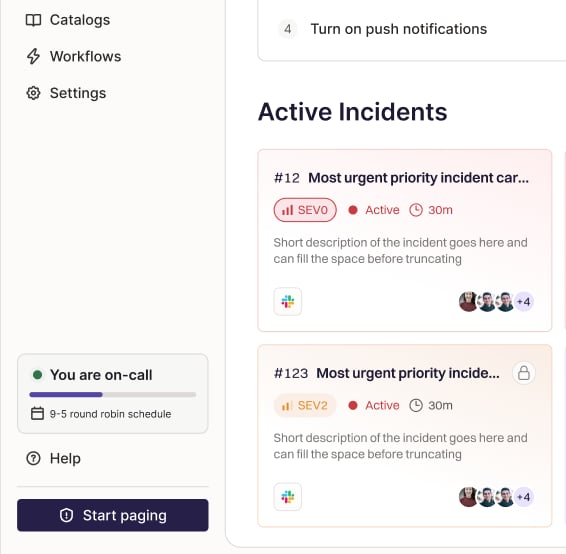
The on-call widget is a compact status card in the Rootly web sidebar that shows **your** on-call status at a glance—without leaving the page you're on. It answers the questions responders ask most: *Am I on call right now? When am I next on? Have I been paged?*
The widget updates live as shifts hand off, pages arrive, and your status changes, so it always reflects the current moment.
The widget shows your **personal** status only. It doesn't change how schedules, escalation policies, or paging work—it's an additive view on top of your existing on-call configuration.
***
## Where to find it
The widget appears in the **left navigation sidebar** of the Rootly web app when the sidebar is expanded. It loads automatically for on-call-enabled teams—there's nothing to configure.
 ***
## What it shows
The widget adapts to your current situation.
### On call now
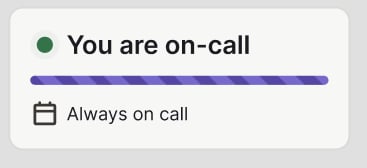
When you're actively on call, the widget shows a progress bar counting down your current shift, along with the schedule you're covering.
For **"always on call"** coverage—where you're the sole owner of a 24/7 schedule, or a direct escalation-policy target—the widget shows an always-on indicator instead of a countdown.
***
## What it shows
The widget adapts to your current situation.
### On call now
When you're actively on call, the widget shows a progress bar counting down your current shift, along with the schedule you're covering.
For **"always on call"** coverage—where you're the sole owner of a 24/7 schedule, or a direct escalation-policy target—the widget shows an always-on indicator instead of a countdown.
 ### Off call — your next shifts
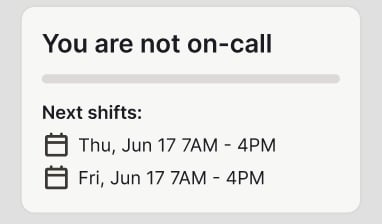
When you're not currently on call, the widget lists your upcoming shift(s), soonest first, with a **See all** link to your on-call calendar.
### Off call — your next shifts
When you're not currently on call, the widget lists your upcoming shift(s), soonest first, with a **See all** link to your on-call calendar.
 ### You've been paged
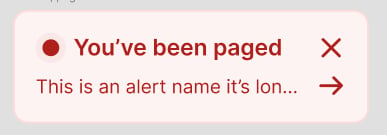
When you have an active, unacknowledged page, the widget surfaces a banner with the alert and a link to open it. You can dismiss the banner, and it reappears if a new page comes in.
### You've been paged
When you have an active, unacknowledged page, the widget surfaces a banner with the alert and a link to open it. You can dismiss the banner, and it reappears if a new page comes in.
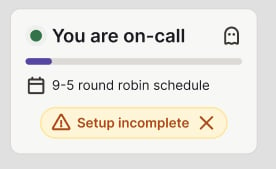
 ### Setup incomplete
If you have no verified phone number and no active mobile device, Rootly can't page you. The widget shows a reminder—with links to add a phone number or install the mobile app—so you can fix it before it matters. See [On-Call Readiness](/on-call/on-call-readiness).
### Setup incomplete
If you have no verified phone number and no active mobile device, Rootly can't page you. The widget shows a reminder—with links to add a phone number or install the mobile app—so you can fix it before it matters. See [On-Call Readiness](/on-call/on-call-readiness).
 ### Shadowing
If you're shadowing another responder (or being shadowed) for training, the widget reflects that too. See [On-Call Shadowing](/on-call/on-call-shadowing) for how shadowing works.
***
## Staying up to date
The widget refreshes on its own:
* The shift progress bar advances continuously.
* Pages, acknowledgements, and shift hand-offs update the widget in real time.
You don't need to reload the page to see your current status.
***
## Requirements
* Your team must have **on-call / alerting enabled**.
* Available in the **Rootly web app**. On-call status is also available in the [Rootly mobile app](/on-call/mobile-app).
To make sure you can actually be paged, verify a phone number and install the mobile app. See [On-Call Readiness](/on-call/on-call-readiness).
### Shadowing
If you're shadowing another responder (or being shadowed) for training, the widget reflects that too. See [On-Call Shadowing](/on-call/on-call-shadowing) for how shadowing works.
***
## Staying up to date
The widget refreshes on its own:
* The shift progress bar advances continuously.
* Pages, acknowledgements, and shift hand-offs update the widget in real time.
You don't need to reload the page to see your current status.
***
## Requirements
* Your team must have **on-call / alerting enabled**.
* Available in the **Rootly web app**. On-call status is also available in the [Rootly mobile app](/on-call/mobile-app).
To make sure you can actually be paged, verify a phone number and install the mobile app. See [On-Call Readiness](/on-call/on-call-readiness).