> ## Documentation Index
> Fetch the complete documentation index at: https://docs.rootly.com/llms.txt
> Use this file to discover all available pages before exploring further.
# Signing Up
> Create a Rootly account or accept an invitation from your organization to get started with incident management, on-call scheduling, and integrations.
To start using Rootly, create an account or accept the invitation your organization sent you.
You can sign up with:
* Google
* Slack
* SSO
* Email and password
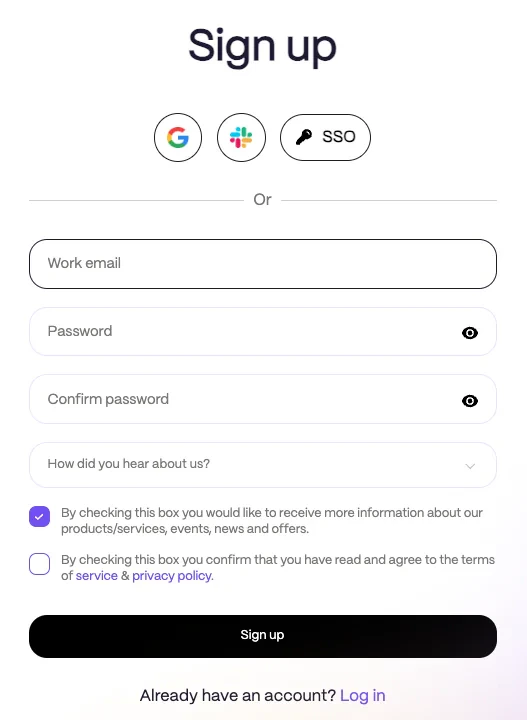 If your company has already invited you to Rootly, use the link in that invitation email to join your organization.
If your email domain is configured for SSO, Rootly will redirect you to your organization’s sign-in page instead of showing the standard sign-up flow.
## Sign Up with Email and Password
If you choose to create an account with email and password, enter your details and create a password that meets Rootly’s requirements.
Passwords must be at least **10 characters** and include:
* One lowercase letter
* One uppercase letter
* One digit
* One special character
Then:
1. Check the box to accept the [**Terms of Service**](https://rootly.com/terms) and [**Privacy Policy**](https://rootly.com/privacy)
2. Click **Sign Up**
## Already Invited?
If your company sent you an invitation, open the email and follow the link to complete setup. Depending on your organization’s configuration, you may finish joining with Google, Slack, SSO, or by creating a password.
## Already Have an Account?
If you already have a Rootly account, use **Sign in** instead of creating a new one.
Once you finish signing up, you’re ready to start using Rootly.
If your company has already invited you to Rootly, use the link in that invitation email to join your organization.
If your email domain is configured for SSO, Rootly will redirect you to your organization’s sign-in page instead of showing the standard sign-up flow.
## Sign Up with Email and Password
If you choose to create an account with email and password, enter your details and create a password that meets Rootly’s requirements.
Passwords must be at least **10 characters** and include:
* One lowercase letter
* One uppercase letter
* One digit
* One special character
Then:
1. Check the box to accept the [**Terms of Service**](https://rootly.com/terms) and [**Privacy Policy**](https://rootly.com/privacy)
2. Click **Sign Up**
## Already Invited?
If your company sent you an invitation, open the email and follow the link to complete setup. Depending on your organization’s configuration, you may finish joining with Google, Slack, SSO, or by creating a password.
## Already Have an Account?
If you already have a Rootly account, use **Sign in** instead of creating a new one.
Once you finish signing up, you’re ready to start using Rootly.