> ## Documentation Index
> Fetch the complete documentation index at: https://docs.rootly.com/llms.txt
> Use this file to discover all available pages before exploring further.
# Workflow Conditions
> How Rootly workflows evaluate run conditions — the all-of / any-of / none-of join operators, per-condition operators by field type, common condition recipes, and troubleshooting workflows that fire wrong.
## Overview
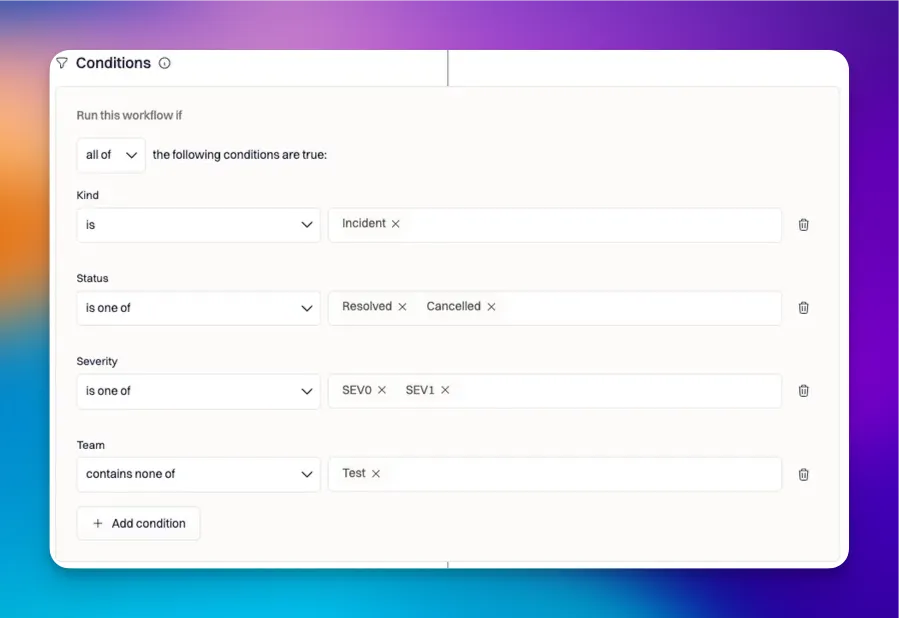
After a workflow's trigger fires, Rootly evaluates **run conditions** to decide whether the workflow's actions should execute. Conditions are the difference between a workflow that fires once a quarter on real SEV0s and one that fires hundreds of times a day on every minor update.
Every condition has two layers:
1. **A join operator** — how the individual conditions combine (**all of**, **any of**, **none of**).
2. **A per-condition operator** — how each condition compares its target field to the value(s) you configured (`is`, `is one of`, `contains any of`, `is set`, etc.).
Getting the join operator wrong is the most common cause of workflows that run more often than expected — the default is **all of**, but a slip to **any of** turns every condition into an OR.
***
## Join Operators
Rootly supports three operators for joining multiple run conditions:
| Operator | Meaning | When to Use |
| ----------- | ------------------------------- | ---------------------------------------------------------------------------------------------------------- |
| **all of** | Every condition must be true. | The default and most common choice. Use when you want the workflow to fire only on a specific combination. |
| **any of** | At least one condition is true. | Use when any of several conditions independently warrants firing (e.g., SEV0 *or* Security incident type). |
| **none of** | Every condition must be false. | Use to exclude — e.g., "fire on all incidents except Test Kind". |
If a workflow is running more often than expected, verify the join operator. Defaulting to **all of** is the safe choice; **any of** turns N conditions into an OR and dramatically widens the match set.
***
## Per-Condition Operators
Each individual condition picks an operator that determines how Rootly compares the field's current value to the value(s) you configured.
| Operator | Returns true when… | Common Field Types |
| ------------------ | ------------------------------------------------------------------ | ---------------------- |
| `is` | The field's value matches exactly. | Single-select, boolean |
| `is one of` | A single-select field matches any of the provided values. | Single-select |
| `none of` | A single-select field matches none of the provided values. | Single-select |
| `contains any of` | A multi-select field includes at least one of the provided values. | Multi-select |
| `contains all of` | A multi-select field includes all of the provided values. | Multi-select |
| `contains none of` | A multi-select field includes none of the provided values. | Multi-select |
| `is set` | The field has any value. | Any |
| `is unset` | The field has no value. | Any |
### Operator Selection by Field Type
The right operator depends on whether the field stores a single value, multiple values, or a boolean:
* **Boolean fields** (e.g., `Is Private`) — use `is set` / `is unset`, or `is true` / `is false` patterns.
* **Single-select fields** (e.g., `Severity`, `Kind`, `Status`) — use `is`, `is one of`, `none of`.
* **Multi-select fields** (e.g., `Services`, `Teams`, `Functionalities`) — use `contains any of`, `contains all of`, `contains none of`.
* **Presence checks** — `is set` and `is unset` work on any field type and are useful for "fire only when an optional field has been filled in" patterns.
 ***
## Common Condition Recipes
The patterns below cover the majority of real-world **incident workflow** conditions — each is a starting point you can extend with additional conditions joined by **all of** to scope further. Recipes for alert, action item, retrospective, or pulse workflows follow the same operator patterns but with different available fields.
Field examples like **Services**, **Teams**, **Environments**, **Functionalities**, and **Incident Types** can be configured as either single-select or multi-select per workspace (see [Built-in Fields](/configuration/built-in-fields)). The recipes below assume the default multi-select configuration; if your workspace has one of these set to single-select, use `is` / `is one of` / `none of` in place of the contains-family operators.
All values shown in the recipes are the **user-facing labels** visible in the workflow editor. In the raw API and audit-log payloads, some of these correspond to different internal identifiers (for example, the Kind label **Sub Test Incident** is `test_sub`); use the labels shown in the UI when authoring conditions.
### Fire only on SEV0 production incidents
```
all of
Severity is one of: SEV0
Environments contains any of: Production
Kind is: Incident
```
The `Kind is: Incident` clause is the easiest miss — without it, a Test Incident at SEV0 will fire the workflow. This example assumes Environments is multi-select (the default); if it's configured as single-select, use `Environment is: Production` instead.
### Fire only on incidents owned by a specific team
```
all of
Teams contains any of: Platform
```
`contains any of` (not `is`) because Teams is multi-select by default. `Teams is one of` would silently fail to match incidents tagged with multiple teams that include Platform. If your workspace has Teams configured as single-select, use `Teams is one of: Platform`.
### Exclude test incidents from a paging workflow
```
all of
Kind is: Incident
Severity is one of: SEV0, SEV1
```
Or, equivalently, list the kinds to exclude explicitly:
```
none of
Kind is one of: Test Incident, Sub Test Incident, Scheduled Maintenance, Sub Scheduled Maintenance, Backfill Incident
```
The positive form (`Kind is: Incident`) is usually clearer and survives the addition of new Kind values better than an exclusion list. See [Incident Kind](/configuration/configuration#incident-kind) for the full list of kinds and what each one triggers.
### Fire only when a custom field is filled in
```
all of
Custom Field "Customer Tier" is set
```
Combine with another condition like `Severity is one of: SEV0` to scope further.
### Fire on any status update except cancellation
```
none of
Status is one of: Cancelled
```
Paired with a Status Updated trigger.
***
## How Conditions Interact with Triggers
Triggers are **OR-joined** — if any selected trigger fires, the workflow initiates. Conditions are then evaluated against the incident's state at the moment the trigger fired.
This has two consequences worth knowing:
1. **Triggers do not contribute to conditions.** A workflow with a Status Updated trigger and a `Status is mitigated` condition will fire only when status changes *to* mitigated — but `Status` in the condition refers to the *new* status, not the trigger event.
2. **Conditions evaluate post-trigger.** If a workflow's trigger is Incident Created and a condition references `Mitigated At`, the condition evaluates against the just-created incident — which has no `mitigated_at` yet. Use `is unset` deliberately if you want to fire only on freshly-created incidents.
***
## Best Practices
* **Default to `all of` and verify the operator before saving.** A workflow that fires too often is almost always an `any of` slip.
* **Always include a `Kind is: Incident` condition on any workflow that pages or notifies people.** Without it, Test Incidents will trigger the workflow during training and demos.
* **Prefer positive conditions over exclusion lists.** `Kind is: Incident` survives the introduction of a new kind value; a `none of` exclusion list (`Test Incident, Sub Test Incident, Scheduled Maintenance, Sub Scheduled Maintenance, Backfill Incident`) breaks the next time a kind is added.
* **Use `contains any of` for multi-select fields.** `is` and `is one of` silently fail to match when the field stores multiple values that include your target — use the contains-family operators instead.
* **Test new conditions on Test Incidents first.** Run a `/rootly test` and confirm the workflow fires (or doesn't) as expected before relying on it in production.
***
## Troubleshooting
Check the join operator. The default is **all of** — if it's been switched to **any of**, the workflow fires whenever a single condition matches. Open the workflow's run conditions block and verify the operator is **all of** (or the value you actually intended).
Three common causes:
1. **Trigger mismatch.** Workflows fire only on the triggers you selected. If you expect a workflow to fire on Severity Updated but only Status Updated is selected, it won't run.
2. **Multi-select condition using `is`.** A condition like `Teams is Platform` evaluates to false when Teams contains \[Platform, Database]. Switch to `Teams contains any of: Platform`.
3. **Kind filter exclusion.** If the workflow has `Kind is: Incident` and you're testing with a `/rootly test`, the condition correctly filters out the test incident. Drop the Kind filter temporarily or run a real `/rootly new` for the test.
Add a `Kind is: Incident` condition to scope the workflow to real production incidents only. Test incidents trigger workflows by default, which is desirable when you want to validate workflow logic — but undesirable for workflows that page humans or notify customers.
Custom field conditions evaluate against the field's current value at the time the trigger fires. If the field is populated later in the incident's lifecycle, an Incident Created trigger will see the field as unset. Either change the trigger to a later event (e.g., Status Updated) or add a separate workflow keyed off the field being populated.
`none of` returns true when **none** of the listed values match — so an empty/unset field returns true (none of the values match because there's no value to match). If you want the condition to require the field to be set, combine `none of` with `is set` under an **all of** join.
***
## Frequently Asked Questions
No. Rootly's condition editor is flat — every condition in a workflow uses the same join operator (**all of**, **any of**, or **none of**). To express compound boolean logic (e.g., `(A AND B) OR (C AND D)`), split into two workflows or restructure as a single workflow with conditions that can be joined under one operator.
Post-update. When a Status Updated trigger fires after an incident moves from Started to Mitigated, conditions reference the post-mitigation state — `Status is mitigated` returns true.
Run conditions use a structured comparison interface (field + operator + value), not Liquid. For dynamic logic, use Liquid in workflow actions instead. Custom field values can still be compared structurally.
Yes. A workflow with zero conditions fires every time any of its triggers fires. This is usually unintended — add at least one condition to scope when the workflow runs.
***
## Related Pages
The umbrella page covering the full workflow execution model.
Workflow type for standard incident lifecycle automation.
The full catalog of actions a workflow can execute once conditions pass.
***
## Common Condition Recipes
The patterns below cover the majority of real-world **incident workflow** conditions — each is a starting point you can extend with additional conditions joined by **all of** to scope further. Recipes for alert, action item, retrospective, or pulse workflows follow the same operator patterns but with different available fields.
Field examples like **Services**, **Teams**, **Environments**, **Functionalities**, and **Incident Types** can be configured as either single-select or multi-select per workspace (see [Built-in Fields](/configuration/built-in-fields)). The recipes below assume the default multi-select configuration; if your workspace has one of these set to single-select, use `is` / `is one of` / `none of` in place of the contains-family operators.
All values shown in the recipes are the **user-facing labels** visible in the workflow editor. In the raw API and audit-log payloads, some of these correspond to different internal identifiers (for example, the Kind label **Sub Test Incident** is `test_sub`); use the labels shown in the UI when authoring conditions.
### Fire only on SEV0 production incidents
```
all of
Severity is one of: SEV0
Environments contains any of: Production
Kind is: Incident
```
The `Kind is: Incident` clause is the easiest miss — without it, a Test Incident at SEV0 will fire the workflow. This example assumes Environments is multi-select (the default); if it's configured as single-select, use `Environment is: Production` instead.
### Fire only on incidents owned by a specific team
```
all of
Teams contains any of: Platform
```
`contains any of` (not `is`) because Teams is multi-select by default. `Teams is one of` would silently fail to match incidents tagged with multiple teams that include Platform. If your workspace has Teams configured as single-select, use `Teams is one of: Platform`.
### Exclude test incidents from a paging workflow
```
all of
Kind is: Incident
Severity is one of: SEV0, SEV1
```
Or, equivalently, list the kinds to exclude explicitly:
```
none of
Kind is one of: Test Incident, Sub Test Incident, Scheduled Maintenance, Sub Scheduled Maintenance, Backfill Incident
```
The positive form (`Kind is: Incident`) is usually clearer and survives the addition of new Kind values better than an exclusion list. See [Incident Kind](/configuration/configuration#incident-kind) for the full list of kinds and what each one triggers.
### Fire only when a custom field is filled in
```
all of
Custom Field "Customer Tier" is set
```
Combine with another condition like `Severity is one of: SEV0` to scope further.
### Fire on any status update except cancellation
```
none of
Status is one of: Cancelled
```
Paired with a Status Updated trigger.
***
## How Conditions Interact with Triggers
Triggers are **OR-joined** — if any selected trigger fires, the workflow initiates. Conditions are then evaluated against the incident's state at the moment the trigger fired.
This has two consequences worth knowing:
1. **Triggers do not contribute to conditions.** A workflow with a Status Updated trigger and a `Status is mitigated` condition will fire only when status changes *to* mitigated — but `Status` in the condition refers to the *new* status, not the trigger event.
2. **Conditions evaluate post-trigger.** If a workflow's trigger is Incident Created and a condition references `Mitigated At`, the condition evaluates against the just-created incident — which has no `mitigated_at` yet. Use `is unset` deliberately if you want to fire only on freshly-created incidents.
***
## Best Practices
* **Default to `all of` and verify the operator before saving.** A workflow that fires too often is almost always an `any of` slip.
* **Always include a `Kind is: Incident` condition on any workflow that pages or notifies people.** Without it, Test Incidents will trigger the workflow during training and demos.
* **Prefer positive conditions over exclusion lists.** `Kind is: Incident` survives the introduction of a new kind value; a `none of` exclusion list (`Test Incident, Sub Test Incident, Scheduled Maintenance, Sub Scheduled Maintenance, Backfill Incident`) breaks the next time a kind is added.
* **Use `contains any of` for multi-select fields.** `is` and `is one of` silently fail to match when the field stores multiple values that include your target — use the contains-family operators instead.
* **Test new conditions on Test Incidents first.** Run a `/rootly test` and confirm the workflow fires (or doesn't) as expected before relying on it in production.
***
## Troubleshooting
Check the join operator. The default is **all of** — if it's been switched to **any of**, the workflow fires whenever a single condition matches. Open the workflow's run conditions block and verify the operator is **all of** (or the value you actually intended).
Three common causes:
1. **Trigger mismatch.** Workflows fire only on the triggers you selected. If you expect a workflow to fire on Severity Updated but only Status Updated is selected, it won't run.
2. **Multi-select condition using `is`.** A condition like `Teams is Platform` evaluates to false when Teams contains \[Platform, Database]. Switch to `Teams contains any of: Platform`.
3. **Kind filter exclusion.** If the workflow has `Kind is: Incident` and you're testing with a `/rootly test`, the condition correctly filters out the test incident. Drop the Kind filter temporarily or run a real `/rootly new` for the test.
Add a `Kind is: Incident` condition to scope the workflow to real production incidents only. Test incidents trigger workflows by default, which is desirable when you want to validate workflow logic — but undesirable for workflows that page humans or notify customers.
Custom field conditions evaluate against the field's current value at the time the trigger fires. If the field is populated later in the incident's lifecycle, an Incident Created trigger will see the field as unset. Either change the trigger to a later event (e.g., Status Updated) or add a separate workflow keyed off the field being populated.
`none of` returns true when **none** of the listed values match — so an empty/unset field returns true (none of the values match because there's no value to match). If you want the condition to require the field to be set, combine `none of` with `is set` under an **all of** join.
***
## Frequently Asked Questions
No. Rootly's condition editor is flat — every condition in a workflow uses the same join operator (**all of**, **any of**, or **none of**). To express compound boolean logic (e.g., `(A AND B) OR (C AND D)`), split into two workflows or restructure as a single workflow with conditions that can be joined under one operator.
Post-update. When a Status Updated trigger fires after an incident moves from Started to Mitigated, conditions reference the post-mitigation state — `Status is mitigated` returns true.
Run conditions use a structured comparison interface (field + operator + value), not Liquid. For dynamic logic, use Liquid in workflow actions instead. Custom field values can still be compared structurally.
Yes. A workflow with zero conditions fires every time any of its triggers fires. This is usually unintended — add at least one condition to scope when the workflow runs.
***
## Related Pages
The umbrella page covering the full workflow execution model.
Workflow type for standard incident lifecycle automation.
The full catalog of actions a workflow can execute once conditions pass.