> ## Documentation Index
> Fetch the complete documentation index at: https://docs.rootly.com/llms.txt
> Use this file to discover all available pages before exploring further.
# Manually Running Workflows
> Trigger Rootly workflows manually through Slack commands, Slack modals, and the web interface for on-demand automation, ad-hoc tasks, and one-off operations.
## Overview
Most workflows run automatically when their trigger events occur. Rootly also supports **manual workflow execution**, which is useful when you want on-demand automation (for example, sending a message, creating an external ticket, or running a one-off operational task).
Manual execution is supported through:
* **Slack command** (manual invocation by workflow command)
* **Slack modal** (interactive workflow picker)
* **Web UI** (trigger a workflow directly from an incident)
Manual runs still respect permissions. If you do not have permission to trigger workflows for a given incident, Rootly will block the action.
***
## Manual Runs via Slack
Rootly supports two Slack-based methods for running workflows manually.
### Option 1: Slack command
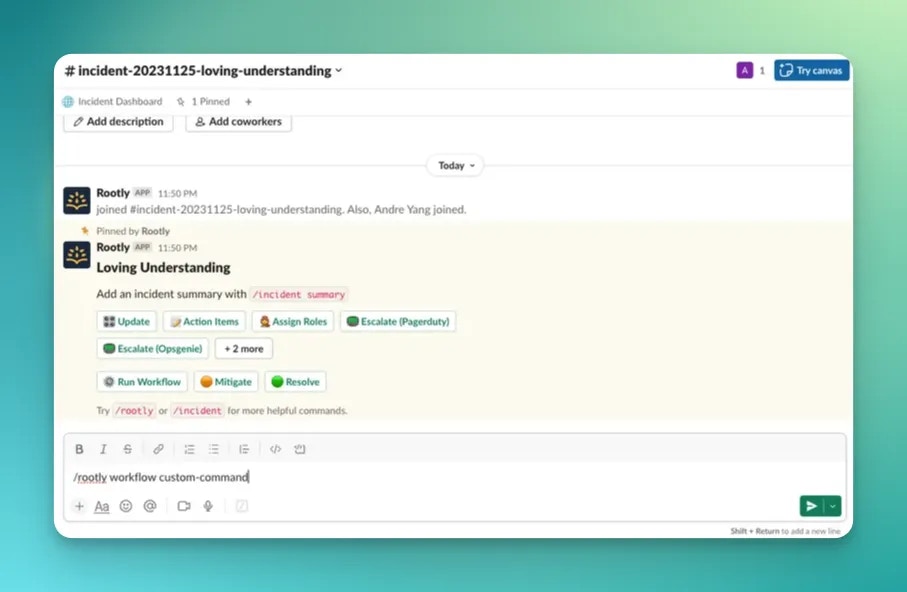
You can run a workflow using:
```
/rootly workflow
```
This command looks up a workflow by its configured **Slack Command** value.
 #### Configure the command on the workflow
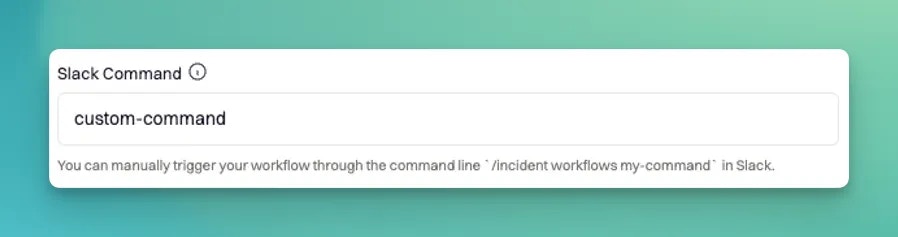
Each workflow can be assigned a command in the **Slack Command** field.
#### Configure the command on the workflow
Each workflow can be assigned a command in the **Slack Command** field.
 #### Required: include Slack Command as a trigger
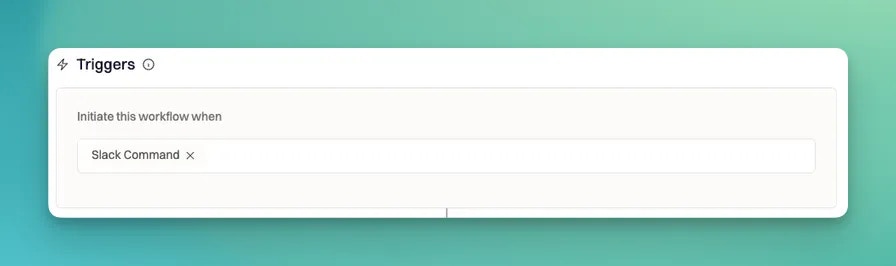
To run a workflow through Slack, the workflow must explicitly include **Slack Command** as one of its trigger events. If it is not selected, Slack will not run the workflow and will instead guide you to enable the trigger.
#### Required: include Slack Command as a trigger
To run a workflow through Slack, the workflow must explicitly include **Slack Command** as one of its trigger events. If it is not selected, Slack will not run the workflow and will instead guide you to enable the trigger.
 #### Important behavior for incident workflows
Incident workflows have an additional requirement:
* **Incident workflows must be triggered from the incident’s Slack channel.**
If you attempt to run an incident workflow from a non-incident channel (or outside incident context), Rootly will not run it.
#### Optional: Slack confirmation message (Command feedback)
If **Command feedback** is enabled on the workflow, Rootly posts an **ephemeral confirmation** to the user in Slack after the workflow is started.
* If the workflow has a configured **Wait** delay, the confirmation indicates the workflow will start after that delay.
* If there is no wait, the confirmation indicates the workflow has started.
Ephemeral confirmations may not be posted if the channel is archived or the user is not in the channel.
***
### Option 2: Slack modal
You can also trigger workflows through Rootly’s Slack modal experience. This is useful when you do not remember the command or want to select from a list interactively.
#### Important behavior for incident workflows
Incident workflows have an additional requirement:
* **Incident workflows must be triggered from the incident’s Slack channel.**
If you attempt to run an incident workflow from a non-incident channel (or outside incident context), Rootly will not run it.
#### Optional: Slack confirmation message (Command feedback)
If **Command feedback** is enabled on the workflow, Rootly posts an **ephemeral confirmation** to the user in Slack after the workflow is started.
* If the workflow has a configured **Wait** delay, the confirmation indicates the workflow will start after that delay.
* If there is no wait, the confirmation indicates the workflow has started.
Ephemeral confirmations may not be posted if the channel is archived or the user is not in the channel.
***
### Option 2: Slack modal
You can also trigger workflows through Rootly’s Slack modal experience. This is useful when you do not remember the command or want to select from a list interactively.
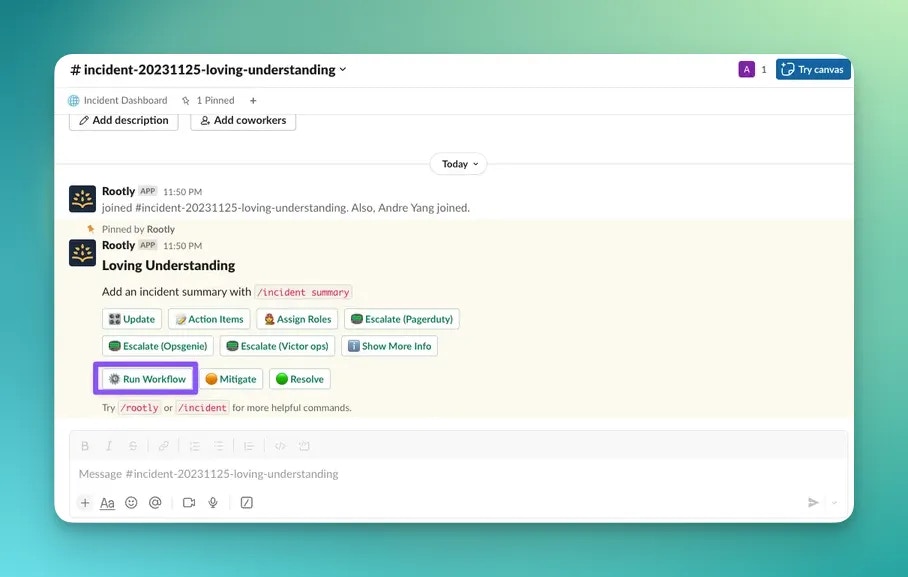
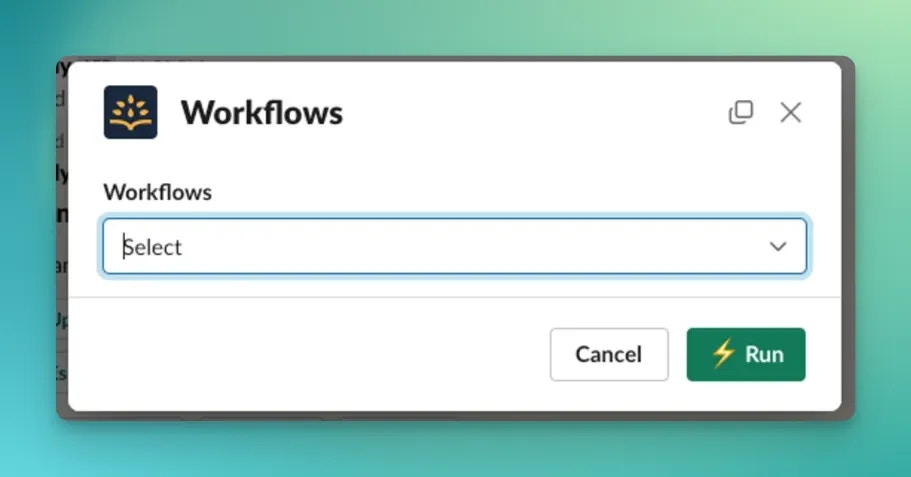 The modal triggers the selected workflow using the workflow’s command value, the same underlying command-driven logic, and the same permission checks.
***
## Manual Runs via Web UI
You can manually trigger workflows from the Rootly web app for a specific incident.
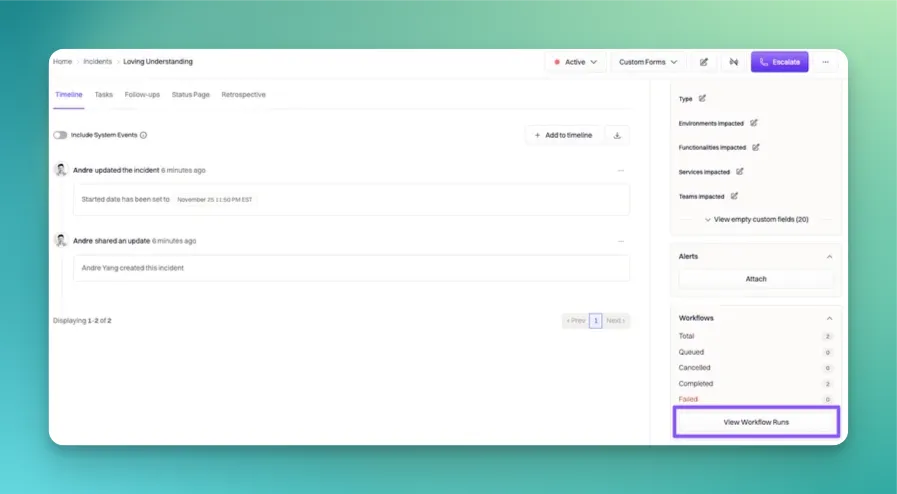
### Step 1: Open workflow runs for an incident
Navigate to the incident, then select **View Workflow Runs** in the right-hand pane.
The modal triggers the selected workflow using the workflow’s command value, the same underlying command-driven logic, and the same permission checks.
***
## Manual Runs via Web UI
You can manually trigger workflows from the Rootly web app for a specific incident.
### Step 1: Open workflow runs for an incident
Navigate to the incident, then select **View Workflow Runs** in the right-hand pane.
 ### Step 2: Trigger a workflow
From the workflow runs view, select **Trigger Workflow**.
### Step 2: Trigger a workflow
From the workflow runs view, select **Trigger Workflow**.
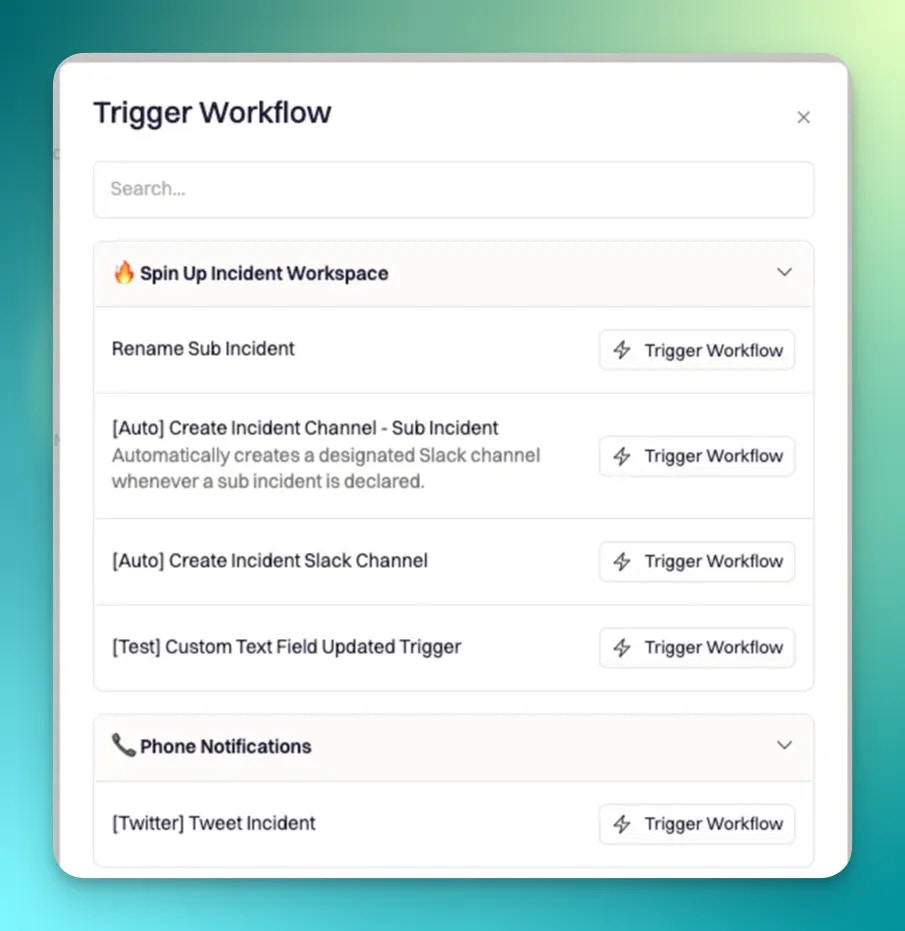
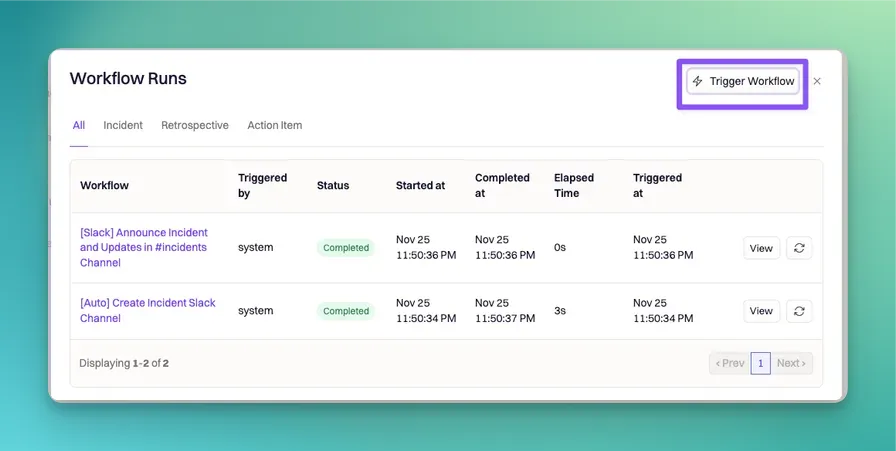 You’ll be presented with a list of available workflows. Selecting a workflow triggers it **for the incident you are currently viewing**.
 #### Which workflows appear in the web picker
The web UI workflow picker is intentionally constrained:
* Only **incident workflows** are listed
* Only workflows that are **enabled** are listed
* Internal workflows are excluded
This prevents accidentally running disabled or internal-only automation from the incident UI.
#### Web-triggered runs execute immediately
Manual runs triggered from the web UI are executed with **immediate execution** semantics. Practically, this means:
* The run starts right away rather than waiting for a configured **Wait** delay.
Use the web UI when you need to run a workflow immediately against a specific incident.
***
## Slack Command Requirements and Validation
Commands must be:
* **Unique per team**
* **Well-formed**, using only letters, numbers, dashes, underscores, and periods
* Not starting/ending with a period or underscore
* Not containing repeated separators (for example `..` or `__`)
If you do not set a command explicitly, Rootly auto-generates one based on the workflow’s kind and name (and will append a suffix if needed to avoid collisions).
***
## Permissions
Manual workflow triggering is permission-gated.
* Triggering workflows on incidents requires incident update-level access (including the permission that covers triggering workflows).
* For private incidents, Rootly applies private incident permission rules.
If a user lacks permission, the workflow will not run from Slack or the web UI.
***
## Best Practices
* **Always include Slack Command as a trigger** if you want Slack-based manual invocation.
* **Use clear, short commands** and keep naming consistent across teams.
* **Enable Command feedback** so users get immediate confirmation after triggering.
* **Prefer the web UI** when you need to trigger immediately against a specific incident and bypass any wait delay.
* **Validate permissions early** when rolling out workflow tooling to non-admin responders.
***
## Frequently Asked Questions
Only workflows that include **Slack Command** as a trigger can be run via `/rootly workflow <command>`.
The most common reasons are: the workflow is missing the **Slack Command** trigger, you are running it outside the incident’s Slack channel, or you do not have permission to trigger workflows for that incident.
The incident web picker lists only enabled incident workflows to prevent accidental execution of disabled or internal workflows during incident response.
Slack-triggered runs respect the workflow’s configured **Wait** delay. Web-triggered runs execute immediately.
#### Which workflows appear in the web picker
The web UI workflow picker is intentionally constrained:
* Only **incident workflows** are listed
* Only workflows that are **enabled** are listed
* Internal workflows are excluded
This prevents accidentally running disabled or internal-only automation from the incident UI.
#### Web-triggered runs execute immediately
Manual runs triggered from the web UI are executed with **immediate execution** semantics. Practically, this means:
* The run starts right away rather than waiting for a configured **Wait** delay.
Use the web UI when you need to run a workflow immediately against a specific incident.
***
## Slack Command Requirements and Validation
Commands must be:
* **Unique per team**
* **Well-formed**, using only letters, numbers, dashes, underscores, and periods
* Not starting/ending with a period or underscore
* Not containing repeated separators (for example `..` or `__`)
If you do not set a command explicitly, Rootly auto-generates one based on the workflow’s kind and name (and will append a suffix if needed to avoid collisions).
***
## Permissions
Manual workflow triggering is permission-gated.
* Triggering workflows on incidents requires incident update-level access (including the permission that covers triggering workflows).
* For private incidents, Rootly applies private incident permission rules.
If a user lacks permission, the workflow will not run from Slack or the web UI.
***
## Best Practices
* **Always include Slack Command as a trigger** if you want Slack-based manual invocation.
* **Use clear, short commands** and keep naming consistent across teams.
* **Enable Command feedback** so users get immediate confirmation after triggering.
* **Prefer the web UI** when you need to trigger immediately against a specific incident and bypass any wait delay.
* **Validate permissions early** when rolling out workflow tooling to non-admin responders.
***
## Frequently Asked Questions
Only workflows that include **Slack Command** as a trigger can be run via `/rootly workflow <command>`.
The most common reasons are: the workflow is missing the **Slack Command** trigger, you are running it outside the incident’s Slack channel, or you do not have permission to trigger workflows for that incident.
The incident web picker lists only enabled incident workflows to prevent accidental execution of disabled or internal workflows during incident response.
Slack-triggered runs respect the workflow’s configured **Wait** delay. Web-triggered runs execute immediately.