> ## Documentation Index
> Fetch the complete documentation index at: https://docs.rootly.com/llms.txt
> Use this file to discover all available pages before exploring further.
# Standalone Workflows
> Create manual Slack command-triggered workflows in Rootly for ad-hoc tasks like emailing dashboards, making calls, querying repos, and running scripts.
## Overview
**Standalone workflows** (internally referred to as *Simple workflows*) are workflows that are **triggered exclusively by a Slack command**. They are not tied to any Rootly object such as incidents, action items, alerts, pulses, or retrospectives.
Because they are manually invoked, standalone workflows are ideal for ad-hoc, on-demand tasks where timing and intent are explicitly controlled by a human rather than by system events.
Standalone workflows are particularly useful for:
* Emailing or posting metrics dashboards on demand
* Making ad-hoc phone calls or sending notifications during an incident
* Fetching repository data such as recent GitHub or GitLab commits
* Running utility actions (HTTP requests, Redis queries, AI prompts)
* Triggering other workflows manually as part of a runbook or checklist
Standalone workflows do not evaluate incident, action item, alert, pulse, or retrospective data. They run purely based on user intent at invocation time.
***
## Supported Trigger
Standalone workflows support **only one trigger**:
* **Slack Command** (`slack_command`)
This trigger allows a user to explicitly run the workflow from Slack using a command.
No other triggers are available or supported for this workflow type.
***
## Configure a Standalone Workflow
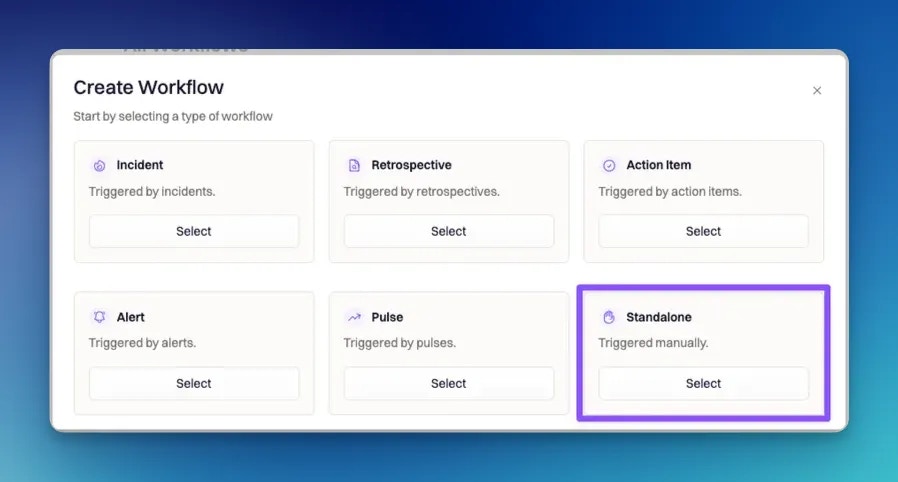
### Step 1: Create the workflow
Navigate to:
**Workflows → Create Workflow → Standalone**
 ***
### Step 2: Configure the Slack command
Standalone workflows must be invoked via Slack using the pattern:
```
/rootly workflow
```
#### Command behavior and defaults
* If you do not explicitly set a command, Rootly automatically generates one using the pattern:
```
standalone-
```
* Commands must be **unique per team**.
* Commands must:
* Start with a letter or number
* Contain only letters, numbers, dashes, underscores, or periods
* Not begin or end with a period or underscore
* Not contain consecutive separators (for example `..` or `__`)
If a generated command conflicts with an existing one, Rootly automatically appends a short random suffix to ensure uniqueness.
For usability, keep commands short, descriptive, and easy to remember. Standalone workflows are often used under pressure.
***
### Step 3: Trigger behavior in Slack
When a user runs:
```
/rootly workflow
```
Rootly will:
1. Locate the workflow by its command
2. Start the workflow run
3. Optionally post an **ephemeral confirmation message** if **Command feedback** is enabled
If the workflow has a configured **Wait** delay, the confirmation message will include the delay duration before execution begins.
***
## Run Conditions
Standalone workflows intentionally have **no run conditions**.
Because these workflows are invoked manually, adding conditional gates based on object state would reduce their usefulness and predictability.
However, standalone workflows **can still use timing controls**, including:
* **Wait before executing**
* Minimum delay: 10 seconds
* Common options include 30 seconds, 1 minute, 5 minutes, 1 hour, and longer intervals
* **Repeat Every / Repeat On**
* Supported repeat intervals include:
* 10 minutes
* 30 minutes
* 1 hour
* 1 day
* 5 days
* Repeat days use the following codes:
* S (Sunday)
* M (Monday)
* T (Tuesday)
* W (Wednesday)
* R (Thursday)
* F (Friday)
* U (Saturday)
These controls are especially useful for scheduled reporting or temporary recurring jobs that you want to start manually and let run for a period of time.
***
## Configure Actions
The actions available in a standalone workflow depend on which integrations are connected in your Rootly workspace. Standalone workflows support a wide range of utility-style actions.
Common examples include:
### Communication and notifications
* Send Slack or Microsoft Teams messages
* Send emails, SMS, WhatsApp messages, or place phone calls
* Create or manage Slack and Microsoft Teams channels
### Reporting and data retrieval
* Email dashboard reports
* Fetch recent alerts or pulses
* Query GitHub or GitLab commits
* Print structured output to Slack for quick inspection
### Automation and utilities
* Run HTTP requests against internal or external APIs
* Execute Redis commands
* Trigger other workflows programmatically
* Invoke AI models (OpenAI, Gemini, Mistral, Anthropic, Watsonx) for summaries or analysis
***
### Step 2: Configure the Slack command
Standalone workflows must be invoked via Slack using the pattern:
```
/rootly workflow
```
#### Command behavior and defaults
* If you do not explicitly set a command, Rootly automatically generates one using the pattern:
```
standalone-
```
* Commands must be **unique per team**.
* Commands must:
* Start with a letter or number
* Contain only letters, numbers, dashes, underscores, or periods
* Not begin or end with a period or underscore
* Not contain consecutive separators (for example `..` or `__`)
If a generated command conflicts with an existing one, Rootly automatically appends a short random suffix to ensure uniqueness.
For usability, keep commands short, descriptive, and easy to remember. Standalone workflows are often used under pressure.
***
### Step 3: Trigger behavior in Slack
When a user runs:
```
/rootly workflow
```
Rootly will:
1. Locate the workflow by its command
2. Start the workflow run
3. Optionally post an **ephemeral confirmation message** if **Command feedback** is enabled
If the workflow has a configured **Wait** delay, the confirmation message will include the delay duration before execution begins.
***
## Run Conditions
Standalone workflows intentionally have **no run conditions**.
Because these workflows are invoked manually, adding conditional gates based on object state would reduce their usefulness and predictability.
However, standalone workflows **can still use timing controls**, including:
* **Wait before executing**
* Minimum delay: 10 seconds
* Common options include 30 seconds, 1 minute, 5 minutes, 1 hour, and longer intervals
* **Repeat Every / Repeat On**
* Supported repeat intervals include:
* 10 minutes
* 30 minutes
* 1 hour
* 1 day
* 5 days
* Repeat days use the following codes:
* S (Sunday)
* M (Monday)
* T (Tuesday)
* W (Wednesday)
* R (Thursday)
* F (Friday)
* U (Saturday)
These controls are especially useful for scheduled reporting or temporary recurring jobs that you want to start manually and let run for a period of time.
***
## Configure Actions
The actions available in a standalone workflow depend on which integrations are connected in your Rootly workspace. Standalone workflows support a wide range of utility-style actions.
Common examples include:
### Communication and notifications
* Send Slack or Microsoft Teams messages
* Send emails, SMS, WhatsApp messages, or place phone calls
* Create or manage Slack and Microsoft Teams channels
### Reporting and data retrieval
* Email dashboard reports
* Fetch recent alerts or pulses
* Query GitHub or GitLab commits
* Print structured output to Slack for quick inspection
### Automation and utilities
* Run HTTP requests against internal or external APIs
* Execute Redis commands
* Trigger other workflows programmatically
* Invoke AI models (OpenAI, Gemini, Mistral, Anthropic, Watsonx) for summaries or analysis
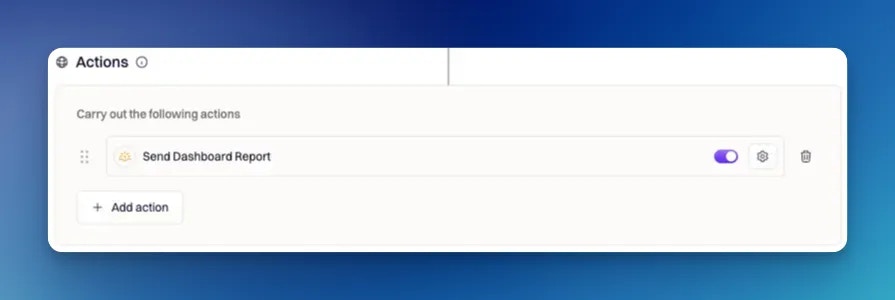 Standalone workflows are often used as building blocks in runbooks. Keep actions modular and focused so workflows remain easy to reason about.
***
## Execution Behavior and Failure Handling
Actions execute **in order**, from top to bottom.
By default:
* If an action fails, the workflow stops immediately and is marked as failed.
Optional behavior:
* You can enable **Skip on Failure** on individual actions.
* When enabled, Rootly records the failure and continues executing subsequent actions.
This is especially useful for non-critical steps such as logging, notifications, or optional data enrichment.
***
## Best Practices
* **Design for human invocation.** Assume the user triggering the workflow wants immediate, clear feedback.
* **Enable command feedback.** Ephemeral confirmations reduce uncertainty and accidental re-runs.
* **Use standalone workflows for tooling, not policy.** If logic depends on incident state or system events, use a different workflow type.
* **Keep commands discoverable.** Document common commands internally and keep naming consistent.
* **Use repeat controls sparingly.** Long-running repeats should be intentional and well-scoped.
***
## Frequently Asked Questions
No. Standalone workflows only run when triggered by a Slack command. They do not respond to system events.
Yes. They are commonly used during incidents for ad-hoc tasks such as fetching data, sending updates, or running utility actions.
Yes. Standalone workflows can trigger other workflows, making them useful as entry points for manual runbooks.
They are designed to be explicit and predictable. Conditions based on object state would make manual execution harder to reason about.
***
Need help designing powerful manual workflows or runbook commands? Contact your Rootly onboarding representative or email **[support@rootly.com](mailto:support@rootly.com)**.
Standalone workflows are often used as building blocks in runbooks. Keep actions modular and focused so workflows remain easy to reason about.
***
## Execution Behavior and Failure Handling
Actions execute **in order**, from top to bottom.
By default:
* If an action fails, the workflow stops immediately and is marked as failed.
Optional behavior:
* You can enable **Skip on Failure** on individual actions.
* When enabled, Rootly records the failure and continues executing subsequent actions.
This is especially useful for non-critical steps such as logging, notifications, or optional data enrichment.
***
## Best Practices
* **Design for human invocation.** Assume the user triggering the workflow wants immediate, clear feedback.
* **Enable command feedback.** Ephemeral confirmations reduce uncertainty and accidental re-runs.
* **Use standalone workflows for tooling, not policy.** If logic depends on incident state or system events, use a different workflow type.
* **Keep commands discoverable.** Document common commands internally and keep naming consistent.
* **Use repeat controls sparingly.** Long-running repeats should be intentional and well-scoped.
***
## Frequently Asked Questions
No. Standalone workflows only run when triggered by a Slack command. They do not respond to system events.
Yes. They are commonly used during incidents for ad-hoc tasks such as fetching data, sending updates, or running utility actions.
Yes. Standalone workflows can trigger other workflows, making them useful as entry points for manual runbooks.
They are designed to be explicit and predictable. Conditions based on object state would make manual execution harder to reason about.
***
Need help designing powerful manual workflows or runbook commands? Contact your Rootly onboarding representative or email **[support@rootly.com](mailto:support@rootly.com)**.