Prometheus Alertmanager를 사용하면 수신 경보로 Rootly에 웹훅을 보낼 수 있습니다. 수신 경보는 인시던트 생성, 채널 알림 또는 온콜 대상 호출에 사용할 수 있습니다.
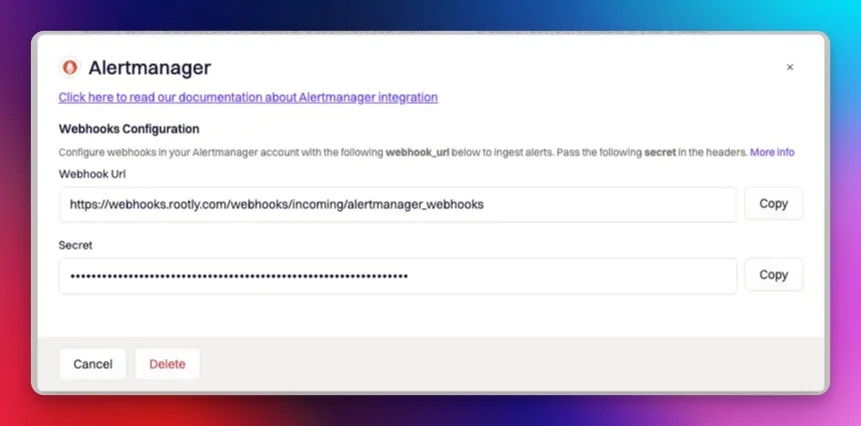
통합 카탈로그에서 Alertmanager를 찾아 Integrations catalogue를 선택하세요 Setup. 다음과 같은 팝업이 표시됩니다.
일반 경보 수신
Rootly로 일반(비 호출) 경보를 보내려면 아래와 같이 alert-manager.yml 구성 파일을 수정해야 합니다:
route:
  receiver: default
  group_by:
  - job
  routes:
  - receiver: rootly
    match:
      alertname: Rootly
    repeat_interval: 1m

receivers:
 - name: rootly
   webhook_configs:
   - url: 'https://webhooks.rootly.com/webhooks/incoming/alertmanager_webhooks'
     send_resolved: true
     http_config:
       authorization:
         type: Bearer
         credentials: a0b9fcad1aae0689cfa05c17df497b2bc5c56d26d3e253503438864dbd6697ee
url와 credentials 매개변수로 설정하세요.
위의 팝업을 놓친 경우 Rootly의 Prometheus 통합 페이지에서 다시 찾을 수 있습니다(Integrations > Prometheus > Configure).
Rootly 온콜 호출하기
Prometheus (Alertmanager)는 Rootly 온콜을 호출하기 위해 두 가지 다른 방식으로 구성할 수 있습니다.
Alertmanager의 수신기 URL을 통해
위의 비 호출 경보 설정과 유사하게 alertmanager.yml 구성 파일을 아래와 같이 수정해야 합니다. 여기서 주요 차이점은 알림 대상을 receivers url의 일부로 지정해야 한다는 것입니다.
route:
  receiver: default
  group_by:
  - job
  routes:
  - receiver: rootly
    match:
      alertname: Rootly
    repeat_interval: 1m

receivers:
 - name: rootly
   webhook_configs:
   - url: 'https://webhooks.rootly.com/webhooks/incoming/alertmanager_webhooks/notify/User/27854'
     send_resolved: true
     http_config:
       authorization:
         type: Bearer
         credentials: a0b9fcad1aae0689cfa05c17df497b2bc5c56d26d3e253503438864dbd6697ee
url와 credentials 매개변수로 설정하세요.
그런 다음 다음을 url 끝에 추가하여 알림 대상을 설정하세요.
notify/<resource_type>/<resource_id>
알림 대상은 다음으로 구성됩니다:
resource_type - 이는 호출에 사용될 Rootly 리소스 유형을 정의합니다.
- 사용 가능한 값은 다음과 같습니다:
User | Group (Team) | EscalationPolicy | Service
resource_id - 이는 호출 대상이 될 정확한 리소스를 지정합니다.
- 리소스의 ID는 각 리소스를 편집할 때 찾을 수 있습니다.
Prometheus 규칙 주석을 통해
Prometheus의 경보 규칙을 사용하는 경우 prometheus.rules.yml 파일의 주석을 통해 알림 대상을 설정할 수 있습니다.
groups:
- name: ./rules.conf
  rules:

  # heartbeat alert
  - alert: Heartbeat
    expr: vector(1)
    labels:
      event: "Heartbeat"
      instance: "prometheus"
      monitor: "prometheus"
      severity: "major"
      timeout: "120"
    annotations:
      summary: "Heartbeat from prometheus"
      description: "Heartbeat from from prometheus"
      rootly: "{\"notification_target\":{\"type\":\"User\",\"id\":\"27854\"}}"
Type - 이는 호출에 사용될 Rootly 리소스 유형을 정의합니다.
- 사용 가능한 값은 다음과 같습니다:
User | Group (Team) | EscalationPolicy | Service
id - 이는 호출 대상이 될 정확한 리소스를 지정합니다.
- 리소스의 ID는 각 리소스를 편집할 때 찾을 수 있습니다.
Prometheus Alertmanager에 대한 자세한 정보는 https://prometheus.io/docs/alerting/latest/configuration/를 방문해 주세요.
이 통합에 대해 도움이나 추가 정보가 필요한 경우 support@rootly.com로 문의하거나 Help > Chat with Us로 이동하여 채팅을 시작하세요.