

Overview
Notification Rules define how Rootly reaches you when an alert is assigned to you. They’re evaluated as an ordered sequence of steps — if an alert stays unacknowledged, Rootly moves to the next step and keeps going until someone responds or the escalation path completes. You configure Audible and Quiet rules separately so urgent pages can behave differently from informational ones: hard-to-miss for production issues, low-noise for signals that shouldn’t wake anyone up. Open Account Settings → Notifications → On-Call Notifications to manage everything on this page.Delivery Methods
Rootly supports several delivery methods for notification rules, each with a slightly different purpose:channel
Device push intended to bypass Do Not Disturb. Use for the loudest step of an audible rule.
channel
Device push that respects Do Not Disturb — a quiet channel.
channel
Real-time audible channel. Use as the reach-through if push doesn’t wake you.
channel
A reliable delivery path when push or phone can’t reach the device.
channel
Suited for non-urgent notifications where audible paging isn’t needed.
channel
Delivers the page as an interactive alert message in a direct message from the Rootly bot, where you can acknowledge, escalate, or resolve it. Requires your Slack account linked under Configuration → Linked Accounts.
channel
Delivers the page as an interactive alert card in your chat with the Rootly bot, where you can acknowledge, escalate, or resolve it. Requires your Microsoft Teams account linked under Configuration → Linked Accounts.
If you want a setup that’s reliable but not disruptive, reserve Critical Alerts and phone calls for audible paging, and use non-critical push, SMS, email, Slack, or Teams for quiet paging. Chat methods work well alongside a phone-based method, but don’t rely on them alone to wake you up.
Audible Rules
Audible rules are your wake-me-up configuration — the sequence Rootly runs through when an alert needs immediate action. Rootly enforces guardrails on audible rules because urgent paging is only useful if it can’t be configured into a silently-broken state. In other words: Rootly won’t let you save an audible policy that can’t actually reach you.Step 1 Requirements
The first step of an audible rule must include a real-time delivery method that matches your device state:- If you have a connected mobile device, Critical Alerts are required on step 1.
- If you don’t have a connected mobile device, a phone call is required on step 1.
Subsequent Steps
Level 2 and beyond still need at least one of Critical Alerts or Phone Call enabled — Rootly won’t let escalation become “quiet” by accident. Beyond that requirement, later steps can add SMS or email alongside Critical Alerts or a phone call.Quiet Rules
Quiet rules are for alerts that still matter but shouldn’t force immediate interruption. They still escalate through steps, but the intent is different: keep responders informed without waking anyone up unless it’s truly necessary. Email, SMS, and non-critical push are the typical quiet channels. Non-critical push is especially useful when you want the alert on someone’s phone without cutting through Do Not Disturb.Making Quiet Notifications Audible on a Silenced Phone
By default, Quiet push respects both Do Not Disturb and silent mode — it arrives on the phone but stays silent when the device is silenced. That’s the intent. If you want quiet pushes to ring through silent mode and DND without reclassifying them as audible, enable Critical Alerts on the device contact method inside the Quiet notification rule itself. Navigation: Account Settings → Notifications → On-Call Notifications → the Quiet rule → the device contact method → Critical Alerts toggle. On supported devices this makes the phone treat the push as a Critical Alert (bypasses silent mode and DND) while Rootly still treats the rule as Quiet for paging logic. The audible-rule constraints (step 1 requirements, phone call fallback) don’t apply.Limits
- 20 rules of each type — audible and quiet are counted separately, so 20 of each.
- A rule that would exceed the cap is refused on save with an explicit message rather than silently dropped.
Test Your Notifications
The Test Notifications action sends test messages to the targets you’ve configured so you can validate delivery end-to-end. Testing is available for email, SMS, phone call, device push, Slack, and Microsoft Teams — the same core methods used by notification rules. Slack and Teams appear only when that integration is set up. Test any time you change phones, update a phone number, reinstall the mobile app, or want to confirm your current configuration still works.Verification Requirements
Contact methods must be verified before they can be used for paging. Rootly enforces this so a rule that looks valid can’t quietly fail to deliver.- Unverified phone numbers block SMS and call configurations.
- Unverified email addresses block email configurations.
- Shift Reminders follow the same rule — reminder delivery methods must be verified when the reminder is enabled.
Shift Reminders
Shift Reminders notify you before your on-call shift starts and when it ends — separate from incident paging. Multiple delivery channels are supported and lead-time options range up to two weeks in advance when expanded options are enabled. For the full reference — supported channels, timing tiers, nested-schedule behavior, and reminder-specific troubleshooting — see Shift Reminders.Default Setup
If notification rules or reminders are missing, Rootly automatically creates a baseline so new responders aren’t left unpaged. With no organization-level configuration, a new user starts with email, phone call, and SMS on their audible rule, email on their quiet rule, and two shift reminders — one for shift start, one for shift end — delivered by email. These defaults are meant to be edited; they provide coverage while you finalize your own setup.Organization Defaults
Admins choose the channels a new user starts with, separately for audible (high urgency) and quiet (low urgency) rules. The defaults are set once, in Alerts → Settings (top-right gear icon) → Default notification settings, and every user created afterwards is provisioned with those channels.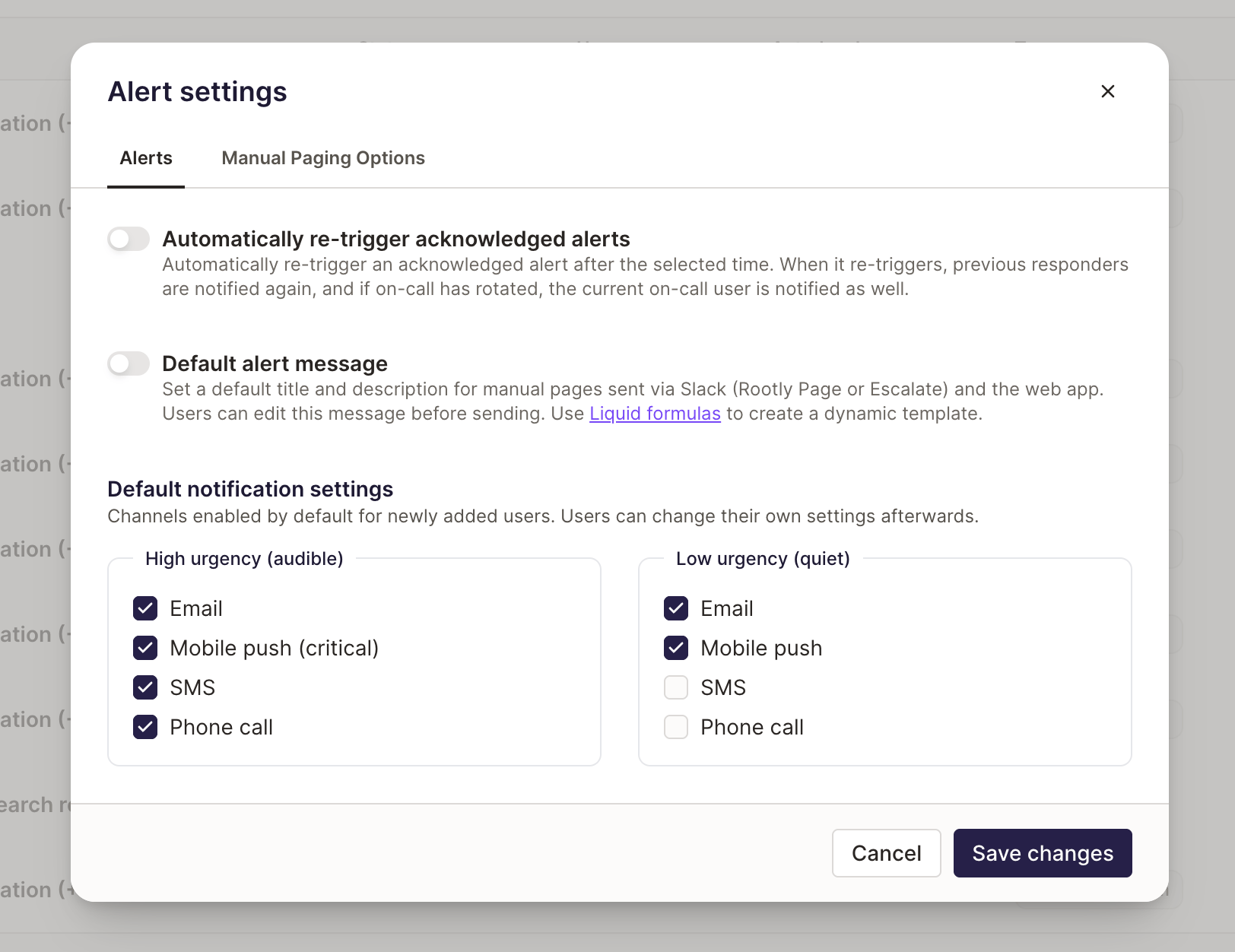
- The form for adding a notification rule is pre-filled with it.
- Verifying a phone number or connecting a first mobile device turns on only the channels the default allows. The number or device is still attached to your profile, so you can turn any other channel on yourself.
Organization defaults apply to users created after the defaults are saved. Rules that already exist are never rewritten, and a default is a starting point rather than a lock — edit your own rules whenever your setup changes.
Best Practices
- Configure an audible step that reaches you when your phone is silenced. Then test it. This one step blocks the most common source of missed pages.
- Pair Critical Alerts with SMS or email. Redundancy on the first audible step is cheap insurance.
- Reserve Critical Alerts for audible rules. Using them on quiet rules by default trains you to ignore the DND bypass.
- Test after every phone change. New phone, updated phone number, or reinstalled app can affect push delivery — test to confirm.
- Verify contact methods before your first shift. Rootly enforces this on save, but the message reads as “why won’t this save?” if you don’t know why.
Troubleshooting
I can't save an audible notification step
I can't save an audible notification step
Audible rules have strict safety requirements so urgent alerts can’t be configured into a non-deliverable state. The most common causes:
- Step 1 is missing the channel for your device state — Critical Alerts if you have a connected mobile device, a phone call if you don’t.
- A later step dropped both Critical Alerts and Phone Call — every audible step (not just step 1) must keep at least one of the two enabled so escalation can’t become “quiet” by accident.
My phone number or email won't work in rules or reminders
My phone number or email won't work in rules or reminders
Notification rules and enabled shift reminders require verified contact methods. Verify the phone number or email address first, then return to On-Call Notifications and save again.
I'm not receiving push notifications
I'm not receiving push notifications
- Confirm whether you’re expecting Critical Alerts (bypass DND) or non-critical push (respects DND).
- Confirm your mobile device is connected and registered.
- If you changed phones, reinstalled the app, or revoked notification permissions at the OS level, reconnect the device and restore permissions.
- Use Test Notifications to validate delivery immediately.
Slack or Microsoft Teams isn't available as a delivery method
Slack or Microsoft Teams isn't available as a delivery method
These options appear only when your organization has the Slack or Microsoft Teams integration set up. Ask an admin to connect the integration under Configuration → Integrations, then link your personal account under Configuration → Linked Accounts.
I'm not receiving pages in Slack or Microsoft Teams
I'm not receiving pages in Slack or Microsoft Teams
- Confirm your Slack or Microsoft Teams account is linked under Configuration → Linked Accounts.
- Confirm Slack or Microsoft Teams is enabled on at least one step of the rule you expect to fire (audible or quiet).
- Use Test Notifications to send a test page.
Quiet push notifications are silent when my phone is on silent mode
Quiet push notifications are silent when my phone is on silent mode
That’s the default — Quiet push respects silent mode and Do Not Disturb. To make quiet pushes ring through silent mode without converting the rule to audible, enable Critical Alerts on the device contact method inside the Quiet rule.See Making Quiet Notifications Audible on a Silenced Phone for the full setup, including the iPhone + Apple Watch and Android Work Profile caveats.
Related Pages
Shift Reminders
Pre-shift and post-shift notifications delivered on the channels you configure.
Alert Muting
Temporarily silence your automated alert notifications during an alert storm.
On-Call Readiness
See at a glance whether responders have working notification methods configured.
Default Notification Settings
Set the channels new users start with, per urgency level.