

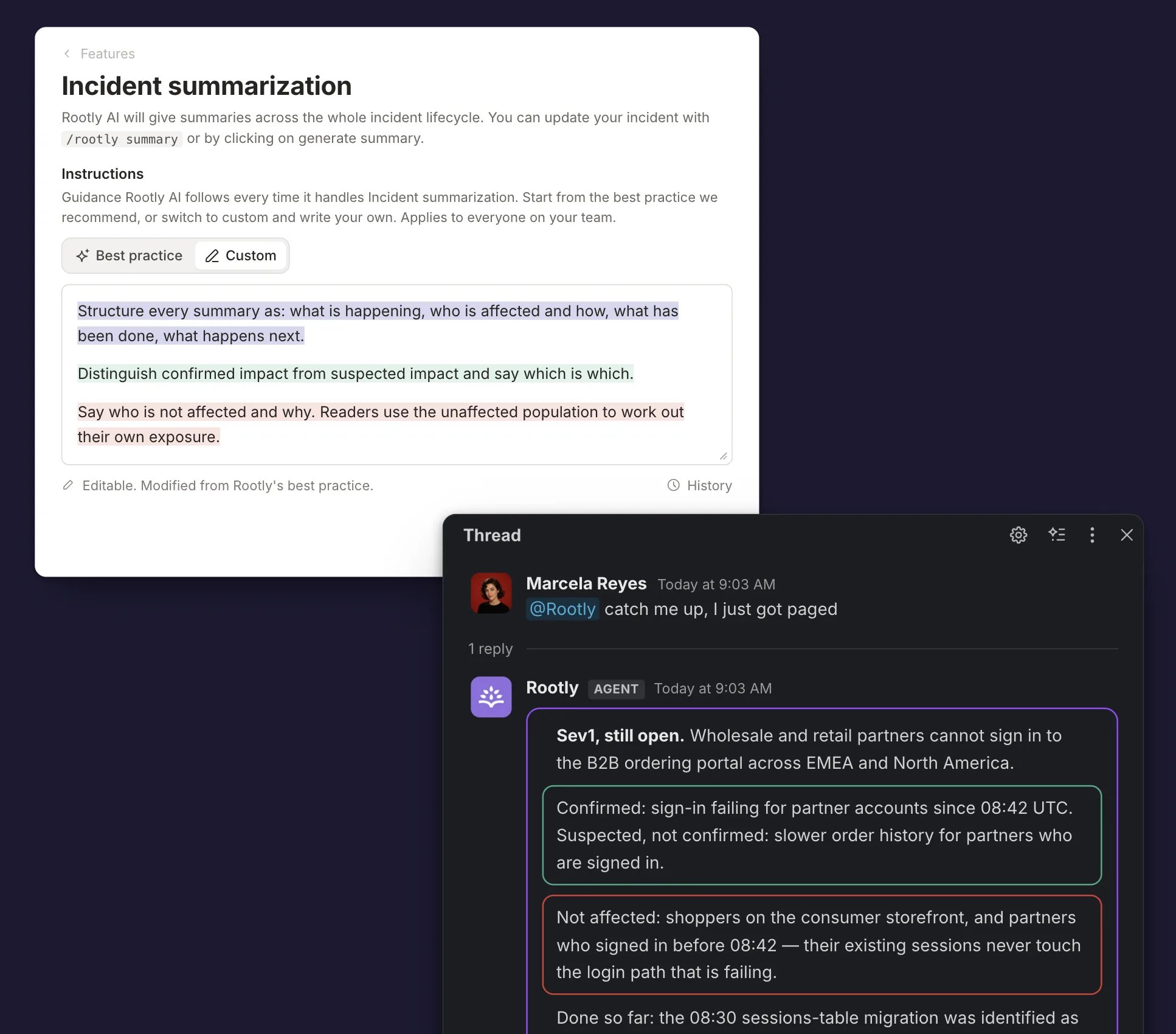
Instructions set on Incident summarization, and the Slack catch-up they shape
Best Practice or Custom
Each Instructions box has two sources. Pick one with the tabs above the box.Active by default
Rootly’s own set, maintained by Rootly and updated as the product changes.
Read-only, with an expandable panel under the box giving the thinking behind
each rule.
Yours to edit
Your own text. Switching to Custom copies Rootly’s set into the box as a
starting point, so you edit rather than start from nothing.
Default Instructions
The full best practice text for every feature.
Where the Best Practice Set Comes From
The best practice instructions are not generic AI guardrails. They are Rootly’s opinion about how AI should behave in an incident, encoded as shipped defaults. They were developed with practitioners from the resilience engineering community, the field that studies how complex systems and the people who run them cope with failure, and shaped by patterns across the millions of incidents managed in Rootly. The defaults reflect that grounding: contributing factors rather than a single root cause, evidence separated from inference, theories named as theories with owners, blameless framing that asks what people were seeing instead of why someone did something, and a clear line between what is missing from the record and what did not happen. Every rule was tested against real incidents before shipping, and each feature’s set carries an expandable Why these defaults panel in the product explaining the reasoning, so the instructions teach good incident practice while they steer the AI. You can read every set in full at Default AI Instructions.Setting Instructions
Across Every Feature
1
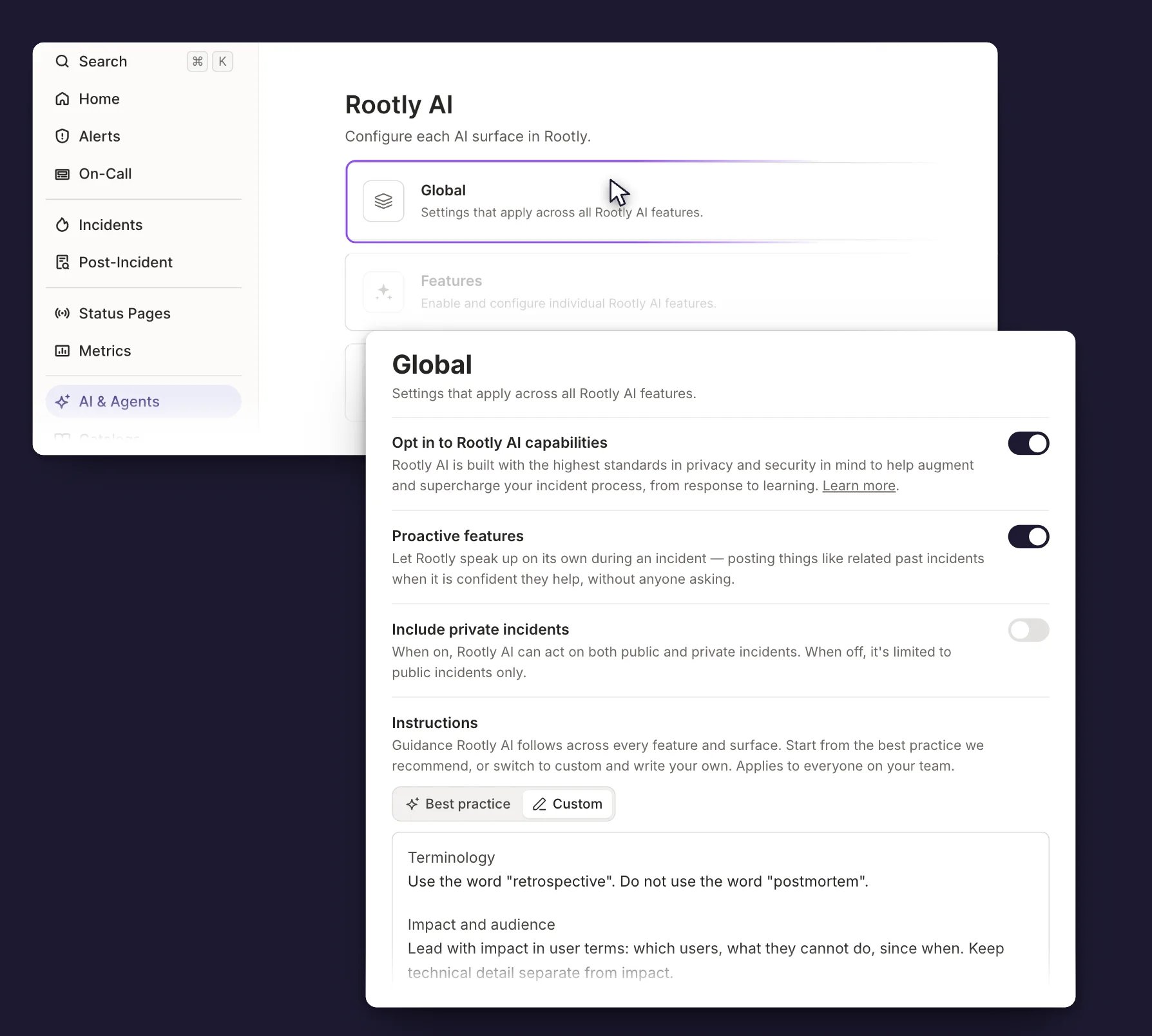
Open AI & Agents
Go to AI & Agents → Global.
2
Switch to Custom
Select Custom above the Instructions box. Rootly’s set is copied in
for you to edit.
3
Write Your Instructions
Edit the text, then click outside the box. A confirmation toast appears
when it saves.
On One Feature
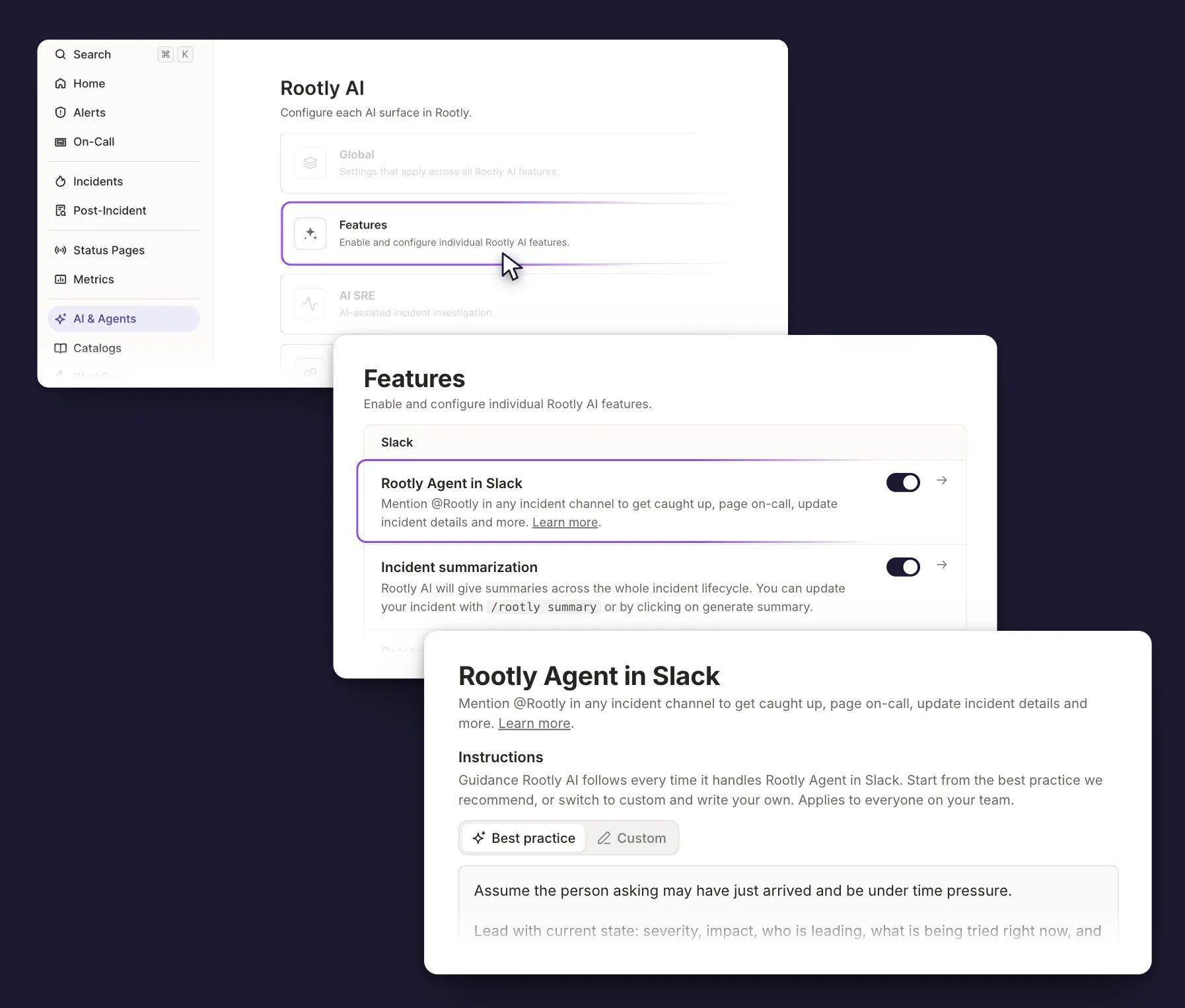
1
Open the Features List
Go to AI & Agents → Features.
2
Open the Feature
Select the arrow at the end of the feature row, next to its toggle. The
feature gets a page of its own.
3
Write Your Instructions
Switch to Custom, edit the text, then click outside the box.
One feature row lives elsewhere: Proactive features sits on AI &
Agents → Global, next to the opt-in toggle, rather than in the Features
list. Its arrow opens its Instructions box the same way.
Where Instructions Apply
Instructions live in two places, both under AI & Agents. They apply together.
Both are sent whenever the feature runs, and each is labeled so Rootly AI knows
which is which. Where the two conflict, the feature instruction wins, because
it is the more specific of the two.
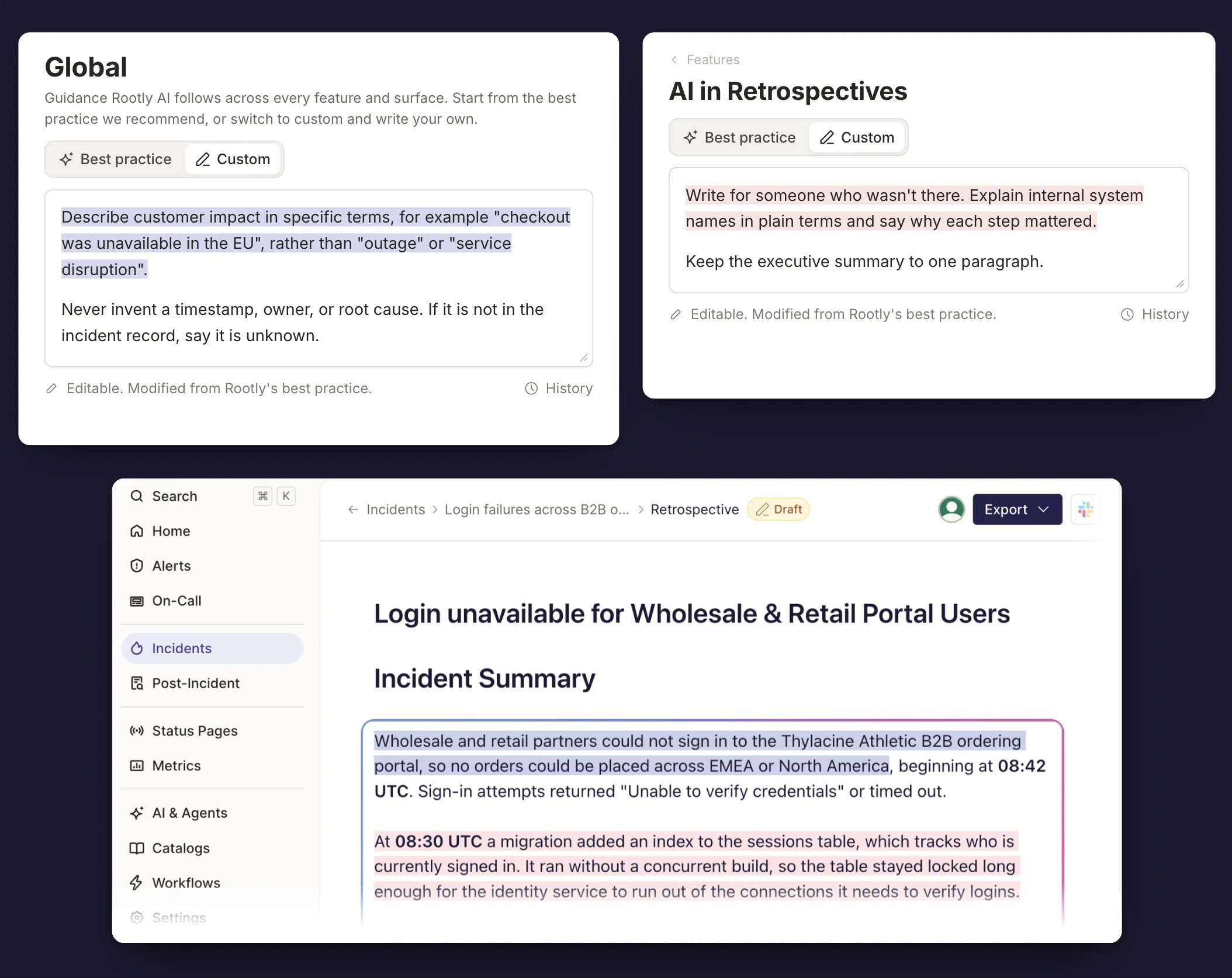
A global instruction and a retrospective instruction, and the draft that carries both
- Global reaches every feature. Keep it to guidance that holds everywhere.
- A feature box only reaches that feature. Write a rule out in full wherever you want it.
Instructions steer how Rootly AI writes. Anything that has to happen every
time belongs in a template or a workflow.
Which Features Accept Instructions
In the order they appear under AI & Agents → Features:
Proactive features also accepts instructions, from its row on the
Global page rather than this list.
A feature has to be turned on before its Instructions box appears.
Writing Your Own
Five things shape a good instruction.Start From the Best Practice Set
Start From the Best Practice Set
Switching to Custom hands you Rootly’s set. Cut what doesn’t fit and add
your own rules on top, rather than clearing the box and starting over.
Add Rules for What You'd Edit
Add Rules for What You'd Edit
Generate the output first. Add a rule for each thing you’d have changed by
hand.
Say What to Do, Not What to Avoid
Say What to Do, Not What to Avoid
Rootly AI follows a positive instruction more reliably. It says what to put
in, not just what to leave out.
- ❌ “Don’t use acronyms.”
- ✅ “Spell out any term a new responder would need to look up.”
Skip the Persona
Skip the Persona
A persona narrows what Rootly AI will do without improving the output. Set
the scene instead. Say who’s reading and under what pressure.
- ❌ “You are an experienced incident commander.”
- ✅ “The reader is joining the incident now and needs to know what to do next.”
Make It Checkable
Make It Checkable
Write rules someone could grade an output against.
- ❌ “Be clear and professional.”
- ✅ “Keep it under 80 characters, in words a new responder would recognize.”
Instructions in Retrospectives
A retrospective block can carry three instructions at once. They live in different places.Account-wide
Set in AI & Agents → Features → AI in Retrospectives. Applies to every AI
block in every retrospective in the account.
One template
Set in the retrospective template builder. Applies to every AI block in that
template.
One block
Set on the block itself. Applies to that block only.
Managing Instructions
Owners and admins edit instructions. Everyone else sees them read-only, so responders can check what’s in effect. The box saves when you click outside it, and an instruction can run to 10,000 characters.History
Select History under the box to see every edit: who made it, when, and what changed, line by line. Switching between Best practice and Custom is recorded there too. Clearing the box empties it and stops the instruction applying. The text stays in History, so you can retrieve it. Turning a feature off leaves its instruction saved. It applies again when you turn the feature back on.Troubleshooting
An Instruction Isn't Changing the Output
An Instruction Isn't Changing the Output
Check that the box is set to Custom, since Best practice ignores your
text while it is selected. Then check that the feature is turned on under
AI & Agents → Features, and that you wrote the instruction on the
feature you meant.
Some Rules Land and Others Don't
Some Rules Land and Others Don't
Long instructions are the usual cause. Cut back to the rules that describe
something you’d otherwise fix by hand, then check whether the ones you kept
come through more consistently.
A Global Rule and a Feature Rule Disagree
A Global Rule and a Feature Rule Disagree
The feature instruction wins. Rewrite one of the two so they agree, rather
than relying on that.
The Instructions Box Is Read-Only
The Instructions Box Is Read-Only
Either the box is set to Best practice, which is read-only by design, or
you aren’t an owner or admin. Switch to Custom, or ask an admin to make the
change.
Frequently Asked Questions
Do I have to write instructions to use Rootly AI?
Do I have to write instructions to use Rootly AI?
No. Every feature starts on Rootly’s best practice set. Switch to Custom
when you want the output to match how your team already writes.
Do instructions apply to everyone on my team?
Do instructions apply to everyone on my team?
Yes. Instructions are set for the whole account, not per person.
Does Rootly change my instructions?
Does Rootly change my instructions?
Only the best practice set is maintained by Rootly, and it updates as the
product changes. Custom text is never edited for you.
Can I preview an instruction before it takes effect?
Can I preview an instruction before it takes effect?
Save it and generate the output once. Adjust from what you see, not from
what you expect.