Overview
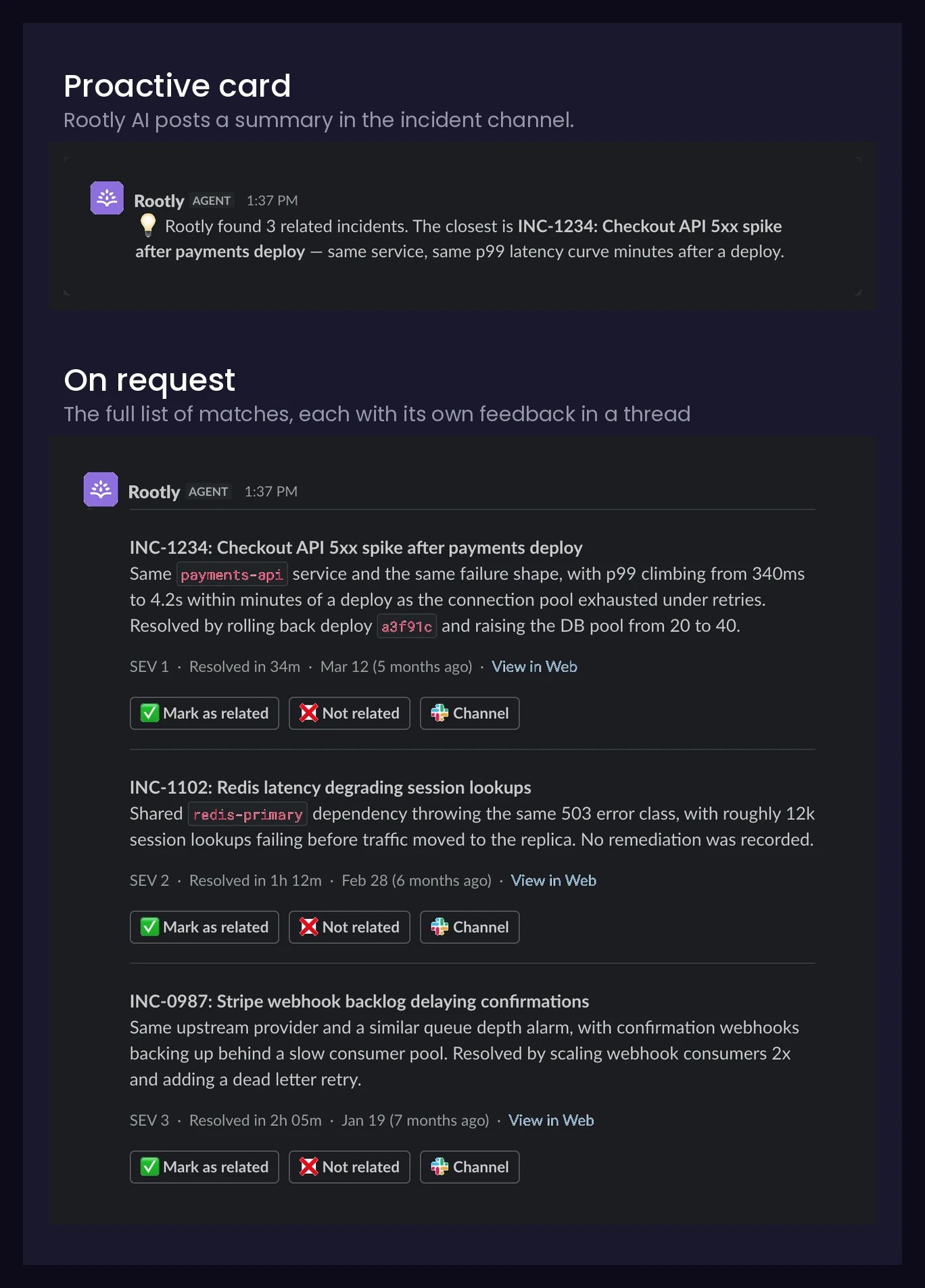
Related Incidents connects the incident you’re working on to relevant incidents from your team’s history. When you ask Rootly AI about an incident, it returns a short, ranked list of past incidents that share a concrete overlap — the same failing component, a matching symptom or error, or a common dependency — along with a one-line explanation of why each incident matches. Instead of relying on memory (“didn’t this happen last quarter?”) or manual searching, responders get the most relevant precedents in the incident channel, each linked to its incident page and Slack channel so they can dig into how it was investigated and resolved.Related Incidents is deliberately conservative. Only high-relevance matches are shown, sorted by relevance — and if nothing in your history is genuinely related, Rootly AI says so rather than padding the list with weak matches.
How to Find Related Incidents
In an incident channel, ask Rootly AI in Slack for related incidents. For example:@Rootly are there any related incidents?@Rootly has something like this happened before?@Rootly find past incidents involving this service.
What’s in Each Suggestion
Each related incident card includes:- Incident title and link — jump straight to the incident page
- Why it matches — a one-line explanation of the concrete overlap with your current incident
- Slack channel — the related incident’s channel, so you can review the discussion without leaving Slack
- Responders — who worked the incident (commander first), so you know who to ask
- Key facts — severity, time to resolution, and when it happened
- Feedback buttons — 👍 / 👎 to tell Rootly whether the suggestion was actually useful
How It Works
When Rootly AI is enabled, Rootly builds a vector embedding of each incident from its title, summary, and attributes (severity, services, environments, incident types, and other metadata). The embedding is kept up to date as the incident evolves — updates to the incident, its timeline, action items, attachments, and other associated records refresh it automatically. When you ask for related incidents, Rootly runs a two-stage funnel:- Retrieval — the current incident’s embedding is compared against your team’s past incidents to gather a pool of candidates.
- Re-ranking — an LLM reviews the candidates against the full incident context and selects only the ones with a genuine, concrete relationship, writing a short explanation for each. Shared boilerplate or superficially similar wording is not enough to qualify.
When Related Incidents is first enabled, embeddings for your historical incidents are built gradually in the background. Results improve over the first hours as your incident history finishes indexing.
Configuration
Related Incidents is part of Rootly AI and must be enabled by an Admin.- Navigate to AI & Agents in the main navigation.
- Under Features, toggle Related incidents on or off.
Privacy and Data Handling
- Your data stays yours — related incidents are only ever drawn from your own organization’s incident history, and your incident data is used solely to deliver Rootly AI functionality for your organization — never to train models for other customers. See Data Privacy for Rootly AI.
- Private incidents — results respect each user’s existing Rootly permissions. If you can’t see a private incident in the web app, it will never appear in your related incidents results.
Best Practices
Keep incident metadata accurate
Related Incidents matches on incident content and attributes — title, summary, severity, services, environments, and incident types. Incidents with accurate metadata produce noticeably better matches, both as the incident you’re asking from and as candidates in your history.
Ask early in the incident
Checking for related incidents during triage is the highest-leverage moment — a strong match can point you at a known cause, a proven mitigation, or the person who fixed it last time.
Troubleshooting
What happened to the Similar Incidents tab?
The legacy Similar Incidents tab on the incident page has been removed and is replaced by Related Incidents. Old links to the tab redirect to the incident page.