

Syntax
Reference a previous action’s output using thetasks object and the action’s slug:
get-service.
Finding an Action’s Slug
While Authoring (Before The Workflow Has Run)
When you’re building the workflow for the first time and don’t yet have a completed run to copy from, derive the slug from the action’s original name (the name set when the action was first created): lowercase it and replace spaces with hyphens. An action created as “Get service from Rootly” has the slugget-service-from-rootly — even if you later rename it to “Get service”. Use this derived slug as your initial reference, then confirm it from the run results below as soon as the workflow runs once.
After A Successful Run (Authoritative)
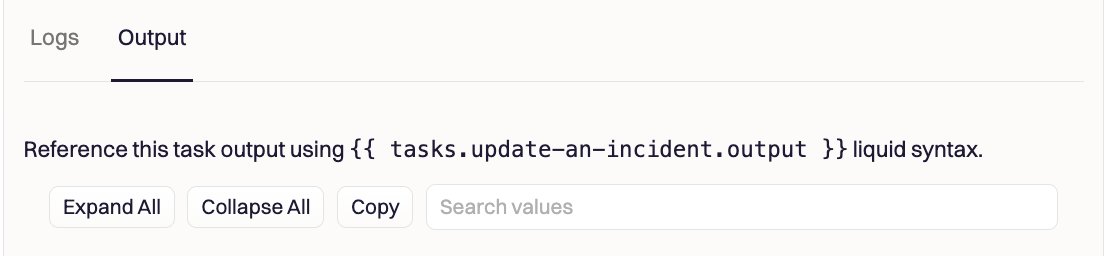
The slug isn’t shown in the workflow editor or returned by the API, so the most reliable way to confirm it is from a completed run:- Run the workflow once, or open a previous run.
- Open the action in the run results.
- Select the Output tab. Rootly displays the exact
tasks.<slug>...reference to copy, so you never have to read it off the action name.
Available Properties
Each completed action exposes the following properties:HTTP Request Action Output
The Fetch an HTTP endpoint action stores the full HTTP response. Access it throughoutput.response:
Accessing Nested JSON
When the HTTP response returns JSON, you can traverse the parsed structure directly:AI Chat Completion Action Output
The OpenAI, Anthropic, Google Gemini, and Mistral chat completion actions store the AI model’s response inoutput.response. The exact structure depends on the provider and model.
OpenAI
OpenAI uses two different API formats depending on the model: GPT models (gpt-4o, gpt-4o-mini, etc.) use the Chat Completions API:
o1-*, o3-*) use the Responses API, which returns a different structure:
If you switch between GPT and reasoning models, you must update the output path in any downstream actions that reference the task output.
Google Gemini
Other Action Outputs
Most built-in actions (Create Jira Issue, Create Linear Issue, Send Slack Message, etc.) store their response inoutput.response. The structure matches the response from the underlying integration API.
Examples:
Examples
Chain Two HTTP Requests
Fetch a service catalog entry, then use part of the response in a follow-up API call. Action 1 — “get-service-info” (HTTP GET):Use HTTP Response in Action URL Parameters
Look up a user by email from a previous action’s response:Feed HTTP Response Into an OpenAI Prompt
Fetch logs from an observability tool, then have AI analyze them. Action 1 — “get-logs” (HTTP GET to your logging API) Action 2 — “analyze-logs” (OpenAI Chat Completion) with prompt:Pass AI Output Into a Subsequent HTTP Request
Generate a postmortem with AI, then post it to the incident timeline. Action 1 — “generate-postmortem” (OpenAI Chat Completion) Action 2 — “post-to-timeline” (HTTP POST):Use the
to_json filter when inserting task output into a JSON body. AI-generated text often contains quotes and newlines that break JSON syntax without proper escaping.Use Jira/Linear Issue Output to Update an Alert
Create a ticket, then write the ticket URL back to a custom alert field. Action 1 — “create-a-linear-issue” (Create Linear Issue) Action 2 — “update-alert-with-ticket” (HTTP PATCH):Assign a Role Based on an On-Call Lookup
Look up who is on-call, find them in Rootly, then assign them to an incident role. Action 1 — “get-on-call” (HTTP GET to your paging provider) Action 2 — “find-rootly-user” (HTTP GET):Using Liquid Filters With Task Outputs
You can apply any Liquid filter to task output values. Common patterns:Troubleshooting
Action Output Is Empty
- Verify the referenced action ran successfully. Check the workflow run log for errors.
- Check that the action slug matches exactly — slugs are case-sensitive and use hyphens, not underscores (for example,
my-http-request, notmy_http_request).
JSON Path Returns Nothing
- The HTTP response body is only parsed as JSON when the response
Content-Typeisapplication/json. If the API returns a different content type,bodymay be a raw string. - Use the workflow run log to inspect the actual response structure and verify your path.
Subsequent Action Does Not See the Previous Output
- Actions run sequentially in order. An action can only reference outputs from actions that appear above it in the workflow editor.
- If the previous action has Skip on Failure enabled and failed, its output may be incomplete or missing.
Variable Is Undefined After Renaming an Action
- A reference that broke after you renamed an action is using the new name. The slug is fixed at creation and doesn’t change on rename. Use the original slug, or copy the exact reference from the Output tab of a completed run (see Finding an action’s slug).