

Overview
The Heroku integration connects Rootly to your Heroku apps via OAuth. Build and release events are automatically tracked as pulses so your team can correlate deployments with incidents — and the Run Command on Heroku workflow action lets you execute rollbacks or diagnostic scripts on a live dyno without leaving the incident response flow.Deployment Pulses
Build starts, completions, and release events are automatically tracked as Rootly pulses and linked to matching services.
Run Commands on Dynos
Execute one-off commands on a Heroku dyno from a workflow — output is streamed and posted to Slack.
Service Correlation
Pulses are automatically associated with Rootly services that have a matching Heroku app name configured.
Scoped Monitoring
Choose which Heroku apps to monitor — Rootly only creates webhooks on the apps you explicitly list.
Before You Begin
- You must be a Rootly admin to set up the integration
- You need a Heroku account with access to the apps you want to monitor
Installation
1
Open the Heroku integration in Rootly
Go to Settings → Integrations, find Heroku, and click Setup.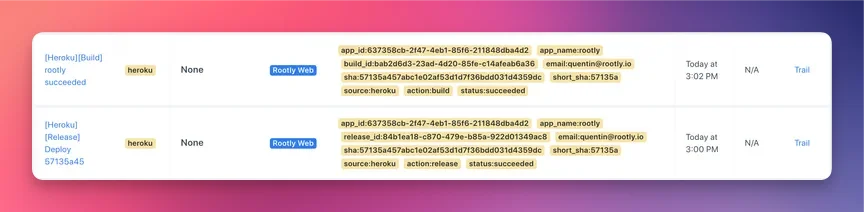
2
Authorize Rootly in Heroku
Click Connect Heroku Account. You’ll be redirected to Heroku to authorize Rootly’s OAuth application. After approving, you’ll be returned to Rootly with the integration connected.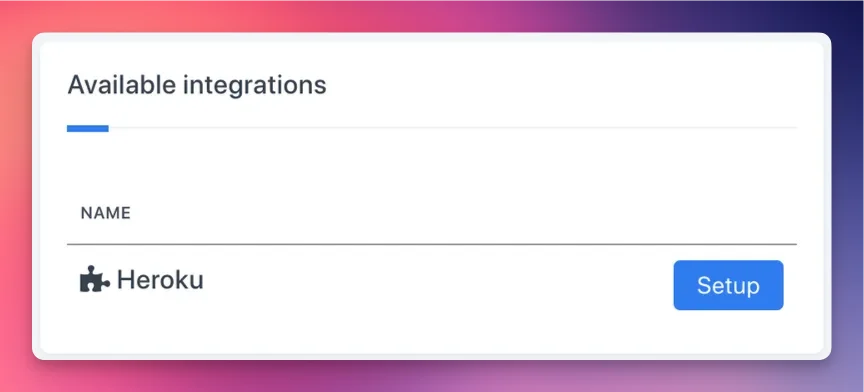
3
Select apps to monitor
In the integration settings, add the names of the Heroku apps you want to track. Rootly creates webhooks on each listed app to receive build and release events.
If you leave the app list empty, no webhooks are created and no pulses will be tracked. Add app names to enable pulse tracking.
Pulse Events
Rootly ingests Heroku webhook events and records them as pulses on the incident timeline and service activity feed. Pulses are automatically linked to Rootly services with a matching Heroku App Name field.Build Events
Each pulse includes the build ID, commit SHA, and the email of the user who triggered the build.
Release Events
Each pulse includes the release version, status, commit SHA, and app name. Rootly filters out non-current release updates to avoid duplicate pulses from Heroku’s release phase behavior.
Rootly tracks
api:build and api:release webhook events. Dyno events (api:dyno) are received but not currently converted into pulses.Workflow Action
Run Command on Heroku
Executes a one-off command on a Heroku dyno and streams the output to Slack. Useful for running rollbacks, querying database state, or executing diagnostic scripts mid-incident.string
required
The command to run on the dyno. Supports Liquid variables — for example, use
{{ incident.title }} to reference the active incident.string
required
The name of the Heroku app to run the command against.
enum
required
The size of the one-off dyno to spin up:
standard-1Xstandard-2X
standard-1X.integer
Maximum run time for the command in seconds. Capped at 1800 seconds (30 minutes) regardless of the value set. Defaults to
1800.boolean
When enabled, records the command run as an event on the incident timeline.
array
One or more Slack channels to receive the command output as a file attachment once execution completes.
Uninstall
To remove the Heroku integration:- Go to Settings → Integrations and find Heroku
- Click Connected to reveal the disconnect option
- Click Disconnect
Frequently Asked Questions
Build and release events are not appearing as pulses
Build and release events are not appearing as pulses
Confirm the app names are listed in the integration settings. Rootly only creates webhooks on explicitly listed apps. Also check that the connected Heroku account still has access to those apps — if permissions have changed, webhooks may have been removed.
Pulses are not linked to a service
Pulses are not linked to a service
Rootly links Heroku pulses to services by matching the Heroku App Name field on each service. Go to the affected service and confirm the field exactly matches the Heroku app name (case-sensitive).
Run Command fails or produces no output
Run Command fails or produces no output
Confirm the app name is correct and the connected OAuth account has permission to create dynos on that app. If the command exits immediately, check that it’s compatible with the app’s runtime environment, buildpack, and Procfile.
The integration disconnected unexpectedly
The integration disconnected unexpectedly
Heroku OAuth tokens can expire or be revoked if the authorizing user’s account access changes. Reconnect using a service account to prevent future disruption. After reconnecting, verify webhooks have been re-created on your monitored apps.
Duplicate pulses are appearing for the same release
Duplicate pulses are appearing for the same release
Heroku sends multiple webhook events during the release phase. Rootly filters out non-current updates, but each pipeline promotion generates its own release event — so deploys through multiple pipeline stages will produce multiple pulses by design.