

Compatible Alerting Tools
Use this source for tools that send an HTTP POST with a JSON object or a supported form-encoded body, including:- Application performance & error tracking — BugSnag, AppOptics, Coralogix
- Infrastructure & log monitoring — Sumo Logic, Elastic, Chronosphere, Nagios, PRTG
- Uptime & synthetic monitoring — Pingdom, uptime.com, Checkly, Cronitor, Runscope
- Security & threat detection — CrowdStrike, Expel, Cloudflare
- Data quality & observability — Monte Carlo
How It Works
The Generic Webhook Alert Source gives you a webhook endpoint URL that your external system POSTs alert events to. When a request arrives, Rootly:- Authenticates the request using the Bearer Token configured for the source.
- Parses the payload and extracts the fields you mapped — title, description, identifier, state, routing target.
- Creates or updates an alert based on the External Identifier. If Rootly already has an alert with the same identifier, follow-up events update it; otherwise a new alert is created.
- Routes the alert to the target you specified, either from the URL or from the payload itself.
- Triggers alert workflows, which can create incidents, page on-call, post to Slack, or run any other downstream action you’ve configured.
Before You Begin
Before creating a Generic Webhook Alert Source, make sure you have:- Access to create alert sources in Rootly
- A tool that can send
POSTrequests with a JSON object or flat form-encoded body - A plan for how alerts should be routed after ingestion
- The fields you want Rootly to extract, such as:
- Alert title
- Description
- External identifier
- Alert state
- Routing target
Content-Type: application/json, or use Content-Type: application/x-www-form-urlencoded for form-encoded bodies.
In production, the Generic Webhook Alert Source uses these endpoint patterns:
- Base endpoint:
POST https://webhooks.rootly.com/webhooks/incoming/generic_webhooks - Fixed target endpoint:
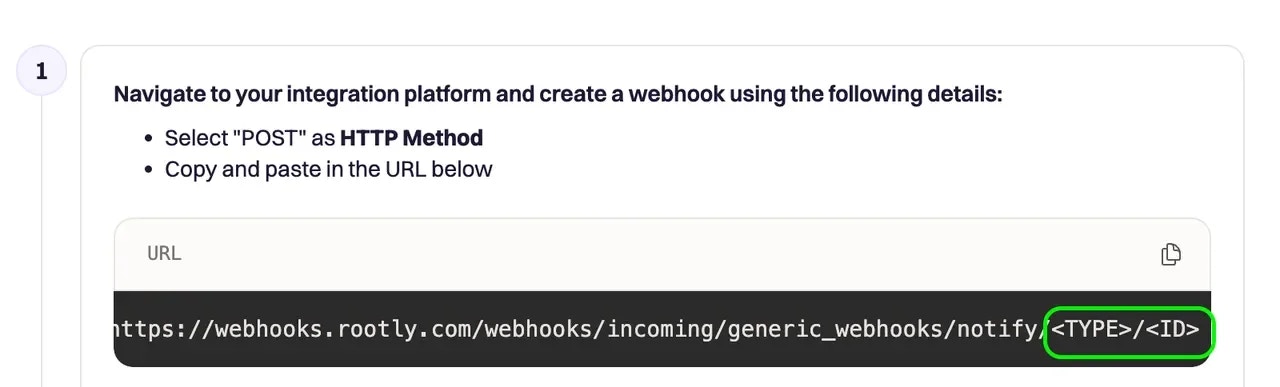
POST https://webhooks.rootly.com/webhooks/incoming/generic_webhooks/notify/<type>/<id>
Installation
Create the Generic Webhook Alert Source
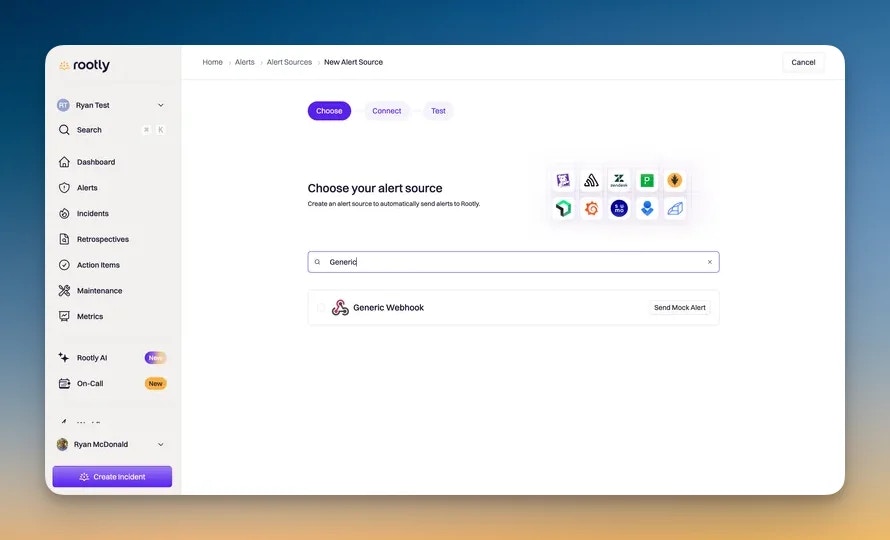
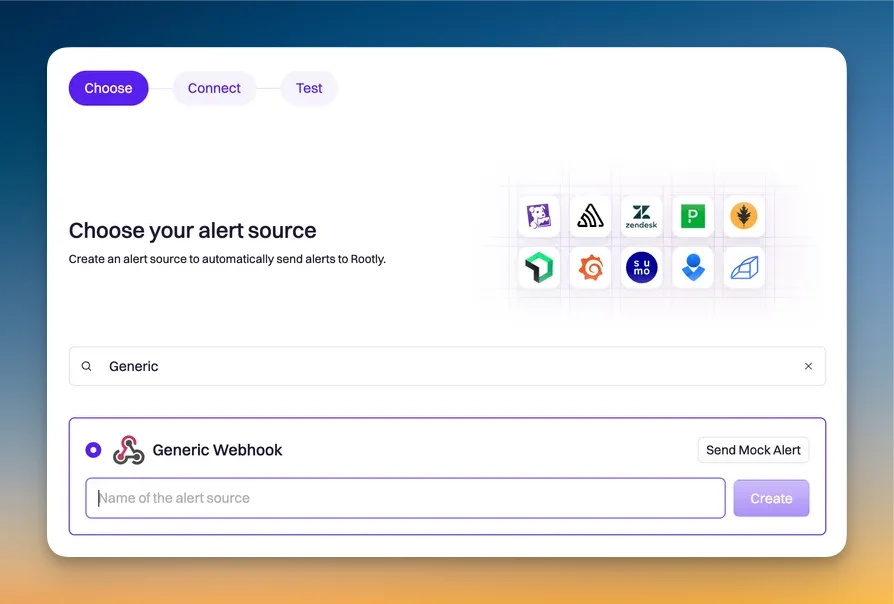
Authenticate incoming requests
Authorization: Bearer <secret>secretas a URL query parameter
Map the incoming payload fields
- Alert description
- External URL
- External identifier
- Alert state
- Notification target type
- Notification target ID
Payload Formats
The Generic Webhook Alert Source accepts JSON objects and flat URL-encoded form bodies. Existing JSON payloads and field mappings continue to work.- Declare
Content-Type: application/x-www-form-urlencodedand use UTF-8; an explicitcharset=UTF-8parameter is also supported. - URL-encode field names and values, including spaces, literal
+signs,&, and non-ASCII characters. - Use unique field names; if a name is repeated, Rootly keeps the last value.
- Use JSON when you need nested objects or arrays; form names such as
labels[team]remain literal field names.
labels[team], use $['labels[team]'] in a JSONPath mapping or {{ alert.data['labels[team]'] }} in an Alert Fields Liquid mapping. Confirm the extracted value in the payload preview.
For example, this body:
$.title to the title, $.monitor_id to the external identifier, and $.state to the state. For sources using Alert Fields, select the decoded fields from the payload preview when defining Liquid mappings.
To send this example, use the complete webhook URL from your source configuration and its Bearer secret:
resolved as the recovery state for this example, then send the same monitor_id with state=resolved to close the alert. To combine repeated trigger events, enable deduplication with the same stable monitor identifier.
Authentication
Rootly authenticates inbound webhook requests with a Bearer Token — a static secret sent in theAuthorization header, or as a secret query string parameter on the webhook URL. Prefer the header form when your sending tool supports it — query parameters tend to be captured in proxy and load-balancer access logs, so they’re more exposure-prone than a header. Either form is simple to set up: paste the secret into your sending tool and you’re done.
Code samples for Bearer Token authentication live in Installation.
Use the same authentication configuration for JSON and form requests. Send the Bearer secret in the Authorization header or URL query parameter; a form field named secret is payload data.
Mapping Payload Fields
Rootly doesn’t require a specific schema. You map fields from your sending tool’s JSON object or decoded form payload to Rootly’s alert fields during source creation. A typical payload from a monitoring tool:monitor_id, incident_id, alert_uuid, etc.) so that a follow-up “resolved” event can close the original alert instead of being ignored.
See the Installation guide for the field-mapping UI walkthrough.
Routing Alerts
Choose how Rootly should select the destination for alerts from this source.Use Alert Routes
Route By URL
Route By Payload
notification_target_id is the Rootly resource’s internal ID — open the service, team, or escalation policy in Rootly and copy the ID from its edit page. Names and slugs aren’t accepted in this field.Form senders can supply the same target type and ID as string fields; map those decoded fields in the source configuration.Use this when a single source needs to route alerts to different targets depending on the event — useful when your monitoring tool already tags events by service or team, or when you want the routing decision to come from the event payload itself. Advanced payloads can also include a Rootly notification target object directly in the JSON body.service, group (or team), escalationPolicy.
Automatically Added Labels
Every alert ingested from a Generic Webhook Alert Source is automatically tagged with asource_name label whose value is your alert source’s name parameterized — lowercased, with spaces and other non-alphanumeric characters replaced by hyphens. For example, an alert source named Harbor Image Scan (c1) adds source_name:harbor-image-scan-c1 to every alert it produces.
This label is the canonical way to differentiate alert sources of the same type in Alert Workflows. The source condition in a workflow matches by source type (for example, generic_webhook), so if you have multiple Generic Webhook sources, the workflow can’t tell them apart from the source condition alone — pair it with a source_name label condition (using contains any of) to scope each workflow to a specific source instance. See Scoping to a specific source instance for the workflow-side setup.
Test the Source
Send a test alert
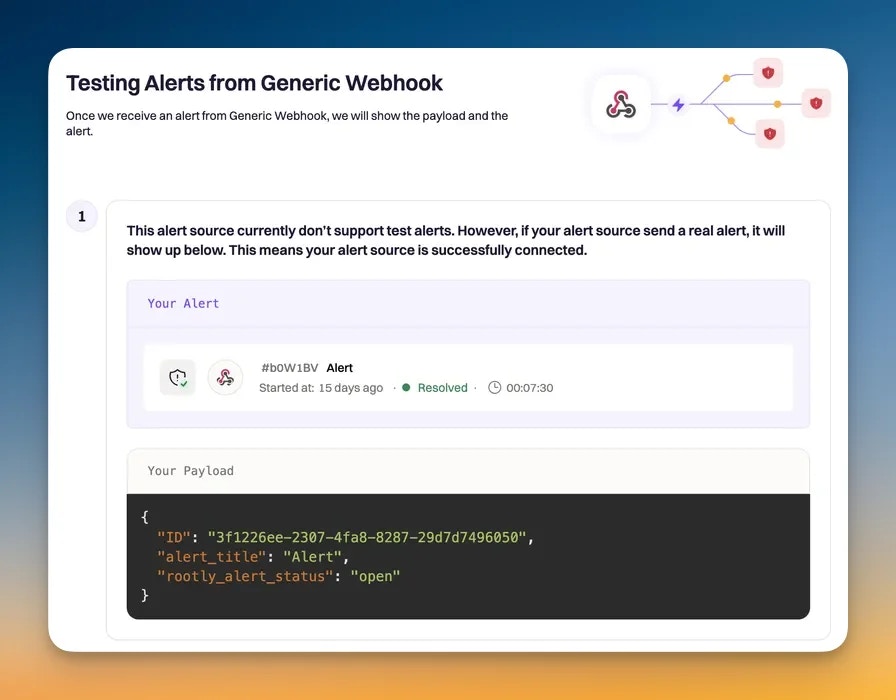
Confirm the alert was processed correctly
- The webhook request reaches Rootly
- The payload is parsed correctly
- The alert title and other mapped fields are populated as expected
- The alert routes to the correct target
- The alert appears in Rootly
Auto-Resolution
Auto-resolution lets Rootly close alerts when your external system sends a recovery or resolved-style webhook event. This is useful when your monitoring platform sends one event when an issue starts and another when it clears — by configuring the correct identifier and state fields, Rootly recognizes the related alert and applies the resolution logic you defined. Auto-resolution depends on the resolution configuration stored on the source. For the Generic Webhook Alert Source, that configuration is based on:- The field that identifies the alert
- The field that represents its state
- The value that should be treated as resolved
Configure Auto-Resolution
Map the identifier field
Map the state field
Define the resolved state value
resolved, recovered, or ok.Enable auto-resolution
Important Notes
- Auto-resolution depends on the field mappings configured for the source
- The identifier field and state field should be stable and predictable in your incoming webhook payload
- If your payload does not include the expected values, Rootly may still ingest the alert event, but it may not resolve the alert the way you intend
- Some teams may also use payload-driven alert status fields separately from auto-resolution mapping
- Teams using newer alert field or resolution-rule configuration may manage this behavior through that newer configuration path instead of the legacy generic webhook mapping flow
From Alert to Incident
Alerts created through this source behave like any other Rootly alert — they’re regular signals you can drive any of Rootly’s alert-driven automation off of:- Create incidents automatically based on alert content, severity, or service
- Page on-call responders through escalation policies
- Post notifications to Slack, Microsoft Teams, or email
- Trigger downstream workflows that update runbooks, status pages, ticketing systems, or run custom scripts
Troubleshooting
Rootly returns 400 for a form-encoded request
Rootly returns 400 for a form-encoded request
Content-Type: application/x-www-form-urlencoded, uses UTF-8, and URL-encodes its field names and values. Other declared character sets and invalid UTF-8 values are rejected. Use the Generic Webhook Alert Source for this format; dedicated integration sources retain their own payload requirements.The webhook returns 200 but no alert appears in Rootly
The webhook returns 200 but no alert appears in Rootly
- Verify the Title field mapping points at a non-empty field in the payload
- Check the source’s recent activity in Rootly to confirm the payload was received
- Confirm the routing target referenced in the URL or payload exists and isn’t archived
Alerts appear but the fields are empty
Alerts appear but the fields are empty
Recoveries create new alerts instead of closing the original
Recoveries create new alerts instead of closing the original
monitor_id, incident_id, alert_uuid, etc.) so trigger and recovery events share the same identifier.Recovery events don't resolve the original alert
Recovery events don't resolve the original alert
One source needs to route to multiple teams
One source needs to route to multiple teams
Frequently Asked Questions
Does my monitoring tool need a native Rootly integration?
Does my monitoring tool need a native Rootly integration?
What's the difference between an alert and an incident in Rootly?
What's the difference between an alert and an incident in Rootly?
Can I use one webhook source for multiple tools?
Can I use one webhook source for multiple tools?
How do I send the same alert to multiple targets?
How do I send the same alert to multiple targets?
Can I customize the alert title beyond what the payload contains?
Can I customize the alert title beyond what the payload contains?
What payload shape does Rootly expect?
What payload shape does Rootly expect?