

Introduction
The PagerDuty integration connects Rootly with PagerDuty so teams can coordinate incidents, alerts, and on-call response across both platforms. This integration is a strong fit for teams that already use PagerDuty for alerting or on-call management and want Rootly to act as the central place for incident coordination, workflows, and response automation. With the PagerDuty integration, you can:- Import, link, and sync services from PagerDuty into Rootly
- View on-call personnel directly from Slack
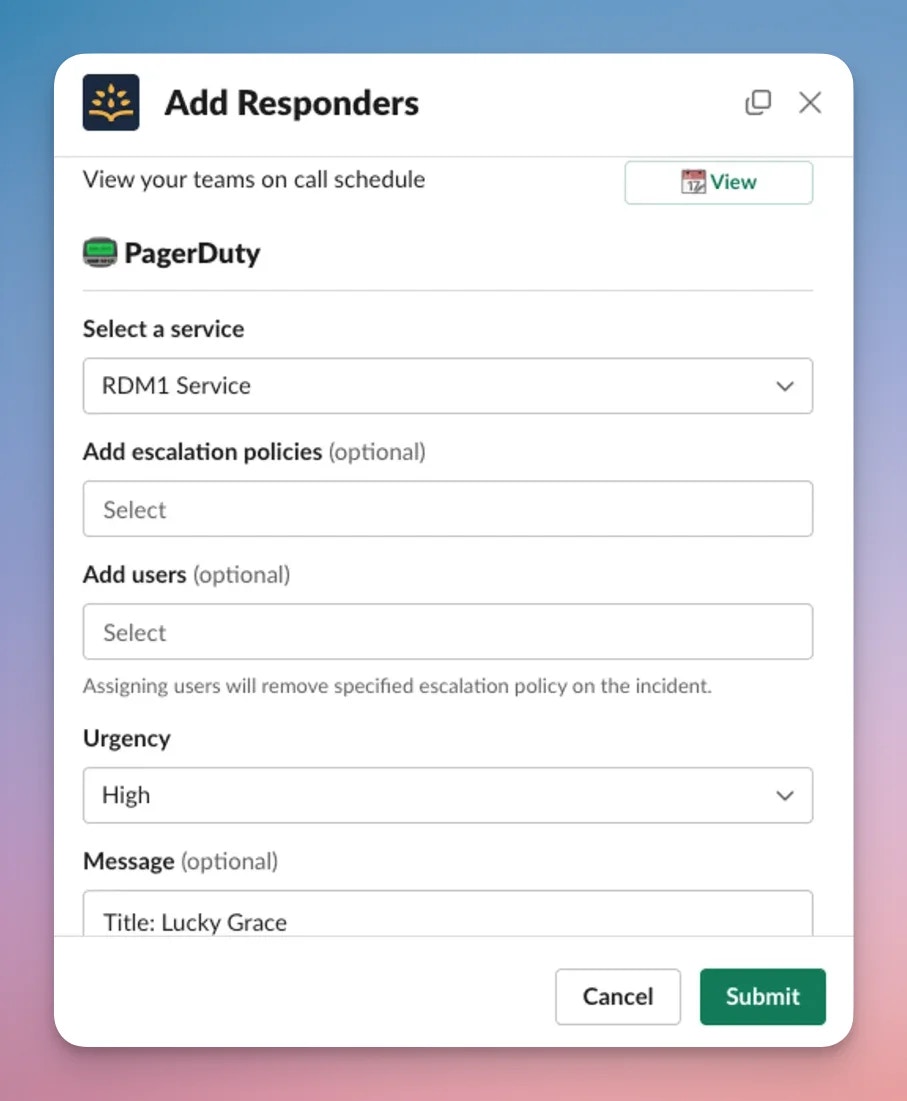
- Page PagerDuty services, escalation policies, and users from Rootly
- Invite on-call responders into incidents and assign incident roles automatically
- Keep key incident and alert activity aligned between Rootly and PagerDuty
- Ingest supported PagerDuty webhook events as Rootly alerts
Before You Begin
Before setting up the PagerDuty integration, make sure you have:- A Rootly account with permission to manage integrations
- A PagerDuty account with access to authorize integrations
- The services, escalation policies, or users you want Rootly to page
- Slack connected as well, if you want to use Slack-based on-call and paging flows
Installation
Start with the Installation page, which walks through connecting PagerDuty to Rootly and setting up the integration correctly.Smart Defaults
The PagerDuty integration includes commonly used default configuration options to help teams get started faster. See the Smart Defaults page for details on recommended settings and default behaviors.Workflows
Rootly relies on workflows to automate how incidents interact with PagerDuty. This includes actions such as:- Paging responders from incident workflows
- Inviting on-call users into incidents
- Resolving PagerDuty incidents from Rootly
- Automating common escalation patterns
Import Teams
You can import PagerDuty teams into Rootly teams from the Teams page. This is useful when you want to align your Rootly team structure with your existing PagerDuty configuration. Once imported, Rootly can use the team relationship during incident workflows, escalation actions, and on-call lookups.FAQs
Rootly can ingest supported PagerDuty webhook events as alerts. These alerts can then be used to drive incident automation, alert workflows, and incident updates in Rootly. See the Alerts page to learn how to configure alert ingestion and related automation.Frequently Asked Questions
PagerDuty has incident management features too. How is this different?
PagerDuty has incident management features too. How is this different?
PagerDuty and Rootly overlap in some areas, but Rootly provides a broader incident management experience with stronger coordination workflows, automation, retrospectives, stakeholder communications, and integrated on-call capabilities.
Should I keep using PagerDuty, or can Rootly replace it?
Should I keep using PagerDuty, or can Rootly replace it?
With Rootly On-Call, Rootly can replace PagerDuty for many teams. If you are evaluating whether to consolidate tooling, see how Rootly compares to PagerDuty.Rootly will continue to support PagerDuty for teams that want to keep using it as part of their incident response stack.
I do not use PagerDuty. Is that okay?
I do not use PagerDuty. Is that okay?
Yes. Rootly does not require PagerDuty. Many teams use Rootly alongside an on-call provider, but Rootly can still support incident management workflows even if your team does not use PagerDuty.
Why am I seeing 'Failed to authenticate. Reason: Invalid Credentials' when connecting PagerDuty?
Why am I seeing 'Failed to authenticate. Reason: Invalid Credentials' when connecting PagerDuty?
This usually means the PagerDuty authorization did not complete successfully. Common causes include an inactive PagerDuty account, revoked authorization, or using the wrong PagerDuty account during setup.Re-authorize the integration and confirm your PagerDuty account is active. If the issue continues, contact support@rootly.com or use Help > Chat with Us in Rootly.